
Are you scratching your head trying to figure out who’s hosting your website? It’s a common dilemma, especially when you’re dealing with technical issues or considering a move to a new hosting provider.
Knowing who your web host is can save you time, money, and a lot of frustration. Imagine having the power to make informed decisions about your site’s performance and security, all starting with just one piece of information. In this guide, you’ll uncover simple steps to identify your web host, empowering you to take control of your online presence.
Stick around, because the solution is easier than you might think—and your website deserves the best.
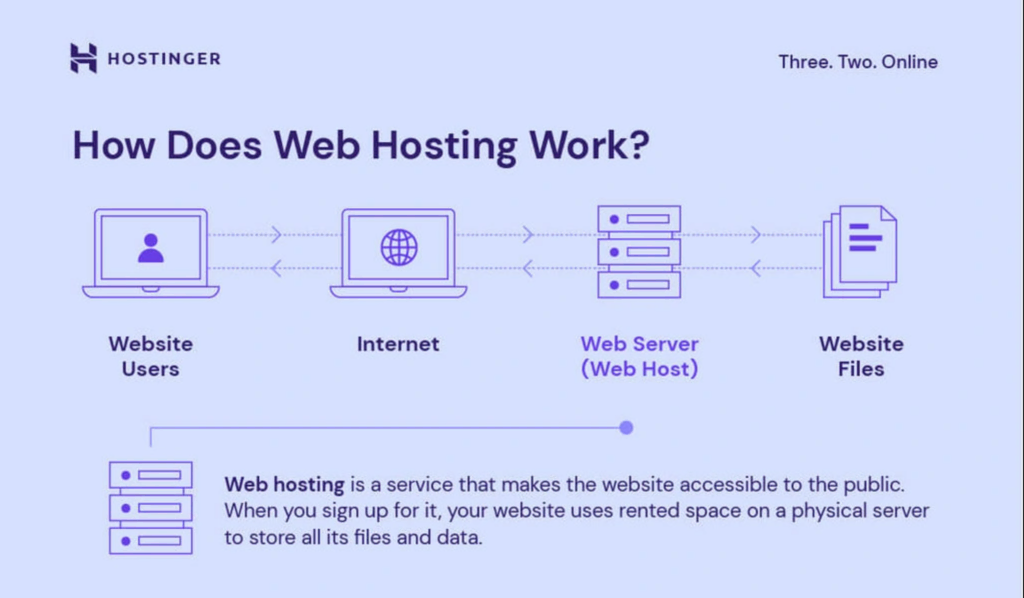
Credit: www.hostinger.com
Importance Of Knowing Your Web Host
Knowing your web host is very important. It helps in solving technical issues fast. If your website goes down, contact your host right away. They can fix it quickly. You can also ask for help if your site is slow. The host can improve speed. This makes users happy. Happy users visit more. This boosts your website’s success.
Choosing a good web host saves money. They offer good deals. Look for hosts with good customer support. They should help anytime. Knowing your host helps in planning for future growth. As your site grows, you may need more resources. Your host can guide you on this. They can offer plans that fit your needs.
Check Your Billing Records
Check your email for bills from your web host. You will find the name of your host there. Look for a company name in the bill. This is usually your web host. If you still have trouble, check your credit card statements. The name of the host might show up there too.
Sometimes, companies bill under a different name. Keep an eye out for this. If all else fails, ask your parents or guardians. They might remember where they paid for the service. People often forget this important step. But it can save you a lot of time.
Examine Whois Data
WHOIS data helps find your web host. It stores domain details. Domain registrars manage these records. Visit a WHOIS website. Type your website name there. It shows information about your host. This data includes registrar name and contact details. It is easy to use. Anyone can find information in minutes.
Not all sites show WHOIS data. Some have privacy protection. This hides owner information. Check for a privacy service mention. If so, direct contact might be needed. WHOIS is a good start to find hosts. It is simple and quick.

Credit: community.cloudflare.com
Explore The Hosting Control Panel
Start by logging into your hosting account. This is usually done on the hosting provider’s website. Use your username and password to sign in. Once inside, locate the control panel. It is often labeled as “cPanel” or “Dashboard”. The control panel is your main hub. Here, you can manage all hosting tasks.
Next, look for the host details. It may be under “Account Information” or “Hosting Details”. This section shows your web host name and other key details. Always keep your login information safe. It protects your website and data.
Inspect Dns Information
Online DNS tools help find web hosts quickly. These tools show DNS records. DNS records reveal useful details. You can see the hosting provider’s name. Enter your website’s domain name in the tool. Press search or go. The tool shows results in seconds. Look for the hosting provider section. This section tells you the host’s name. Some tools might show the IP address too. You can use this address for more checks. Make sure the tool is free to use. Paid tools might offer more details. Free tools usually give enough information.
Find Hosting Provider
Finding your hosting provider is easy. DNS records hold important clues. Look at the nameserver details. Nameservers often match the host’s name. Check the registrar’s information too. Registrars sometimes host websites. Google can help find hosting providers. Search the nameserver or IP address online. Search results show the provider’s website. Contact the provider for more help. Providers assist with hosting questions. Keep a note of the provider’s details. You’ll need them for future checks.
Credit: whitepeak.io
Consult Your Web Developer
Your web developer can help find your web host. They work closely with your website. They know the hosting details. Ask them for the web host’s name. They can also provide the login details if needed. Your developer often keeps records of this information. This makes it easy to find. They are a good resource for web-related questions. Always keep their contact information handy. You may need it for future queries. It is important to maintain good communication. This ensures you get the help you need.
Utilize Online Hosting Lookup Tools
Many online tools help find your web host. These tools are easy to use. Type your website’s name in the search bar. The tool will show your host. Some tools also give extra details. You might see the server location. You might see the hosting provider’s contact info. It’s important to use reliable tools for accurate info. Many tools are free. You can use them anytime. These tools save time and effort. They are perfect for quick checks. Knowing your host is helpful. It helps with website issues. It helps when changing hosts. It helps with security checks. These tools make finding hosts simple.
Review Email Communications
Check your email for messages from your web host. Search using keywords like “hosting” or the name of your host. These emails might be about your account setup or billing. They usually contain useful information. Save these emails in a folder. This helps in finding them later.
Support emails are another way to find your host. Look for past support requests or tickets. These emails often have details about your hosting company. Read through them carefully. They might have the host’s contact details. If you find something useful, take note of it.
Consider Third-party Management Services
Choosing third-party management services can simplify web hosting tasks. These experts handle everything for you. They offer support, updates, and security checks. Your website stays safe and up-to-date. You don’t need to worry about technical issues. They fix problems quickly and efficiently. This saves you time and effort. It also ensures your website runs smoothly. Many services provide 24/7 help. You can contact them anytime. This is useful if you face urgent issues. These services often have affordable plans. You can choose one that fits your budget. With their help, managing your website becomes easier.
Frequently Asked Questions
How Do I Find My Website Host?
Check your website’s domain registrar account for hosting details. Use online tools like WhoIs to identify your host. Access your website’s control panel for hosting provider information. Contact your web developer for assistance. Review your email records for hosting invoices or confirmation emails.
What Is Your Website Host?
Our website host is Bluehost. They provide reliable service with excellent customer support. Bluehost ensures fast page loading and secure hosting. Their affordable plans are ideal for businesses. They offer features like free SSL certificates and domain registration. Bluehost is trusted by millions worldwide.
Visit Bluehost for more information on their hosting services.
How Do I Find My Dns Hosting Provider?
Check your domain’s WHOIS information for DNS hosting provider details. You can use tools like ICANN WHOIS or WHOIS. net. Access your domain registrar account to find DNS settings. Contact your website administrator for assistance if needed.
How Do I Know What Platform My Website Is Hosting?
Check your website’s hosting platform by using online tools like BuiltWith or WhatCMS. Access your server settings or contact your hosting provider for confirmation. Look for hosting details in your website’s admin panel or documentation. These methods help identify your website’s hosting platform easily.
Conclusion
Finding your web host doesn’t have to be complex. Start by checking your email for hosting details. Most providers send information after purchase. Use domain lookup tools for clues if emails are missing. They reveal hosting services linked to your website.
Contact your domain registrar for more help. Their support can guide you through the process. Remember, knowing your host is crucial. It helps manage your website effectively. Keep host details safe for future reference. Regular checks ensure smooth operations. Stay informed about your web hosting.
It’s key to your online presence.


