
Are you curious about the mysterious world of web hosting? Whether you’re starting a blog, launching an online store, or building a portfolio, finding the right web host for your website is crucial.
It’s like choosing the perfect home for your digital presence. But with so many options out there, how do you make the best choice? You want reliability, speed, and affordability, but you might be feeling overwhelmed. Don’t worry, you’re not alone! We’re going to demystify the process and guide you step-by-step in finding the ideal web host tailored to your needs.
By the end, you’ll feel confident and ready to make your decision. So, let’s dive in and uncover the secrets to finding the web host that will support your online success.
Types Of Web Hosting
Shared hosting is a basic type. Many websites use one server. It’s cheap and simple. Best for small websites or beginners. But, websites may run slow. Why? Because resources are shared.
VPS stands for Virtual Private Server. It offers more power. Each website gets a part of a server. More secure than shared hosting. Good for growing websites. It costs more, though.
Dedicated hosting means one server for one website. It offers full control. It’s very powerful and secure. Best for big websites. But, it’s expensive. Only for serious businesses.
Cloud hosting uses many servers. If one fails, others help. It’s very reliable. Good for websites with lots of visitors. Costs depend on usage. It can grow with your needs.
Features To Consider
Bandwidth and storage are key. Bandwidth is like a road for data. Bigger roads can carry more cars. The same is true for data. Storage is like a closet. You need space for your things. More storage means you can keep more files. Both are important. Make sure you have enough.
Uptime is how often a website is online. A good host offers a high uptime guarantee. This means your website is online most of the time. Look for 99% or more. This keeps your website running smoothly. Visitors will be happy.
Security is like a lock on a door. It keeps bad people out. Web hosts use security measures to protect websites. They have firewalls and backups. Look for a host with strong security. This keeps your site safe.
Customer support helps when there is a problem. Good support is like a helpful friend. They are ready to assist you. Check if they are available 24/7. Fast response is important. It can solve issues quickly. Your website will run better.
Budget Considerations
Free hosting can be a good start. No cost makes it attractive. Some companies give free hosting. They may show ads on your site. Limited features come with free plans. It’s good for small projects. But, not for business sites. You can upgrade later if needed.
Many hosts offer cheap plans. These are good for small websites. You get more features than free plans. Better support and no ads. Prices can start as low as a few dollars. Always check the features you need. Make sure the plan fits your budget.
Premium services give more power. They are for big websites or businesses. High traffic needs these plans. You get top-notch support. More storage and faster speeds too. They cost more but offer great value. Choose them if you need top performance.
Researching Providers
Reviews tell stories about a provider’s service. Look for honest opinions from users. Check if they mention uptime and customer support. Avoid sites with many complaints. Find balanced reviews that highlight pros and cons. Trust sources that are neutral and not biased.
Plans differ in features and price. Look for storage and bandwidth options. Check if there are hidden fees. Compare renewal prices. See if they offer free trials or money-back guarantees. Understand what each plan offers before choosing.
Reputation matters in hosting. Research how long they have been in business. Find out if they are known for reliability. Read about their security measures. Check if they have won awards. Ask friends or peers about their experiences.
Technical Requirements
Choosing the right server is key. CPU power matters for speed. RAM is like your computer’s memory. More RAM means better performance. Storage type is important too. SSD storage is faster than HDD. Bandwidth affects how many visitors can come. More bandwidth is better.
Your server must work with your software. Operating systems like Linux or Windows matter. Web servers like Apache or Nginx need checking. Programming languages like PHP or Python should match. Database systems like MySQL or PostgreSQL are crucial.
Websites grow. Scalability is about handling more visitors. Upgrading servers should be easy. Cloud hosting can help scale quickly. Load balancing distributes traffic for stability. Auto-scaling adjusts resources automatically.
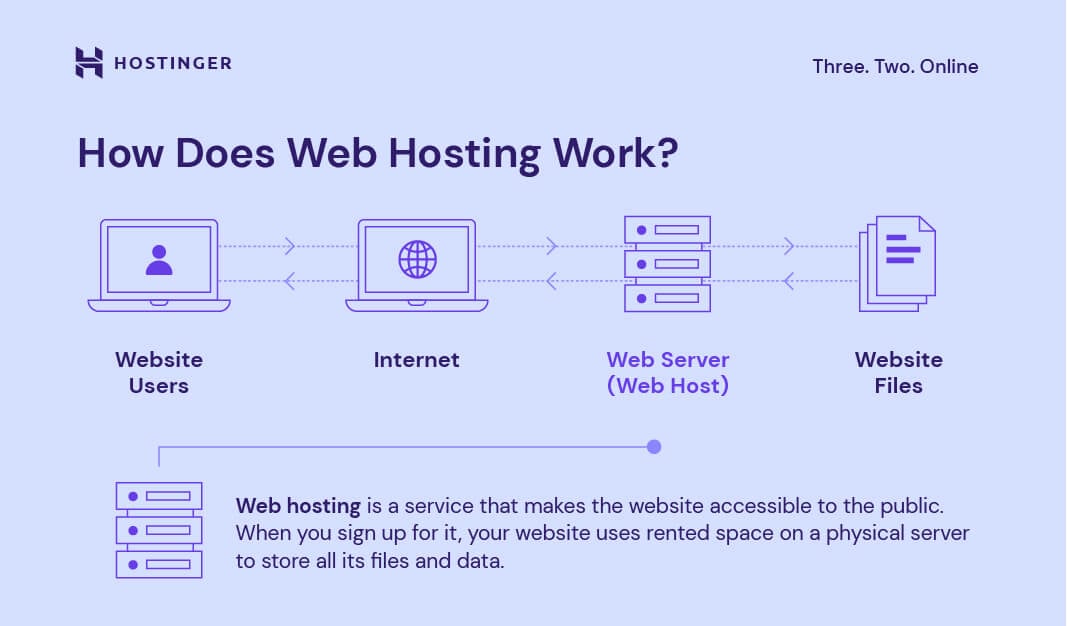
Credit: www.hostinger.com
Signing Up Process
Start by picking a hosting plan. Each plan has different features. Basic plans are usually cheaper. They offer limited resources. Advanced plans cost more. They provide extra features like more storage.
Next, register a domain name. A domain is your website’s address. You can buy one from a domain registrar. Some hosts offer a free domain. This is available in certain plans. Make sure your domain is easy to spell.
After registering, set up your account. You will need to fill out forms. Provide your name, email, and payment details. Create a strong password. This keeps your account safe and secure. Check all details before submitting.
Migrating Your Website
Choosing the right web host for your website involves researching companies that offer reliable service and support. Consider factors like uptime guarantees, customer service, and pricing. Reviews and recommendations can also guide your decision to ensure a smooth migration.
Backup Procedures
Backup your website data. Use reliable tools. Save copies on your computer. Store on cloud for safety. Check all files are backed up. Don’t forget databases. Keep backups updated. Backups help in emergencies. They protect your site.
Transfer Tools
Use transfer tools wisely. They move your site smoothly. Choose tools that suit your needs. Some tools are free. Others need payment. Check reviews before picking. Test tools on small files first. Ensure they work correctly.
Testing After Migration
Test your website after moving. Check links are working. Ensure images load properly. Test forms for issues. Fix broken elements. Ask friends to test too. Keep an eye on visitor feedback. Testing ensures your site runs well.

Credit: www.crazyegg.com

Credit: www.metalink.net
Frequently Asked Questions
How Do I Know The Web Server Of A Website?
Use online tools like “What’s My DNS” or “WHOIS” to identify a website’s web server. Inspect browser’s “Network” tab or check HTTP headers for server information.
What Is Your Website Host?
Our website is hosted by Bluehost. They offer reliable services and excellent customer support. Bluehost ensures fast loading times and robust security features, enhancing your browsing experience. Their affordable plans make them a popular choice for many businesses. We trust Bluehost to keep our site running smoothly.
How Do I Find Out What Platform A Website Is Hosted On?
Use online tools like BuiltWith or Wappalyzer to identify the hosting platform. Check website source code for hosting clues. Utilize browser extensions for quick insights. Conduct a WHOIS search to discover hosting details.
How Do I Find The Dns Host Of A Website?
Use online tools like DNS Checker or MXToolbox to find a website’s DNS host. Enter the domain name to get detailed DNS records. You can also use the “nslookup” command in the command prompt for a quick lookup. These methods provide accurate DNS host information efficiently.
Conclusion
Finding a website’s web host is simple with the right tools. Start with domain lookup services. These reveal basic hosting details quickly. Use WHOIS search for deeper insights. It shows the hosting provider and more. Explore online resources like DNS checker.
They offer detailed hosting information. Don’t forget web host directories. They list popular hosting providers. Always verify your findings for accuracy. Now you can identify any website’s host easily. Keep these tips in mind. You’ll save time and effort. Happy hosting hunting!


