
Are you curious about hosting your web app in Azure? You’re not alone.
Many developers and businesses are choosing Azure for its reliability and scalability. Imagine a platform where your app can perform seamlessly, no matter the traffic spikes or data demands. That’s what Azure offers. But how does it work? Understanding the hosting process can be the key to unlocking the full potential of your web app.
You’ll discover the steps and strategies to effortlessly host your web app in Azure, ensuring optimal performance and security. Dive in to find out how Azure can transform your web app experience and give you the competitive edge you need.
Azure Web Hosting Overview
Azure is a cloud service by Microsoft. It helps to host web apps. Azure Web Apps is one popular service. It makes hosting easy. You can use Azure to scale your app. This means you can handle more users. Azure also keeps apps secure. Security is very important for users. Azure provides many tools for developers. These tools make creating apps easier. You can also use Azure to test your app. Testing helps find mistakes. It makes sure the app works well. Azure helps save time and money. It is a good choice for hosting web apps.
Choosing The Right Azure Service
Azure App Service is great for hosting web apps. It supports many languages, like Python and Java. You can deploy apps quickly and manage them easily. App Service offers built-in security and scaling features. This makes it a popular choice for many developers.
Azure Kubernetes Service is used for running containerized applications. It helps in managing clusters of containers. AKS is good for apps that need to handle lots of users. It offers flexibility and control over your app environment. Developers like it for its robust features.
Azure Functions is a serverless option. It runs small code pieces in the cloud. You only pay for the time code runs. This makes it cost-effective for short tasks. Functions are good for automating simple jobs. They help in reducing overhead and maintenance.
Setting Up An Azure Account
Azure makes hosting web apps easy with its scalable cloud platform. Create an account to access tools for deploying and managing web applications. Choose hosting plans based on your app’s needs to ensure optimal performance.
Account Creation
Creating an Azure account is easy. Go to the Azure website. Click on “Create Account”. Fill out the form. Use your email address. Choose a strong password. Verify your email. Follow the steps. Now, your account is ready.
Subscription Options
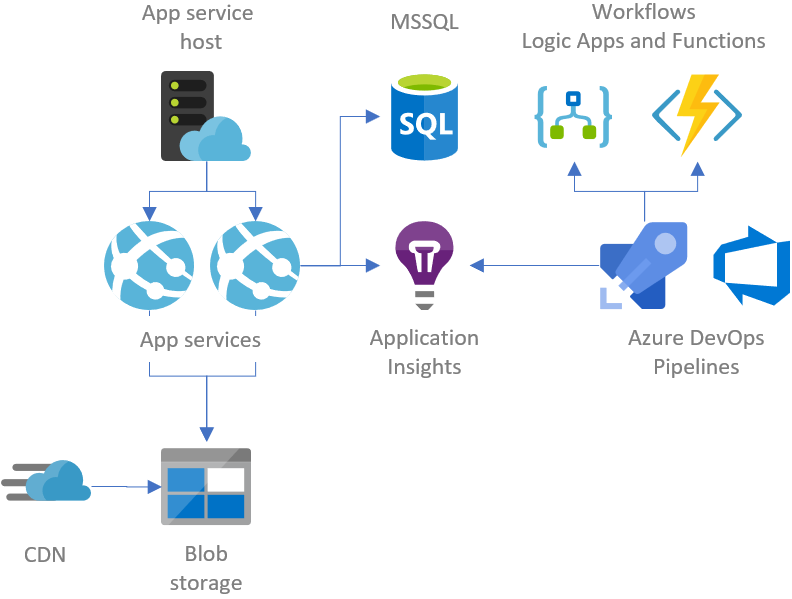
Azure offers different subscription choices. Some are free. Others cost money. Free options are great for beginners. Paid plans offer more features. Choose what fits your needs. Compare plans carefully. Consider your budget. Make sure to understand each plan. This helps in choosing the best one. You can change plans later if needed.
Credit: gunnarpeipman.com
Deploying A Web App
Azure Portal makes it easy to deploy a web app. First, sign in to the Azure Portal. Click on “Create a resource” and select “Web App”. Fill in the details like name and region. Choose a pricing tier that suits your needs. Finally, click “Review + Create” and then “Create”. Your web app is now ready to use. Simple and fast.
You can use Azure CLI for deployment. First, open your terminal. Log in with the command: az login. Next, create a new app with: az webapp create. Provide the necessary details like name and resource group. This method is quick and efficient. It gives you control over the deployment process.
Configuring Your Web App
Deploying a web app in Azure involves uploading it to the cloud platform. Configure settings for scalability, security, and performance. Azure provides tools for monitoring and managing your app efficiently.
App Settings
App settings in Azure are very important. They help your web app work better. You can set values like database connections. These settings make sure your app has all it needs. You must keep them updated. This ensures smooth operation.
Environment Variables
Environment variables store secret data. They keep passwords safe. Your app reads them to work properly. You should never share these values. Azure makes it easy to manage them. You can add or change them anytime. This flexibility is useful for developers.
Scaling And Performance
Azure offers auto-scaling to handle more users. This means your web app can grow or shrink. It does this based on demand. Auto-scaling helps to keep your app fast and efficient. You don’t need to worry about overloading servers. Azure manages the resources for you. This feature makes sure your app runs smoothly. Even if many people use it at once.
Monitoring is key for a good app. Azure provides tools for performance monitoring. These tools show how your app is doing. You can see if there are slowdowns or errors. By tracking performance, you make sure users have a good experience. If something goes wrong, you can fix it quickly. Keeping an eye on your app helps it stay reliable.
Security Best Practices
Azure hosts web apps by providing a secure and scalable environment. It uses security measures like authentication, encryption, and firewalls. These features help protect data and keep applications safe from threats.
Authentication And Authorization
Using strong authentication and authorization is vital for web apps. Azure offers tools for this. Azure Active Directory helps keep data safe. Users should have unique logins. This stops unwanted access. Two-factor authentication adds extra security. It’s like a secret password. Only trusted users can get in. Always check and update user permissions. This keeps your app safe.
Data Encryption
Encrypting data protects it from hackers. Azure provides encryption tools. These tools guard data both in transit and at rest. Using SSL/TLS ensures secure data transfer. It’s like sending a secret message. Only the intended user can read it. Encrypt sensitive information like passwords. This keeps them hidden from bad actors. Regularly update encryption keys. This maintains data security over time.
Cost Management
Azure offers many pricing tiers for web app hosting. Each tier has different features and costs. Basic tiers provide limited resources. These are good for small apps. Higher tiers offer more power. They support bigger apps and more traffic. Choose the right tier for your needs. This helps manage costs. Upgrading is easy. Start small and grow as needed.
Optimizing costs is crucial in Azure. Use auto-scaling to adjust resources. This saves money during low usage. Turn off unused services. This reduces costs too. Monitor your usage regularly. Azure provides helpful tools for this. Also, set spending limits. This prevents unexpected charges. Keep your app efficient. It reduces resource need and costs.
Troubleshooting Common Issues
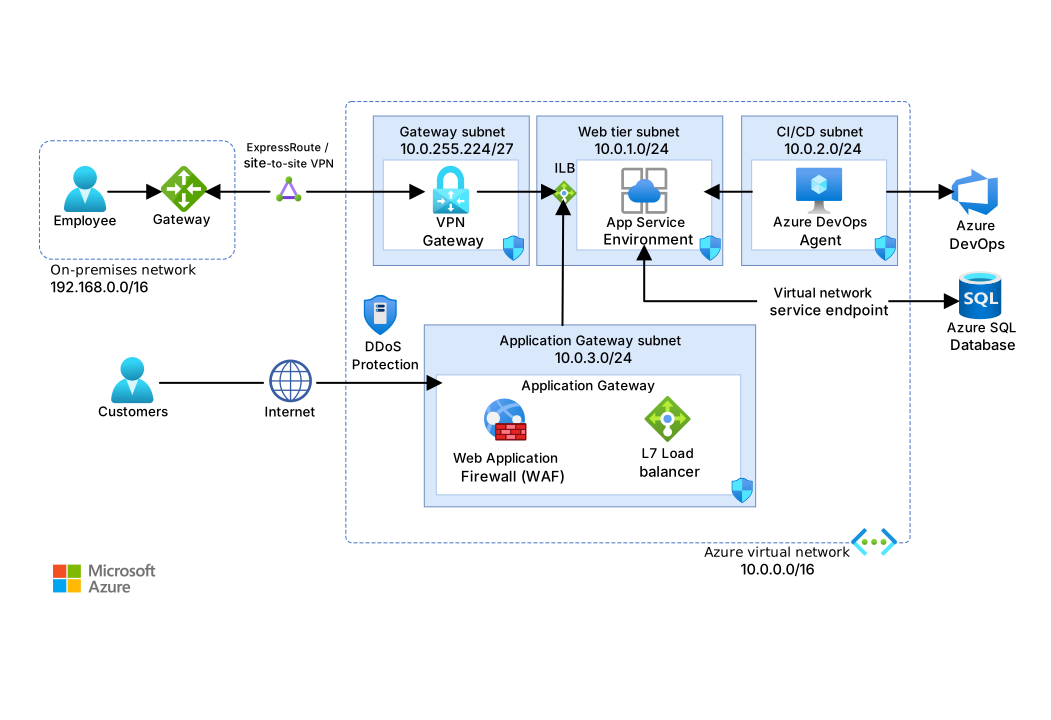
Hosting web apps in Azure involves setting up resources, managing configurations, and ensuring connectivity. Troubleshooting issues often includes checking network settings, verifying resource allocations, and ensuring proper app deployment. Effective management helps maintain app performance and reliability in the cloud environment.
Error Logs
Error logs help find problems in apps. They show what went wrong. These logs are like a list of mistakes. Reading them can help fix issues. Sometimes, they point to missing files. Other times, they show wrong code. Always check logs when errors pop up. Keep logs safe and organized. This makes it easier to find mistakes later. Use tools to read logs faster. This can save time.
Support Options
Azure offers many support options. You can find help on the internet. There are guides and forums. Many people share tips online. Azure has a help center too. It answers common questions. If stuck, ask a friend or expert. They might know the answer. Sometimes, just asking helps. Remember, there’s always a way to solve problems.
Credit: learn.microsoft.com
Credit: k21academy.com
Frequently Asked Questions
How Do Azure Web Apps Work?
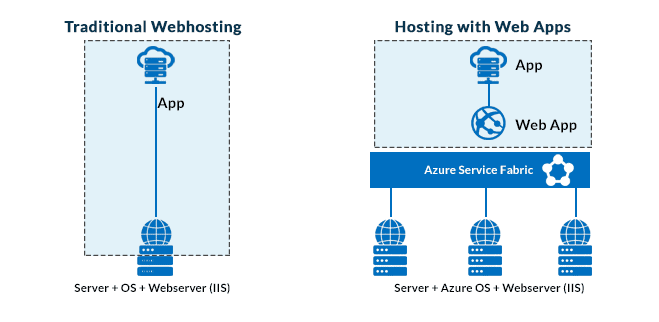
Azure Web Apps host and run web applications in the cloud. They provide scalable, secure, and managed environments. Users deploy apps using various programming languages and frameworks. Azure handles infrastructure, allowing focus on development and functionality. It integrates with Azure services for enhanced performance and features.
How Are Web Applications Hosted?
Web applications are hosted on servers, either on-premises or in the cloud. Popular cloud providers include AWS, Google Cloud, and Azure. Hosting involves deploying the application, ensuring security, and managing resources. This setup allows users to access the application via the internet seamlessly.
How To Host .net Application In Azure?
To host a. NET application in Azure, create a new Web App through Azure Portal. Deploy your application using Azure DevOps or Visual Studio. Choose the appropriate hosting plan based on your needs. Configure settings for scalability and performance. Monitor application health using Azure Monitor for optimal performance.
Can A Website Be Hosted On Azure?
Yes, a website can be hosted on Azure. Azure offers scalable cloud hosting solutions. It provides various services like virtual machines, app services, and databases. You can deploy websites easily using Azure’s user-friendly interface. Benefit from high availability, security, and global reach.
Azure supports various programming languages and frameworks.
Conclusion
Hosting web apps in Azure is straightforward and efficient. Azure provides tools that simplify deployment. Scaling apps is easy with Azure’s cloud infrastructure. Developers can focus on building, not managing servers. Azure ensures security and reliability for apps. Costs can be optimized with pay-as-you-go models.
Resources are available for learning more about Azure. Support is accessible for troubleshooting issues. Azure’s global reach helps apps perform well worldwide. Explore Azure’s features to enhance your web app. Embrace the possibilities and make your app shine. Azure is a solid choice for hosting web applications.


