
Have you ever stumbled upon a website and wondered what web host is powering its sleek performance? Perhaps you’re in the process of launching your own site and are curious about what hosting service could best suit your needs.
Uncovering the secret behind a website’s hosting provider can provide you with invaluable insights. It can guide your choices and elevate your online presence. In this post, you’ll learn simple and effective ways to find out which web host a site is using.
Get ready to unlock the mystery, satisfy your curiosity, and enhance your digital strategy. Stay with us, and discover how this knowledge can transform your approach to web hosting.
Methods To Identify Web Hosting
Online tools can help you find a site’s web host. Some tools are free, others cost money. HostAdvice and WhoIsHostingThis are popular choices. These tools are easy to use. Just enter the site’s URL. They show you hosting information quickly. Many people use these tools. They save time and effort.
Visit the website and check for hosting clues. Look at the site’s footer. Sometimes, hosts are named there. Check for any special branding. This might be a clue to the host. Page source can provide hints. Right-click and select “View Page Source.” Look for hosting-related links. These can help identify the host.
DNS records can show web hosting details. Use online DNS lookup tools. MXToolbox is one such tool. Enter the site’s domain name. The tool will display DNS records. Look for nameserver information. It often indicates the host. DNS records help uncover hosting secrets.

Credit: www.facebook.com
Popular Web Hosting Services
Many websites use shared hosting. This means many sites are on one server. It is affordable for small websites. Bluehost is a well-known provider. HostGator is another popular choice. Both offer easy setup. They provide good support. These services are great for beginners.
Dedicated hosting is for big websites. It offers a whole server for one site. This means better speed and control. SiteGround is a trusted name here. InMotion Hosting is another good option. They provide strong security. This hosting is best for high-traffic sites.
Cloud hosting is flexible. It uses many servers to host a site. This provides high uptime. Amazon Web Services (AWS) is a leader in this area. Google Cloud is also popular. These services are scalable. They are perfect for growing businesses.
Analyzing Website Metadata
Look at the HTML source code of a website. This helps find hosting details. Right-click on the page. Choose “View Page Source”. Search for meta tags or comments. Sometimes, hosting info is hidden here. Check if there is a generator tag. It may show hosting platform. Be patient. Explore different parts of the code. Every detail counts. Try using shortcuts like Ctrl+F. Type “host” or “server”. This finds related words quickly.
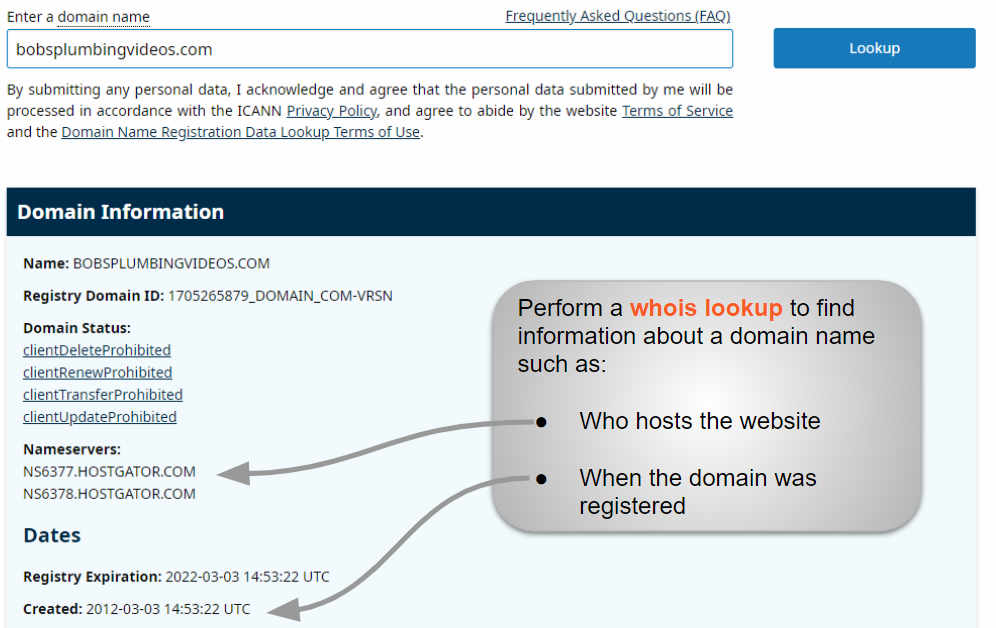
WHOIS is a tool. It gives data about websites. Use it to know hosting info. Go to a WHOIS search site. Enter the website address. Find details like domain name and IP address. This helps identify the host. Look for lines about registrar. Sometimes, hosting info is there. Pay attention to dates. They show when the domain was registered. WHOIS is a useful tool. It gives key information.
Credit: www.boldgrid.com
Common Challenges In Identifying Hosts
Some sites hide their hosting details. This makes it hard to find the host. They use services to mask this information. Privacy protection is one such service. It hides the host’s name. This keeps the site safe from attacks. Detecting masked details needs special tools. These tools look deeper into the site data. They can sometimes reveal the host name. But not always. Because some sites use strong masking methods. These methods keep host details hidden.
Some sites use many hosts. Each host does different tasks. One host may store website files. Another host runs the website. Tracking these hosts is hard. You need to check different parts of the site. Tools help find these hosts. But not all tools work well. Some hosts are hidden deeply. Finding them needs patience. Understanding site structure helps too. Knowing how a site works can reveal hosts. It makes searching easier.
Tools And Resources
Many websites offer free tools to check a site’s host. These tools are easy to use. Just enter the website’s URL. The tool will show the hosting provider. Some popular options are WhoIsHostingThis and Hosting Checker. They provide fast results. No need for registration or payment. Great for quick checks. Useful for beginners and experts alike.
Paid tools offer advanced features. They give more details about web hosts. SpyFu and SEMrush are two examples. These tools need subscriptions. They cost money but offer in-depth data. Useful for detailed analysis. They show server locations and IP addresses. Perfect for users needing detailed information.
Advanced Techniques
Reverse IP Lookup helps find more sites on the same server. This technique can reveal multiple websites hosted by the same web host. Use special tools online to perform this check. Enter the website’s IP address into the tool. The tool will list other sites sharing the IP. This method can hint at the hosting company’s name. Be careful with the results. Not all shared IPs belong to the same host.
Traceroute shows the path data takes from your computer to the website. It lists each step, called a hop, in the journey. Each hop shows an IP address. Sometimes, the host’s name appears in the traceroute. Use the command prompt for this analysis. Type “tracert” followed by the website’s URL. Watch each hop carefully. Look for names or clues about the host.
Legal And Ethical Considerations
Understanding legal and ethical considerations is crucial when identifying a website’s hosting provider. Always respect privacy laws and avoid using unauthorized tools or methods. Ensure compliance with regulations to protect user data and maintain ethical standards.
Privacy Concerns
Checking a site’s hosting service can raise privacy issues. People often worry about their personal data. Everyone must respect online privacy. It’s important to know what information is shared. Protecting this data is crucial. Websites have rules about privacy. Always follow these privacy rules.
Legality Of Host Identification
Finding out a site’s host must be legal. Some tools can reveal hosting info. Use them carefully. Laws differ by region. Know the rules before using these tools. It’s wrong to use illegal methods. Always stay within the law. Respect others’ rights and property. This is very important.

Credit: www.crazydomains.com
Frequently Asked Questions
How To Find Out What Web Hosting A Site Is Using?
Use tools like “Whois” or “Hosting Checker” to identify a site’s hosting provider. Check the site’s “DNS records” or “IP address” to gather more details. Browser extensions like “Wappalyzer” also reveal hosting information. Inspect the site’s “HTML source code” for host-related comments or links.
How To Find Out What Platform A Website Is Hosted On?
Use online tools like BuiltWith or WhatRuns to identify a website’s hosting platform. Check the site’s source code for hosting details. Inspect HTTP headers or use browser extensions to reveal hosting information. Conduct a WHOIS search to uncover the hosting provider’s data.
How Do I See What Server A Website Is Using?
Use online tools like Netcraft or BuiltWith to identify a website’s server. Alternatively, check the HTTP headers using browser developer tools. These methods reveal server information quickly and effectively.
How Do I Find The Domain Host Of A Website?
Use WHOIS lookup tools to find a website’s domain host. Enter the domain name to see registrar details. Popular tools include ICANN, DomainTools, and Whois. net. These services provide contact information, registration dates, and host data. Ensure the domain isn’t privacy-protected for complete information.
Conclusion
Finding a website’s host is straightforward with the right tools. Simple steps can reveal the details you need. Knowing the host helps troubleshoot issues faster. It also aids in understanding competitor strategies. Always check hosting details when exploring new web technologies.
This knowledge empowers better decisions for your own site. Keep learning and stay curious about web hosting trends. Whether you’re a beginner or seasoned webmaster, these insights can be invaluable. Use them to enhance your site’s performance and reliability. Happy hosting!


