
Are you curious about how WordPress actually builds your website? You might wonder, “Does WordPress use HTML?” Understanding this can give you more control over your site and help you make smarter design choices.
You’ll discover how WordPress works behind the scenes and why knowing about HTML can empower you to create a better online presence. Keep reading to unlock the secret connection between WordPress and HTML—and see how it affects your website’s look and performance.
Credit: kinsta.com
WordPress And Html Connection
WordPress and HTML share a close relationship. WordPress uses HTML to display web pages on browsers. Every WordPress site is built on HTML code behind the scenes. Understanding this connection helps users see how content appears online.
How WordPress Generates Html
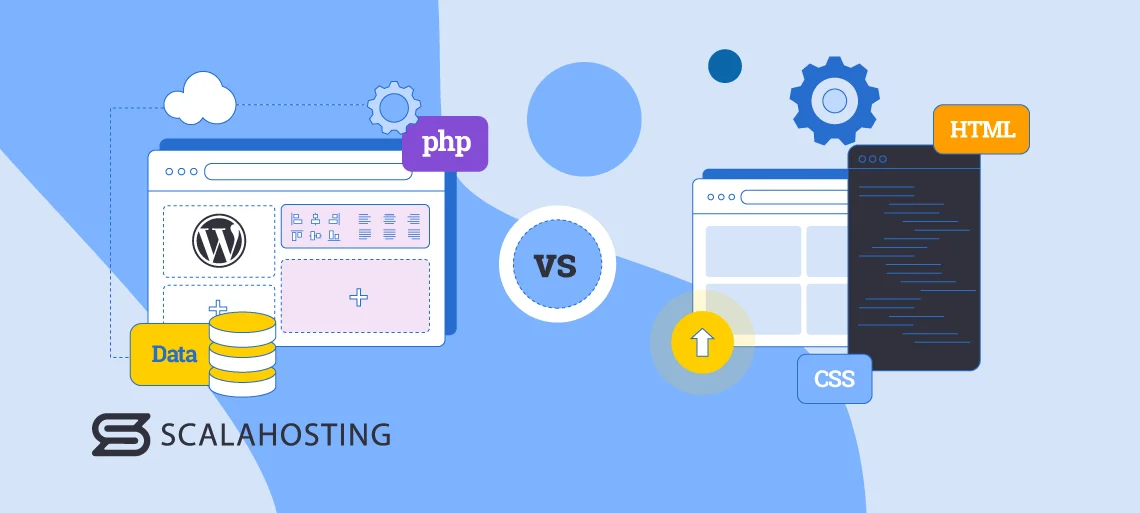
WordPress creates HTML dynamically. When a user visits a page, WordPress runs PHP scripts. These scripts pull content from the database. Then, WordPress combines content with HTML structure. The result is a complete HTML page sent to the browser. This process happens quickly and automatically.
This dynamic generation allows easy updates. Users can change content without touching HTML code. WordPress handles the technical parts in the background.
Role Of Themes And Templates
Themes control the look of WordPress sites. They contain HTML templates with CSS styles. Templates decide how pages and posts display. Each template has HTML tags defining page layout.
Users select themes to change site appearance. Themes use HTML to structure headers, footers, and sidebars. Templates keep the design consistent across pages.
Credit: www.scalahosting.com
Editing Html In WordPress
Editing HTML in WordPress gives users more control over their website content. It lets you change the structure and style of your pages. This helps make your site look just how you want. WordPress makes it easy to work with HTML, even for beginners.
You can edit HTML directly or use special blocks designed for coding. Understanding these options can improve your site’s design and functionality.
Using The Block Editor
The Block Editor is WordPress’s main tool for creating content. It divides your page into blocks. Each block can hold text, images, or other content types. You can add and move blocks easily to build your page.
This editor supports HTML editing inside text blocks. It helps you add custom code without leaving the editor. This is useful for small changes like adding links or formatting.
Accessing The Html View
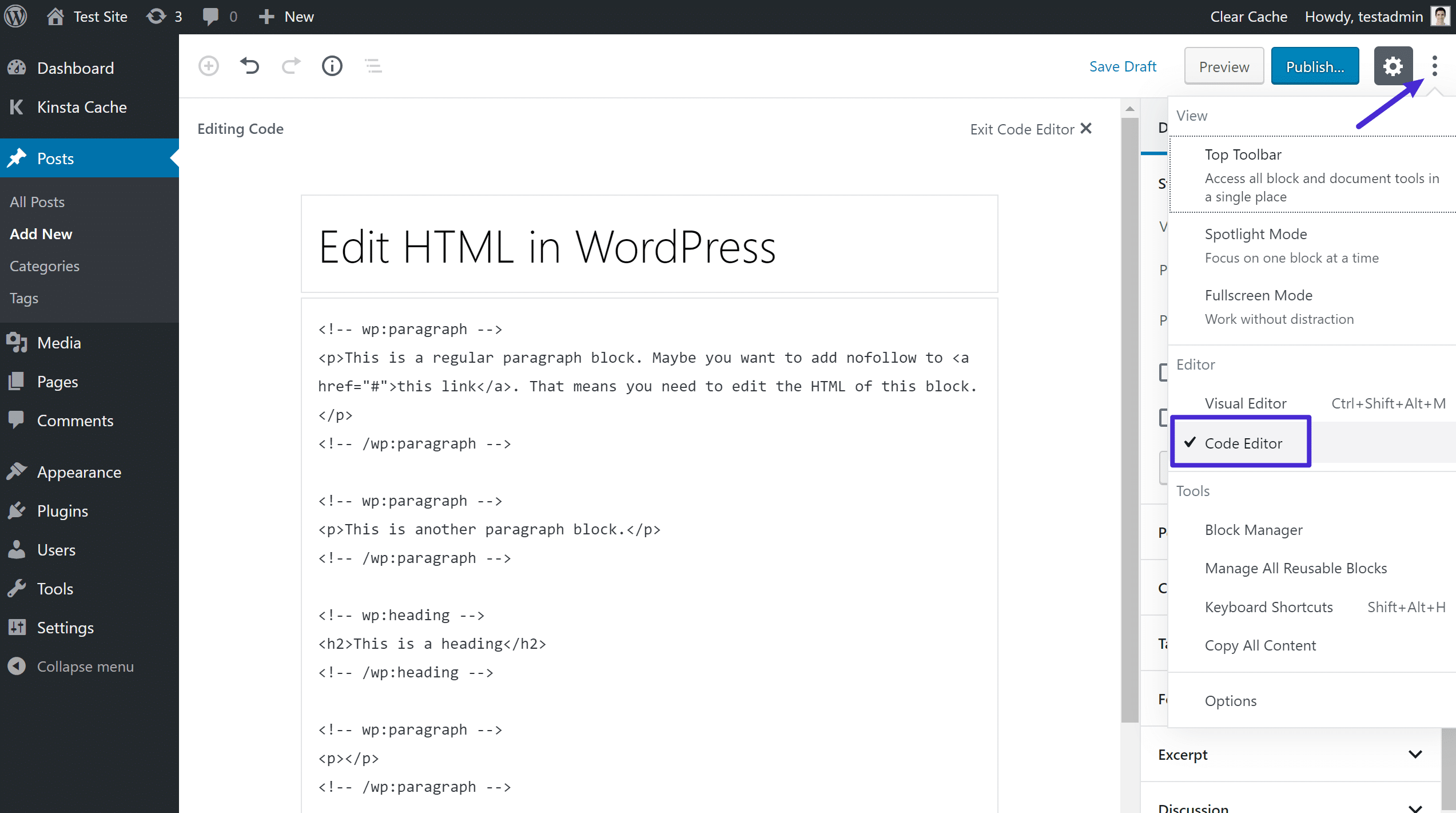
Every block in the editor has a way to see its HTML code. You can switch to the HTML view to edit the code directly. This view shows the exact HTML behind your content.
Editing in HTML view lets you fix errors or add special tags. It gives more precision than the visual editor. You can switch back anytime to see your changes in normal view.
Customizing With Html Blocks
WordPress offers a dedicated HTML block for custom code. This block lets you write full HTML snippets inside your page. It’s perfect for adding unique elements not found in other blocks.
You can add scripts, styles, or custom layouts with this block. It gives you freedom to create advanced designs. The HTML block is easy to insert and edit within the Block Editor.
Html Skills For Bloggers
HTML skills help bloggers create better posts. Basic knowledge lets you control how your content looks. It also helps fix small errors quickly. Even simple HTML can improve your blog’s style and structure.
Basic Html Tags To Know
Start with tags like for paragraphs. Use to for headings. The tag creates links. and highlight text. These tags are the building blocks of your posts.
Improving Post Appearance With Html
HTML lets you add lists using
Troubleshooting Common Html Issues
Check for missing closing tags like or . Broken links often have incorrect URLs in tags. Images may not show if the path is wrong. Validate your HTML with online tools. Fixing these problems keeps your blog professional.

Credit: www.inmotionhosting.com
Plugins And Html Integration
WordPress allows easy integration of HTML through plugins. These plugins help users add custom code without editing theme files. This makes the website more flexible and personalized. Plugins also improve how HTML content looks and works. They offer tools for editing, previewing, and managing HTML safely.
Using plugins for HTML brings many benefits. They simplify the process for beginners and speed up work for experts. At the same time, users must be careful with the code they add. Some HTML can cause problems if not handled well. That’s why understanding security is important.
Plugins That Enhance Html Editing
Several plugins improve HTML editing in WordPress. Plugins like “WP Editor” give a better code editor with syntax highlighting. “Advanced Code Editor” helps manage HTML, CSS, and JavaScript easily. These tools let users see code changes live. They reduce errors and improve website design.
Other plugins add blocks or widgets that support custom HTML. This allows users to place code in posts or sidebars. Such features make websites more interactive and unique. Editing HTML directly inside WordPress becomes simple and clear.
Security Concerns With Custom Html
Adding custom HTML can create security risks. Malicious code might harm the website or visitors. Unsafe scripts can steal data or slow down the site. WordPress limits some HTML tags for safety. But plugins may allow more freedom, increasing risk.
Users should always check the code before adding it. Using trusted plugins and keeping them updated helps. Avoid copying code from unknown sources. Regular backups protect the website from problems. Careful HTML use keeps WordPress sites safe and fast.
Best Practices For Html In WordPress
Writing HTML in WordPress needs care and attention. Good practices keep your site fast, clean, and user-friendly. Clear HTML helps both visitors and search engines understand your content. Follow these best practices for better results.
Maintaining Clean Code
Always write simple and clear HTML. Avoid extra tags and unnecessary attributes. Clean code loads faster and reduces errors. Use proper nesting for elements like
, and . Keep your code easy to read and edit. This helps when updating or fixing your site later.
Ensuring Mobile Responsiveness
Use HTML tags that support responsive design. Include the tag in your header. This tag controls how your site looks on phones and tablets. Use flexible layouts with percentages instead of fixed pixels. Test your pages on different screen sizes often. Mobile-friendly sites keep visitors longer and improve rankings.
Optimizing For Seo
Use proper HTML tags for headings like
to . These tags tell search engines what is important. Add alt text to images using the ![]() tag’s alt attribute. Alt text improves accessibility and SEO. Use clean URLs and semantic HTML tags like
tag’s alt attribute. Alt text improves accessibility and SEO. Use clean URLs and semantic HTML tags like and . Well-structured pages help search engines index your content better.
Frequently Asked Questions
Does WordPress Use Html For Website Content?
Yes, WordPress uses HTML to structure and display website content. It generates HTML code dynamically for each page or post visitors see.
Can I Edit Html Directly In WordPress?
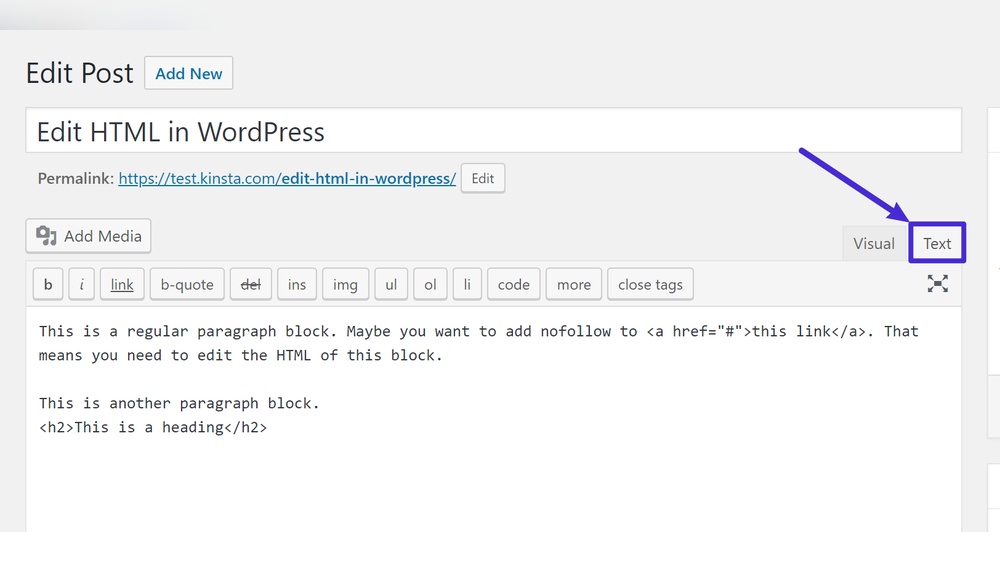
You can edit HTML directly using the WordPress editor’s “Text” or “Code” view. This allows customization beyond the visual editor.
How Does WordPress Generate Html Pages?
WordPress combines PHP, HTML, CSS, and JavaScript to create dynamic web pages served to users as standard HTML files.
Is Knowledge Of Html Necessary For WordPress Users?
Basic HTML knowledge helps customize content and troubleshoot issues, but it’s not required for creating websites using WordPress’s visual tools.
Conclusion
WordPress uses HTML to build and display web pages. It creates the structure that browsers read and show. Users do not need to write HTML to use WordPress. Still, knowing basic HTML helps customize and improve sites. WordPress mixes HTML with other languages like PHP and CSS.
This mix makes sites look good and work well. Understanding this can help you manage your website better. Simple but powerful. That’s how WordPress works with HTML.


