

Are you wondering if WordPress has Bootstrap built in? If you’re trying to create a website that looks great and works smoothly on all devices, this question is important.
You want to know if you can combine the power of WordPress with the flexibility of Bootstrap without extra hassle. You’ll discover how these two popular tools work together, what you need to know to use them effectively, and how to make your website stand out.
Keep reading to unlock the secrets that can take your site to the next level.
WordPress And Bootstrap Compatibility
WordPress and Bootstrap work well together in many ways. Both are popular tools for building websites. WordPress is a content management system. Bootstrap is a front-end framework for design and layout. Combining them can help create responsive and user-friendly sites.
Understanding how these two fit together helps in making better websites. Each has unique strengths. Knowing their compatibility clears confusion for developers and site owners.
Core Features Of WordPress
WordPress offers easy content management. It supports themes and plugins to extend functions. The platform is open source and widely used. It allows users to create blogs, shops, and portfolios. WordPress handles content without coding skills. It also supports custom designs and features.
Bootstrap Framework Essentials
Bootstrap provides a set of CSS and JavaScript tools. It helps build responsive layouts that fit all screens. The grid system organizes page elements neatly. Bootstrap includes buttons, forms, and navigation components. It simplifies front-end design with reusable blocks. The framework is open source and mobile-first.
Common Integration Scenarios
Many developers add Bootstrap to WordPress themes. This improves site appearance and responsiveness. Bootstrap styles can override default WordPress styles. Custom themes can use Bootstrap grids for layout. Plugins may also use Bootstrap components. Integration requires careful loading of CSS and scripts. Proper integration ensures a smooth user experience.
Methods To Integrate Bootstrap With WordPress
Bootstrap is a popular framework for building responsive websites. WordPress users often want to use Bootstrap to enhance their site design and functionality. Several methods exist to add Bootstrap to a WordPress site. These methods vary in ease and control. Choose the best method based on your skills and needs.
Using Bootstrap Themes
One easy method is using Bootstrap-based WordPress themes. These themes come pre-built with Bootstrap styles and scripts. You can find many free and paid themes with Bootstrap integration. Installing a Bootstrap theme saves time and effort. It lets you use Bootstrap features without coding. Customize the theme to fit your brand and content.
Manual Bootstrap Integration
Manual integration gives full control over Bootstrap use. Download Bootstrap files from the official website. Add CSS and JavaScript files to your WordPress theme folder. Enqueue these files properly in your theme’s functions.php file. This method requires basic coding knowledge. You can then use Bootstrap classes in your posts and templates. It allows precise design adjustments and customization.
Bootstrap Plugins For WordPress
Bootstrap plugins help add Bootstrap features quickly. These plugins load Bootstrap scripts and styles automatically. Some plugins also provide blocks or shortcodes for Bootstrap components. Using a plugin is a good option for beginners. It avoids manual code editing and errors. Check plugin compatibility with your WordPress version before installing.
Advantages Of Using Bootstrap In WordPress
Bootstrap offers many benefits for WordPress users. It simplifies the design and development of websites. Using Bootstrap can improve the look and function of WordPress themes. Developers save time and create responsive layouts easily. Bootstrap also provides ready-made UI components that fit various needs. These advantages help build websites that work well on all devices.
Responsive Design Benefits
Bootstrap uses a flexible grid system. This system adjusts layouts to fit different screen sizes. Your WordPress site will look good on phones, tablets, and desktops. No extra coding is needed for responsiveness. Visitors enjoy a smooth experience no matter their device.
Faster Development Process
Bootstrap includes pre-built CSS and JavaScript files. These files speed up the creation of website elements. Developers avoid writing repetitive code. WordPress themes and plugins can be built more quickly. This fast pace reduces project time and effort.
Customizable Ui Components
Bootstrap offers buttons, forms, menus, and more. These components are easy to customize for a unique look. WordPress users can match their site style with little work. The components are tested and reliable. This ensures consistent design and function across the site.
Credit: www.youtube.com
Challenges And Limitations
Using Bootstrap with WordPress can bring some challenges. It is not always a smooth fit. These challenges can affect your site’s look, speed, and ease of use. Understanding these limits helps you plan better and avoid problems.
Potential Conflicts With WordPress Themes
Bootstrap has its own styles and scripts. WordPress themes also come with unique code. Sometimes, these can clash and cause layout issues. Buttons, fonts, or menus might not display correctly. Fixing these conflicts may need extra coding skills. Not all themes support Bootstrap easily.
Performance Considerations
Bootstrap files add extra weight to your website. Loading these files can slow down your site. Slow sites can hurt user experience and SEO rankings. Using only needed parts of Bootstrap can reduce this problem. Avoid loading the entire framework if not necessary.
Maintenance And Updates
Bootstrap updates often introduce new features or fixes. WordPress themes also receive updates regularly. Keeping both updated can be tricky. Updates might break your site or cause conflicts. Regular testing is required to keep everything working well.
Best Practices For Smooth Integration
Integrating Bootstrap with WordPress can improve your site’s design and function. Following best practices helps the process go smoothly. This ensures your site stays fast, responsive, and easy to manage.
Focus on choosing the right Bootstrap version, optimizing for speed and SEO, and testing on different devices. These steps keep your site user-friendly and professional.
Choosing The Right Bootstrap Version
Select a Bootstrap version that fits your WordPress theme and plugins. Using the latest stable version avoids bugs and security issues. Older versions might lack features or updates.
Check compatibility with your theme before adding Bootstrap. Some themes already use Bootstrap, so avoid loading it twice. This prevents conflicts and slowdowns.
Optimizing For Speed And Seo
Load Bootstrap files efficiently. Use minified CSS and JavaScript to reduce file size. Smaller files load faster, improving site speed.
Combine Bootstrap files with your custom styles. This reduces the number of server requests. Faster sites rank better on search engines.
Use only needed Bootstrap components. Avoid loading the full library if you use few features. This cuts down unnecessary code.
Testing Across Devices
Bootstrap is designed to be responsive. Still, test your site on phones, tablets, and desktops. Check for layout issues or slow loading times.
Use browser developer tools to simulate different screen sizes. Fix any broken elements or overlapping text. A smooth experience keeps visitors engaged.
Credit: www.creolestudios.com
Real-world Examples And Use Cases
Many WordPress users want to know how Bootstrap fits into real projects. Seeing actual examples helps understand its value. Bootstrap offers a solid base for building responsive and attractive websites. WordPress themes and plugins often use it to improve design and usability.
This section shows real-world examples of Bootstrap in WordPress. It covers popular themes built with Bootstrap. It also shares stories of successful Bootstrap use in WordPress sites.
Popular Bootstrap-based WordPress Themes
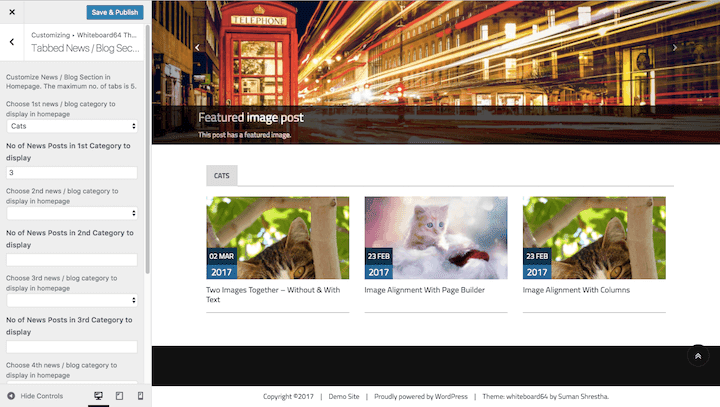
Several WordPress themes use Bootstrap as their foundation. Themes like “UnderStrap” combine WordPress with Bootstrap’s grid system and components. “Bootstrap Blog” is another theme that relies on Bootstrap for clean layouts and mobile-friendly design.
These themes help beginners and developers build fast, responsive sites. They come with ready-made Bootstrap styles and scripts. Users can customize them easily without deep coding knowledge.
Successful Bootstrap Integration Stories
Many websites improved their performance using Bootstrap with WordPress. For example, small businesses created sleek websites that work well on phones and desktops. Bloggers found it easier to organize content with Bootstrap’s layout tools.
Developers built custom plugins that use Bootstrap’s modals and buttons. This boosted user interaction and site functionality. Bootstrap helped maintain design consistency across different site parts.
Credit: www.abrightclearweb.com
Frequently Asked Questions
Does WordPress Support Bootstrap Integration?
Yes, WordPress supports Bootstrap integration. Developers can add Bootstrap manually or use themes and plugins that include Bootstrap for responsive design.
Can I Use Bootstrap Themes In WordPress?
Absolutely, you can use Bootstrap-based themes in WordPress. Many themes come pre-built with Bootstrap for easy customization and mobile-friendly layouts.
Is Bootstrap Necessary For WordPress Website Design?
Bootstrap is not necessary but highly recommended. It simplifies responsive design and speeds up development for WordPress websites.
How To Add Bootstrap To A WordPress Site?
To add Bootstrap, enqueue Bootstrap CSS and JS files in your theme’s functions. php file or use a plugin that integrates Bootstrap.
Conclusion
WordPress and Bootstrap work well together for many website needs. You can easily add Bootstrap to a WordPress site. This helps create a clean, responsive design. Many themes and plugins support Bootstrap integration. Using both tools gives you more control over your site’s look and feel.
It also helps your site work well on phones and tablets. Overall, combining WordPress with Bootstrap makes building websites simpler and faster. Try it out to see how it fits your project.


