
Are you thinking about creating a website with WordPress but unsure if it includes hosting? This question is one of the first you need to answer before getting started.
Understanding whether WordPress comes with hosting can save you time, money, and headaches down the road. You’ll discover the truth about WordPress hosting, what options you have, and how to choose the best setup for your website. Keep reading to make sure you start your online journey on the right foot.
WordPress Hosting Options
WordPress offers different hosting options to suit various needs. Choosing the right type helps manage your website better. The hosting option affects cost, control, and ease of use. Understanding these options lets you pick what fits your project.
WordPress.com Hosting
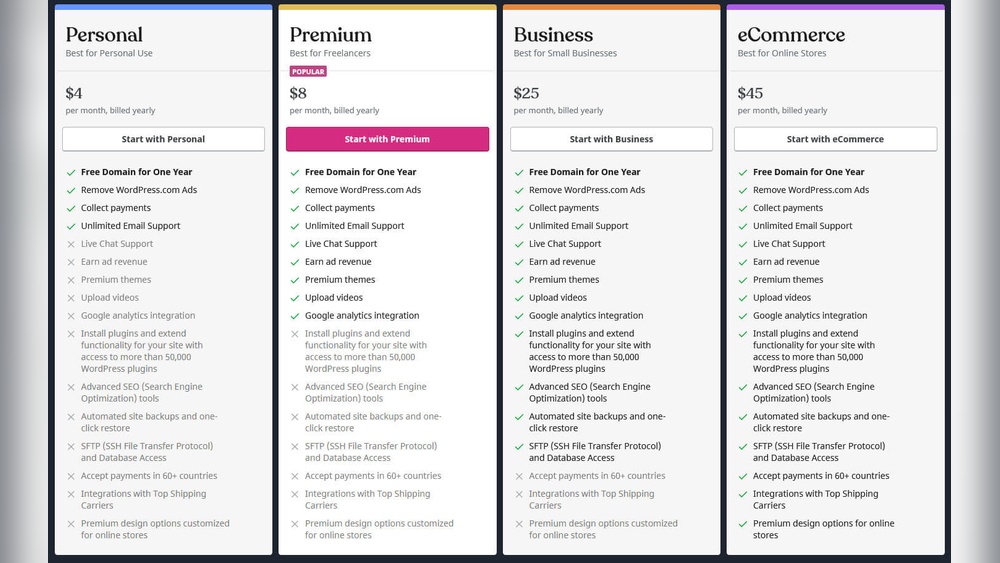
WordPress.com provides hosting included in the service. You do not need to buy separate hosting. It handles updates, security, and backups for you. This option is simple and good for beginners. However, it limits customization and plugin use. Plans range from free with basic features to paid with more tools.
Self-hosted WordPress.org
Self-hosted WordPress.org requires buying hosting separately. You download WordPress software and install it on your server. This option gives full control over your website. You can use any themes and plugins you want. It needs more technical skill to manage hosting and security. Many web hosts offer WordPress-optimized hosting plans. This choice suits users who want flexibility and growth.
Differences Between WordPress.com And WordPress.org
WordPress.com and WordPress.org are two different platforms that use the WordPress software. Many people confuse them because they share the same name. Knowing their differences helps you choose the right one for your website needs.
Both platforms let you build websites, but they handle hosting, control, and costs very differently. Understanding these key points can save time and money.
Hosting Included Or Not
WordPress.com includes hosting as part of its service. This means you do not need to buy separate web hosting. Your site runs on WordPress.com’s servers, and they take care of security and backups.
WordPress.org does not include hosting. You must find and pay for your own web host. This gives you more freedom but means more responsibility for site maintenance.
Control And Customization
WordPress.com limits customization options. You can choose themes and add basic plugins only on higher plans. Some code changes are not allowed.
WordPress.org offers full control. You can install any theme, use any plugin, and change code freely. This suits users who want a unique and flexible website.
Cost Factors
WordPress.com has free and paid plans. Free plans show ads and limit features. Paid plans remove ads and add more tools but come with monthly fees.
WordPress.org software is free. Costs come from hosting, domain registration, and premium plugins or themes. You control how much you spend.
Choosing The Right Hosting For Your Site
Choosing the right hosting for your WordPress site affects its speed, security, and uptime. Hosting is where your website lives on the internet. Picking the right type helps your site run smoothly and grow with your needs.
Different hosting options fit different website types. Small blogs do well on simple hosts. Larger sites need stronger servers. Knowing your options helps you decide.
Shared Hosting
Shared hosting means many websites share one server. It is the cheapest option. Good for beginners and small sites with low traffic.
Shared hosting has limits on resources. Speed can slow if other sites use too much power. Security risks increase with many users on one server.
Managed WordPress Hosting
Managed WordPress hosting is built just for WordPress sites. The host handles updates and backups. It keeps the site secure and fast.
This option costs more than shared hosting. It suits business sites or blogs with steady visitors. It saves time and effort on technical tasks.
Vps And Dedicated Hosting
VPS (Virtual Private Server) gives you more control. You share a server but get your own space. It is faster and more secure than shared hosting.
Dedicated hosting means you rent a whole server. It is the most powerful option. Best for large sites with heavy traffic and special needs.
Both VPS and dedicated hosting require more technical skill. They offer better performance and customization options.

Credit: www.bluehost.com
Setting Up WordPress With Hosting
Setting up WordPress with hosting is an important step to get your website online. Hosting stores your website files and makes your site visible on the internet. WordPress can work with different hosting options. This section explains two common ways to set up WordPress with hosting.
Using WordPress.com
WordPress.com offers hosting and WordPress combined. You create an account, and the platform hosts your site for you. It is easy to start with no technical setup needed. Choose a plan, pick a domain name, and start building your website. WordPress.com handles updates, security, and backups automatically. This option suits beginners or those who want a simple site fast.
Installing WordPress On A Hosting Provider
Installing WordPress on a hosting provider gives more control over your site. First, buy hosting from a provider like Bluehost or SiteGround. Next, use the hosting control panel to install WordPress. Many hosts offer one-click WordPress installation tools. After installation, log in to your WordPress dashboard to customize your site. This method requires more setup but allows full control over themes and plugins.
Pros And Cons Of WordPress Hosting Choices
Choosing the right hosting for WordPress affects your website’s success. Different hosting options offer various benefits and drawbacks. Understanding these helps you pick the best fit for your needs. This section breaks down the main pros and cons of WordPress hosting choices.
Ease Of Use
Some WordPress hosting providers offer one-click installations. This makes setup simple for beginners. Managed WordPress hosting handles updates and backups automatically. It saves time and avoids technical tasks. On the other hand, self-hosting requires manual setup and maintenance. This might confuse new users without technical skills.
Performance And Speed
Dedicated WordPress hosting often includes servers optimized for fast loading. Speed improves user experience and SEO rankings. Shared hosting can slow down your website if many sites share the same server. Performance depends on server resources and traffic. Careful choice of hosting affects site responsiveness.
Security Considerations
Managed WordPress hosts usually provide strong security measures. They include malware scanning and automatic updates. This reduces the risk of hacks and data loss. Shared hosting may have weaker security protections. It increases vulnerability to attacks from other sites on the server. Security features vary widely among hosts.
Cost Efficiency
Shared hosting is the most affordable option. It suits small websites or blogs with low traffic. Managed WordPress hosting costs more but offers extra services. These services save time and reduce technical work. Custom hosting plans may have hidden fees. Budget and needs determine the best choice.
Common Hosting Providers For WordPress
WordPress does not include hosting by itself. You need a hosting provider to publish your website online. Many companies offer hosting services tailored for WordPress users. These providers vary in price, features, and support. Choosing the right host affects your site’s speed, security, and uptime.
Common hosting providers for WordPress fall into two main groups: shared hosts and managed WordPress hosts. Each type suits different needs and budgets. Understanding both helps you pick the best option for your site.
Popular Shared Hosts
Shared hosting is a budget-friendly choice for new websites. Many users share one server’s resources. This setup keeps costs low but may affect performance during traffic spikes.
Popular shared hosts for WordPress include Bluehost, SiteGround, and HostGator. These companies offer easy WordPress installation and basic support. They provide enough features for small blogs and personal sites.
Top Managed WordPress Hosts
Managed WordPress hosting is designed for better speed and security. Hosts handle updates, backups, and technical tasks. This service suits business sites and growing blogs.
Top managed WordPress hosts are WP Engine, Kinsta, and Flywheel. They offer fast servers and expert WordPress support. Pricing is higher but adds peace of mind and strong performance.
Tips For Managing WordPress Hosting
Managing WordPress hosting is essential for a smooth website experience. Proper care keeps your site fast and safe. Small steps make a big difference. Focus on backups, updates, and performance checks.
Backup Strategies
Always have a backup plan. Save your site data regularly. Use plugins or your hosting service for backups. Store copies in different locations. This protects your site from data loss or hacking.
Regular Updates
Keep WordPress, themes, and plugins updated. Updates fix bugs and security issues. They also add new features. Set a schedule to check for updates weekly. Avoid delays to keep your site secure.
Monitoring Performance
Track your website speed and uptime. Use tools to check loading times. Slow sites lose visitors and rankings. Fix problems quickly to improve user experience. Regular monitoring keeps your site healthy.

Credit: www.cloudpanel.io
Credit: www.hostinger.com
Frequently Asked Questions
Does WordPress Include Hosting By Default?
WordPress. org does not include hosting by default. You must purchase hosting separately to use the WordPress software. WordPress. com, however, offers hosting as part of its service plans.
Can I Use WordPress Without Hosting?
No, you cannot use WordPress without hosting. Hosting is essential to store your website files and make your site accessible online.
What Is The Difference Between WordPress.com And WordPress.org Hosting?
WordPress. com provides managed hosting with limitations. WordPress. org requires you to buy your own hosting and offers full customization freedom.
Is WordPress Hosting Expensive For Beginners?
WordPress hosting can be affordable for beginners. Many providers offer budget-friendly plans with easy WordPress installation and support.
Conclusion
WordPress itself does not include hosting. You must choose a hosting provider separately. Some companies offer plans with WordPress pre-installed. This makes setup faster and easier. Hosting affects your website’s speed and security. Think about your needs before selecting a host.
Shared hosting is affordable but slower. Managed WordPress hosting is faster but costs more. Understanding hosting helps you build a better site. Now, you can make a smart choice for your WordPress website.


