
Are you thinking about building a website with WordPress but worried about hidden costs? You might be wondering, “Does WordPress charge monthly fees?”
It’s a question that can make or break your decision before you even start. Understanding the costs upfront helps you avoid surprises and plan your budget wisely. You’ll get clear answers about WordPress pricing, what’s free, what may cost you, and how to choose the best option for your needs.
Keep reading to find out exactly how WordPress handles charges—and how you can save money while getting the website you want.
Credit: litextension.com
WordPress Pricing Models
Understanding WordPress pricing models helps you choose the right plan for your needs. WordPress offers different options for users who want a simple blog or a full website. Costs vary depending on features and hosting choices.
Free Vs Paid Plans
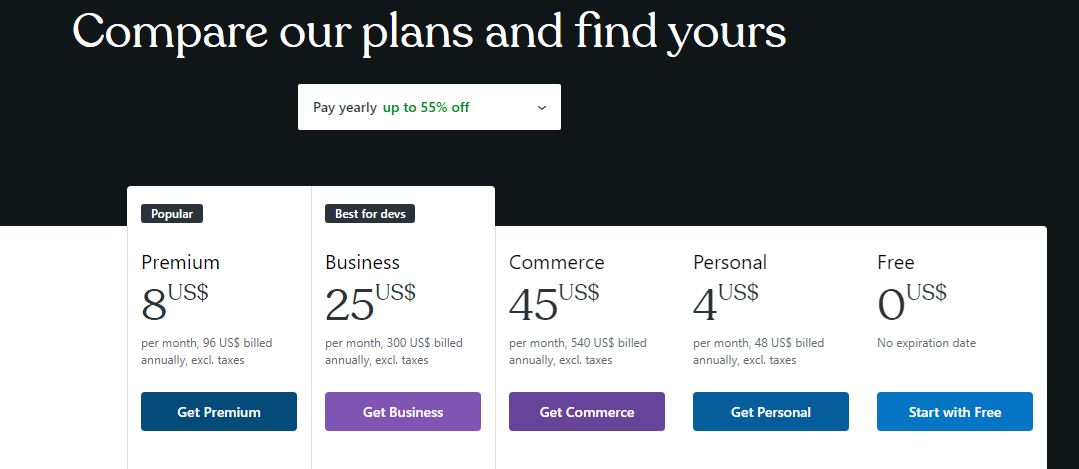
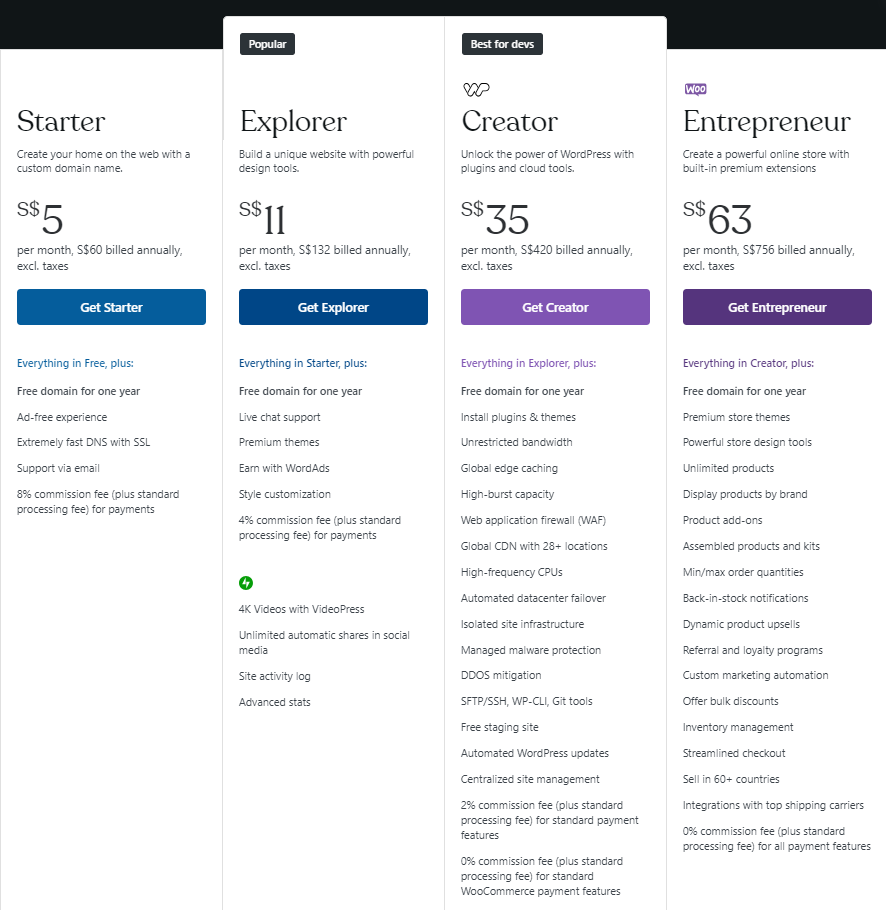
WordPress provides both free and paid plans. The free plan lets you create a basic website without any cost. It includes a WordPress.com subdomain and limited design options. Paid plans offer more tools like custom domains, extra storage, and advanced themes. These plans are suitable for businesses and serious bloggers. Monthly fees depend on the plan’s features and support level.
WordPress.com Vs WordPress.org
WordPress.com is a hosted service with free and paid plans. It manages hosting and updates for you. The paid plans add more control and features. WordPress.org is a self-hosted platform. You download the software for free but pay for hosting and domain separately. This option gives full control over your website design and functionality. Costs vary based on your hosting provider and add-ons.
Credit: www.hostinger.com
Monthly Fees Breakdown
Understanding the monthly fees for a WordPress site helps in planning your budget. WordPress itself is free. Costs come from other services needed to run your website. These services include hosting, domain registration, and optional premium themes or plugins.
Each service has its own price range. Knowing these fees helps avoid surprises. Let’s break down the common monthly costs for WordPress users.
Hosting Costs
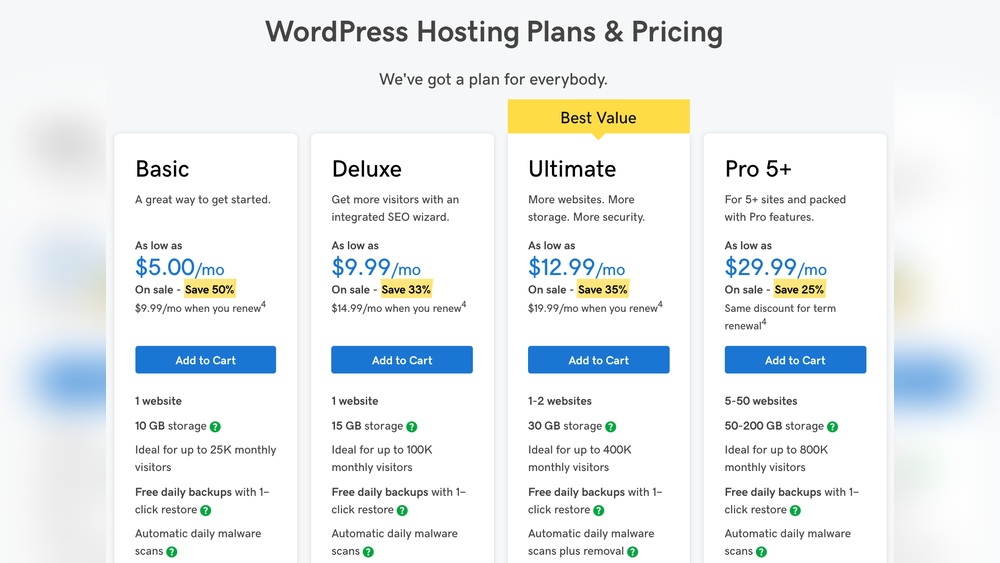
Hosting is where your website lives online. You rent space on a server. Prices vary based on speed, storage, and support. Shared hosting can cost as little as $3 to $10 per month. Managed WordPress hosting is more expensive but easier to use. It may cost $20 to $50 monthly. Good hosting keeps your site fast and secure.
Domain Registration
A domain is your website’s address, like example.com. You pay a yearly fee that can be divided monthly. Domains usually cost $10 to $15 per year. This means about $1 per month. Some domains cost more if they are popular or special. Registering a domain is essential for any website.
Premium Themes And Plugins
WordPress offers free themes and plugins. Premium options add more features and design choices. Premium themes usually cost a one-time fee or a small monthly fee. Plugins for SEO, security, or backups may have monthly charges. These costs depend on the tools you choose. They improve your site but are not mandatory.
Hidden Expenses To Watch
WordPress itself does not charge a monthly fee for its software. Yet, running a website with WordPress can involve hidden costs. These costs may add up over time and affect your budget. Knowing these expenses helps you plan better.
Security And Backups
Keeping your site safe is important. Free security plugins exist, but paid options offer stronger protection. Many premium plans include automatic backups. Without backups, you risk losing your data. Paying for security and backup services can prevent big problems.
Customization Services
WordPress themes and plugins come in free and paid versions. Free options may lack features or support. Customizing your website often needs premium themes or plugin upgrades. Hiring a developer to change your site costs extra. These services improve your site’s look and function.
E-commerce And Marketing Tools
Running an online store requires special tools. Basic WordPress does not include e-commerce features. Paid plugins help with payments, shipping, and inventory. Marketing tools, like email services, often have monthly fees. These tools help grow your business but add to costs.
Cost-saving Tips
Saving money on WordPress costs is important for many website owners. There are smart ways to keep expenses low without losing quality. Simple choices can reduce your monthly or yearly fees.
These tips help you control spending while building a great site. Focus on plans, tools, and add-ons to cut down costs.
Choosing The Right Plan
Select a WordPress plan that fits your needs. Basic plans cost less and work well for small sites. Avoid paying for features you do not use. Upgrade only when your site grows and needs more power.
Check each plan’s details carefully. Compare prices and features before deciding. This saves money and avoids surprises later.
Using Free Resources
WordPress offers many free themes and plugins. These tools help you build your site without extra cost. Choose well-rated free options to keep your site secure and functional.
Free resources are easy to find on the WordPress directory. Use them instead of paid tools until you really need more features.
Managing Plugin And Theme Expenses
Limit the number of paid plugins and themes. Each one adds to your monthly cost. Only buy what is essential for your site’s success.
Regularly review your plugins and themes. Remove those that you no longer use. This keeps your site fast and your expenses low.
Is WordPress Worth The Cost?
Understanding the cost of WordPress helps decide if it fits your needs. WordPress offers free and paid plans. Each plan has different features and limits. Knowing what you get for your money is important. It helps you choose the right option for your website goals.
Benefits Of Paid Features
Paid WordPress plans give extra tools and support. You get more storage space for files and images. Custom themes and plugins become available for better design. The site runs without ads, offering a cleaner look. You receive access to professional support for quick help. These features improve your site’s performance and appearance. They save time and effort managing your website.
Comparing Alternatives
Other website builders also offer free and paid plans. Some have simpler tools but fewer customization options. Others charge higher fees but include hosting and support. WordPress stands out for flexibility and control over design. It has a large community and many plugins. Choosing depends on your budget and website needs. Consider what features matter most before deciding.
Credit: www.elegantthemes.com
Frequently Asked Questions
Does WordPress Charge Monthly For Basic Use?
WordPress. com offers a free basic plan with no monthly fees. Paid plans with extra features start at a monthly cost. You can choose free or premium options based on your needs.
Are WordPress Hosting Fees Monthly Or Yearly?
Hosting fees vary by provider and plan. Many hosts offer monthly or yearly billing options. WordPress itself does not charge hosting fees; these come from third-party companies.
Is There A Monthly Fee For WordPress Plugins?
Most WordPress plugins are free to use. Some premium plugins require a monthly subscription for updates and support. Check each plugin’s pricing before installation.
Do I Pay Monthly For WordPress Themes?
Free themes are available without any charges. Premium themes often have a one-time fee or yearly subscription. Monthly payments for themes are rare but possible.
Conclusion
WordPress itself does not charge a monthly fee for its software. You can download and use it for free on your own web host. Costs come from hosting services, domain names, and optional premium themes or plugins. These fees vary depending on your needs and choices.
Many users start with low costs and grow as their site expands. Understanding these details helps you plan your budget well. WordPress offers flexibility without forcing fixed monthly payments. Choose what fits your goals and wallet best.


