
Have you ever wondered if Amazon S3 uses a cache for static web hosting? Understanding how S3 handles your data can be a game-changer for your website’s performance.
Imagine a world where your site loads blazingly fast, delighting every visitor and keeping them coming back for more. By unlocking the secrets of S3’s caching mechanisms, you can elevate your site to new heights. Dive into this article to discover whether S3 has a cache and how it could benefit your web hosting strategy.
Let’s unravel the mystery together and transform your online presence.
Credit: www.pulumi.com
Amazon S3 Static Web Hosting
Amazon S3 is a tool for storing files on the web. You can host static websites using S3. It is simple and fast. Static websites have fixed content. They don’t change based on user actions. S3 is great for this. It serves the content directly to users. No server-side code needed.
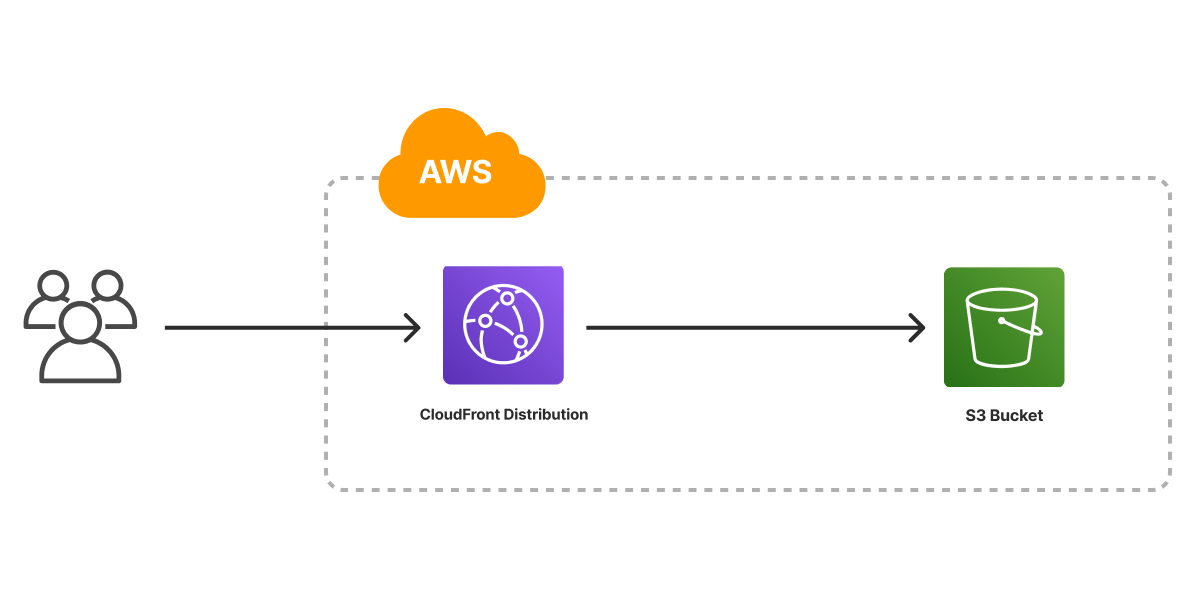
S3 does not have a built-in cache for static hosting. You can use Amazon CloudFront for caching. CloudFront is a content delivery network. It speeds up the delivery of your site. It caches your content around the world. Users get fast access to your site.
To set up, link S3 with CloudFront. This helps in faster loading times. Faster sites make users happy. Keep your site simple. Use S3 for storage. CloudFront for caching. It’s a good way to host a static site.

Credit: aws.plainenglish.io
Caching In Web Hosting
Caching makes websites load faster. It saves data for quick access. With cache, the server doesn’t fetch data every time. This saves time and resources. Websites become more efficient. Users enjoy smooth browsing. Cache helps reduce load on servers. It keeps popular data ready.
Browsers store web pages for quick loading. CDNs distribute data across many locations. Proxy servers cache data for networks. Memory caching keeps data in RAM for speed. Disk caching saves data on hard drives. These methods improve performance. They reduce server work and save bandwidth. Caching is vital for a fast web experience.
Amazon S3 And Caching
Amazon S3 does not have native caching for static websites. This means S3 alone cannot store web content temporarily. It always serves files directly from its storage. This might lead to slower load times. Especially if users are far from the S3 region. Static sites need fast access to files. But S3 does not offer this by itself.
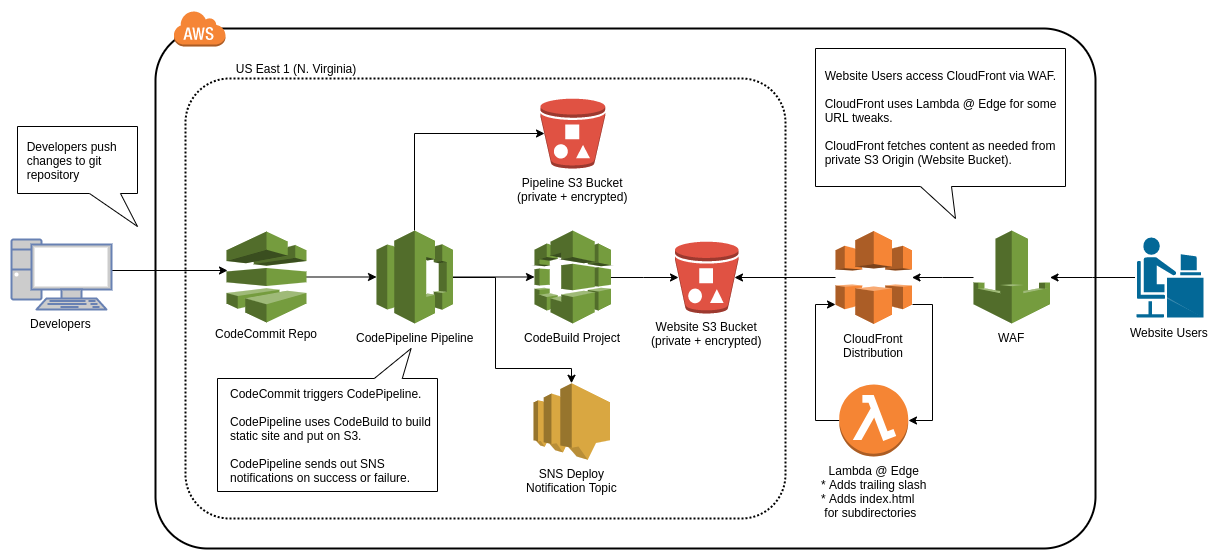
To improve speed, users often use external caching solutions. Popular choices include CloudFront and other CDNs. These tools store copies of files closer to users. This reduces load time and improves website performance. Integration is simple and effective. It helps websites deliver content faster. Caching solutions work well with S3. They provide the speed that S3 lacks by itself.
Credit: ordinaryexperts.com
Benefits Of Caching For Static Websites
Caching helps in making websites load faster. This means less time waiting. A fast website keeps visitors happy. Quick load times are important. They keep people on your site longer. When pages load fast, it feels smooth and easy. This is good for all users, even with slow internet. Fast sites also work better on phones. Everyone loves a speedy page.
Caching takes some work away from the server. This is important for static websites. Less server work means fewer errors. It also saves server costs. When there is less load, the server stays strong. This helps the website stay online more. It also gives a better experience to visitors. Fewer server requests mean smoother browsing. This keeps everything running well.
Challenges With S3 Caching
Amazon S3 does not provide built-in caching for static web hosting. This can lead to slower load times for users. Implementing a content delivery network (CDN) helps improve performance by caching content closer to users.
Cache Invalidation
Cache invalidation is tricky with S3. Static files may not refresh quickly. Users might see old data for a while. This happens because changes do not reach users at once. The distribution network takes time to update. This can be a problem for sites needing real-time updates. Proper planning is needed to manage cache.
Consistency And Reliability
Keeping data consistent is key. Reliability of cache updates can vary. Sometimes, changes are not seen by users. This can cause confusion. Consistent updates are important for user trust. Reliable cache ensures users see the right information. Regular checks can help maintain this. Being mindful of changes is crucial.
Best Practices For S3 Caching
CloudFront works with S3 to deliver content fast. It acts like a giant network of servers around the world. These servers store copies of files. When someone visits your site, they get the file from the closest server. This makes the website load faster. CloudFront also protects your site from too much traffic. Think of it as a helper for your website.
Cache-Control headers tell browsers how long to keep files. This helps in saving bandwidth and speeds up loading. You can set these headers on S3. Choose how long files should stay in the cache. A long time means fewer requests to the server. But, be careful! If files change often, set a shorter time. This way, users always see the latest version.
Comparing S3 With Other Hosting Options
S3 offers fast and reliable performance for static web hosting. It ensures quick load times for web pages. This is important for user experience. Fast websites keep visitors happy. In contrast, some other hosts may be slower. They might not handle requests as quickly. A slow site can frustrate users. S3 uses a global network. This helps in delivering content swiftly. Other hosts might lack this feature. They may rely on fewer servers. This can affect speed and performance.
Amazon S3 is highly scalable. It can handle a lot of traffic. This is perfect for growing websites. As a site grows, S3 can adjust. No need for manual changes. Some hosts struggle with high traffic. They can’t scale as well. This can cause downtimes. S3 automatically scales to meet demands. It makes it a reliable choice. Other hosts may require upgrades. These can be costly and time-consuming. S3 offers a hassle-free solution for websites of all sizes.
Future Of Caching In S3
Amazon S3 might get better caching soon. This will help websites load faster. Faster websites mean happy users. Caching saves data for quick access. It reduces wait times for visitors. Developers hope for more improvements. Better caching can make hosting cheaper. Less data transfer saves money. This is good news for small businesses.
Experts believe S3 could use smarter technology. It might learn which data to cache. This means less work for developers. Automatic caching can save time. It can also reduce errors. This is important for website owners. Time saved means more focus on other tasks. It helps keep websites running smoothly.
Web hosting can become more efficient. With better caching, websites perform well. Users will have a better experience. This leads to more visitors and happy customers. Hosting costs may decrease, too. Lower costs mean more savings for businesses. Overall, better caching benefits everyone.
Frequently Asked Questions
Does The S3 Have Caching?
Amazon S3 does not provide caching natively. Users can implement caching using CloudFront or third-party solutions for faster access. Utilizing caching can significantly improve data retrieval speeds and reduce latency. CloudFront integrates seamlessly with S3 for efficient content distribution across global locations, enhancing overall performance.
Can Amazon S3 Be Used For Static Web Hosting?
Yes, Amazon S3 can host static websites. It supports HTML, JavaScript, and CSS files. Amazon S3 offers a scalable, secure, and low-cost solution for static web hosting. You can configure S3 buckets for website hosting and utilize features like custom error pages and redirects.
What Security Risks Exist To Data Stored In S3 Used For A Static Website?
Data in S3 for static websites face risks like unauthorized access, data breaches, and misconfigured permissions. Implement encryption, access controls, and monitoring to enhance security. Regular audits and updates help maintain protection against vulnerabilities.
How Much Does It Cost To Host A Static Website On Aws S3?
Hosting a static website on AWS S3 costs approximately $0. 023 per GB stored. Data transfer fees apply. AWS Free Tier offers 12 months of free storage for 5GB. Pricing varies based on storage and data transfer usage. Always check the AWS pricing page for the most current rates.
Conclusion
S3 doesn’t have a built-in cache for static web hosting. This means you rely on other caching solutions. Using a CDN can help improve performance. It reduces the load on S3 by caching files closer to users. Consider integrating CloudFront for this purpose.
It works well with S3, providing faster content delivery. Proper caching strategies can enhance user experience. They help reduce latency and server load. Always plan your caching approach carefully. This ensures your website remains efficient and responsive.


