
Are you thinking about starting a website with WordPress but wondering if you need to download it first? You’re not alone.
Many people ask this question because the process can seem confusing at first. Understanding whether you have to download WordPress or if there’s an easier way can save you time and frustration. You’ll discover the simple truth about WordPress and what steps you really need to take to get your site up and running quickly.
Keep reading—you might be surprised how easy it actually is!

Credit: wptavern.com
WordPress Basics
WordPress is a popular tool for building websites. It helps people create blogs, online stores, and portfolios. Many people wonder if they need to download WordPress to start. Understanding WordPress basics clears up this question.
Knowing what WordPress is and the types of platforms it offers helps you decide the best way to use it. This section explains these key points in simple terms.
What WordPress Is
WordPress is a software that lets you build websites easily. It uses themes and plugins to change how your site looks and works. You do not need to know coding to use it. WordPress is free to use and open source. This means anyone can change and share it.
Types Of WordPress Platforms
There are two main types of WordPress platforms. One is WordPress.com, which is hosted online. You do not have to download anything to use it. The other is WordPress.org, which is self-hosted. Here, you must download WordPress and install it on your server.
WordPress.com is easier for beginners. WordPress.org gives more control and features but needs more work. Knowing these types helps you choose the right one for your needs.
When Downloading Is Necessary
Downloading WordPress is not always necessary. Many users choose the hosted version for ease. Yet, some situations require downloading the software. Understanding when to download helps you decide the best path for your site.
Self-hosted WordPress Explained
Self-hosted WordPress means you download the software. You then install it on your own web server or hosting service. This gives full control over your website’s features and design. You handle updates, backups, and security. It is different from WordPress.com, where hosting is managed for you.
Benefits Of Downloading WordPress
Downloading WordPress allows you to customize your site fully. You can install any plugin or theme. It offers more flexibility for advanced features and design. Also, you keep full ownership of your content. This option suits businesses and bloggers wanting more control. It often leads to better site performance and SEO options.
Using WordPress Without Downloading
Using WordPress without downloading is possible through WordPress.com. This hosted platform lets you create a website without installing software. You only need to sign up and start building your site online. It is a quick and easy way to get your site live.
This option is great for beginners or those who want a simple website. You do not have to worry about hosting or technical setup. Everything is managed for you on WordPress.com.
WordPress.com Features
WordPress.com offers various features to build your site. You get free themes to change your site’s look. Basic tools help you write posts and pages easily. It includes built-in security and automatic backups. Hosting is included, so no extra cost for servers. You can use a free subdomain like yoursite.wordpress.com. Paid plans add more storage and custom domains.
Limitations Of Hosted WordPress
WordPress.com has some limits compared to self-hosted WordPress. You cannot install custom plugins or themes on free plans. Some design options are restricted. You have less control over site files and code. Monetization options are limited unless you upgrade plans. The platform shows ads on free sites. Storage space is smaller than self-hosted WordPress. These limits may affect growing or complex websites.
Credit: solidwp.com
Installation Steps For Downloading WordPress
Installing WordPress is a simple process anyone can follow. It lets you create a website quickly. This section explains the basic steps for downloading and installing WordPress on your server.
Understanding the server needs and following clear steps helps avoid errors. This guide breaks down the process into easy parts.
Server Requirements
WordPress needs a web server to work. Most use Apache or Nginx. Your server must run PHP version 7.4 or higher. It also requires MySQL version 5.6 or higher, or MariaDB version 10.1 or higher.
Make sure your hosting supports HTTPS. It protects your website and visitors.
Step-by-step Installation Guide
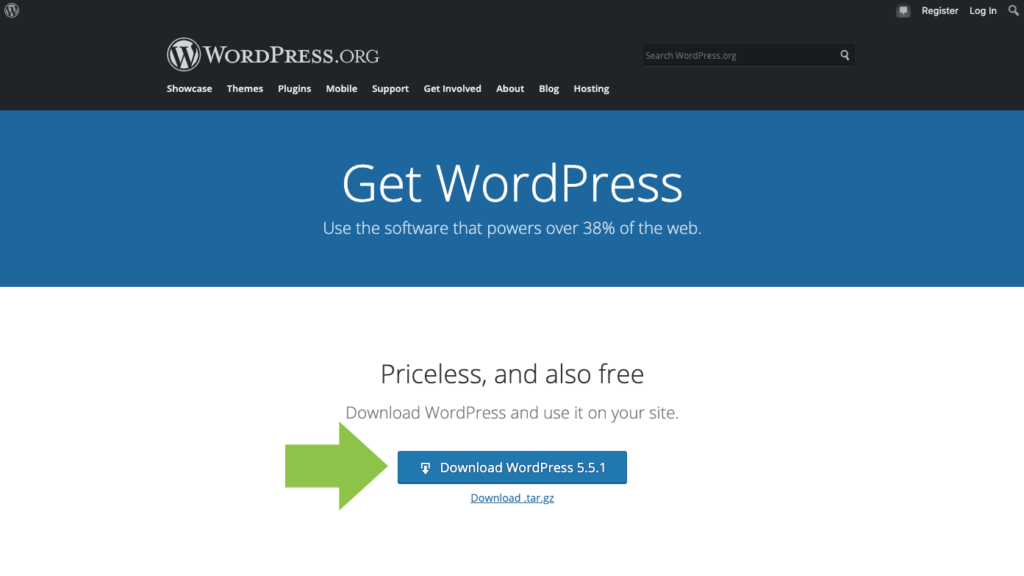
First, download the latest WordPress package from the official website. Save the file on your computer.
Next, upload the WordPress files to your web server using FTP or your hosting control panel.
Create a new database in your hosting account. Write down the database name, username, and password.
Open your web browser and go to your website’s URL. The WordPress setup page will appear.
Fill in the database information you saved earlier. Click “Submit” and then “Run the installation.”
Enter your website title, username, and password. These will help you log in later.
Click “Install WordPress.” After a few moments, you will see a success message.
Now, log in to your new WordPress site with the username and password you created.
Managing WordPress After Download
After downloading WordPress, managing your site is the next important step. Proper care keeps your website running smoothly and safely. Simple tasks like updates and security checks protect your content and visitors. Regular attention helps avoid problems and keeps your site fast and reliable.
Updating And Maintenance
WordPress updates come out often. They fix bugs and add new features. Keep your WordPress core, themes, and plugins up to date. Old versions can cause errors or slow your site. Back up your website before updates. This way, you can restore it if something goes wrong.
Clear cache regularly to see changes immediately. Check your site after updates to ensure everything works well. Maintenance includes cleaning unused plugins and themes. This reduces security risks and improves speed.
Security Considerations
Security is vital for every WordPress site. Use strong passwords for your admin account. Change default usernames like “admin.” Install security plugins to scan for malware. Limit login attempts to stop hackers.
Enable SSL to encrypt data between your site and visitors. Keep backups in case of attacks or data loss. Remove unused themes and plugins to reduce weak spots. Regularly review user roles and permissions. Only give access needed for tasks.

Credit: www.reddit.com
Choosing The Right Option
Choosing the right WordPress option can seem tricky. There are two main ways to use WordPress. Each way fits different needs and skills. Picking the best one saves time and effort. It helps your website work well.
This section explains the differences. It also shows what to think about. This helps make a clear choice.
Comparing Hosted Vs Self-hosted
Hosted WordPress means your site runs on WordPress.com. You don’t need to download or install anything. WordPress.com handles updates and security. It is easy to start but has some limits. You get less control over design and plugins.
Self-hosted WordPress means you download WordPress software from WordPress.org. You install it on your own web host. This way gives full control over your site. You can add any plugin or theme. It needs more work and technical skills.
Factors To Consider
Think about your skill level and time. Hosted WordPress is good for beginners. Self-hosted suits users who want full control. Consider your budget. Hosted plans are often cheaper at first. Self-hosted needs hosting and domain costs.
Look at your website goals. For simple blogs, hosted works fine. For business sites or shops, self-hosted is better. Check how much support you want. Hosted offers built-in help. Self-hosted requires finding help outside.
Frequently Asked Questions
Do You Need To Download WordPress To Start A Blog?
No, you don’t always need to download WordPress. You can use WordPress. com, a hosted platform. It allows you to create a blog without installation. However, downloading WordPress is necessary for self-hosted websites with more control and customization.
Can I Use WordPress Without Downloading It Locally?
Yes, WordPress. com lets you use WordPress without any downloads. It hosts your site and handles updates. For full control, downloading WordPress for self-hosting is required. This option is ideal for advanced users and developers.
Is Downloading WordPress Necessary For A Self-hosted Website?
Yes, downloading WordPress is essential for self-hosted sites. You must install it on your web server. This gives you full control over your website’s design, plugins, and functionality. It’s the preferred choice for professional websites.
What Are The Benefits Of Downloading WordPress?
Downloading WordPress offers full customization and control. You can install themes, plugins, and modify code. It also allows better SEO optimization and monetization. This option suits users wanting complete ownership of their website.
Conclusion
WordPress offers both online and downloadable options. You don’t always need to download it. Hosting services often provide easy setup without downloads. Choosing depends on your skill level and needs. Downloading gives more control but needs technical work. Online versions are simple and quick to start.
Both ways let you build a great website. Think about what fits your project best. Either way, WordPress makes website creation easy.


