
Have you ever stumbled upon a beautifully designed WordPress website and found yourself wondering, “What plugins are they using to achieve this?” You’re not alone.
The secret sauce behind those impressive features and seamless functionalities often lies within the plugins. Knowing what plugins a site uses can provide you with invaluable insights and inspiration for your own WordPress projects. Imagine uncovering the tools that enhance user experience, boost SEO, and streamline operations—all without spending countless hours on trial and error.
This knowledge can save you time, money, and effort while propelling your website to new heights. In this blog post, we’ll explore whether it’s possible to see what WordPress plugins someone is using and how you can uncover these hidden gems. Get ready to elevate your WordPress game!
Credit: www.greengeeks.com
Identifying WordPress Plugins
WordPress powers many websites. Each site uses plugins to add features. Sometimes, you might wonder what plugins a site uses. One simple way is to check the website’s source code. Right-click on the page and select “View Page Source”. Look for “wp-content/plugins” in the code. This can show plugin names. Another way is using online tools like WPThemeDetector or BuiltWith. They scan and tell you the plugins used. These methods can help find plugins, but not always. Some sites hide their plugins for security. Always respect privacy and don’t misuse information.

Credit: qodeinteractive.com
Reasons To Discover Plugins
Finding new ideas can be tough. Exploring plugins from other sites can help. It shows what works well for them. You can see popular tools and features. This can give your site a fresh look. Sometimes, a small change can make a big difference. Your site can be unique and interesting.
Knowing your competitors is smart. Checking their plugins gives you an edge. It shows how they attract visitors. You can learn what makes their site special. See which plugins boost their success. Then, think about using similar ones. This helps in staying ahead of the game.
Successful sites have secrets. One secret is their plugin choice. By studying their plugins, you can learn a lot. Discover why certain plugins make them stand out. You can also see how they improve user experience. This knowledge is valuable for your own site. Try new plugins and see what fits best.
Methods To Detect Plugins
Discovering which WordPress plugins are in use can enhance website understanding. Tools like WPScan provide insights into plugin details. Browser extensions and source code inspection might also reveal plugin information.
Browser Inspection Tools
Browser inspection tools can reveal hidden secrets. Right-click on a webpage, then select “Inspect”. A panel appears. It shows the source code. Look for terms like “wp-content/plugins”. These words hint at plugins. It’s like a treasure hunt in code. The tools are built into browsers. No need to download anything extra. Just a few clicks and you are exploring.
Online Detection Services
Online detection services can help find WordPress plugins. Websites like WPScan or WhatWPThemeIsThat are handy. Simply enter the site’s URL. The service analyzes the site. It identifies themes and plugins. Results are quick and detailed. Easy for anyone to use. No technical skills needed. It’s like having a magic wand for websites.
Manual Source Code Search
Searching the source code manually is another way. Open the site in a browser. Right-click and view the source. Use “Find” or “Ctrl+F” to search. Type “plugins” in the search box. The browser highlights matches. You might find plugin names. This method requires patience. But it’s a direct approach.
Limitations And Challenges
Hidden or Custom Plugins make it tough to see all plugins. Many websites use custom plugins. These plugins are not listed in public directories. This makes them hard to find. Developers sometimes hide plugin details. They do this for security reasons. This means not all plugins are visible. Some tools might show installed plugins. But they can miss the hidden ones. Understanding this can help manage expectations.
Security and Privacy Concerns arise when checking plugins. Websites keep plugin info private. Sharing plugin details can risk security. Hackers might target known plugins. Some plugins protect private info. They prevent others from seeing plugin lists. Always respect privacy when seeking plugin info. Knowing security limits helps keep sites safe.
Ethical Considerations
Identifying WordPress plugins on a site raises ethical concerns about privacy and respect for intellectual property. Unauthorized plugin access may violate site security and can lead to misuse of sensitive data. Being mindful of these aspects ensures responsible internet behavior and protects user rights.
Respecting Privacy
Privacy is important. Everyone deserves to keep their website details safe. Plugins are a part of this privacy. Avoid snooping into someone’s plugin list. It feels like peeking into someone’s room. Respect boundaries. Think about how you would feel if someone did the same to you. Always ask for permission before checking plugins. It’s the right thing to do.
Avoiding Unauthorized Use
Using someone’s plugins without asking is wrong. Unauthorized use can cause problems. Websites may break. Owners might get upset. Protect your site by choosing your own plugins. Find out what suits your needs. Don’t copy from others without asking. Be fair and honest in your actions. Remember, integrity matters in the digital world.
Credit: www.easywp.com
Alternatives To Plugin Detection
Ask website owners about their plugins. Some may share this info. Others might not respond. Still, it is a direct way. Keep your message short and polite. This can help in getting a reply. Always respect their choice to share or not.
Plugin marketplaces have many options. WordPress Plugin Directory is a popular one. It shows many plugins people use. You can see ratings and reviews too. This helps in finding similar plugins. Look for popular and well-rated plugins. These are often reliable choices.
Tools For Plugin Identification
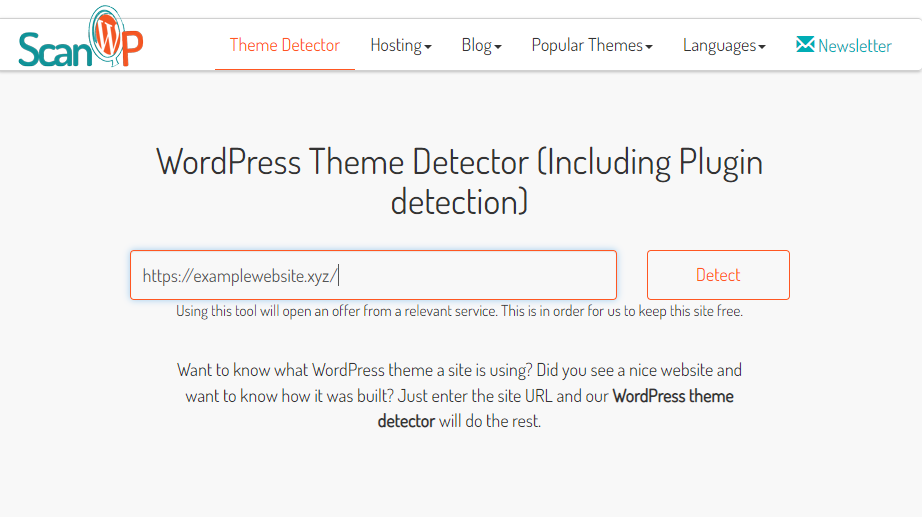
WPThemeDetector is a great tool to find out about plugins. You type the website address and it shows details. The tool tells you about the theme and plugins used. It is simple and easy to use. Perfect for beginners.
BuiltWith helps you find website technologies. This includes plugins and other tools. The tool gives a list of plugins and frameworks. You learn about the backend of a site. Useful for curious minds.
Wappalyzer is a browser extension. It tells you about many web technologies. You can see plugins and analytics tools. It is fast and efficient. Just click the icon and learn more. Very handy for tech lovers.
Best Practices For Plugin Use
Discovering which WordPress plugins are being used is not straightforward. Tools and browsers can sometimes reveal plugin names. This helps in learning best practices and improving your website.
Choosing Reliable Plugins
Choose plugins from trusted developers. Check reviews and ratings. Popular plugins often mean they are good. Look for plugins with many downloads. This shows users trust them. Avoid plugins with low ratings.
Ensuring Compatibility
Plugins must work well with your site. Check if they fit your version of WordPress. Some plugins may not work with certain themes. Always test plugins before using them. This helps avoid problems later.
Regular Updates And Maintenance
Plugins need updates to stay safe. Developers fix bugs in updates. Check for updates often. Update plugins regularly. Delete unused plugins. This keeps your site running well. A clean site is a happy site.
Frequently Asked Questions
How Can You Identify WordPress Plugins On A Site?
You can identify WordPress plugins by inspecting the site’s source code for plugin-specific scripts or styles. Tools like BuiltWith can also help reveal plugins. However, some plugins may be hidden due to custom configurations or security measures.
Is It Legal To Check WordPress Plugins Used?
It is generally legal to check WordPress plugins used on a site, as long as you use public methods. Avoid using invasive techniques or violating any terms of service. Always respect privacy and legal boundaries while conducting such checks.
Are There Tools To Find WordPress Plugins?
Yes, tools like BuiltWith, Wappalyzer, and WhatRuns can identify WordPress plugins. These tools analyze public data to provide insights into the technologies used by a website. They offer an easy way to explore a site’s plugin setup.
Can Plugins Be Hidden From Detection?
Yes, plugins can be hidden using custom coding or security plugins. Site owners may choose to conceal plugins for security reasons. This makes detection difficult, requiring more sophisticated methods to identify them.
Conclusion
Exploring WordPress plugins can be insightful. Knowing which plugins others use helps tailor your site. You gain inspiration for new features. This knowledge aids in improving your WordPress experience. It fosters creativity and innovation. Security remains a priority when discovering plugins.
Ensure your site stays protected. Avoid unnecessary plugins that might slow down performance. Focus on functionality that suits your needs. This approach enhances your site’s efficiency. Stay informed and adapt wisely. Your WordPress journey becomes smoother and more effective. Embrace continuous learning.
Your site will benefit greatly.


