

Are you wondering if you can make your WordPress site private? Whether you want to keep your content just for a select group or protect your work from unwanted visitors, making your site private is easier than you think.
You’ll discover simple ways to lock down your WordPress site and control who gets access. By the end, you’ll have the tools to keep your website exactly how you want it—safe, secure, and private. Keep reading to find out how!
Why Make WordPress Private
Making your WordPress site private can protect your content and control who sees it. Privacy helps keep sensitive information safe. It also limits access to certain users only. This choice can improve the user experience and support your site goals.
Benefits Of A Private Site
A private WordPress site keeps your content secure from unwanted visitors. It helps protect personal or business data. You control who can view your posts and pages. This control reduces spam and unauthorized comments. It also builds trust with your users. Privacy can improve site speed by limiting traffic. You can test new features without public exposure. A private site creates a focused environment for members or clients.
Common Use Cases
Many use private WordPress sites for team projects and internal communications. Companies share documents and updates safely with employees. Teachers create private class sites for students and parents. Creators offer exclusive content to paying subscribers. Writers protect drafts and unpublished work. Clients access private portfolios or project progress. Private sites serve as testing grounds before public launch.
Methods To Restrict Access
Keeping your WordPress site private means stopping unwanted visitors. You can limit access with simple tools and settings. This helps protect your content from the public. Here are three main ways to restrict access effectively.
Password Protect Your Site
Password protection is a quick way to block strangers. You add a password to your whole site or certain pages. Visitors must enter the password to see content. WordPress allows this with built-in options or plugins. This method suits small sites or temporary privacy needs.
Use Membership Plugins
Membership plugins control who can view your site. They let you create user roles and restrict content. Only registered members get access to private pages. These plugins often include subscription and payment features. They work well for clubs, courses, or paid content.
Enable Private Mode
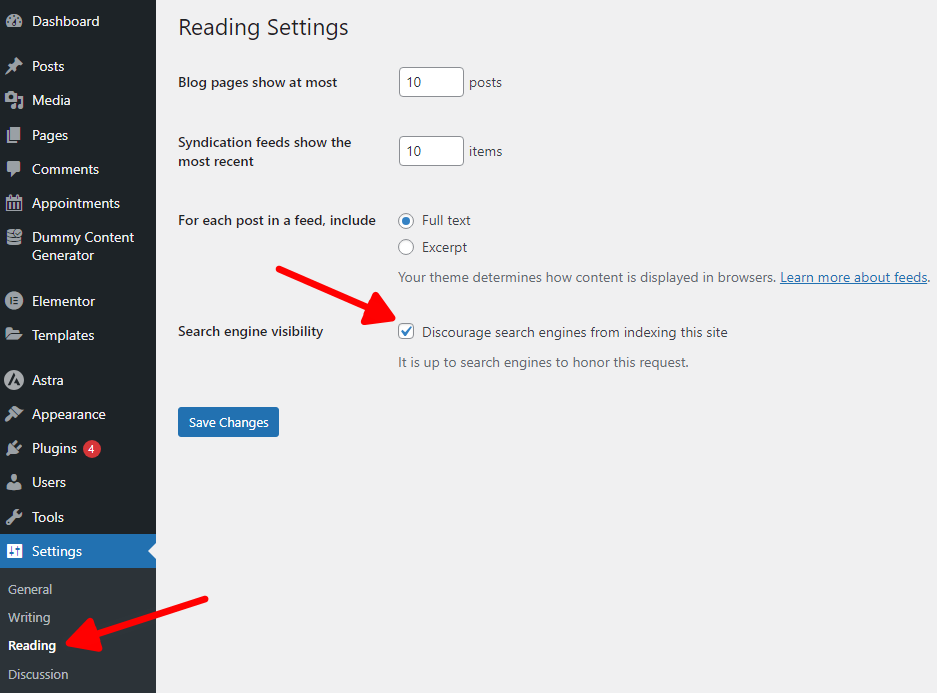
Private mode hides your site from search engines and public view. WordPress offers a “Discourage search engines” option in settings. It stops your site from appearing in search results. Private mode is easy to turn on and off. It suits sites under development or for select audiences.
Setting Up Password Protection
Setting up password protection is a simple way to make your WordPress site private. It stops visitors from seeing your content unless they enter a password. This method works well for small sites or pages that need limited access. You do not need special tools or skills to set it up.
Using Built-in WordPress Features
WordPress has a built-in option to protect pages or posts with a password. Open the editor for the page or post you want to secure. On the right side, find the “Visibility” option. Change it from “Public” to “Password Protected.”
Type your chosen password in the box. Save or update the page. Visitors must enter this password to see the content. This method is quick and works without plugins. It protects individual pages but not the entire site.
Configuring .htaccess Protection
You can protect your whole WordPress site by using .htaccess files on your server. This method adds a login prompt before anyone sees the site. It works at the server level, making it very secure.
First, create a .htpasswd file with usernames and passwords. Then edit the .htaccess file in your WordPress root folder. Add code to require a username and password for access. This blocks all visitors until they log in.
This setup is technical but very effective. It protects the entire website, not just pages. Use it if you want strong privacy for your WordPress site.
Credit: motopress.com
Using Plugins For Privacy
Making a WordPress site private protects your content from unwanted visitors. Plugins offer an easy way to control who can see your site. They provide tools to restrict access without coding skills. Using plugins saves time and adds strong privacy features.
Top Privacy Plugins
Several plugins help make your WordPress site private. “Password Protected” lets you lock the entire site with one password. “Private Only” restricts access to logged-in users only. “WP Private Content Plus” controls access to specific pages or posts. These plugins are popular for their ease of use and reliability.
Step-by-step Plugin Setup
First, install your chosen privacy plugin from the WordPress dashboard. Next, activate the plugin to start using its features. Then, go to the plugin settings to configure privacy options. Set a password or choose user roles allowed to view content. Finally, save your changes and test the site’s privacy settings. Adjust as needed to ensure full protection.
Controlling User Roles And Permissions
Controlling user roles and permissions is key to making a WordPress site private. It helps limit who can see and change your content. This control keeps your site safe from unwanted access. Understanding roles and permissions lets you manage users better.
Managing User Access
WordPress has built-in roles like Subscriber, Contributor, Author, Editor, and Administrator. Each role has different access levels. Subscribers can only read content. Editors can publish and edit posts. Administrators have full control.
Assign roles carefully. Give only needed permissions to each user. Remove or limit access for users who do not need it. This reduces risks of accidental changes or leaks. Always check user roles regularly.
Customizing Roles
You can change default roles by using plugins or custom code. Custom roles allow specific permissions for unique needs. For example, create a role that can only view private posts. Or limit editing rights to certain pages.
Custom roles help keep the site organized and secure. They give you more control over who can do what. Adjust roles based on your site’s goals and privacy needs. Test changes to avoid locking yourself out.

Credit: www.youtube.com
Securing Your WordPress Site
Keeping your WordPress site safe is very important. A secure site protects your content and your visitors. It also helps your site rank better on search engines. Simple steps can make your WordPress site much safer. These steps stop hackers and keep your data private.
Enabling Ssl
SSL creates a secure link between the website and the visitor’s browser. This link hides all data sent between them. It stops hackers from stealing information like passwords or credit card numbers. Many hosting services offer free SSL certificates. Once activated, your website address changes from “http” to “https”. This small change builds trust with visitors and improves SEO rankings.
Regular Updates And Backups
WordPress and its plugins get updates often. These updates fix security holes and add new features. Running the latest versions keeps your site safe from attacks. Backups save your website data. If something goes wrong, backups restore your site quickly. Schedule automatic backups and update your site regularly for strong protection.
Limiting Login Attempts
Hackers try many password guesses to enter your site. Limiting login attempts blocks them after a few tries. This stops repeated attacks and protects your login page. Use plugins to set limits on login attempts. It helps keep your site locked down and your account safe.
Testing Your Private Site
Testing your private WordPress site ensures it works as planned. This step helps confirm that only the right people can see your content. It also lets you find and fix any access issues before going live.
Checking Access Restrictions
Start by visiting your site in a browser where you are not logged in. Your site should ask for a password or show a login page. Try accessing different pages to see if restrictions apply everywhere. Ask a friend or use a different device to test access too. This helps confirm that your private settings are active and consistent.
Troubleshooting Common Issues
If your site is still visible to everyone, check your privacy plugin settings. Make sure the plugin is activated and configured correctly. Clear your site’s cache and your browser cache. Sometimes old files cause errors. Review your user roles and permissions. They should limit access as intended. Look for conflicts with other plugins or themes. Disable them one by one to find the problem. Fixing these issues ensures your site stays private and secure.

Credit: passwordprotectwp.com
Frequently Asked Questions
How Can I Make My WordPress Site Private?
You can make your WordPress site private using plugins or built-in settings. Use a privacy plugin or restrict access via password protection. This limits site visibility only to authorized users or administrators. It enhances security and controls who can view your content.
Is It Possible To Password Protect WordPress Pages?
Yes, WordPress allows password protection for individual pages and posts. Simply edit the page, choose “Visibility,” and set a password. Visitors must enter this password to view the content. This method offers a quick way to restrict access without complex settings.
Can I Restrict WordPress Site Access To Logged-in Users?
Yes, you can restrict access by requiring users to log in. Use membership or privacy plugins that block content from visitors not logged in. This method is ideal for private communities or membership sites needing controlled access.
What Plugins Help Make WordPress Private?
Popular plugins like “My Private Site,” “Password Protected,” and “Private Content” help make WordPress private. They offer user-friendly settings to restrict content, require login, or add password protection. Choose a plugin based on your site’s privacy needs and ease of use.
Conclusion
Making your WordPress site private helps protect your content and control access. You can use plugins or built-in settings to limit who sees your site. This keeps your information safe from unwanted visitors. Private sites work well for personal blogs, businesses, or member-only areas.
Choose the method that fits your needs best. Keep your site secure and easy to manage. Privacy on WordPress is simple and useful. Try it to keep your online space just how you want.


