

Are you wondering if you can make your WordPress blog private? Whether you want to share your thoughts only with close friends, protect your content from strangers, or create a space just for a select group, keeping your blog private can be a smart move.
You’ll discover simple ways to lock down your WordPress site without losing control or flexibility. By the end, you’ll know exactly how to keep your blog just for the eyes you choose. Ready to take control of your blog’s privacy?
Let’s dive in.
Reasons To Keep Your Blog Private
Keeping a WordPress blog private is useful for many reasons. Privacy helps control who sees your content. It can protect your personal thoughts and work. Privacy also helps manage sensitive information carefully. Below are key reasons to keep your blog private.
Protecting Personal Content
Private blogs keep your personal stories safe. Only chosen readers can access your posts. This stops strangers from reading your private thoughts. Protecting your content helps you feel secure online.
Limiting Audience Reach
Not every post is for everyone. Sometimes, you want to share with a small group. A private blog limits who can visit your site. This keeps your audience focused and trusted.
Managing Sensitive Information
Blogs may contain sensitive data. Private settings help control who sees this information. It reduces the risk of misuse or theft. Managing sensitive content with care is important.
Credit: www.bluehost.com
Built-in WordPress Privacy Options
WordPress offers simple tools to control your blog’s privacy. These built-in options help keep your content safe. You can choose who sees your posts and pages. No extra plugins are needed. These features suit users who want to limit access without complex steps.
Setting Site Visibility
WordPress lets you control your entire site’s visibility. In the dashboard, go to Settings > Reading. Here, you find options to discourage search engines from indexing your site. This does not fully hide your site but lowers its public reach. It is useful for sites under development or private projects.
Password Protecting Pages
You can add passwords to individual pages or posts. While editing content, look for the Visibility option in the Publish box. Choose Password Protected, then enter a password. Only visitors with the password can see the content. This method is quick and does not need extra plugins.
Using Private Posts
Private posts stay visible only to site admins and editors. In the post editor, select Visibility and pick Private. These posts do not show up on your public site or in search results. It is a good way to write drafts or share sensitive information with your team only.
Plugins For Enhanced Privacy
Making a WordPress blog private is easier with the right plugins. These tools help control who sees your content. They add layers of protection without complex coding. Privacy plugins fit many needs, from simple passwords to full membership systems. Choose one that matches your blog’s privacy goals.
Password Protection Plugins
Password protection plugins block access to your blog or specific pages. Visitors must enter a password to view the content. This method works well for small groups or temporary privacy. Plugins like Password Protected and Simple Password Protect offer easy setup. They keep your posts hidden from the public quickly.
Membership And User Access Plugins
Membership plugins control who can register and log in to your site. They allow you to create private areas for members only. You can restrict content based on user roles or subscription levels. Popular plugins include MemberPress and Restrict Content Pro. These tools help build a private community on your blog.
Content Restriction Tools
Content restriction tools limit access to parts of your blog. You can hide posts, pages, or sections from visitors. Some plugins let you set rules based on user status or login state. Examples are WP Private Content Plus and Content Control. These plugins give fine control over what users see.

Credit: www.youtube.com
Step-by-step Guide To Make Blog Private
Making a WordPress blog private protects your content from public view. This guide helps you set your blog to private step-by-step. Follow each step carefully to secure your site quickly.
Adjusting WordPress Settings
Start by logging into your WordPress dashboard. Go to “Settings” and select “Reading.” Find the option labeled “Search Engine Visibility.” Check the box that says, “Discourage search engines from indexing this site.” Save your changes.
This step limits search engines from showing your site in results. It does not block visitors entirely but reduces visibility.
Configuring Privacy Plugins
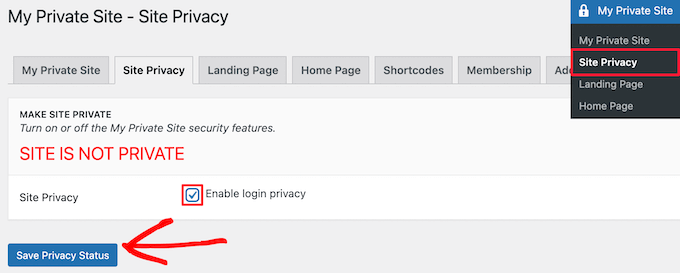
Install a privacy plugin from the WordPress plugin directory. Popular choices include “Password Protected” or “Private Only.” Activate the plugin and go to its settings.
Set up a password or restrict access to logged-in users only. Save your configuration. Plugins add stronger protection than default settings.
Testing Access Restrictions
Log out of your WordPress account. Open your site in a new browser or incognito mode. Check if the blog content asks for a password or login.
Try to access a post or page. If you see a login or password prompt, the restriction works. If not, revisit your settings or plugin options.
Tips For Maintaining Blog Security
Keeping your WordPress blog secure is important to protect your content and visitors. Simple steps help reduce risks of hacking and data loss. Follow these tips to maintain strong blog security.
Regular Updates And Backups
Always update WordPress, themes, and plugins. Updates fix security holes and improve performance. Set a schedule to back up your entire site. Store backups safely on a cloud or external drive. Backups help restore your blog after attacks or errors.
Strong Password Practices
Use long passwords with letters, numbers, and symbols. Avoid common words or simple patterns. Change passwords regularly for all user accounts. Never share passwords with others. Use a password manager to keep track safely.
Monitoring User Activity
Track actions of all users on your blog. Look for unusual login attempts or changes. Limit user roles to only what they need. Remove inactive or suspicious accounts quickly. Monitoring helps catch problems before they grow.
Credit: www.wpbeginner.com
Frequently Asked Questions
How Can I Make My WordPress Blog Private?
You can make your WordPress blog private by adjusting visibility settings. Use the “Private” option under the “Visibility” section in the post or page editor. This restricts access to logged-in users with appropriate permissions only.
Can I Password Protect My Entire WordPress Blog?
Yes, you can password protect your entire WordPress blog using plugins like “Password Protected. ” These plugins add a password prompt before visitors can view any content on your site.
Will Making My WordPress Blog Private Affect Seo?
Making your WordPress blog private blocks search engines from indexing your content. This means your posts won’t appear in search results, which can reduce your site’s online visibility.
Is It Possible To Limit WordPress Blog Access By User Roles?
Yes, WordPress allows you to restrict blog access by user roles. Plugins like “MemberPress” or “User Role Editor” help you control who can view specific content based on their role.
Conclusion
Making a WordPress blog private helps control who sees your content. You can choose settings to restrict access easily. This keeps your posts safe from unwanted visitors. Private blogs work well for personal journals or team projects. Just follow simple steps in your WordPress dashboard.
Privacy adds a layer of security and peace of mind. You stay in charge of your blog’s audience. Try these options to keep your blog just for you or select readers. Privacy is simple, useful, and effective.


