
Thinking about building a website but worried about the cost? You might have heard that WordPress is a great option, but can you actually make a WordPress website for free?
The answer might surprise you. Whether you want a personal blog, a portfolio, or even a small business site, understanding how to create your own WordPress website without spending a dime could open up new possibilities for you. Keep reading to discover how easy it is to get started and what you need to watch out for to make the most of your free WordPress site.
Your perfect website could be just a few clicks away.
Credit: beginnersbook.com
Free WordPress Options
Creating a WordPress website without spending money is possible. There are several free options available. These options help you start your site with little to no cost. Understanding these choices will help you make the best decision for your website.
WordPress.com Vs WordPress.org
WordPress.com offers a free plan with basic features. It hosts your site for you. You get limited storage and a WordPress subdomain. This option is easy for beginners but has restrictions on customization.
WordPress.org is free software you install on your own hosting. It gives full control over your site. You can use any theme or plugin. Hosting and domain costs apply, but the software itself is free.
Choosing A Free Hosting Provider
Free hosting providers offer server space at no cost. They usually limit storage, bandwidth, and features. Some popular free hosts include InfinityFree and AwardSpace. Be aware of ads and slower speeds on free plans.
Choose a host with good uptime and customer support. Check user reviews before deciding. Free hosting is a good start but may not suit larger sites.
Using Free Themes And Plugins
Thousands of free themes are available in the WordPress theme directory. These themes are easy to install and customize. Pick a theme that fits your website’s style and purpose.
Free plugins add functionality to your site. They can help with SEO, security, and design. Always update themes and plugins to keep your site safe and fast.
Setting Up Your Site
Setting up your WordPress site is the first step to creating your online presence. The process is simple and does not require any coding skills. You can have a website ready in just a few steps. Follow the guide below to start your free WordPress site easily.
Each step helps you build a strong foundation for your website. Focus on creating a good structure and look. This will attract visitors and keep them interested.
Creating A Free Account
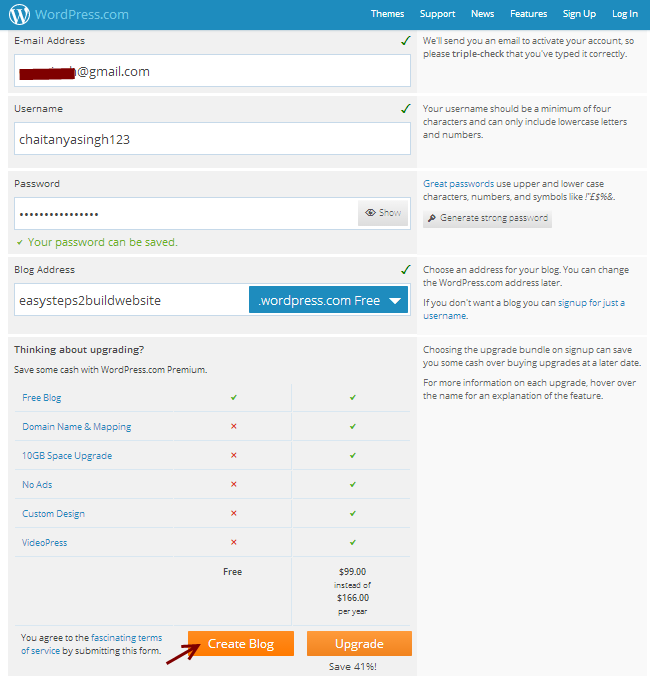
Begin by visiting WordPress.com. Click on the sign-up button to create a new account. Enter your email, username, and password. Choose a free plan to avoid any charges. Confirm your email address to activate your account. Your free WordPress account is now ready to use.
Installing WordPress
WordPress.com automatically installs WordPress for you. This means no manual setup is needed. Once your account is active, you can start building your site right away. The platform handles all technical details behind the scenes. You get a fully functional website without any hassle.
Selecting A Theme
Choose a theme to define your website’s appearance. WordPress offers many free themes to pick from. Browse through the theme library and select one that fits your style. Themes control colors, fonts, and layout. You can change themes anytime to refresh your site’s look.
Customizing Your Website
Customizing your WordPress website is the step where your site starts to take shape. It lets you create a unique look and organize content in a clear way. Simple tools in WordPress help you add pages, set menus, and make your site easy to use. Small changes can make a big difference in how visitors see your site.
Adding Pages And Posts
Pages are the main parts of your website, like Home or About. Posts are for blog entries or news updates. WordPress makes it easy to add both. Click “Add New” under Pages or Posts in the dashboard. Enter a title and content, then hit “Publish.” You can add images and format text simply. This lets you keep your site fresh with new content.
Using Widgets And Menus
Widgets add extra features to your site’s sidebars or footers. You can add search bars, recent posts, or social links. Menus help visitors find pages fast. Create menus in the Appearance section. Drag pages or categories into the menu area. Place the menu in the header or footer. Both widgets and menus make your site easier to navigate.
Basic Seo Tips
SEO helps search engines find your site. Use clear titles for pages and posts. Write simple descriptions with keywords. Add alt text to images. This describes them to search engines. Use short URLs with important words. Keep your content helpful and easy to read. These small steps help your site show up in search results.
Limitations Of Free WordPress Sites
Free WordPress sites offer a quick way to build a website without spending money. They are great for beginners or small projects. Yet, free sites come with several limits that affect your website’s growth and appearance. Understanding these limits helps decide if a free WordPress site fits your needs.
Storage And Bandwidth Restrictions
Free WordPress sites provide limited storage space. This limits how many images and files you can upload. Bandwidth is also restricted, which means fewer visitors can access your site at the same time. If your site grows, these limits can slow down or block access.
Limited Customization Features
Customization options are basic on free WordPress sites. You cannot install custom themes or plugins. This limits how your site looks and works. Your site may look similar to others using free plans, reducing uniqueness and branding.
Ads And Branding
WordPress places ads on free sites to cover costs. You cannot remove these ads or control their content. Also, your site will show WordPress branding, which may seem less professional. This can distract visitors and affect your site’s credibility.
Upgrading To Paid Plans
Starting with a free WordPress website is a great way to test your ideas. As your site grows, you might want more options. Upgrading to a paid plan offers tools that improve your site’s look and function. Paid plans provide features that help you build a more professional site and reach more visitors.
Benefits Of Premium Features
Paid plans offer more storage space for your files and images. You get access to custom themes that make your site unique. Advanced design tools help you change the look without needing to code. You can connect your own domain name for a cleaner website address. Premium plans allow you to remove WordPress ads from your site. They also support e-commerce features if you want to sell products or services.
Choosing The Right Plan
WordPress offers several paid plans, each with different features. Think about what you want your site to do. A personal plan suits blogs or small websites. Business plans include tools for marketing and SEO support. E-commerce plans provide payment options and store management. Compare plans based on your budget and site goals. Pick the plan that fits your needs without overspending.
Migrating From Free To Paid
Upgrading your site is simple and quick. Your content stays safe during the switch. Log in to your WordPress account and select the plan you want. Follow the steps to pay and confirm your upgrade. After upgrading, explore new tools and settings in your dashboard. Use tutorials and support from WordPress if you need help. Your site will look better and perform faster with the paid plan.

Credit: www.youtube.com
Tips For Success
Creating a free WordPress website is a great start. Success depends on how well you manage and grow it. Simple steps can help your site stand out and attract visitors. Focus on key areas to keep your website fresh and interesting.
Maintaining Your Website
Keep your website updated often. Check for plugin and theme updates regularly. Updates fix problems and add new features. Back up your site to avoid losing data. Test your website on different devices to ensure it works well everywhere.
Creating Engaging Content
Write clear and simple articles. Use short sentences and easy words. Add images to make content more interesting. Answer questions your visitors may have. Post new content regularly to keep visitors coming back.
Growing Your Audience
Share your website on social media platforms. Join groups where your topic is popular. Encourage visitors to leave comments and share your posts. Use keywords that people search for. Respond quickly to messages and comments.
Credit: www.elegantthemes.com
Frequently Asked Questions
Can I Create A WordPress Website For Free?
Yes, you can create a WordPress website for free using WordPress. com. It offers free hosting, a subdomain, and basic features with some limitations.
What Are The Limitations Of A Free WordPress Site?
Free WordPress sites have limited storage, no custom domain, and display WordPress ads. Advanced themes and plugins are unavailable without upgrading.
How To Get A Custom Domain For Free On WordPress?
A custom domain is not free on WordPress. com. You must purchase one or upgrade to a paid plan for domain mapping.
Can I Use Plugins On A Free WordPress Website?
No, free WordPress. com plans do not allow third-party plugins. Plugins require upgrading to a Business or higher plan.
Conclusion
Yes, you can create a WordPress website for free. It offers many tools and themes at no cost. Free plans have some limits but work well for beginners. You can upgrade later if you need more features. Starting free helps you learn how WordPress works.
This way, you save money while building your site. It’s a simple path to have an online presence today. Try it out and see how easy website building can be.


