
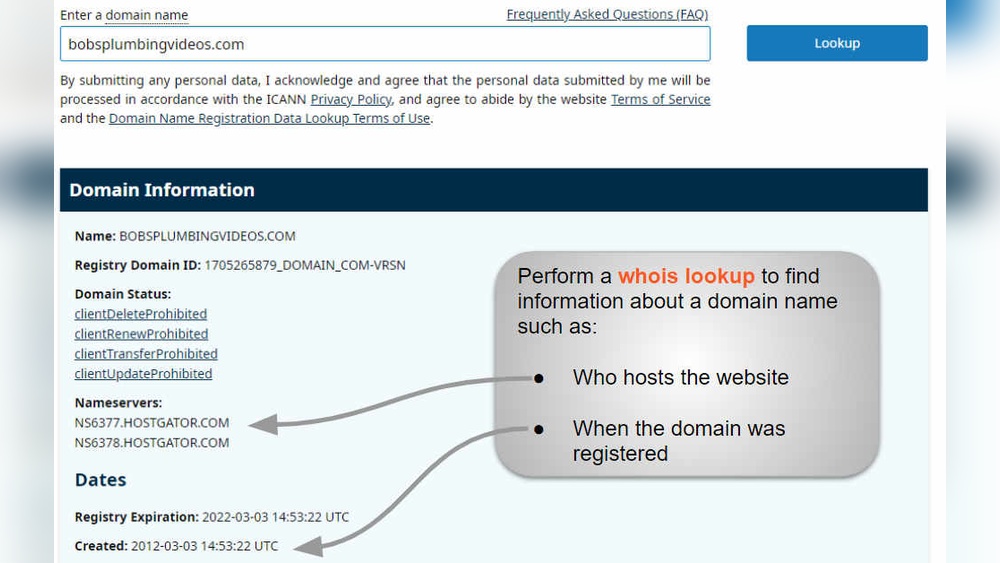
Are you wondering if WordPress can host your domain? You’re not alone.
Many people want a simple, reliable way to get their website online without juggling multiple services. The good news is, WordPress offers options that might fit your needs perfectly. Whether you want everything handled in one place or prefer more control by using separate hosting, understanding how WordPress works with domains can save you time and hassle.
Keep reading to discover how you can get your domain hosted with WordPress and which path is best for you.

Credit: www.youtube.com
WordPress Hosting Options
WordPress gives you two main ways to host your website. Each has different features and control levels. Choose based on your needs and skills.
Understanding these options helps you decide how to manage your domain and hosting smoothly.
WordPress.com Hosted Sites
WordPress.com hosts your website and domain for you. It offers free plans with a WordPress subdomain. You get basic features without extra cost.
Paid plans let you connect a custom domain name. They include more storage, themes, and support. Hosting, security, and backups are handled by WordPress.com. This option suits beginners or those who want less technical work.
Self-hosting With WordPress.org
WordPress.org provides free software to build your site. You must buy hosting and a domain from other companies. This option gives full control over your website and files.
You choose hosting providers, themes, and plugins freely. It needs more technical knowledge and maintenance. Self-hosting is ideal for users who want flexibility and advanced features.
Using Your Own Domain
Using your own domain on WordPress adds professionalism and trust to your website. It helps visitors find your site easily and remember your brand. WordPress supports custom domains, letting you connect a domain you already own or transfer one to their platform. This section explains how to manage your domain with WordPress.
Connecting A Domain On WordPress.com
Start by logging into your WordPress.com dashboard. Go to the “Upgrades” menu and select “Domains.” Click “Add a domain” and choose “Use a domain I own.” Enter your domain name and follow the instructions to update your domain’s DNS settings. This process links your domain to your WordPress site.
After updating DNS records, it may take some time for changes to apply. Once complete, visitors can access your site using your custom domain.
Domain Mapping Requirements
Domain mapping allows you to use a custom domain with a WordPress.com site. This service requires upgrading to a paid plan. Without it, you cannot fully connect your domain to WordPress.com. The upgrade includes domain mapping and removes WordPress.com ads from your site.
Make sure your domain is registered with a third-party provider before mapping. You will need access to your domain’s DNS settings to complete the process.
Transferring Domains To WordPress
You can move your domain registration to WordPress.com for easier management. Start the transfer by unlocking your domain at your current registrar. Obtain the authorization code needed for transfer. In your WordPress.com dashboard, go to “Domains,” choose “Transfer a domain,” and enter your domain name.
Follow the prompts and enter the authorization code. The transfer can take up to a week. After transfer, manage your domain directly through WordPress.com.
Cost Factors
Cost plays a big role in deciding if WordPress can host your domain. Understanding the price details helps you choose the right plan. WordPress offers different options with various costs depending on your needs.
Free Plan Limitations
The free WordPress plan gives you a subdomain, not a custom domain. You get a web address like yoursite.wordpress.com. It does not include domain registration or hosting for your own domain name. Some features remain locked until you upgrade. Ads may appear on your site, which you cannot remove.
Paid Plan Benefits
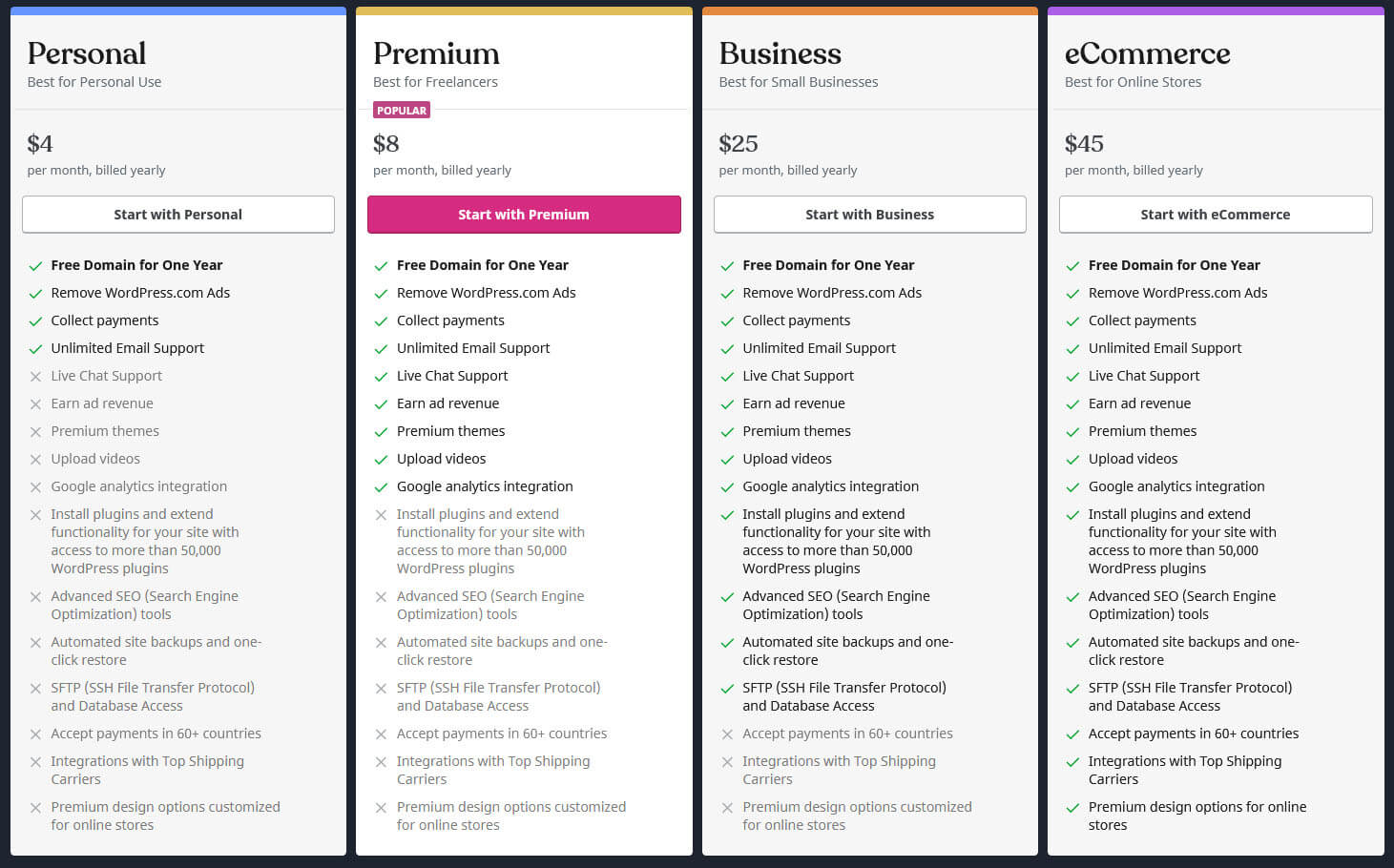
Paid plans allow you to use a custom domain without extra fees. You get more storage and better site performance. These plans include hosting and free domain registration for one year. You can remove ads and use premium themes. Support is available for technical help and site management.
Separate Hosting And Domain Costs
You can also use WordPress.org software with separate hosting providers. This means you pay for hosting and domain registration separately. Hosting prices vary by provider and service level. Domain names usually cost around $10 to $20 per year. This method gives more control but requires more setup.
Features And Flexibility
WordPress offers a range of features and flexibility for hosting your domain. It suits beginners and advanced users alike. Whether you choose WordPress.com or WordPress.org, you gain control over your website’s design and function. The platform supports various themes and plugins, which help customize your site. Updates and maintenance are streamlined to keep your site secure and fast. Overall, WordPress provides tools that adapt to your needs as your site grows.
Theme And Plugin Access
WordPress provides thousands of themes to change your website’s look. Themes range from simple blogs to complex business sites. Plugins add extra features like contact forms or SEO tools. WordPress.com limits plugin use on free plans but allows more options on paid plans. WordPress.org users can install any plugin they want. This flexibility helps create a site that fits your exact needs.
Maintenance And Updates
WordPress.com handles most updates automatically. This includes security patches and software upgrades. You do not have to worry about technical details. WordPress.org requires manual updates for themes, plugins, and the core system. Hosting providers may offer managed services to help. Regular updates improve site speed and protect against hackers. Keeping your site updated is essential for smooth operation.
Control Over Website Functionality
WordPress.org offers full control of your website’s code and data. You can modify themes, plugins, and backend settings freely. This is ideal for developers or users who want custom features. WordPress.com restricts some advanced customizations, especially on free plans. Paid plans provide more control but still have limits. Choosing between WordPress.com and WordPress.org depends on how much control you want.
Choosing The Right Hosting
Choosing the right hosting is a key step for your WordPress website. Hosting affects your site’s speed, security, and uptime. It also impacts how easy it is to manage your domain. Understanding your options helps you pick the best fit for your needs and location. This guide explains hosting choices and what they mean for Austin, Texas users.
Seamless Integration On WordPress.com
WordPress.com offers a simple way to host your domain. It includes hosting, domain registration, and themes in one place. This makes setup fast and easy. Your site, domain, and tools work together without extra steps. It suits beginners who want less hassle and quick results. Plans range from free to paid, with more features at higher levels.
Benefits Of Self-hosting
Self-hosting means using WordPress.org software with a separate host. This gives you full control over your site and domain. You can install any plugin or theme you want. It often costs less over time and offers more flexibility. Self-hosting requires more technical knowledge. You handle backups, updates, and security yourself or through your host.
Key Considerations For Austin, Texas Users
Austin users should consider local server locations for better speed. Choose a host with good customer support in your time zone. Check if the host offers easy domain transfer and SSL certificates. Reliable uptime and fast loading times improve visitor experience. Compare prices and features with your specific needs in mind.

Credit: www.gsplugins.com
Step-by-step Setup
Setting up your domain with WordPress is straightforward. Follow these simple steps to get your site online quickly. Each step ensures your domain and hosting work smoothly together.
Keep your focus on one task at a time. This approach reduces errors and speeds up the process. Let’s start with registering your domain.
Registering A Domain
Begin by choosing a domain name that fits your brand. Use WordPress.com or any trusted domain registrar. Search for your preferred name to check availability. Once found, complete the registration by providing your details. Pay the registration fee to secure your domain.
Remember, a good domain is short and easy to remember. Avoid complicated spellings or symbols.
Setting Up Hosting On WordPress.com
Next, set up hosting on WordPress.com for a hassle-free experience. Choose a plan that fits your needs and budget. Free plans offer basic features with a WordPress subdomain. Paid plans include custom domain support and extra tools.
Create your WordPress.com account and pick a theme for your site. Hosting is included, so no need to find a separate provider. Your website will be secure and fast.
Linking Domain To Your Site
After hosting, link your domain to your WordPress site. Go to your site’s dashboard and find the “Domains” section. Select “Add a domain” and choose “Use a domain I own.”
Enter your registered domain name and follow the prompts. Update your domain’s DNS settings if required. This step connects your domain to your WordPress hosting.
Wait for the changes to take effect. It can take a few hours to 48 hours. After that, your site will load with your custom domain.
Credit: www.boldgrid.com
Frequently Asked Questions
Can WordPress Host A Domain?
Yes, WordPress. com hosts domains and offers domain registration with hosting plans. WordPress. org requires separate hosting and domain providers.
Can I Bring My Own Domain To WordPress?
Yes, you can bring your own domain to WordPress. Connect it via your dashboard under Upgrades → Domains. This requires a paid plan for domain mapping.
Is WordPress Free If I Have My Own Domain?
WordPress software is free, but using your own domain requires paid hosting or a WordPress. com plan with domain mapping.
How Much Does It Cost To Host A Domain On WordPress?
Hosting a domain on WordPress. com costs from $4 to $45 per month, including hosting and a custom domain. WordPress. org software is free, but hosting and domain fees vary by provider.
Conclusion
WordPress can host your domain, but choices depend on your needs. WordPress. com offers hosting and domain registration together. You can get a free site with a WordPress subdomain. For a custom domain, a paid plan is necessary. WordPress. org is free but needs separate hosting and domain services.
Decide based on budget, control, and ease of use. Hosting your domain on WordPress simplifies site management. Choose the option that fits your website goals best.


