
Are you wondering if you can use Python in WordPress to make your website smarter or more powerful? You’re not alone.
Many people ask this because Python is famous for its ease and flexibility, while WordPress is the go-to platform for building websites. But can you really combine the two? Keep reading, and you’ll discover practical ways to bring Python into your WordPress world.
By the end, you’ll know exactly how to boost your site’s potential using the best of both tools. Don’t miss out—your website’s next level could be just a few steps away!
Python And WordPress Compatibility
Python and WordPress are popular in the tech world. Both serve different purposes in web development. Understanding their compatibility helps in deciding how to use them together effectively.
WordPress is mainly built with certain web technologies. Python is a versatile language with its own strengths. Their compatibility depends on how these technologies work together.
WordPress Core Technologies
WordPress is primarily written in PHP. It uses MySQL for database management. JavaScript handles dynamic content on the client side. These form the core of WordPress.
PHP and MySQL work tightly to deliver content quickly. WordPress plugins and themes rely on PHP. It is not designed to run Python code natively.
Python’s Role In Web Development
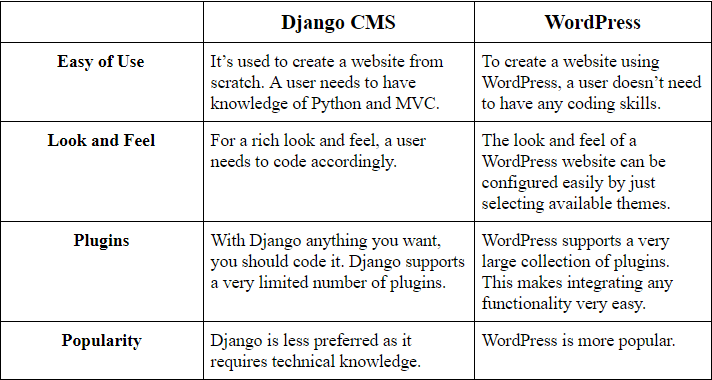
Python is popular for backend web development. Frameworks like Django and Flask use Python. They build web apps and APIs efficiently.
Python handles tasks like data processing and automation well. It runs on servers differently from PHP. Python does not integrate directly into WordPress.
Developers use Python alongside WordPress via APIs. This keeps systems separate but connected. Python can enhance WordPress sites indirectly.

Credit: www.statuscake.com
Ways To Integrate Python With WordPress
Integrating Python with WordPress expands the website’s functionality beyond typical limits. It allows developers to run complex tasks and data processing using Python’s power. There are several ways to connect Python with WordPress, each with its own uses and benefits.
Using Rest Api For Communication
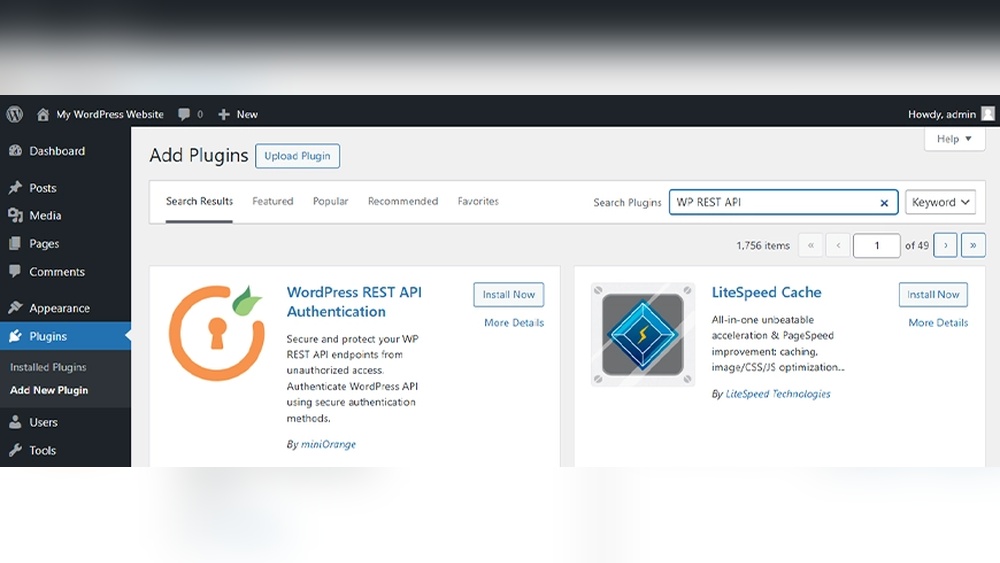
WordPress offers a REST API that lets external programs communicate with it. Python scripts can send requests to this API to create, read, update, or delete content. This method keeps the WordPress site and Python code separate but connected. It is ideal for automation, data syncing, and remote management.
Embedding Python Scripts Externally
Python scripts can run on a separate server and send results to WordPress. The site can display these results using iframe or JavaScript. This way, Python handles heavy tasks without slowing down the WordPress site. It suits projects needing complex calculations or data analysis.
Utilizing Plugins With Python Support
Some WordPress plugins allow running Python code within the site. These plugins create a bridge between the WordPress environment and Python interpreter. They help users add Python features without deep technical knowledge. This approach is useful for adding custom functions or small automation tasks.
Popular Use Cases For Python In WordPress
Python is a versatile language that can support many tasks in WordPress. Its simplicity and power make it a good choice for developers and site owners. Below are some popular ways Python helps improve WordPress sites.
Data Analysis And Reporting
Python can collect and analyze data from your WordPress site. It helps track visitor numbers, behavior, and popular content. This information guides decisions about site improvements. Python libraries like Pandas and Matplotlib create clear reports and charts. These reports make it easy to understand complex data quickly.
Automating Content Management
Python scripts can manage posts and pages on WordPress automatically. Tasks like scheduling posts, updating content, or deleting old items become easier. Automation saves time and reduces errors. It also helps keep the website fresh and organized without manual work.
Enhancing Seo With Python Tools
Python can improve SEO by analyzing keywords and site performance. Tools can check for broken links, slow pages, or missing metadata. Python scripts suggest ways to optimize content for search engines. This helps increase the site’s visibility and attract more visitors.
Credit: theonetechnologies.com
Setting Up Python Integration
Setting up Python integration with WordPress opens new ways to enhance your website. Python can handle tasks that PHP alone might find complex. This section guides you through the essential steps to connect Python with WordPress smoothly.
Configuring Server Environment
Start by ensuring your server supports Python. Most web hosts run Linux, which works well with Python. You need SSH access to install and manage Python scripts. Check your server’s Python version and update it if needed. Set permissions correctly to allow Python scripts to run. Use virtual environments to keep dependencies isolated. This setup keeps your WordPress site stable and secure.
Installing Necessary Libraries
Python libraries help interact with WordPress easily. Install libraries like requests to make HTTP calls. Use python-wordpress-xmlrpc for XML-RPC API access. Run pip install requests python-wordpress-xmlrpc to get these. Keep libraries updated to avoid compatibility issues. Only install what you need to keep your environment clean.
Connecting Python With WordPress Apis
WordPress offers REST and XML-RPC APIs for external access. Use Python to send requests and receive data from WordPress. Start with REST API for modern integration. Write Python scripts to create, read, update, and delete posts. Authenticate using application passwords or OAuth tokens. Test your connection with simple API calls first. Proper API use ensures smooth communication between Python and WordPress.
Performance And Security Considerations
Troubleshooting common issues is key when using Python with WordPress. Errors can slow down your project. Identifying problems early saves time and frustration. This section covers frequent challenges and clear solutions.
Debugging Api Requests
API requests may fail for many reasons. Start by checking the request URL and parameters. Make sure the endpoint is correct and accessible. Use logging to capture request and response data. This helps find where the process breaks. Test requests with tools like Postman before coding. Validate that your Python code sends the right headers. Incorrect headers often cause errors. Also, watch for timeouts or connection issues. These might need adjusting server settings or retry logic.
Handling Data Format Mismatches
Data format problems often cause errors in Python and WordPress. Confirm the data type expected by the API. JSON is common, but some APIs use XML or other formats. Use Python libraries like json or xml.etree.ElementTree to parse data correctly. Check for missing or extra fields in the data. These can cause failures or incorrect results. Validate data before sending or after receiving it. Simple print statements can reveal format issues quickly.
Resolving Permission Errors
Permission errors are common when accessing WordPress resources. Ensure your API keys or tokens have the right permissions. Check user roles and capabilities in WordPress settings. Sometimes, server file permissions block access to scripts or data. Adjust these using FTP or your hosting control panel. Review WordPress security plugins that might restrict API access. Clear caches if changes do not take effect immediately. Proper permissions prevent many frustrating errors.

Credit: www.anthonymorganti.com
Frequently Asked Questions
Can I Directly Run Python Code In WordPress?
No, WordPress does not natively support running Python code. It primarily uses PHP. However, you can integrate Python through APIs or plugins for specific tasks.
How To Integrate Python With WordPress?
You can connect Python with WordPress using REST APIs. Python scripts can interact with WordPress data remotely, enabling dynamic content and automation.
Are There Plugins To Use Python In WordPress?
There are limited plugins for Python integration in WordPress. Most solutions involve custom API setups or external services to bridge Python and WordPress.
Can Python Improve WordPress Site Functionality?
Yes, Python can handle complex tasks like data analysis and automation. It enhances WordPress sites when used alongside PHP via APIs or external tools.
Conclusion
Python can be used with WordPress in some cases. It works best for specific tasks like data processing or automation. WordPress mainly uses PHP, so full Python integration is limited. Plugins or APIs help connect Python scripts with WordPress sites.
This setup suits users with coding experience. Beginners may find it tricky to combine both. Overall, using Python in WordPress is possible but depends on your needs and skills. Choose the right tools to make the process easier. Keep learning and experimenting to get the best results.


