
Are you wondering if you can use plugins with the free version of WordPress? If you’ve started building your website and want to add extra features, this question is probably on your mind.
Plugins can transform a simple site into something powerful and unique. But can you really unlock these tools without paying? Keep reading to discover the truth about plugins on free WordPress and how it affects your website’s potential. This guide will help you make the best choice for your online presence.
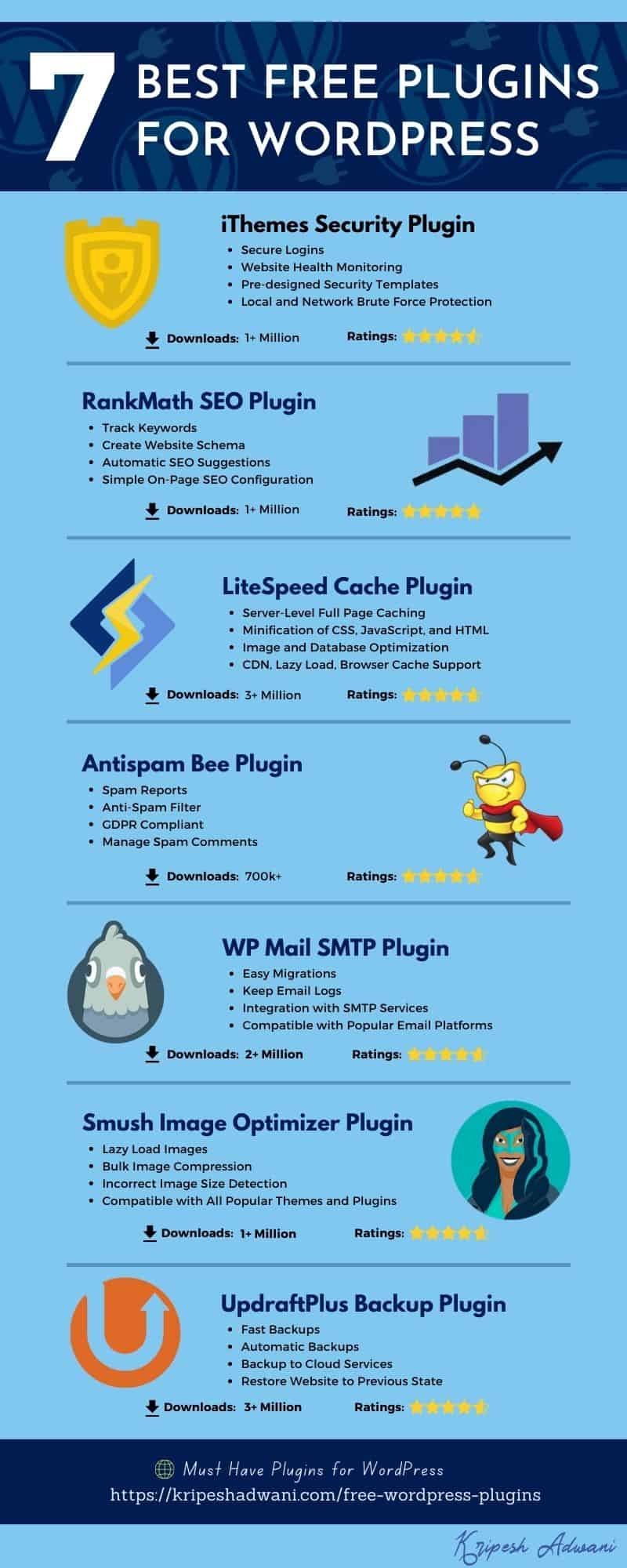
Credit: kripeshadwani.com
Free WordPress Basics
Free WordPress is a popular choice for many new bloggers and small websites. It lets you create and manage a website easily. You get a basic platform to publish your content without any cost. Knowing what the free plan includes helps you decide if it fits your needs.
What Free WordPress Offers
The free WordPress plan provides a website with a WordPress.com subdomain. You get access to basic themes and customization options. You can write posts, add pages, and use built-in tools. It also includes basic security and hosting on WordPress servers. This plan is good for simple blogs and personal sites.
Limitations To Expect
The free plan limits your ability to use plugins. You cannot upload or install third-party plugins. This restricts adding extra features beyond what WordPress provides. You also face storage limits and fewer design options. Ads may appear on your site, which you cannot remove. These limits affect site flexibility and growth potential.
Plugins On Free WordPress
Plugins are tools that add extra features to a WordPress site. They help improve how your site works and looks. On free WordPress, using plugins is different from paid plans. Understanding these differences can help you decide what works best for your site.
Plugin Access Restrictions
Free WordPress does not allow you to install third-party plugins. You can only use the built-in features and a limited set of official plugins. This limits your ability to customize your site fully. Paid plans offer full access to thousands of plugins. These can add contact forms, SEO tools, and more. Free users must rely on WordPress’s default tools. This keeps your site safe but less flexible.
Why Plugins Matter
Plugins add important functions to a website. They can improve site speed, security, and design. Without plugins, it is hard to create a unique site. Plugins help with marketing, backups, and social sharing. They make managing a website easier and more effective. For a growing site, plugins become very useful. They save time and add professional features quickly.
Alternatives To Plugins
Using plugins on the free WordPress plan is limited. This restriction can make some website features hard to add. Still, you have choices beyond plugins. These options help improve your site without extra costs or upgrades.
Built-in Features You Can Use
WordPress offers many features inside its free plan. You can customize your site’s look with themes and basic settings. The editor lets you add images, videos, and text easily. Widgets help add small blocks like calendars or recent posts. These tools improve your site without plugins. Use categories and tags to organize content well. This helps visitors find what they want quickly. Also, you can embed social media posts directly in your pages. These built-in options keep your site simple and neat.
Third-party Tools Outside WordPress
Some tools work outside WordPress but still improve your site. For example, you can create contact forms with free online services. Then, embed them on your site with simple code. Use email marketing tools to collect subscribers and send newsletters. Social media management platforms help schedule posts and track engagement. Image editors online let you make graphics without plugins. These tools connect easily and add value to your site. They keep your site flexible while respecting WordPress limits.
Credit: neilpatel.com
Upgrading For Plugins
Free WordPress plans have limits. One major limit is not being able to add plugins. Plugins add features and improve your site’s performance. Upgrading your plan lets you install plugins. This change can make your website more powerful and flexible.
Choosing The Right Paid Plan
WordPress offers several paid plans. Each plan has different features. Some plans allow plugin installation. Others offer more storage or better support. Choose a plan that fits your needs and budget. Consider what plugins you want to use. Some plugins need higher-level plans. Check the details before upgrading.
Benefits Of Premium Access
Paid plans give access to many plugins. These plugins help with SEO, security, and design. You can add contact forms, online stores, or social media tools. Premium access also removes WordPress ads. Your site looks more professional. You get more control over your website’s features. This helps improve user experience and site traffic.
Tips For Managing Plugins
Managing plugins effectively is key to a smooth WordPress experience. Plugins add useful features but can slow down your site or cause errors if not handled well. Careful management helps keep your site fast and secure.
Focus on choosing plugins that truly benefit your site. Keep them updated and remove those you no longer use. This approach reduces risks and improves performance.
Selecting Essential Plugins
Pick plugins that solve specific problems. Avoid installing too many at once. Each plugin uses resources and can conflict with others. Choose well-reviewed and popular plugins. This lowers the chance of bugs and security issues.
Ensuring Compatibility And Security
Check if plugins work with your WordPress version. Read recent user reviews for compatibility feedback. Update plugins regularly to patch security flaws. Delete inactive plugins to reduce vulnerabilities. Strong security keeps your site safe from attacks.

Credit: formidableforms.com
Frequently Asked Questions
Can I Install Plugins On A Free WordPress.com Site?
No, free WordPress. com sites do not allow plugin installations. Plugin use is limited to paid plans like the Business or eCommerce plans.
What Are The Plugin Restrictions On Free WordPress?
Free WordPress. com accounts cannot add custom plugins. You can only use built-in features and WordPress. com provided tools.
How Can I Use Plugins Without Upgrading WordPress?
To use plugins, you must upgrade to a paid WordPress. com plan or switch to a self-hosted WordPress. org site.
Are There Alternatives To Plugins On Free WordPress?
Yes, free WordPress. com users can use built-in blocks and widgets for added functionality without plugins.
Conclusion
Free WordPress plans do not support custom plugins. You can only use built-in features and themes. To add plugins, upgrading to a paid plan is necessary. This limits flexibility but keeps things simple for beginners. Think about your website needs before choosing a plan.
Plugins can add useful tools and features to your site. Starting free is fine for small projects or testing ideas. Later, you can switch to paid plans for more options. Choose wisely to match your goals and budget.


