
Are you wondering if you can switch from WordPress.com to WordPress.org? If you’ve started your website on WordPress.com but feel limited by its features, you’re not alone.
Many users want more control, flexibility, and freedom to grow their site. The good news is, yes—you can make the switch. But how exactly do you do it? And what should you watch out for? Keep reading to discover everything you need to know to move your website smoothly and unlock the full potential of WordPress.
org.
Differences Between WordPress.com And WordPress.org
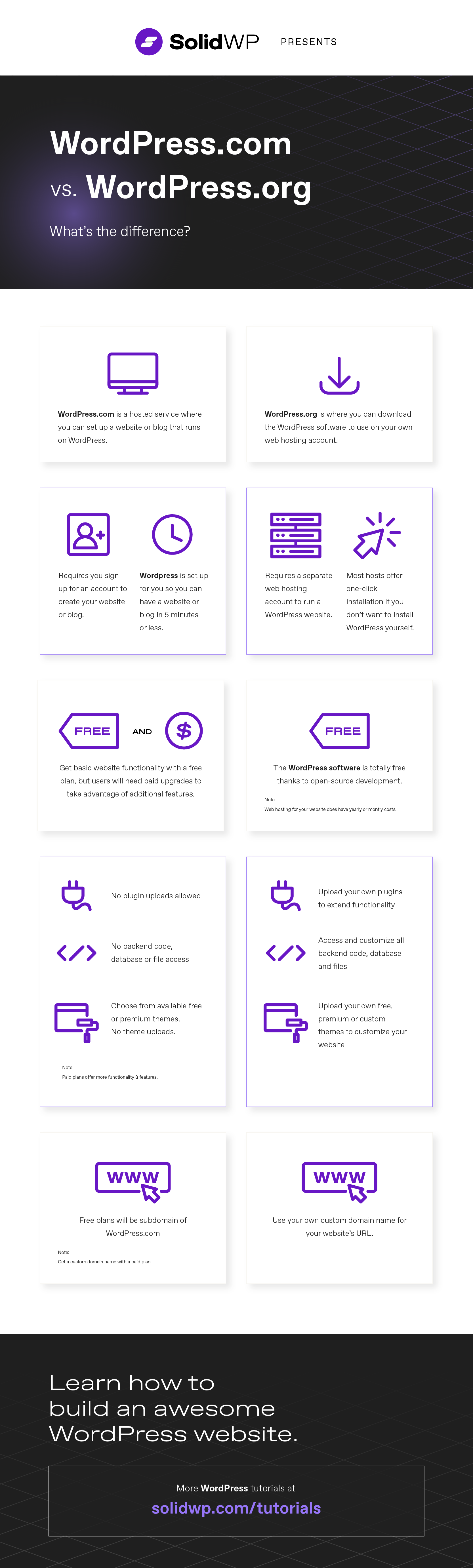
WordPress.com and WordPress.org are two different platforms for building websites. Both use WordPress software but work in different ways. Understanding their differences helps you decide which one fits your needs better. Here are key points that separate the two.
Hosting And Control
WordPress.com hosts your site for you. It handles all the server and maintenance tasks. You have limited control over the server settings and files. WordPress.org requires you to find your own web host. This means you control the server, files, and backups. You decide how your site runs and what resources it uses.
Customization Options
WordPress.com restricts themes and plugins. You can only use what they offer in their plans. Custom code is mostly off-limits. WordPress.org lets you install any theme or plugin you want. You can change your site’s code freely. This gives you full control to create a unique website.
Cost Implications
WordPress.com has free and paid plans. The free plan shows ads and limits features. Paid plans remove ads and add more tools but can be costly over time. WordPress.org is free to download. You pay only for hosting, domain name, and optional premium themes or plugins. Costs vary depending on your choices.
Monetization Opportunities
WordPress.com limits how you can earn money. You cannot run most ads unless you use their program. Selling products and services has rules. WordPress.org allows complete freedom to monetize. You can run ads, sell products, use affiliate links, and more without restrictions.
Credit: duplicator.com
Reasons To Switch To WordPress.org
Switching from WordPress.com to WordPress.org offers many benefits for website owners. WordPress.org gives you more control over your site. This control helps you create a site that fits your needs perfectly.
Many users find WordPress.org better for growing their online presence. It offers tools and features that make managing and customizing easier. Here are some key reasons to consider this switch.
Greater Flexibility
WordPress.org lets you change your website’s design and features freely. You can use any theme or create your own. This freedom means your site can look exactly how you want. There are no limits on customization or branding.
Advanced Plugin Usage
With WordPress.org, you can install any plugin you need. Plugins add functions like e-commerce, contact forms, or SEO tools. WordPress.com restricts plugin use, but WordPress.org opens all options. This helps you build a more powerful website.
Improved Seo Capabilities
WordPress.org offers better tools to improve your site’s search ranking. You can use SEO plugins and customize settings fully. This helps your site appear higher in search results. More visitors can find your content easily.
Ownership Of Content
With WordPress.org, you fully own your website and all content. You control where your site is hosted and how data is handled. This ownership protects your work and ensures long-term access. No third party controls your content.
Preparing For The Switch
Preparing for the switch from WordPress.com to WordPress.org takes careful planning. It helps to avoid problems later. This phase sets the foundation for a smooth move. Focus on three key steps. Backup, hosting, and domain choice.
Backing Up Your Site
Start by saving all your content. Posts, pages, images, and comments must be safe. Use WordPress.com’s export tool to create a backup file. Download it to your computer. This file helps restore your site on WordPress.org. Do not skip this step. Losing data can cause big headaches.
Choosing A Web Host
Select a reliable web host for your new site. Hosting stores your website’s files and shows them online. Look for hosts with good speed and uptime. Customer support is also important. Pick one that fits your budget and needs. Check reviews and plans before deciding.
Selecting A Domain Name
Decide on a domain name for your WordPress.org site. You can keep your old domain or get a new one. A short and simple domain is easier to remember. Make sure it matches your brand or topic. Register your domain with a trusted provider. Secure your online identity before moving your site.
Migrating Content From WordPress.com
Migrating content from WordPress.com to WordPress.org involves moving all your posts, pages, and media safely. This process helps you keep your website’s history and design intact. It takes a few steps but is straightforward with the right guidance. Preparing your data correctly ensures a smooth transition to your new self-hosted site.
Exporting Your Data
Start by logging into your WordPress.com dashboard. Find the Tools menu and select Export. Choose to export all content to get posts, pages, and media files. The system creates an XML file for download. Save this file on your computer. This file contains your website’s essential content for the next step.
Importing To WordPress.org
Log in to your new WordPress.org site’s dashboard. Go to Tools and click Import. Choose WordPress from the list, then install the importer plugin if needed. Upload the XML file you exported before. Assign authors to the imported content or create new users. Check the option to download and import attachments. This helps move your images and files.
Fixing Broken Links And Media
After import, check your posts and pages for broken links. Broken links happen if URLs changed during migration. Use a plugin or manual checks to find broken links. Update links to point to the correct locations on your new site. Also, verify all images show correctly. Re-upload missing media files to keep your site looking good.
Setting Up Your New WordPress.org Site
Setting up your new WordPress.org site is an exciting step after moving from WordPress.com. This process gives you more control over your website. You can choose the design, add powerful features, and protect your site easily. Getting started might seem hard, but with clear steps, it becomes simple.
Installing Themes And Plugins
Themes control how your site looks. WordPress.org offers thousands of free and paid themes. Choose a theme that fits your style and content. Installing a theme is easy. Go to the dashboard, click on “Appearance,” then “Themes.” Click “Add New,” find a theme, and click “Install.” After installation, activate the theme to use it.
Plugins add new features to your site. You can add contact forms, SEO tools, and more. To install plugins, go to “Plugins” in the dashboard. Click “Add New,” search for plugins, then click “Install Now.” Activate the plugin to start using it. Always pick trusted plugins with good reviews.
Configuring Settings
Settings control how your website works. Start by setting your site title and tagline under “General Settings.” Check the “Reading” settings to decide if your homepage shows recent posts or a static page. Adjust “Discussion” settings to control comments and avoid spam.
Permalinks help with SEO. Set them to “Post name” for cleaner URLs. Visit “Permalinks” under settings and select this option. Save changes to improve your site’s structure and make links easy to read.
Enhancing Security Measures
Security is important for every website. Start by choosing a strong password for your admin account. Use different passwords for email and hosting accounts.
Install a security plugin to protect your site from hackers. Good options include Wordfence and Sucuri. Keep WordPress, themes, and plugins updated to fix vulnerabilities. Regular backups help restore your site if something goes wrong. Use plugins or hosting services that offer automatic backups.
Credit: www.wpbeginner.com
Common Challenges And Solutions
Switching from WordPress.com to WordPress.org can be a smart move. It gives you more control and flexibility. Yet, this change also brings some challenges. Knowing common problems helps you prepare and solve them fast. Below are main challenges and ways to handle them.
Handling Downtime
Downtime happens when your site is offline during the switch. Visitors cannot see your content then. This may hurt your reputation and traffic. Schedule the move during low traffic hours. Use a maintenance plugin to show a notice. Backup your site before starting. This protects your data if something goes wrong.
Dealing With Seo Impact
SEO can drop if the switch is not done right. Search engines may see your site as new. Use 301 redirects to point old URLs to new ones. This keeps your search rankings steady. Update your sitemap and submit it to search engines. Check your site for broken links after moving.
Troubleshooting Technical Issues
Technical problems can appear during or after the move. These include plugin conflicts, missing images, or slow loading. Test your site in a staging environment first. Fix errors before going live. Use support forums and tutorials for help. Keep your plugins and themes updated.
Tips For A Smooth Transition
Switching from WordPress.com to WordPress.org can seem hard. A smooth move needs good planning and care. Follow these simple tips to keep your site safe and working well. Take your time and prepare well for the best results.
Planning Your Timeline
Set clear dates for each step of the move. Decide when to export your content and when to import it. Leave extra time for fixing issues. Avoid rushing to prevent mistakes. A good timeline helps keep everything on track.
Testing Before Launch
Test your new site on a private link first. Check if all pages load and look right. Test links, images, and forms. Make sure plugins work correctly. Fix problems before going live to avoid surprises.
Communicating With Your Audience
Tell your readers about the change ahead. Use your blog or email to share news. Explain any downtime or changes they may see. Keep your audience informed to build trust. Clear communication keeps visitors happy.
Credit: solidwp.com
Frequently Asked Questions
Can I Move My Blog From WordPress.com To WordPress.org?
Yes, you can move your blog by exporting content from WordPress. com and importing it to WordPress. org. You must also migrate your media files and set up hosting for WordPress. org.
What Are The Benefits Of Switching To WordPress.org?
WordPress. org offers full control over your site, unlimited plugin options, better SEO, and customization. You also own your data and can monetize without restrictions.
Do I Need Technical Skills To Switch To WordPress.org?
Basic technical skills help, but many hosting providers offer easy WordPress. org installation and migration tools. Tutorials and support are widely available to guide you.
Will My Website Experience Downtime During The Switch?
If you plan carefully and migrate files correctly, downtime can be minimal or avoided. Using a staging site or maintenance mode helps prevent visitor disruption.
Conclusion
Switching from WordPress. com to WordPress. org gives you more control. You can customize your site fully and use many plugins. It needs some technical work but offers great freedom. Keep backups and plan the move carefully. Your site can grow with fewer limits this way.
Think about your needs and skills before switching. This choice can help your website improve over time. Take small steps, and don’t rush the process.


