
Are you looking to host your website using AWS but unsure about which tool to choose? You’re not alone.
Navigating through the myriad of options AWS offers can be overwhelming. We’ll simplify your decision-making process by breaking down the most effective tools AWS provides for hosting your web application. Whether you’re a seasoned developer or a newcomer, understanding the right tool for your needs is crucial.
We’ll guide you through the essentials, highlight the unique benefits of each option, and help you make an informed choice that aligns with your hosting requirements. By the end, you’ll have a clear path forward, ensuring your website runs smoothly and efficiently. Let’s dive in and find the perfect AWS tool for your hosting needs.

Credit: aws.amazon.com
Aws Hosting Options
EC2 lets you run virtual servers. You can choose memory and storage sizes. It is flexible and scalable. You pay for what you use. EC2 is great for custom setups. Many businesses use it for control.
Elastic Beanstalk is easy to use. It helps you deploy applications. You don’t manage servers. Just upload your code. AWS handles the rest. It is good for simple apps. Fast and automatic scaling.
Lightsail is simple and cheap. Perfect for small websites. It offers pre-configured setups. You get a fixed monthly price. Easy to start and manage. Good for beginners and small projects.
Key Features Of Ec2
EC2 can grow with your needs. It handles many users at once. Add more resources easily. Reduce them when needed. This saves money and improves efficiency.
EC2 keeps your data safe. It uses strong security measures. Your information stays protected from threats. Access is controlled by you. This way, only the right people can enter.
EC2 lets you choose what you need. Pick the right settings for your tasks. Adjust resources to fit your specific needs. Make your application run just the way you want it to.
Benefits Of Elastic Beanstalk
Elastic Beanstalk offers a managed environment for your applications. It handles the setup and maintenance. This lets you focus on code, not servers. Updates and patches are automatic. Security is also handled by Beanstalk. This saves time and effort.
Automated scaling adjusts resources based on traffic. Your application can grow or shrink as needed. This helps keep costs low. Resources are used efficiently. Your app stays fast even with more users.
Elastic Beanstalk easily integrates with AWS services. You can connect to databases and storage. This boosts functionality. Use services like S3 and RDS with ease. Integration is seamless. All tools work together smoothly.
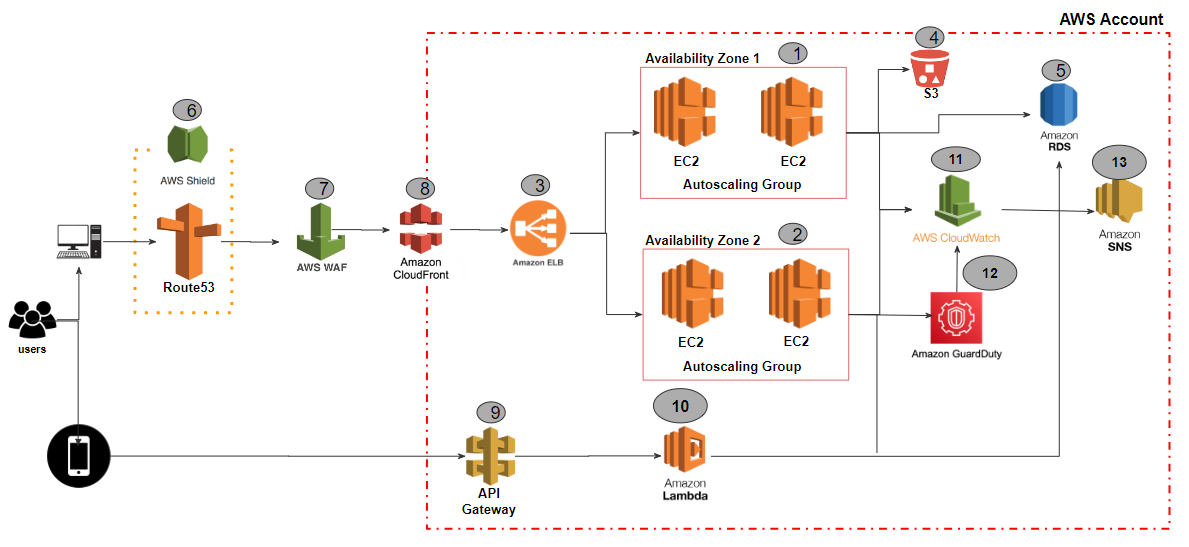
Credit: shabarish033.medium.com
Lightsail For Simplicity
Lightsail is simple. It is easy for beginners. No complex setup needed. You can start quickly. A few clicks and you’re ready.
Lightsail offers low-cost plans. You pay a small fee each month. Costs are easy to predict. No hidden charges or surprises.
Instances are pre-configured for you. This saves time. There’s no need to set up from scratch. Choose a setup and start.
Choosing The Right Tool
Different projects need different tools. Small websites might need less power. Big sites need more power. AWS offers many tools. Simple sites can use Amazon S3. It is good for static sites. For dynamic sites, Amazon EC2 is better. It can handle more tasks. Choose the right tool for your project needs. This will make your website run smoother.
Money matters when picking a tool. Some AWS tools cost less. Others cost more. Amazon Lightsail is good for small budgets. It is simple and cheap. Amazon EC2 can be more costly. But it offers more features. Choose wisely based on your budget. Save money but get what you need.
Skill level affects tool choice. Amazon S3 is easy to use. Good for beginners. Amazon EC2 needs more knowledge. Experts can use it better. Amazon Elastic Beanstalk helps manage apps. It is good for users with some skills. Know your skills. Pick a tool that matches them.
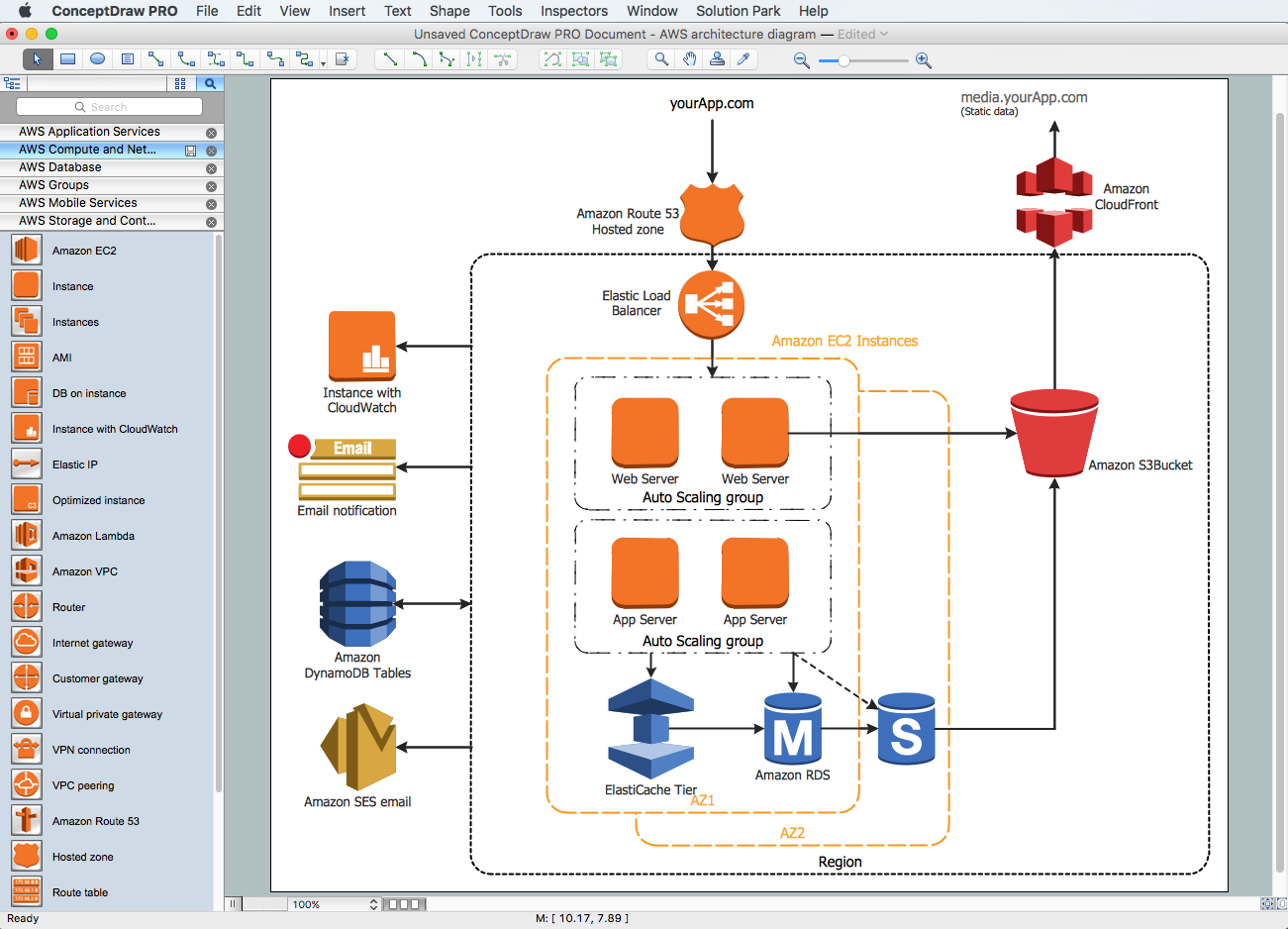
Credit: www.conceptdraw.com
Real-world Use Cases
AWS offers tools for small businesses to host their websites. Amazon Lightsail is a simple tool. It provides virtual servers, storage, and networking. Simple to use and cost-effective. It helps small businesses start quickly. Another option is AWS Amplify. Great for creating web and mobile apps. It allows easy integration with other AWS services.
Enterprises can host complex applications using AWS. Amazon EC2 provides scalable computing power. It suits large applications that need constant access. AWS Elastic Beanstalk is another choice. It manages the application environment. Enterprises can focus on building applications. AWS tools ensure reliability and security for enterprise needs.
AWS is perfect for developers. Tools like AWS Cloud9 offer a cloud IDE. Developers can write, run, and debug code. AWS CodePipeline helps in testing. It automates the release process. This ensures quality and speeds up development. AWS supports a variety of programming languages and frameworks.
Future Trends In Aws Hosting
Serverless computing means you don’t manage servers. AWS does it for you. This helps in cutting costs. You pay only for what you use. It makes your site fast. There is no need to worry about server upkeep. Your focus stays on building your app. It is easy for beginners to start.
Containerization is like putting apps in boxes. These boxes are called containers. They help apps run smoothly on any computer. AWS uses tools like Docker. Containers make apps portable and easy to manage. They also use less space than virtual machines. This means more efficiency.
AI helps computers learn and think. AWS uses AI to make hosting smarter. Machine learning tools can predict what your app needs. This helps in scaling resources automatically. AI tools also improve user experience. They make your site smart and responsive.
Frequently Asked Questions
Which Aws Service Will Be Used To Host Web Application?
AWS Elastic Beanstalk hosts web applications efficiently. It automates scaling, deployment, and management. Easily deploy applications in multiple languages. Elastic Beanstalk supports Java,. NET, PHP, Node. js, Python, Ruby, and more. It integrates with other AWS services for better performance.
How Do I Host My Website On Aws?
Sign up for AWS. Create an S3 bucket for static sites or EC2 instance for dynamic sites. Upload your files. Configure DNS settings in Route 53. Use CloudFront for CDN services. Ensure security with AWS Certificate Manager. Verify your setup and go live.
Can You Host A Web App On Aws?
Yes, you can host a web app on AWS. AWS offers various services for hosting, such as EC2 and Elastic Beanstalk. These services provide scalable and reliable infrastructure. Choose the service that fits your app’s needs for optimal performance and cost-efficiency.
Is Aws Good For Hosting Websites?
AWS is excellent for hosting websites due to its scalability, reliability, and global reach. It offers flexible pricing and robust security features, making it suitable for businesses of all sizes. With various hosting options, AWS can accommodate both simple static sites and complex dynamic applications efficiently.
Conclusion
Choosing the right AWS tool can be challenging. Each tool offers unique benefits. Consider your project’s specific needs. Cost, scalability, and ease of use are key factors. AWS provides options for every requirement. Whether small or large projects, there’s a fit.
Explore the features of each tool. Match them to your goals. This helps in making an informed decision. With the right choice, your web hosting experience will improve. Your business can grow smoothly. AWS tools are reliable. Trust them to handle your web hosting needs effectively.
Make your choice with confidence.


