
Imagine having the power to share your thoughts, projects, or business with the world at any time. Hosting your own web server can make this a reality.
Whether you’re a tech enthusiast or a budding entrepreneur, understanding how to host a web server is a skill that opens up endless possibilities. You might think it’s complicated, but don’t worry—it’s simpler than you think. In this guide, you’ll discover step-by-step instructions that demystify the process, empowering you to take control of your online presence.
Ready to unlock the secrets of web hosting? Let’s dive in and explore how you can bring your digital dreams to life.
Choosing The Right Server
There are many types of servers. One option is a hardware server. This is a physical machine. You can touch it. Another option is a virtual server. This is not physical. It is a part of a larger machine. It acts like its own server.
Hardware servers are reliable. They can be costly. They need space in a room. Virtual servers are flexible. They can be cheaper. They need less space. Each type has pros and cons. Choose based on your needs.
Setting Up The Environment
Start with installing the web server software. Choose Apache or Nginx. Both are popular and efficient. Download the installer from their official site. Follow the instructions to install. Make sure your system meets the requirements. Check if the software runs correctly. You might need additional packages. Install them if necessary.
Open the configuration file. Find it in the installation folder. This file controls how your server behaves. Set the server name and document root. The document root is where your files live. Set permissions to keep your server safe. Test your configuration. Use the test command in the terminal. Fix any errors you find. Restart the server to apply changes. Your server is now ready to host websites!
Domain And Dns Configuration
First, you need a domain name. This is your website’s address. Choose a name that is easy to remember. Many websites offer domain registration. Look for a trusted provider. It should be easy to use. You can check if your name is available. If it is, you can buy it. Domains usually have yearly fees. Be ready to renew your domain each year.
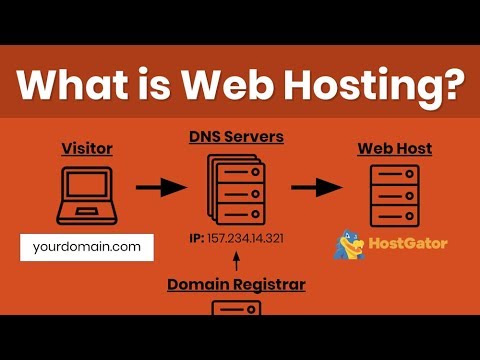
After getting a domain, set up DNS records. DNS helps connect your domain to your server. Go to your domain provider’s dashboard. Find the DNS settings. You need to add an A record. This points to your server’s IP address. Also, add a CNAME record for any subdomains. Save the settings. It might take some time to update.

Credit: www.hostinger.com
Security Measures
Setting up a firewall is crucial for your server. It blocks bad traffic. A firewall protects your server from threats. Choose a reliable firewall for better safety. Make sure your firewall is updated regularly. Check firewall settings often to ensure they work well. Adjust rules as needed for new threats. This keeps your server safe.
SSL certificates secure data between server and user. They encrypt information. This makes it hard to steal. Websites with SSL show a padlock symbol. Users trust sites with SSL. Getting an SSL certificate is easy. Many companies offer them. Choose a certificate that suits your needs. Always renew before it expires. Keep data safe and secure.
Testing The Server
Testing the server is vital after setting up a web server. It ensures the server responds correctly to requests. Proper testing helps identify and fix potential issues, ensuring smooth operation and user satisfaction.
Accessing The Server
Open a web browser and type your server’s IP address. This should take you to your server’s home page. If it works, your server is running. Ensure your computer is on the same network as the server. This helps in accessing it easily. If there’s a problem, check your firewall settings. Sometimes, firewalls block access.
Troubleshooting Common Issues
Sometimes, the server does not work. First, check if the server is powered on. Make sure the cables are plugged in. Check the server’s software settings. Ensure you have the right permissions to access the files. Restart your server to fix small issues. If problems persist, check the server logs. Logs often show where the problem is.
Credit: www.youtube.com
Maintenance And Monitoring
Ensuring your web server runs smoothly involves regular maintenance and monitoring. Check server health to prevent issues. Update software to enhance security and performance.
Regular Updates
Keeping your web server updated is crucial. Security patches protect against threats. New features enhance functionality. Updates improve performance. Ignoring them can lead to downtime. Regular updates ensure smooth operation. Schedule updates during low-traffic hours. This minimizes disruption. Always back up data before updating. This prevents data loss. Test updates on a staging server first. This helps avoid issues on the live server.
Performance Monitoring Tools
Monitoring tools track your server’s health. They check speed and uptime. Alerts notify you of problems. Tools show resource usage. High usage can slow your server. Optimize resources to maintain speed. Some tools offer graphs and reports. These help analyze trends. Choose tools that are easy to use. They should fit your budget. Popular options include Nagios and Zabbix. Both are reliable and trusted.

Credit: en.wikipedia.org
Frequently Asked Questions
How Do I Host My Own Website Server?
To host your own website server, choose reliable hardware and install a server OS like Ubuntu. Set up a static IP address, configure DNS, and install web server software such as Apache or Nginx. Secure your server with firewalls and regular updates.
Ensure reliable internet connectivity for consistent access.
Is Google Web Hosting Free?
Google offers limited free web hosting through Firebase. For more features, a paid plan is required.
How Much Does It Cost To Host A Website Server?
Website hosting costs vary widely, ranging from $3 to $500 monthly. Factors include provider, server type, and resources. Shared hosting is cheaper, while dedicated servers cost more. Consider additional expenses like domain registration and SSL certificates. Always compare features and pricing before choosing a hosting plan.
Can I Turn My Pc Into A Web Server?
Yes, you can turn your PC into a web server. Install server software like Apache, configure network settings, and manage security protocols. Ensure your internet connection is stable and fast enough to handle traffic. Regularly update software for security and performance.
Conclusion
Setting up a web server is easier than it seems. Start with choosing the right hardware and software. Keep security in mind for safe operations. Test your server to ensure everything works smoothly. Regular updates keep your server secure and efficient.
Troubleshooting skills are crucial for resolving issues. Learning through practice boosts confidence. Remember, persistence is key to mastering server hosting. Share your experiences with others. Encourage feedback to improve your skills. Hosting your own server can be rewarding. Enjoy the journey of learning and adapting.


