
Imagine having the power to control your very own website right from the comfort of your home. Yes, it’s possible, and you can do it with just your PC!
If you’ve ever wondered how to host a website without paying for external hosting services, you’re in the right place. By the end of this article, you’ll have the knowledge you need to transform your home computer into a fully functioning web server.
Are you ready to unlock the potential of your PC and take control of your online presence? Hosting your website from home not only saves you money but also gives you the satisfaction of managing everything yourself. Stick around, and you’ll discover the step-by-step process to make your home PC a reliable web host, along with tips to ensure it’s secure and efficient. Your journey to becoming a home web hosting expert starts now!

Credit: www.wikihow.com
Understanding Web Hosting Basics
Web hosting is like renting space on the internet. Your website lives there. It is a home for your website. Every website needs hosting to be online. Think of it like storing your toys in a box. The box is the host. It keeps your toys safe. If the box is strong, your toys are safe. The same goes for hosting. Good hosting keeps your site safe.
There are many types of web hosting. The first is shared hosting. You share space with others. It is cheap but slow. Next is VPS hosting. You get your own space. It is faster. Then there is dedicated hosting. You have the whole server. It is fast but costs more. Lastly, cloud hosting. It uses many servers. It is very reliable. Each type has pros and cons.
Home Pc Requirements
Your home PC should have a strong processor. An Intel i5 or AMD Ryzen is a good choice. Memory is important too. At least 8GB RAM is recommended. Hard drive space matters. You need at least 500GB free space. A stable internet connection is essential. Ensure your PC has a good network card.
Your PC needs software to host a website. Apache or NGINX are popular choices. You need a database program too. MySQL or PostgreSQL work well. Install a text editor for coding. Notepad++ or Sublime Text are great options. Don’t forget security software. Protect your PC with a firewall and antivirus.
Setting Up A Local Server
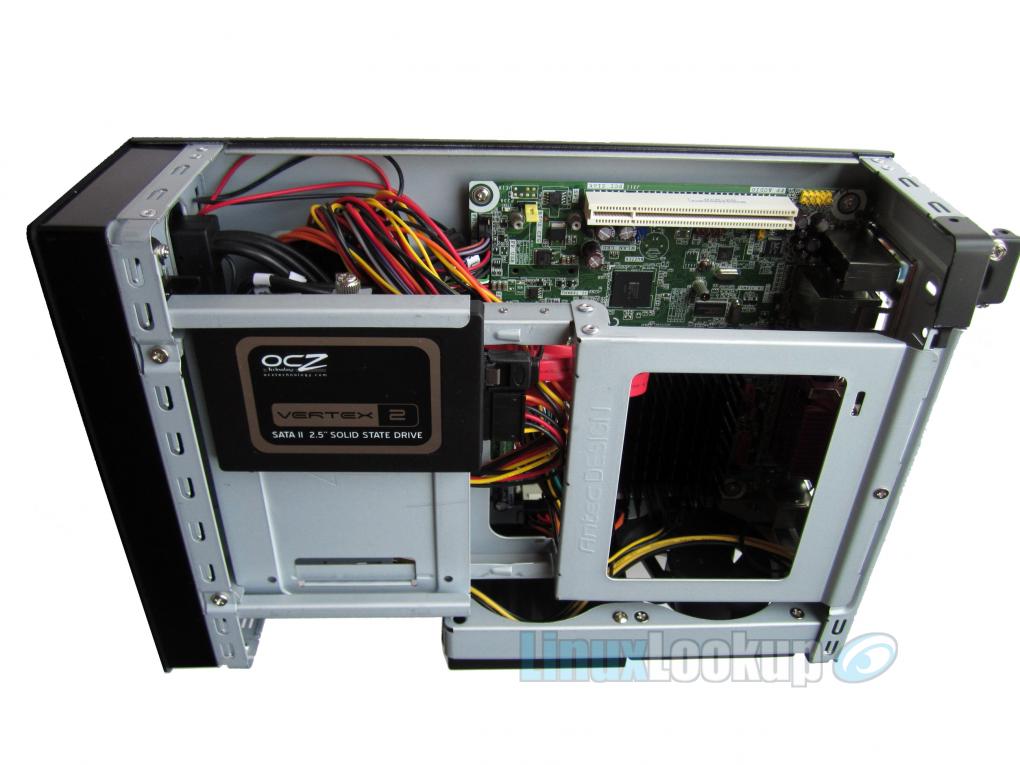
First, choose a server software like Apache or Nginx. These are both popular and free. Download the software from their official website. Follow the simple installation steps. Make sure to install all necessary components. This might include PHP and MySQL. Once installed, start the server. Ensure it runs without errors. If errors occur, check the error log. This log helps identify issues quickly.
After installation, configure your server settings. Open the configuration file. This file controls how your server behaves. Set the document root directory. This is where your website files will live. Ensure the server listens on port 80. Port 80 is the default for web traffic. Save changes and restart the server. Check if your server works by entering “localhost” in your browser. If you see a welcome page, your server is working.
Credit: www.linuxlookup.com
Managing Domain Names
A domain name is your website’s address. You need to buy it first. Many websites sell domain names. Choose a name that is easy to remember. Check if your name is available. If it is, you can buy it. Keep your domain name short and simple. This helps people find your site easily.
Your domain name must connect to your home IP. This step is very important. You use a DNS provider for this. DNS stands for Domain Name System. It tells the internet where your website is. Update the DNS settings with your home IP address. This makes sure your site is reachable to everyone.
Ensuring Security
A firewall helps protect your computer. It blocks harmful traffic. Always keep your firewall on. Use antivirus software too. It scans for viruses. Viruses can damage files. Update your antivirus often. New viruses appear daily. Stay alert!
Data transfers need to be safe. Use encryption methods. Encryption hides your data. Only the receiver can read it. Choose strong passwords. They protect your files. Avoid simple passwords. Hackers guess them easily. Change passwords regularly. Keep your connections secure.
Testing And Troubleshooting
Servers need regular checks. Make sure the server is not slow. Use tools like Task Manager to see CPU usage. Keep an eye on the memory and disk space. Too much use can cause problems. Check the network speed too. A slow network means a slow server.
Sometimes, servers face issues. One common issue is the server not starting. Check if the power supply is working. Another issue is the server crashing. This can happen if it gets too hot. Make sure the fans are working. If the website is not loading, check the internet connection. Restart the router if needed.
Scalability And Upgrades
Your website is growing. It needs more power. Upgrade your hardware when traffic rises. Slow load times mean it’s time. More RAM can help. Faster processors make tasks quick. Check your storage too. Space matters for large files.
Cloud solutions add flexibility. They allow sharing of workloads. Scale up without buying new hardware. Remote access is easy with the cloud. Data backups are safer there. Combining home hosting with cloud offers balance. Hybrid solutions can save costs. They ensure smooth operation.
Credit: www.youtube.com
Frequently Asked Questions
Can I Host A Website From My Home Computer?
Yes, you can host a website from your home computer. Ensure your internet connection is stable. Use server software like Apache or Nginx. Check your ISP’s terms of service for hosting permissions. Keep your computer secure and updated. Consider potential security and performance issues.
How To Make A Home Pc As A Web Server?
Install web server software like Apache or Nginx. Configure settings for domain and port forwarding. Ensure your internet connection supports hosting. Regularly update security settings to protect data. Monitor server performance and manage resources efficiently.
How Can I Host A Website From Home For Free?
Use your computer as a server with software like XAMPP or WAMP. Register a domain and configure DNS settings. Ensure proper security measures to protect data. Use free dynamic DNS services for a consistent IP address. Monitor bandwidth usage to prevent service interruptions.
How To Host A Server On Your Own Computer?
Install server software like Apache or Nginx. Configure settings according to your needs. Open necessary ports on your firewall. Ensure a static IP or use a dynamic DNS service. Test your setup to confirm accessibility.
Conclusion
Hosting a website from your home PC is possible. With the right steps, you can make it happen. Start by setting up your server correctly. Ensure your internet connection is stable. Security is crucial; always keep your software updated. Test your site regularly for any issues.
Manage your resources wisely to avoid downtime. Remember, patience and practice are key. Hosting at home saves money, but requires effort. Keep learning and improving your skills. Soon, you’ll be running your website smoothly from home. Enjoy the process and keep exploring new possibilities.


