
Are you eager to showcase your Python web application to the world without spending a dime? Hosting your application for free is not only possible but also easier than you might think.
In this guide, you’ll discover the secrets to leveraging free platforms that allow you to deploy your Python web application quickly and efficiently. Imagine reaching a global audience and gaining valuable feedback on your project—all without opening your wallet. By the end of this article, you’ll have the know-how to put your application live, enhancing your coding journey and broadening your horizons.
Dive in to learn how you can make the most of these free hosting solutions and start sharing your innovation today.

Credit: www.youtube.com
Choosing A Free Hosting Platform
Free hosting platforms are available for Python web apps. Heroku is a popular choice. It offers easy setup and deployment. PythonAnywhere provides a user-friendly interface. You can host small apps for free. GitHub Pages is another option, but mainly for static sites. Netlify supports static sites and simple backend functions. Glitch allows coding and hosting in one place. These platforms have limitations. Read their terms for usage rules. Free tiers often have limited storage. Bandwidth might also be restricted. Consider these factors before choosing.
Storage is important for hosting. Free plans often limit it. Bandwidth affects app speed. Check the limits on free plans. Support might not be available for free users. Security features can vary. Ensure your app data is safe. Ease of use matters. Choose a platform that is simple to navigate. Scalability is crucial for growing apps. Check if upgrading is easy. Features can differ, so compare platforms carefully.
Setting Up The Development Environment
First, download Python from the official website. Choose the right version. Once downloaded, install it on your computer. Make sure to check the box that says “Add Python to PATH.” This step is very important. Next, open the command prompt. Type pip install followed by the library name. This will install the libraries you need. Some popular libraries are Flask and Django. They help create web applications.
Open your command prompt again. Type python -m venv myenv. This command creates a virtual environment named myenv. You can name it anything you like. Activate this environment by typing myenvScriptsactivate on Windows. For Mac or Linux, type source myenv/bin/activate. This will help keep your projects organized. Now, you can install libraries inside this environment. This keeps your main Python clean and tidy.
Building The Python Web Application
There are many frameworks for building Python web apps. Flask and Django are the most popular. Flask is lightweight and easy to use. Django offers more features and tools. Flask is good for small projects. Django fits larger projects better. Both have strong community support. Choose based on your needs. Flask for simplicity. Django for more complex apps.
A Python web app has a simple structure. First, it has a main file. This is where the code runs. Then, it has templates for the HTML files. These show how the web pages look. Next, it uses static files like CSS and JavaScript. These make the pages pretty. Finally, there are routes to connect URLs to functions. This is how the app works.
Deploying Your Application
Get your code ready. Make sure it works. Check for any errors. Fix them before you deploy. Organize files neatly. Use folders to separate them. Choose a hosting platform. Many offer free options. Understand their requirements. Prepare your code accordingly. Test locally first. Make sure everything runs smoothly. Set up environment variables. They keep your secrets safe. Use them for passwords and keys. This helps in secure deployment.
Git helps track changes. It is essential for coding projects. Learn basic commands. Clone your repository. Work on your code. Commit changes often. This saves your progress. Push to remote repository. Others can see your work. Branches allow multiple versions. Use them wisely. Fix bugs on separate branches. Merge changes when ready. GitHub is popular for hosting. It offers free plans. Start with a free account. Explore its features.
Configuring The Hosting Platform
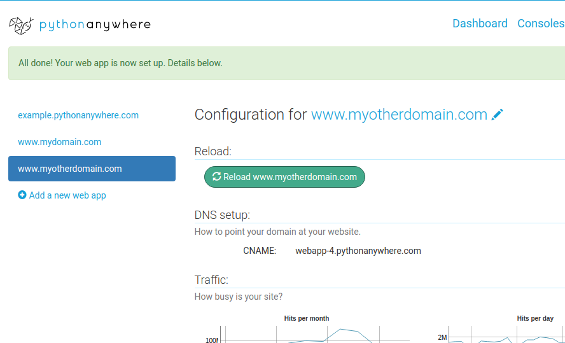
Setting up a hosting platform for a Python web application can be free and simple. Use platforms like PythonAnywhere or Heroku to host your project without costs. These services offer easy deployment, making your application accessible online quickly.
Environment Variables Setup
Setting up environment variables is easy. These variables store important information. Things like passwords. Or API keys. They keep data safe. Platforms need these variables. They help in running apps smoothly. Use your hosting platform’s dashboard. Add your variables there. Remember to name them correctly. Follow the instructions on the platform. This way, your app will work well.
Database Configuration
Connecting your app to a database is vital. First, choose the right database. Options include MySQL and PostgreSQL. Create a database instance on your hosting platform. Next, note the connection details. These include username, password, and host. Add these details to your app’s settings. Ensure the connection is secure. Test the connection. Ensure it works before going live.
Managing Domain And Ssl Certificates
Hosting a Python web application for free involves managing domain and SSL certificates efficiently. Choose a platform offering free hosting services, like Heroku or GitHub Pages. Secure your site with SSL certificates to protect user data and ensure a trustworthy connection.
Domain Name Registration
Choosing a domain name is fun. It should be short and easy to remember. Many platforms offer free domain names. Some popular ones are Freenom and InfinityFree. These platforms provide easy registration. Ensure your domain name is unique. Check its availability first. A unique name is important for branding.
Setting Up Ssl
SSL certificates secure your website. They make sure data is safe. You can get free SSL certificates from Let’s Encrypt. It’s a popular choice for web developers. Installation is simple. Most hosting platforms offer step-by-step guides. Secure websites gain trust from users. SSL is essential for safety online.
Optimizing Application Performance
Monitoring tools help you see your app’s performance. They track errors and speed. They show how much memory is used. They help find problems early. Good tools make fixing easier. They keep your app running smoothly. They alert you when things go wrong. They provide reports. These reports are easy to read. They help you understand your app better. Use them regularly. They improve app health.
Caching speeds up your app. It stores data for quick access. It reduces load time. It helps the app run faster. It saves server resources. Cached data is reused. It prevents repeated calculations. It keeps users happy. It improves user experience. Choose what to cache wisely. Cache frequently accessed data. Clear old cache often. It keeps the app efficient. It balances speed and memory.
Credit: www.pythonanywhere.com
Handling Common Issues
Easily host your Python web application for free by using platforms like GitHub Pages or Heroku. Troubleshoot common issues like dependency errors or server downtime by checking online forums or community help. Keep your code light and efficient to ensure smooth hosting.
Debugging And Error Logs
Debugging helps find what is wrong with your code. Error logs are like a diary of mistakes. They tell you what went wrong and where. Always check the logs when something breaks. It is important to fix errors fast. Logs help you spot patterns of mistakes. This saves time. Use tools to make debugging easy. They show errors in a simple way. Fixing small errors early can prevent bigger problems later.
Security Concerns
Keeping your app safe is very important. Security stops bad people from breaking your app. Always update your tools and libraries. New updates fix security holes. Never share your passwords. Use strong ones with letters and numbers. Check your app for weak spots. Fix them to keep the app safe. Teach your team about security too. Everyone should know how to keep the app secure.
Maintaining And Updating The Application
Keeping your Python web application running smoothly is crucial. Regular updates ensure security and performance. Utilize platforms like Heroku or GitHub Pages for free hosting, making maintenance easier.
Regular Updates
Keeping your app updated is crucial. Updates fix bugs and improve performance. New features can make users happy. Regular updates help keep the app secure. Always check for security patches. They protect your app from hackers.
Plan updates in advance. Have a schedule. This keeps things organized. Users appreciate consistency. Inform them about changes. Use simple words and clear messages. Make the update process easy. Users should not face problems while updating.
User Feedback Implementation
Listening to users is very important. They give valuable feedback. Feedback helps improve the app. Make a way for users to share thoughts. Use surveys or feedback forms. Keep these simple and quick.
Analyze feedback regularly. Find common issues. Fix them in the next update. Let users know their feedback matters. Share what changes were made. This builds trust with users. Happy users use the app more.

Credit: www.reddit.com
Frequently Asked Questions
How To Host A Python Web App For Free?
Host your Python web app for free using platforms like Heroku, PythonAnywhere, or Replit. Sign up, deploy your app, and follow their documentation for setup. These services offer free tiers with limitations, perfect for small projects or learning purposes. Optimize your code for efficient resource usage.
Is Pythonanywhere Still Free?
Yes, PythonAnywhere offers a free tier for beginners. It provides limited resources for hosting Python web apps. Explore their pricing plans for more features and higher resource allocations. Enjoy coding and experimenting without upfront costs. Register for a free account and start coding today!
Where Can I Host My Python Website?
Host your Python website on platforms like Heroku, AWS, or Google Cloud. These offer reliable services and scalability. Consider Python-specific hosting like PythonAnywhere for easier deployment. Choose based on your budget and technical needs. Optimize your site for search engines to enhance visibility and user engagement.
How To Deploy A Python Application On A Web?
Deploy a Python application by choosing a web hosting service like Heroku or AWS. Package your app using Flask or Django. Configure the server and upload your code. Use a web server like Gunicorn or uWSGI for serving. Set up a database if needed and manage dependencies with virtualenv.
Conclusion
Hosting a Python web application free is entirely possible. You have explored different platforms. Each offers unique benefits for your project. Evaluate your needs carefully. Choose the platform that best suits you. Keep security and scalability in mind. Ensure your application runs smoothly.
Test thoroughly before deploying live. Remember, free hosting might have limitations. But it’s a great starting point. Perfect for learning and experimenting. Don’t hesitate to upgrade later. As your project grows. Enjoy the process of building your web application. Happy coding!


