
Are you ready to launch your very own website but feeling overwhelmed by the technicalities of web hosting setup? You’re not alone!
Navigating the world of web hosting can feel like stepping into a maze, especially if you’re new to it. But fear not, this guide is here to simplify the process for you. Whether you’re aiming to start a personal blog, an online store, or just showcase your portfolio, understanding how to set up web hosting is your first crucial step.
By the end of this article, you’ll have the confidence and knowledge to get your site up and running smoothly. So, why wait? Let’s dive in and make your online presence a reality!
Choosing The Right Hosting Type
Shared hosting is like sharing a house. Many websites use the same server. It’s the most affordable option. Great for beginners or small sites. Resources are limited. If one site gets busy, others may slow down. It’s easy to set up and manage. Perfect for personal blogs and small businesses.
VPS stands for Virtual Private Server. It’s like having your own room in a hotel. More control and flexibility than shared hosting. Offers better performance and security. Costs more than shared hosting. Ideal for growing websites. You get a dedicated portion of the server. Manage resources more efficiently.
Dedicated hosting means you get the whole server. No sharing with others. This offers maximum performance and security. Best for large websites and businesses. High cost, but worth it for heavy traffic. Full control over the server settings. You need technical skills to manage it. Suitable for large online stores.
Cloud hosting uses many servers. If one fails, another takes over. This means reliable and scalable hosting. Costs can vary. Pay only for what you use. Good for websites with changing needs. Handles traffic spikes well. Suitable for modern businesses. Easy to upgrade or downgrade resources.
Selecting A Reliable Hosting Provider
Choosing a hosting provider is important. First, check their uptime guarantee. A high uptime means your website will be online most of the time. Next, consider customer support. Good support helps you solve problems quickly. Pricing is also important. Look for a plan that fits your budget. Check for scalability too. This means your hosting can grow with your website. Don’t forget about security features. A secure host keeps your site safe from hackers.
| Provider | Uptime | Support | Price |
|---|---|---|---|
| HostGator | 99.9% | 24/7 Chat | Low |
| Bluehost | 99.9% | 24/7 Phone | Medium |
| SiteGround | 99.9% | 24/7 Chat | High |
Registering A Domain Name
Choose a name that is easy to remember. Keep it short and simple. Avoid using numbers and hyphens. Check if the name is easy to spell and pronounce. Think about your audience. The name should relate to your business. Use keywords that describe your services. This helps people find you. Make sure it sounds professional.
Find a trusted domain registrar. Check if your desired name is available. If it’s taken, try different options. Once you find a name, register it. Provide your contact details. Choose the registration period. One year is common. Pay the fee to complete the process. Now, you own the domain. Remember to renew it on time. This keeps it active for your site.

Credit: www.godaddy.com
Setting Up Your Hosting Account
First, visit the hosting provider’s website. Look for the sign-up button. Click it to start creating your account. Enter your personal details. This includes your name and email. Choose a username and password. Make sure they are secure. Follow any instructions given on the page. You might need to verify your email.
Select your hosting plan. Different plans fit different needs. Choose the one that suits you. Look for a plan that fits your budget. After choosing, proceed to payment. Fill in your payment details. Make sure they are correct. Complete the payment process. Once done, your account is created. You can now start using your hosting account.
Log into your hosting account. Find the dashboard. It is your control center. Look for basic settings. These settings help you manage your site. Change the language if needed. Set the time zone. This helps with scheduling. Enable security features. They protect your site. Save changes before leaving the page. Your site is now ready to use.
Uploading Website Files
FTP stands for File Transfer Protocol. It helps move files. First, download an FTP client. FileZilla is a popular choice. Open the FTP client and enter your server details. This includes host, username, and password. Connect to the server. You will see your computer files on one side. Server files are on the other side. Select the files you want to upload. Drag and drop them to the server side. Wait for the files to finish uploading.
Most hosting providers offer a File Manager. This is in the control panel. Log in to your hosting account. Find the File Manager tool. Open it. You will see your server’s folders. Navigate to the folder where you want to upload. Click the upload button. Choose the files from your computer. Upload them to the server. File Manager is easy to use.

Credit: wegic.ai
Configuring Email Accounts
Go to your hosting dashboard. Find the email section. Click on “Create New Email”. Enter a name for your email. Choose a domain from the list. Set a strong password. Make sure it is easy to remember. Click on “Create”. Now, you have a new email address.
Open your email app or program. Go to the “Add Account” section. Enter your new email address. Type in the password you set earlier. Choose IMAP or POP3 for incoming mail. Use your host’s server details. Input the outgoing mail server info. Save the settings. Test by sending a message.
Installing A Content Management System
WordPress is very popular. Many people use it. It is easy to install. It is also easy to manage.
Joomla is another option. It has many features. Some users like its flexibility.
Drupal is powerful. It is good for big sites. Some find it complex, though.
First, choose a CMS. Download its files. Next, upload them to your web host. Use FTP for this.
Then, create a database. You need this for your site. Use your hosting control panel. Enter database details when asked.
Run the installation script. Follow the steps. Set up your site as needed. You are now ready to start!
Managing Security And Backups
Keep your website safe with strong passwords. Use a mix of letters, numbers, and symbols. Update passwords often. Enable a firewall to block unwanted access. Keep all software updated. Updates fix security holes. Use SSL certificates. They keep data private. Teach others about security too.
Backups save your data if something breaks. Use automatic backups. They save time and effort. Keep backups in multiple locations. Use a trusted cloud service. It stores data safely. Check backups often. Make sure they work.
Monitoring And Optimizing Performance
Keeping track of your site’s speed is crucial. Load time matters a lot. A slow site can lose visitors. Check how fast pages open. Response time is key. It shows how quick your server is. A fast response means happy users. Error rate is another metric. Count any failed requests. A high error rate needs fixing.
Use caching to speed up your site. It stores data for quick access. Reduce image size for faster load. Smaller images mean quicker pages. Minify code to improve performance. Less code means faster processing. Choose a content delivery network (CDN). It spreads data across many servers. This helps in loading content faster.
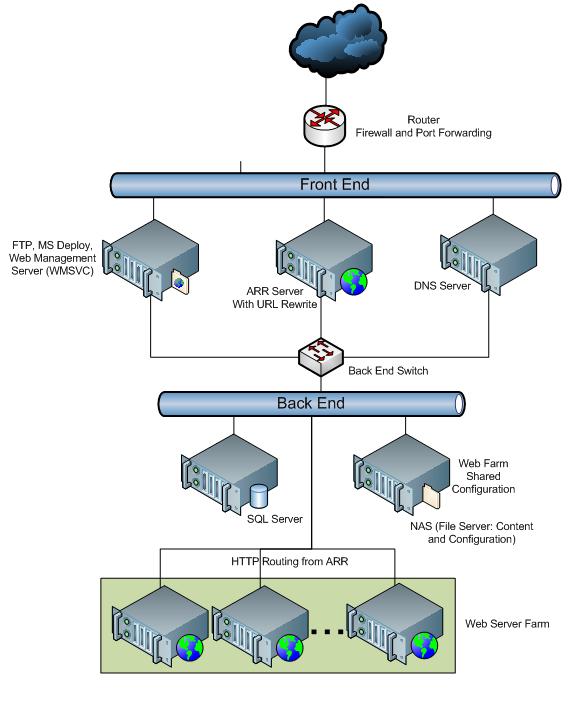
Credit: learn.microsoft.com
Frequently Asked Questions
How Do I Set Up My Website Hosting?
Choose a reliable hosting provider. Register a domain name. Select a hosting plan. Configure DNS settings. Upload your website files.
How To Start A Web Hosting?
Begin by choosing a reliable hosting provider and registering a domain name. Select a hosting plan, set up server software, and configure settings. Ensure website security and backup solutions. Test website functionality before launching. Optimize for speed and performance.
Can I Host My Website By Myself?
Yes, you can host your website yourself. You’ll need a server, technical skills, and a reliable internet connection. Self-hosting allows for complete control but requires maintenance and security management. Consider costs and time commitment before proceeding.
Can You Do Web Hosting Yourself?
Yes, you can host your website yourself. It requires technical skills, hardware, and software. Ensure you have a reliable internet connection and security measures. Self-hosting offers control but can be complex and costly. Consider your needs before opting for DIY web hosting.
Conclusion
Setting up web hosting is simpler than it seems. Follow each step carefully. Choose a reliable hosting provider. Register your domain name. Configure your DNS settings. Upload your website files. Test everything before going live. Always keep backups of your site.
This ensures data safety. Web hosting can be daunting at first. Yet, with patience, anyone can succeed. Practice makes perfect. Regular updates and maintenance are crucial. Stay informed about new hosting features. This enhances your website’s performance. Now, you’re ready to share your site with the world.
Enjoy the journey!


