
Have you ever found yourself staring at your website, wondering who’s actually hosting it? You’re not alone.
Many website owners lose track of their web host, especially when juggling multiple tasks in the digital world. Whether you’re experiencing technical issues or simply planning a migration, knowing your web host is crucial. But don’t worry, finding out who your web host is doesn’t have to be a daunting task.
In this guide, we’ll walk you through the simple steps to uncover this mystery. Stay with us, and by the end, you’ll have all the information you need at your fingertips. Curious to know more? Let’s dive in and demystify your website’s home on the internet.
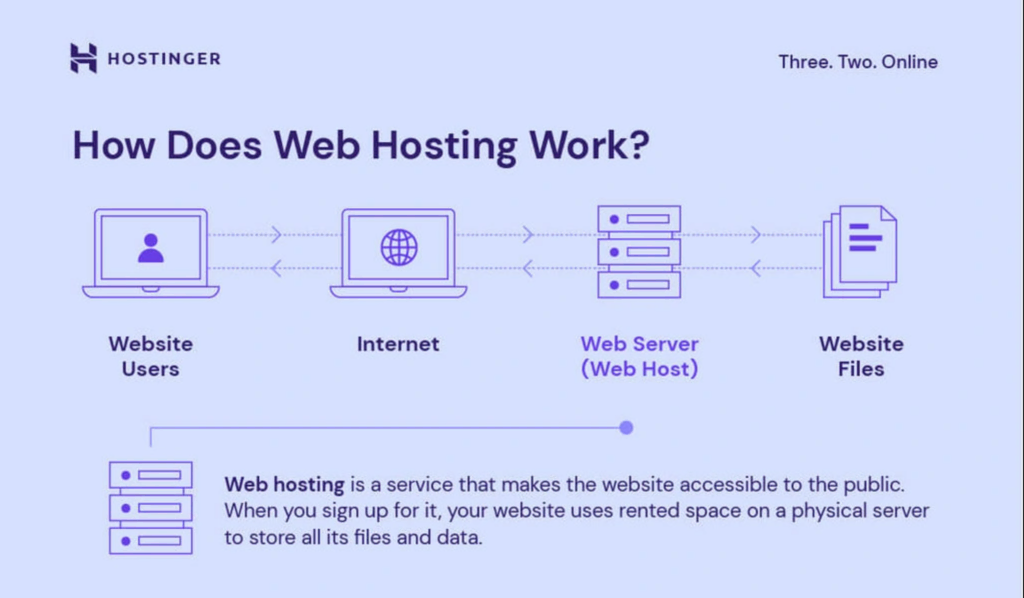
Credit: www.hostinger.com
Identifying Your Web Host
First, check your email for web hosting details. These emails often have info about your web host. Look for subject lines like “Hosting Account” or “Welcome to [Host Name]“. This is a good place to start.
Next, visit your website’s dashboard. Platforms like WordPress might show host info. Sometimes, you can find this in the settings or about sections. If unsure, ask someone for help.
Use online tools like WhoIs Lookup. This tool shows domain details. It often tells you the web host name. Enter your domain, and click search. Results usually show the host info.
Using Online Tools
Online tools can help you find your web host. A Domain Hosting Checker is an easy tool. You enter your domain name. The tool will show who hosts your site. It’s quick and simple. Many websites offer free checks. Results come back fast. This is a great way to check hosting info.
Use Whois Lookup Services to find details. Enter your website’s name. It shows the owner and the host. This service is also free. It gives lots of info. You can learn about your site’s setup. Many people use this tool. It’s reliable and easy to use.
Checking Domain Registration
Visit a domain registrar’s website to begin. Websites like GoDaddy and Namecheap are popular. Enter your domain name in the search bar. Click to view your domain’s information. Look for the section that shows your domain’s registrar. This information is often called “Whois data.”
The Whois data shows important details. You will see the registrar’s name and contact info. Check for the administrative contact and the technical contact. These details help you find your web host. If you need more help, contact the registrar directly. They can provide further assistance.
Examining Billing Records
Check your invoices for the web host’s name. Look for receipts in your email too. Sometimes, the host’s name is on them. You might see their logo or contact info. This helps you know who they are. Keep your records safe. They are important.
Go to your bank account or credit card statements. Find past payments for your website. The web host’s name might be there. Check your online banking app if you have one. Payment history shows who you pay for hosting. It’s a good clue to find your web host.
Exploring Control Panel
cPanel is a tool for managing your website. It helps control different parts. Start by logging into your cPanel account. Look for the “General Information” or “Account Information” sections. These sections often show the web host’s name. Sometimes, a logo or name is visible at the top. Check the “Contact” or “Support” tabs too. They might have host details. If unsure, find the “Server” or “Hosting” sections. These can give more clues. Keep an eye out for any labels or names. These might be your web host. It’s like finding a name tag at a party.
Consulting Your Website Administrator
Reach out to the person managing your site. They often know who hosts it. Website administrators have access to hosting details. Ask them directly for this information. They can provide the host’s name and other details. This is often the fastest way to find out.
Check any documents related to your website. These might be contracts or setup guides. They often list the web host information. Look for emails or files from when the site was created. This can give you clues about your web host. Keep these documents safe for future use.
Utilizing Support Forums
Support forums help many users with web host questions. People share their experiences and solutions. This makes it easier to find answers. Community members are often eager to help. They provide tips and guidance. By joining these forums, you can learn a lot.
Community members are friendly and knowledgeable. They offer advice about web hosts. You can ask questions there. Someone will likely know the answer. Many people visit these forums daily. They enjoy helping others.
Discussions about web hosting can be very informative. They cover different topics. You might find threads about your web host. Reading these can provide valuable insights. Sometimes, users share their host experiences. This helps others make better choices.

Credit: community.cloudflare.com
Credit: whitepeak.io
Frequently Asked Questions
How Do I Know Whois Hosting My Website?
Use a WHOIS lookup tool to find your website host. Enter your domain name to view hosting details.
What Is Your Website Host?
Our website is hosted by Bluehost. It’s reliable and offers excellent support and uptime. Bluehost ensures fast loading times, enhancing user experience. With easy integration features, it suits both beginners and experts. Choosing Bluehost guarantees robust security and scalability for future growth.
How Can I Find My Host?
Check your website’s hosting details in the domain registrar account or use online WHOIS tools. You can also contact your website developer or support team for assistance.
How Do I Find Out Who Owns My Website Domain?
Use a WHOIS lookup tool to find domain ownership details. Enter your domain name to access the owner’s information. This can include registrant details, contact information, and registration dates. Tools like ICANN WHOIS or domain registrars’ websites provide this data easily.
Conclusion
Finding your web host isn’t hard. Start with your domain name. Check your email for hosting details. Use online tools to gather information. Contact the website support if needed. Knowing your host helps manage your site better. It ensures smooth operation.
Save hosting details for future reference. Regular checks can prevent issues. Stay informed about your hosting service. It empowers you to make decisions easily. Keep learning to enhance your web experience. Your knowledge grows as you explore. Now, you can confidently manage your website.


