
Switching web hosting companies might seem daunting, but you’re not alone in wanting a change. Maybe your site is running slower than a snail in molasses, or customer support has become as elusive as a shadow in the dark.
Whatever your reason, you deserve a seamless transition to a new host that meets your needs. Imagine a website that loads faster, performs better, and offers support when you need it most. Doesn’t that sound like a dream? This guide will take you step-by-step through the process, ensuring you avoid common pitfalls and make the switch with confidence.
Ready to unlock the full potential of your website? Let’s dive in and discover how you can switch web hosting companies effortlessly.

Credit: seolocale.com
Reasons To Change Hosting Providers
Slow website speed can frustrate visitors. This can lead to lost customers. A good hosting provider ensures fast load times. Another reason to switch is poor customer service. Quick and helpful support matters. It helps solve problems faster. Unreliable uptime can also be an issue. Websites need to be online all the time. Frequent downtime affects business and trust. High costs might push you to change. Cheaper options with better features exist. Security issues are another concern. A secure hosting provider protects your data. Lastly, limited resources can hold you back. More bandwidth and storage might be needed as you grow.
Evaluating Your Current Hosting Needs
Check if your website loads quickly. Slow websites can upset users. Use tools to measure speed. Compare the results with industry standards. Look for any downtime or errors. Frequent issues can be a sign to switch. Make sure the host provides reliable uptime.
Know how much storage your site uses. Check the bandwidth needed monthly. More traffic means more bandwidth. Ensure you have enough CPU and RAM. This helps in keeping the site fast.
List features needed for your site. Email accounts, databases, and SSL certificates are important. Consider backup services for safety. Some sites need e-commerce support. Ensure your host offers what you need.
Choosing A New Hosting Provider
Different hosting plans offer varied features and prices. It’s important to look at what each plan provides. Some plans include more storage and bandwidth. Others may offer better security features. Make sure the plan suits your site’s needs. Think about the cost too. A good plan fits your budget and needs.
Reviews help you see real experiences from users. Look for both good and bad reviews. Testimonials on the provider’s site can be useful too. They show satisfied customers and their experiences. Reading these helps in making a wise choice. Always check multiple sources for reviews.
Good customer support is crucial. Check if they offer 24/7 help. See if they have live chat, phone, or email support. Fast and helpful support can solve issues quickly. It’s comforting to know help is always there. Good support makes everything easier.

Credit: firstsiteguide.com
Preparing For The Transition
Always back up your website before making changes. Use tools to save your data. Store these backups in a safe location. This ensures your information is secure. If things go wrong, you can restore it.
Write down your website’s current settings. Include details like domain names, database info, and configurations. Keep this document handy. It helps in setting up on the new host.
Notify your team and clients about the switch. Share the plan and timeline. Clear communication avoids confusion. Everyone stays informed and ready for changes.
Migrating Your Website
Make sure your domain name is unlocked. This is important for transfer. Get the authorization code from your current registrar. Go to the new registrar and start the transfer. Enter the code when asked. This process takes a few days. During this time, your site stays online.
Backup all your website files and databases. Use FTP to download files to your computer. Export your database using a tool like phpMyAdmin. At the new host, upload your files. Import your database too. Check that all files are in the right place. This ensures your site works properly.
Test your website on the new host. Check all pages and links. Make sure everything loads fast. Look for any errors or broken links. Fix any problems you find. Testing is crucial before you switch DNS. It ensures a smooth transition for visitors.
Post-migration Steps
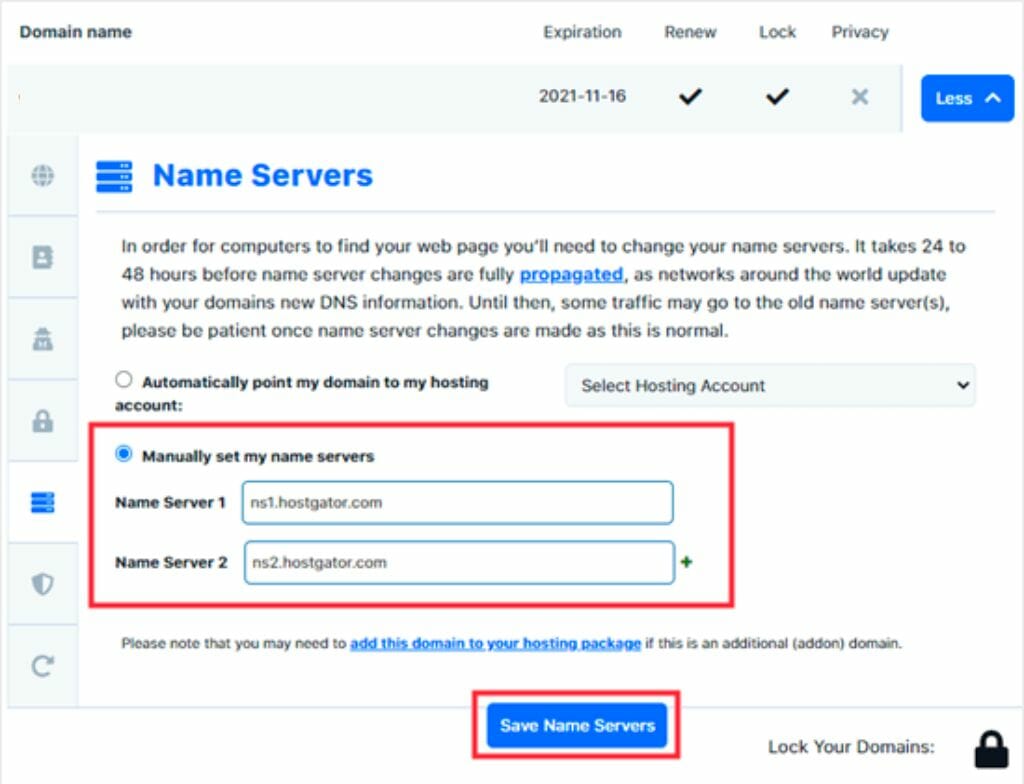
DNS settings are crucial for website visibility. After migration, update DNS records immediately. This ensures users find your site easily. Check the nameservers of your new hosting provider. Enter them in your domain registrar’s panel. Changes can take a few hours to propagate. Patience is key during this process.
Keep an eye on your website speed and uptime. Check loading times regularly. Use tools like Google PageSpeed Insights. Ensure your site is responsive across devices. Fast websites retain users better. Slow ones drive them away. Performance affects user experience and search rankings.
Issues might arise after migration. Common ones include broken links or missing images. Verify all pages load correctly. Ensure internal links work. Check for 404 errors. Fix them promptly. Contact support if problems persist. They can provide assistance and solutions.
Tips For A Smooth Transition
Switching web hosting companies requires careful planning. First, back up your website data. Then, choose a reliable new host. Next, transfer files and databases. Update DNS settings to point to the new server. Test your website thoroughly to ensure everything works smoothly.
Finally, cancel your old hosting account.
Communicating With New Provider
Reach out to your new provider early. Share your needs clearly. Ask for guidance on their services. Clarify any doubts you have. Prompt communication avoids confusion. Ensure all details are correct. Stay in touch for updates.
Scheduling Downtime
Pick a low-traffic time for switching. Inform users about possible downtime. Plan for backup if needed. Coordinate with your provider for smooth transfer. Minimize disruption with careful timing. Notify users in advance.
Maintaining Seo Rankings
Keep your SEO settings safe. Avoid major changes during transfer. Ensure URL structure remains the same. Monitor ranking for any drops. Communicate with SEO specialists if needed. Protect your website traffic and visibility.
Credit: diggitymarketing.com
Frequently Asked Questions
Can I Change My Web Hosting Company?
Yes, you can change your web hosting company. Choose a new provider, migrate your website, and update DNS settings. Always backup your data before transferring. Ensure the new host meets your needs and offers reliable support. Check for any contract terms or fees with your current host.
How To Transfer Web Hosting From One Company To Another?
To transfer web hosting, first back up your website files and databases. Choose a new hosting provider, then update DNS settings to point to the new server. Upload your files to the new host. Verify everything works properly, then cancel the old hosting account.
Is It Easy To Switch Website Hosts?
Switching website hosts can be simple with proper planning. Backup your site, choose a reliable host, and follow their migration steps. Most hosts offer migration support, making the process smoother. Ensure domain settings are correct to minimize downtime. Always verify website functionality post-transfer to ensure a seamless transition.
Can I Move My Website From Godaddy To Another Host?
Yes, you can move your website from GoDaddy to another host. Backup your files and database first. Choose a new hosting provider and upload your site files there. Update your domain’s DNS settings to point to the new host. Ensure everything works properly after the migration.
Conclusion
Switching web hosting companies can seem daunting. But it doesn’t have to be. With careful planning, the process becomes manageable. Start by backing up your website data. Choose a reliable new host that suits your needs. Transfer your files and test your website thoroughly.
Fix any issues before making the switch live. Keep your visitors informed about the move. This ensures trust and minimizes disruptions. Switching hosts can improve your site’s performance. It’s worth the effort for better service. Follow these steps, and transition smoothly.
Your website deserves the best hosting provider available.


