
Ever found the perfect WordPress theme but wished you could use it on Blogger? You’re not alone.
Many people love the flexibility of WordPress themes but want the simplicity and user-friendliness of Blogger. The good news is, you can have the best of both worlds. In this guide, you’ll discover how to upload a WordPress theme to Blogger with ease.
Imagine transforming your Blogger site with a stunning WordPress design that captivates your audience and enhances your content. This process isn’t just about aesthetics; it’s about making your blog more engaging and professional. Stick around to learn how you can give your Blogger site a fresh, new look that stands out. Your blog deserves to shine, and this is your chance to make it happen.
Prerequisites
Blogger and WordPress are two different platforms. Blogger is owned by Google. It is easy to use. WordPress is more advanced. It offers many themes and plugins. Blogger is simple for beginners. WordPress needs more learning. Many prefer WordPress for its customization. Blogger is good for basic blogging.
WordPress has many themes. Choose a theme that looks nice. Pick a theme that is easy to read. Make sure it is mobile-friendly. Check if the theme loads fast. Fast loading is important. Select a theme that fits your blog’s style. Good themes attract more readers.

Credit: www.pipdig.co
Convert WordPress Theme To Blogger
You need some tools to change a WordPress theme to Blogger. WordPress2Blogger is one such tool. It helps in converting WordPress themes easily. Another useful tool is Theme Converter. It simplifies the conversion process. These tools make the task simple and quick.
First, choose a WordPress theme you like. Then, use the WordPress2Blogger tool. Upload your WordPress theme file there. Click on the convert button. The tool will change your theme into a Blogger-friendly format. Next, download the converted file. Now, go to Blogger dashboard. Select theme and click on backup/restore. Upload the downloaded file. Your theme is now ready on Blogger.
Prepare Blogger For New Theme
It’s smart to save your current template. This way, you won’t lose anything. Go to your Blogger dashboard. Click on the “Theme” option. You will see a button labeled “Backup/Restore” at the top right. Click it. A window will appear. Click “Download” to save your current theme. Now, you have a copy. Safe and sound!
Before changing themes, tweak some settings. Go to the “Settings” tab in your dashboard. Check the “Basic” settings. Ensure your blog is public. Navigate to “Search Preferences”. Enable meta tags and descriptions. This helps search engines find your blog. Now, your blog is ready for a new theme!
Credit: www.compromath.com
Upload Converted Theme To Blogger
Start by logging into your Blogger account. Look for the dashboard on the main page. It shows all your blogs and settings. Click on the blog you want to change. You will see a menu on the left side. Find the Theme option there. Click it to see more choices.
On the theme page, find the Backup/Restore button. Click on it. A new window opens. You will see an option to upload a file. Click Choose File. Find the theme file on your computer. Select it and click Upload. Wait a few seconds. Your theme should now be active. Refresh the page to see changes.
Customize New Blogger Theme
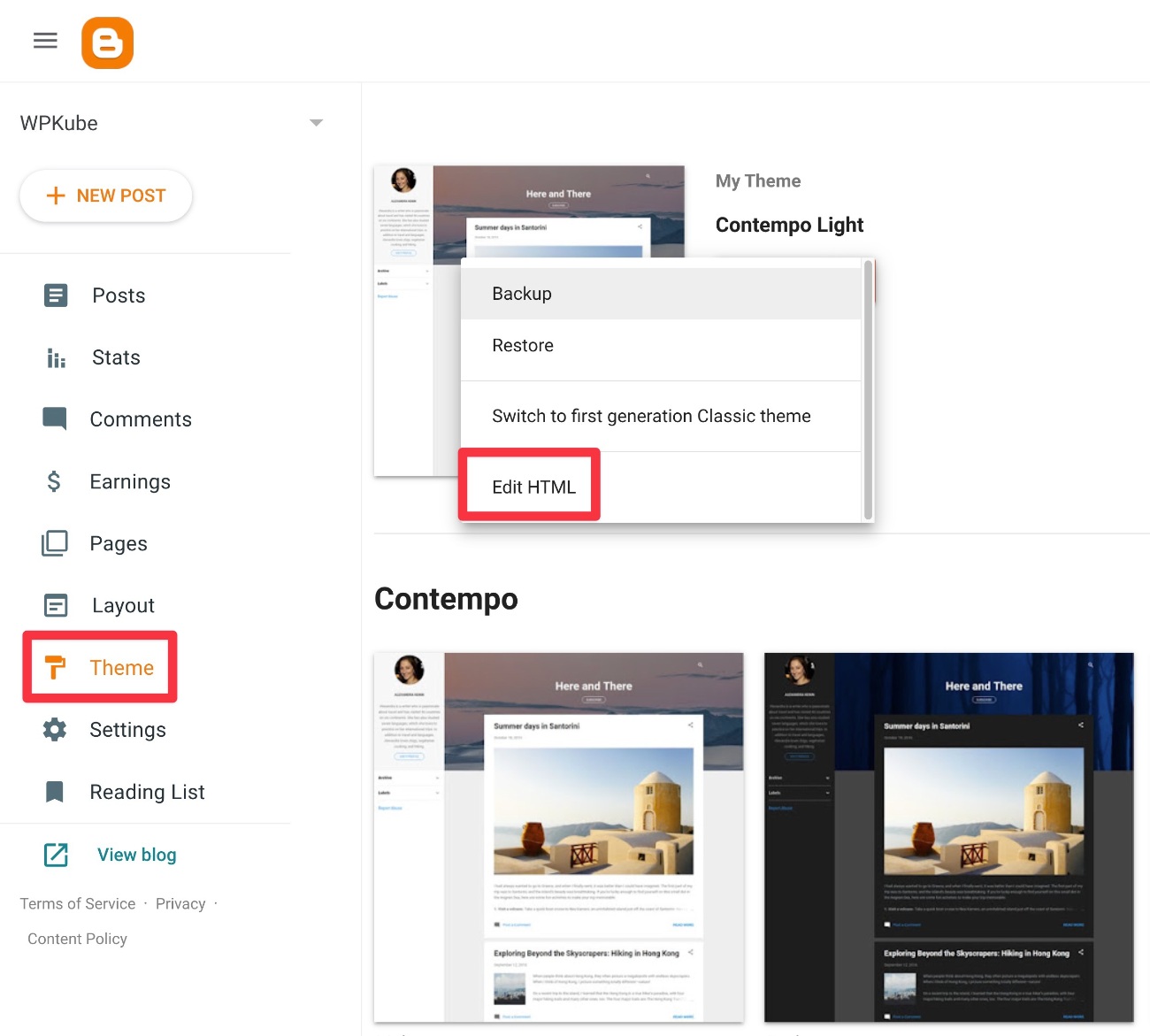
Changing the HTML and CSS of your Blogger theme can be fun. Open the Blogger Dashboard. Go to the Theme section. Click on Edit HTML. You will see a lot of code. Do not worry. Look for the parts you want to change. You can add new colors. You can change fonts. You can make your blog look unique. Save your changes. Check your blog to see the new look.
Add widgets and gadgets to make your blog better. Widgets are small tools. They show things like recent posts. Gadgets add fun stuff to your blog. Go to the Layout section in Blogger. Click on Add a Gadget. Choose the gadget you like. Some gadgets show your social media. Others show a video. Add them where you want. Save your layout. Now your blog has cool features!
Credit: www.wpkube.com
Troubleshooting Common Issues
Uploading a WordPress theme to Blogger can be tricky. Start by downloading the theme files to your computer. Use Blogger’s theme upload feature to import the WordPress theme, ensuring compatibility with Blogger’s platform.
Resolving Layout Problems
Sometimes, layouts might look strange. This can happen with new themes. Check your Blogger settings. Ensure your theme matches your blog style. Use the Blogger editor to adjust. This helps fix layout issues. Preview changes before saving. This ensures everything looks good.
Fixing Broken Links And Images
Broken links can confuse visitors. They might not find what they need. Check all links in your theme. Make sure they work. Images are important too. Broken images look bad. Check image paths. Make sure they are correct. Update paths if needed. This makes sure everything displays right.
Frequently Asked Questions
How Do I Upload A Theme To Blogger?
To upload a theme to Blogger, go to the Blogger dashboard. Click “Theme” and then “Backup/Restore. ” Choose “Upload” and select your downloaded theme file. Click “Open” and then “Upload” to apply the theme to your blog.
How To Convert WordPress Theme To Blogger Template?
To convert a WordPress theme to a Blogger template, manually recreate the design using HTML, CSS, and Blogger’s XML format. Ensure compatibility by testing on Blogger’s platform. Use Blogger’s template editor for adjustments and formatting. Backup your WordPress theme files for reference during the conversion process.
How Do I Transfer From WordPress To Blogger?
Export your WordPress content to an XML file. Import this file into Blogger using Blogger’s import tool. Adjust settings, templates, and check formatting to ensure compatibility. Verify all links and images are correctly transferred. Review your new Blogger site for any necessary tweaks or updates.
How Do I Upload A Template To My WordPress Blog?
Log into WordPress, go to “Appearance” then “Themes”. Click “Add New” and upload your template file. Activate the template to apply changes.
Conclusion
Uploading a WordPress theme to Blogger is straightforward. Follow the steps carefully. First, select a theme that suits your needs. Next, download the theme files. Then, access your Blogger account. Go to the “Theme” section. Click on “Edit HTML. ” Paste your theme code there.
Save your changes. Preview your blog to check the look. Adjust settings as needed. Now, your blog has a fresh design. Keep exploring new themes. Enhance your blog’s appearance. Engage your audience more effectively. Enjoy your new Blogger theme!


