
Are you ready to give your WordPress site a fresh look? Installing a WordPress theme is one of the simplest ways to customize your website and make it stand out.
But if you’re wondering how to get started, don’t worry—you’re in the right place. This article is designed to walk you through the process of installing a WordPress theme, step by step, even if you’re a complete beginner. By the end, you’ll have the tools and confidence to transform your site into a masterpiece.
So, let’s dive in and explore the creative possibilities waiting for you!
Credit: www.elegantthemes.com
Choosing The Right Theme
Themes can be free or premium. Free themes are cost-free. Premium themes cost money but offer more features. Free themes are good for beginners. They are simple and easy. Premium themes have more designs. They can make your site look special. Support and updates are better with premium themes. Free themes may not get regular updates. Premium themes often have better security features. Free themes might have limited options.
Functionality is what a theme can do. Design is how it looks. Think about your site’s purpose. Choose a theme that fits your needs. Some themes have extra tools. These tools can help you build your site. Look at the theme’s design. Is it clean and simple? Some designs are colorful. Others are plain. Pick a design that suits your style. Check if the theme is responsive. This means it works on phones and tablets. Responsive themes are important. They help users view your site easily.
Preparing For Installation
Always backup your website. It keeps your data safe. Use a plugin to do this. Many plugins are available. Choose the one you like. Save your backup in a secure place. It protects against data loss. You can restore it anytime. It is easy and important.
Check compatibility of the theme. Themes need to work with your WordPress version. Ensure it matches your plugins. Check the PHP version too. Compatibility keeps your site working well. Ask for help if unsure. Developers can assist you. A good check prevents issues later.
Installing Via WordPress Dashboard
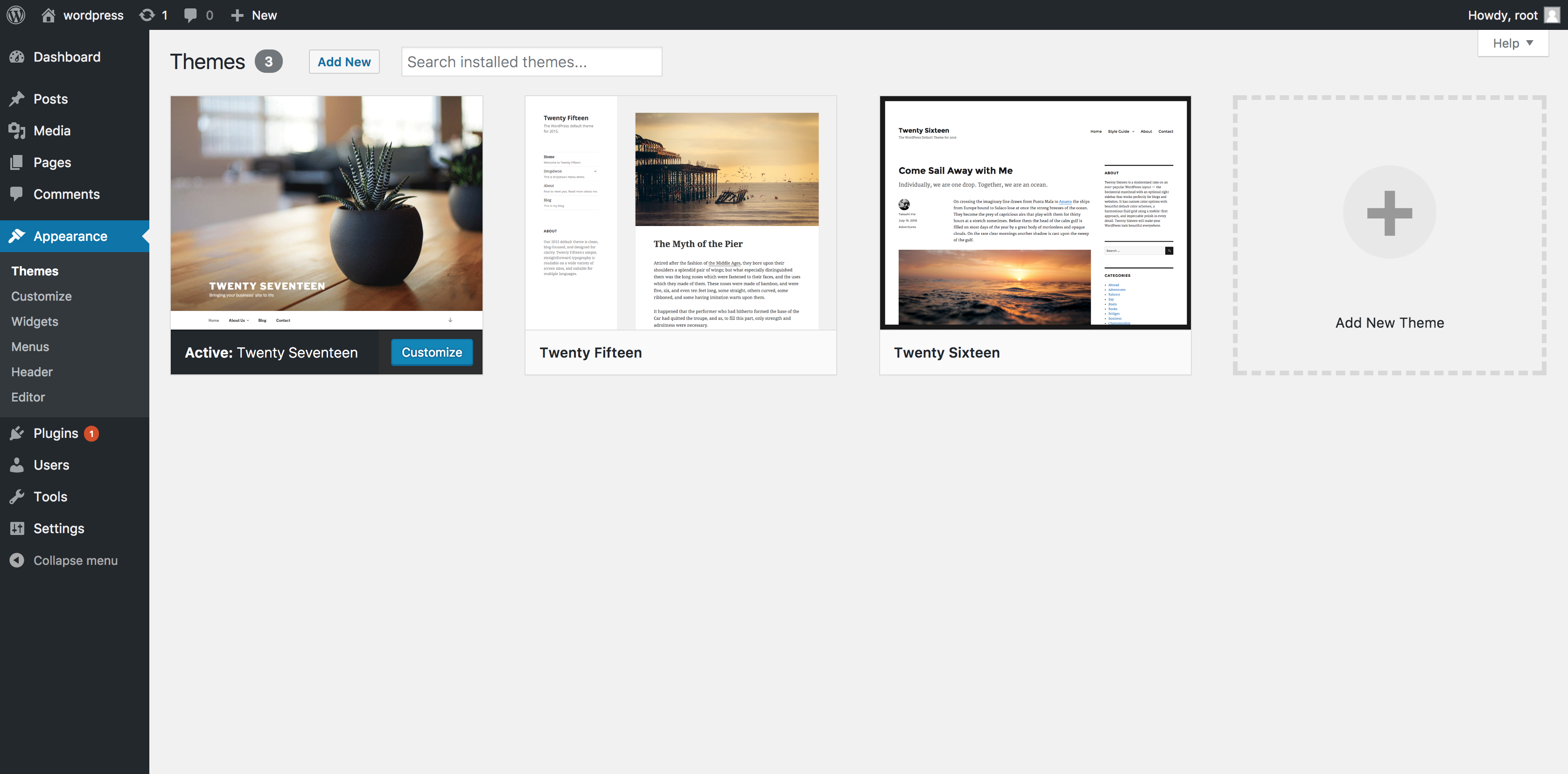
Open your WordPress dashboard. Look for the Appearance option. It is on the left side. Click on Themes under Appearance. This shows all your installed themes.
Click the Add New button at the top. You can see a Upload Theme button. Click it to upload your theme file. Make sure it’s in .zip format. Click Install Now to upload.
After upload, you see an Activate option. Click Activate to use the new theme. Now your site has a new look!

Credit: www.shoutmeloud.com
Installing Via Ftp
First, find a WordPress theme you like. Go to its page. Click the download button. Save the theme files on your computer. Ensure the files are in a ZIP format. Check your download folder. Make sure all files are there.
You need an FTP software like FileZilla. Open the FTP software. Enter your host details. This includes server name, username, and password. Connect to your website. Wait until the connection is successful. You will see your website files.
Navigate to the wp-content folder. Then, open the themes directory. Drag and drop your theme files here. Wait for the upload to complete. The theme is now on your site. Go to the WordPress dashboard. Activate the new theme from there.
Customizing Your Theme
The Customizer lets you change your theme’s look. You can adjust colors, fonts, and more. It’s easy to find under Appearance in your dashboard. Simply select Customize and start making changes. You can see changes in real-time. This helps you decide what looks best. Remember to click Save & Publish when you are done.
Widgets add extra features to your site. They can display calendars, recent posts, and more. To add a widget, go to Appearance and click Widgets. Drag and drop the widgets you like into your theme’s areas. You can also remove them if needed. Widgets make your site more useful and fun.
Menus help visitors find things on your site. You can add or remove pages from your menu. Go to Appearance and choose Menus. Create a new menu or change an existing one. Drag items to change their order. Save your changes to update your site. A good menu makes your site easy to navigate.
Credit: www.namecheap.com
Troubleshooting Common Issues
Installing a WordPress theme often involves common issues. These may include upload errors or compatibility problems. Addressing these typically requires checking file formats and updating plugins.
Theme Not Displaying Correctly
Sometimes, a theme might not show up right. This can be confusing. First, check if the theme is activated. Go to the themes page in your WordPress dashboard. Make sure the theme is set as active. If it is active, try clearing your browser cache. Old files can cause display issues. Another reason might be your theme is not compatible with your WordPress version. Check if you need to update WordPress or the theme. Always keep them up-to-date.
Resolving Conflicts With Plugins
Themes may not work well with some plugins. This can break your site. Deactivate all plugins first. Then, reactivate them one by one. See which one causes the problem. Once you find the culprit, look for an alternative plugin. Or, contact the plugin’s support team. They might have a solution. Always back up your site before making changes. Backups keep your data safe.
Frequently Asked Questions
How Do I Install A WordPress Theme?
To install a WordPress theme, log into your dashboard. Navigate to Appearance > Themes. Click “Add New,” choose a theme, and click “Install. ” Once installed, click “Activate” to apply the theme. Ensure you customize settings for optimal performance. Always back up your site before making changes.
Can I Download My WordPress Theme?
Yes, you can download your WordPress theme. Go to your WordPress dashboard, navigate to “Appearance,” then “Themes. ” Select your theme and use the “Download” option. Make sure you have the necessary permissions and backup your files for safety.
How Do You Activate A WordPress Theme?
To activate a WordPress theme, log in to your dashboard. Navigate to “Appearance” and click “Themes. ” Find your desired theme, then click “Activate. ” Your theme will now be live on your site. Ensure you customize it for the best appearance and functionality.
How To Install A Theme Manually?
Download the theme file from the developer’s website. Go to your platform’s dashboard, click ‘Themes’, then ‘Add New’. Select ‘Upload Theme’, choose the file, and click ‘Install Now’. Activate the theme once installed. Always check compatibility and backup your site before installing new themes.
Conclusion
Installing a WordPress theme is simple and straightforward. First, choose a theme that suits your needs. Download it to your computer. Next, log into your WordPress dashboard. Click on “Appearance,” then “Themes. ” Upload your downloaded theme. Click “Install,” then “Activate.
” Your theme is now live. Explore its settings to customize your site. Experiment with different options to find the perfect look. Remember, a good theme enhances your site’s functionality and style. Keep practicing and exploring. With time, you’ll become more confident in managing your website themes.
Happy blogging!


