
Have you ever browsed through WordPress themes and thought, “I wish I could create something unique just for my site”? You’re not alone.
Many website owners dream of crafting a theme that perfectly matches their vision and branding. Imagine having full control over every detail, from layout to colors and fonts. Creating your own WordPress theme might sound challenging, but it’s easier than you think.
You’ll not only learn valuable skills but also gain the satisfaction of showcasing your creativity to the world. Dive into this guide and discover how you can design a WordPress theme that’s truly yours, bringing your website to life like never before. Keep reading, because the secret to your perfect website is just a few scrolls away!
Getting Started
Creating your own WordPress theme can be a rewarding journey. Begin by understanding WordPress’s theme structure and requirements. Experiment with coding in HTML, CSS, and PHP to bring your design to life.
Setting Up Development Environment
Creating a WordPress theme begins with setting up your development environment. First, install a local server. Tools like XAMPP or MAMP are popular. These tools help run WordPress on your computer. Then, download the latest version of WordPress from its website. Unzip the files into your local server’s root directory.
Tools And Software Needed
Several tools are essential. A code editor like Visual Studio Code is crucial. It helps write and edit code easily. Also, a web browser is needed. Chrome or Firefox will work fine. These browsers help test and view your theme. Lastly, consider using version control software like Git. It helps track changes in your code.
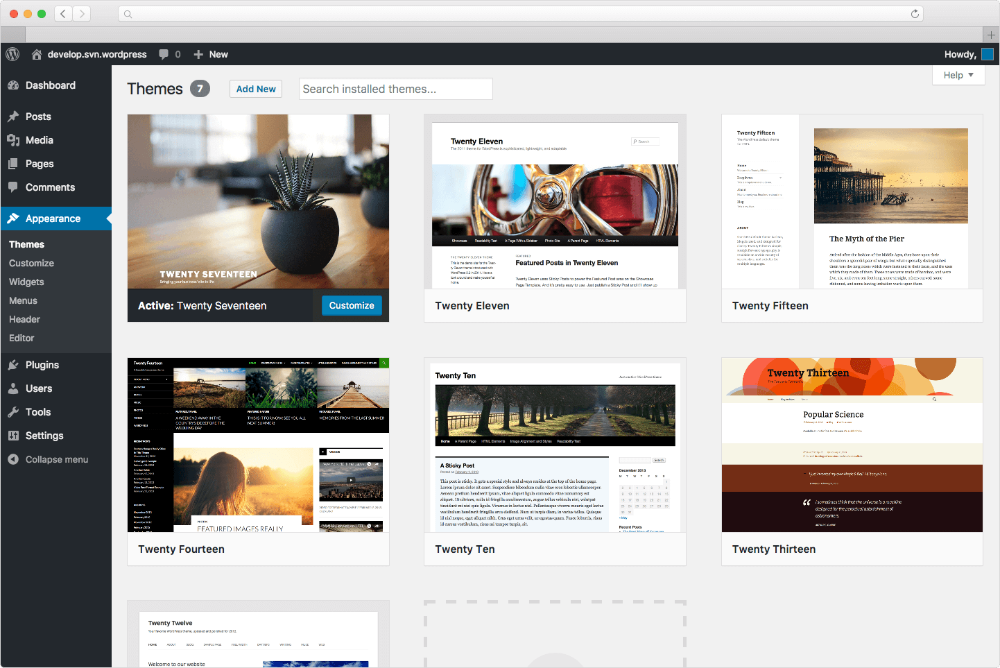
Credit: docs.presscustomizr.com
Understanding Theme Structure
A WordPress theme has many files. Each file does something different. The style.css file is the most important. It controls the look of your site. The index.php file is the main template. It shows your site’s content.
Other files include functions.php, header.php, and footer.php. They control different parts of your site. Functions.php adds features. Header.php shows the top of the page. Footer.php shows the bottom.
Themes need core components to work. The WordPress Loop is one component. It shows posts on the site. Another component is widgets. Widgets add small features. Sidebars hold these widgets.
Themes use templates for different pages. Templates can be for single posts or archives. Each template has a specific use. They help organize content on the site.
Creating Basic Theme Files
The style.css file is important. It tells WordPress about your theme. It has information like theme name and author. Write CSS rules here to style your theme. Use simple colors and fonts. This file helps make your website look nice.
The index.php file is the main template. It shows content on your site. You can add HTML code here. This file connects with other files. It helps display posts and pages. Make sure to keep it simple.
The functions.php file adds features to your theme. Use it to add menus and widgets. It can also include scripts and styles. This file makes your theme more powerful. Write simple functions to start.
Customizing Your Theme
Custom styles make your WordPress theme unique. Use CSS to change fonts, colors, and layouts. Open the style.css file in your theme folder. Add your styles there. For example, you can change the background color to blue. This adds a personal touch. Always save your changes. Refresh your website to see updates. Do you like it? If not, tweak it again. Small changes can make big differences. Experiment with styles. Don’t be afraid to try new things. Your theme should reflect your style.
Templates control the structure of your theme. Find the template files in your theme folder. Common files include header.php and footer.php. Open these files to see the code. Modify the code to change the layout. You can add or remove sections. Want a new menu? Add code for it in the header file. Always back up files before changes. This keeps your work safe. After editing, refresh your website. Check if changes look good. Fix any errors quickly.
Integrating Theme Features
Crafting your own WordPress theme involves blending distinct features for a unique design. Start by exploring basic theme structures and incorporating elements like custom headers and widgets. Experiment with style sheets and templates to create an engaging, functional theme.
Adding Widgets And Sidebars
Widgets help add extra features. Think of them as small building blocks. Sidebars hold these widgets. They can be on the left or right side. Adding a sidebar is easy. Use the WordPress Customizer. Find the widgets section. Drag your favorite widgets into the sidebar. You can choose from many options. There are text, calendar, and recent posts widgets. Each adds something special to your theme. You can always change the order. Just drag them around. Try different widgets to see what fits best.
Implementing Menus
Menus are important for your site. They guide visitors. They show the main parts of your site. WordPress makes menu creation simple. Use the Appearance tab. Click on Menus. Create a new menu. Add pages or links to it. Drag to rearrange items. Save your menu when done. You can make more than one menu. Some themes support multiple menus. Experiment with different menu layouts. Find what works best for your site.

Credit: www.bluchic.com
Testing And Debugging
Creating your own WordPress theme involves testing and debugging for smooth functionality. Identify errors and fix them for optimal performance. Use debugging tools to ensure your theme works across devices and browsers.
Checking For Errors
Errors can make your theme look bad. Use tools to find errors. Some tools are free. They show you where errors are. Fixing errors makes your theme better. Always check for syntax errors. These are common and easy to fix.
Sometimes, errors hide in the code. Be patient and look carefully. Update your tools often. New updates help find more errors. This keeps your theme clean and fast.
Ensuring Compatibility
Your theme should work on all devices. Check on phones, tablets, and computers. Some features might not work on all. Make sure the theme looks good everywhere. Test on different browsers too. Chrome, Firefox, and Safari are popular.
Compatibility is important for users. They want a smooth experience. Always update your theme for new devices. This helps keep it reliable and user-friendly.
Publishing Your Theme
Creating your own WordPress theme involves understanding basic coding and design principles. Start by setting up a development environment to customize templates and styles. Publishing your theme requires testing it thoroughly and following WordPress guidelines for successful upload.
Preparing For Release
Your theme needs a clear description. This helps users know what to expect. Include any unique features your theme offers. Ensure your coding is clean. Remove any errors or unnecessary parts. Test your theme on different devices. It should work on phones, tablets, and desktops. Make sure the design is consistent. Colors and fonts should match across all pages. Create detailed documentation. This helps users understand how to use your theme. Include steps to install and customize your theme. Consider adding a FAQ section. Address common questions users might have.
Submitting To WordPress Repository
Submit your theme to the WordPress repository. Follow their guidelines carefully. Check your theme meets the requirements. Include a readme file. This file should explain your theme. Make sure your theme is secure. Users need to trust your theme. Keep your theme updated. Update it regularly to fix bugs. Respond to user feedback. Improve your theme based on suggestions. This builds a strong user community.
Maintaining Your Theme
Creating your own WordPress theme involves designing unique layouts, customizing styles, and coding functionalities. Begin with basic HTML, CSS, and PHP skills. Utilize WordPress’s theme development framework to craft personalized designs that reflect your brand’s identity.
Updating For Compatibility
WordPress changes often. Themes must stay compatible. Check for updates regularly. Use the latest WordPress version. Update your theme code when needed. Keep plugins updated too. This prevents errors and bugs.
Responding To User Feedback
User feedback is important. Listen to your users. They help improve your theme. Fix issues they report. Add features they request. This makes your theme better. Happy users share your theme with others. They trust themes that work well.
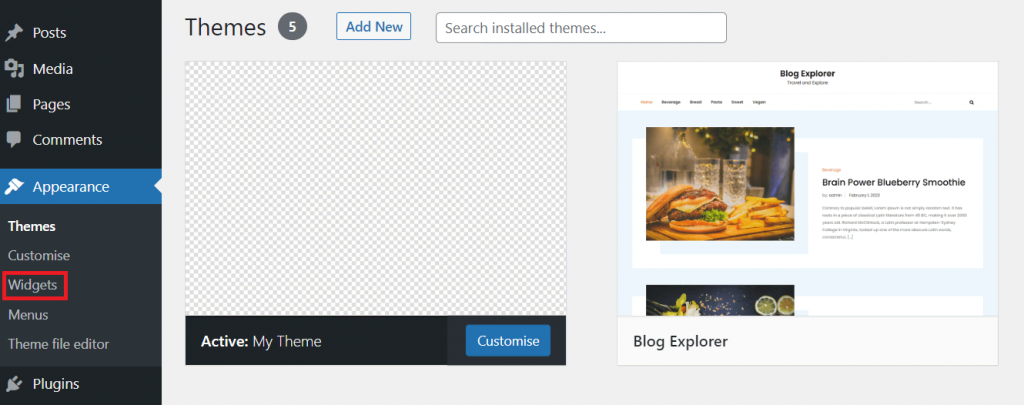
Credit: www.hostinger.com
Frequently Asked Questions
Can I Create My Own WordPress Theme?
Yes, you can create your own WordPress theme. Use the WordPress Theme Development Handbook for guidance. Utilize HTML, CSS, PHP, and JavaScript. Start with a theme template or build from scratch. Customize design elements and functionalities to match your vision.
Test thoroughly before launching.
How To Make A WordPress Theme Free?
To create a free WordPress theme, learn HTML, CSS, and PHP basics. Use WordPress’s Theme Handbook as a guide. Develop your theme using a local WordPress installation. Test for responsiveness and compatibility. Submit your theme to WordPress. org for review and distribution.
Which Theme Builder Is Best For WordPress?
Elementor is the top choice for WordPress theme building. It’s intuitive, versatile, and offers extensive customization options. Users love its drag-and-drop functionality and responsive design features. Elementor’s vast library of templates and widgets simplifies creating stunning websites effortlessly. Its regular updates ensure compatibility with WordPress advancements.
How Do I Create My Own Template In WordPress?
Create a WordPress template by accessing your theme folder via FTP. Duplicate an existing template file, rename it, and edit the content using a code editor. Save changes and upload it back to your server. Use the WordPress dashboard to assign your new template to pages or posts.
Conclusion
Creating your own WordPress theme is an exciting project. It allows you to design a site that truly reflects your style. Start by planning the layout and features you need. Learn the basics of WordPress theme development. Use guides and tutorials to help along the way.
Keep your code clean and organized for best results. Test your theme thoroughly before launching. Remember, practice makes perfect. With patience, you can build a theme that stands out. Enjoy the process and see your ideas come to life. Your custom theme awaits!


