
Are you ready to elevate your WordPress website with a touch of professional design and functionality? Discover the magic of Envato Market themes and how they can transform your site.
Imagine having access to a treasure trove of beautifully crafted themes, each designed to enhance your website’s look and feel. But how do you seamlessly integrate one of these themes with WordPress? It’s simpler than you think. You’ll uncover the step-by-step process of making an Envato Market theme work harmoniously with your WordPress site.
Whether you’re looking to revamp your blog, create a stunning portfolio, or launch an e-commerce store, understanding this integration can unlock endless possibilities. Stay with us, and let’s dive into the world of Envato Market themes and WordPress to empower your digital presence.

Credit: themeforest.net
Envato Market And WordPress Connection
Envato Market offers many themes for WordPress. These themes help make websites look good. Each theme has a special design and features. They are easy to install and use. First, download the theme from Envato. Then, go to your WordPress dashboard. Click on “Themes” and then “Add New”. Upload the downloaded theme file. WordPress will guide you through the rest. It’s simple and quick.
Some themes have extra tools like page builders. These tools help create pages without code. Many themes come with support. If you need help, you can ask the theme maker. They often provide updates to fix bugs. Always keep your theme updated. This keeps your site safe and running well.
Choosing The Right Theme
Selecting a theme is very important for your website. Envato Market offers many themes. Each theme has unique features. You must choose a theme that fits your needs. Think about your site’s purpose. A good theme makes your site look nice. It also helps users find things easily.
Before buying a theme, check its compatibility with WordPress. Ensure the theme works with your version. Look at the theme’s reviews. See what others say about it. Consider the support offered. You might need help later.
Theme Features And Compatibility
Themes have different features. Some are better for blogs. Others suit business sites. Check if the theme is responsive. It should work on phones and tablets. A responsive theme improves user experience.
Downloading And Installing
First, log in to the Envato Market website. Navigate to your account. Go to the Downloads section. Find your purchased theme there. Click the Download button next to your theme. Choose the Installable WordPress file option. This file is a .zip file. Save it on your computer.
Open your WordPress admin panel. Find the Appearance menu on the left. Click on Themes. Then, click Add New at the top. Choose Upload Theme. Click the Choose File button. Select the .zip file you saved. Click Install Now. Wait for the installation to finish. Lastly, click Activate to use your theme. Now, your website has a new look!
Setting Up The Theme
First, you must install the theme in WordPress. Go to the WordPress dashboard. Find the “Appearance” tab and click on “Themes.” Upload the theme from your computer. Once uploaded, click “Activate” to use it. Now, you can start customizing. Change the colors, fonts, and layout to match your style. Use the WordPress customizer for easy changes. This tool is simple and fun. You can see changes in real-time. This helps in making quick decisions.
Plugins add more features to your theme. They help make your site better. Some plugins are must-haves. For example, a SEO plugin improves search engine ranking. A security plugin keeps your site safe. An optimization plugin makes your site fast. Install these from the WordPress plugin directory. Always keep them updated for best performance.
Utilizing Theme Features
Envato Market themes often include page builders that simplify design. Drag and drop tools let you create custom layouts. No coding needed. Choose from various layouts. Options include grids, columns, and sliders. Each theme offers unique styles. Personalize your site easily. Preview changes live. Save time and effort.
Widgets add features like social media links and contact forms. Place them in sidebars or footers. Shortcodes give extra functionality. They embed content like galleries or videos. Just copy and paste the code. Easy to use. Both tools enhance your site. Themes come with preset widgets and shortcodes. Use them to improve site design.
Optimizing For Performance
Envato Market themes integrate seamlessly with WordPress, enhancing website performance and design. They offer customizable features, catering to diverse website needs while ensuring ease of use. Users can quickly adapt themes to suit their brand, improving functionality and aesthetic appeal.
Speed Optimization Techniques
Fast websites are very important. A slow site makes users leave quickly. Use lightweight themes from Envato Market. They load faster. Minimize the use of large images. Large images slow down the site. Use tools to compress images. Compressed images load quickly. Use caching plugins. Caching helps to deliver pages faster. Optimize CSS and JavaScript files. Minified files load faster.
Enable lazy loading for images. Lazy loading helps images load only when needed. This saves time. Reduce the number of plugins. Too many plugins slow down the site. Regularly update WordPress and themes. Updates often improve speed and security. Monitor site speed with tools like Google PageSpeed. Regular checks help maintain speed.
Seo Best Practices
Good SEO helps your site rank better. Use an SEO plugin like Yoast. These plugins guide you in optimizing pages. Use descriptive titles for each page. Titles should include important keywords. Write clear and simple content. This helps users and search engines. Use header tags like H1, H2, and H3. They help organize content. Add alt text to images. Alt text describes images for search engines.
Make sure the site is mobile-friendly. Many users browse on phones. Mobile-friendly sites rank better. Use internal links to connect pages. Internal links help users find related content. Use a clean URL structure. Clean URLs are easy to read and remember. Regularly update content. Fresh content keeps users engaged. Monitor SEO performance with tools like Google Analytics. Regular checks help improve SEO.
Troubleshooting Common Issues
Envato Market themes integrate seamlessly with WordPress, enhancing design and functionality effortlessly. Troubleshooting common issues involves understanding theme compatibility and plugin conflicts. Regular updates ensure smooth operation and optimal performance, keeping your site visually appealing and user-friendly.
Error Identification
Problems may arise with Envato themes and WordPress. Identifying these errors is essential. Common issues include broken links, missing images, and plugin conflicts. Check each error carefully. Make a list of issues found. This helps you track problems.
Effective Solutions
Solutions can be simple. Update all plugins. This often fixes conflicts. Check theme settings for errors. Sometimes, a setting might be wrong. Reinstall the theme if issues persist. This can refresh settings. Seek help from forums. Many users share solutions. They can offer tips and advice.
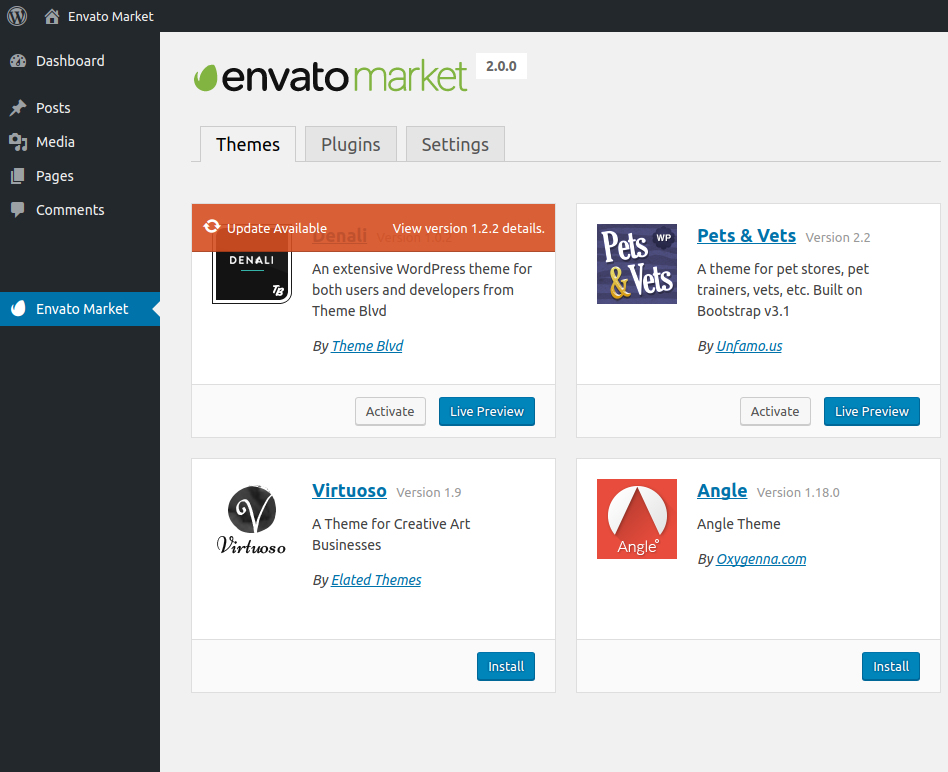
Credit: www.envato.com
Theme Updates And Maintenance
Envato Market themes integrate smoothly with WordPress, enhancing design and functionality. Regular updates ensure compatibility and security. Users enjoy a seamless experience with easy customization options and reliable support, making it ideal for maintaining a dynamic website.
Keeping Themes Updated
Updating themes is very important. New updates fix bugs and improve security. Themes with regular updates work better. Check for updates often. This helps keep the website safe and fast. Envato Market themes usually have automatic updates. Always use the latest theme version. Old versions may have problems. Updated themes can add new features.
Regular Maintenance Tips
- Backup your site often. This saves your data.
- Check theme settings. Make sure everything works well.
- Update plugins. Old plugins can cause issues.
- Test your site. Look for broken links or errors.
- Clean up unused files. This helps speed up the site.
Leveraging Community Support
Envato Market themes integrate smoothly with WordPress, offering customizable design options. Users can easily install and activate themes, enhancing website functionality and appearance. Community support aids in troubleshooting and maximizing theme features for optimal performance.
Forums And Help Centers
Envato Market themes often have dedicated forums and help centers. Users can ask questions and get help. They find answers to common problems. Forums are a place to share knowledge. People help each other out. It’s a team effort. Many users like to read tips and tricks there. Help centers offer guides and tutorials. They are easy to follow.
Connecting With Other Users
Connecting with other users is key. New users can learn from experienced ones. Feedback is also valuable. It helps improve the theme. Some users even make friends. They share experiences and ideas. This makes the community strong. Everyone benefits from it. Collaboration is important in these spaces.
Credit: elements.envato.com
Frequently Asked Questions
How To Use Envato Theme On WordPress?
Install your Envato theme by downloading it first. Navigate to WordPress dashboard, then click “Appearance”, select “Themes”. Choose “Add New”, click “Upload Theme”. Upload the theme file, then activate it. Customize your theme using the options available in the WordPress dashboard.
Ensure you save your changes.
Is Envato Good For WordPress?
Envato is excellent for WordPress. It offers diverse themes and plugins, catering to various website needs. Quality and support are top-notch, making it a preferred choice for developers and designers. Explore Envato for creative resources to enhance WordPress sites effectively.
Which Theme Builder Is Best For WordPress?
Elementor is widely regarded as the best WordPress theme builder. It offers user-friendly features and high customization options. Many users appreciate its drag-and-drop functionality. Elementor also provides a vast library of templates. Its compatibility with various plugins enhances its versatility.
How Do Themes Work In WordPress?
Themes in WordPress control the design and layout of your website. They include templates and stylesheets. Users can easily switch themes via the WordPress dashboard to change the site’s appearance. Themes offer customization options and can be free or premium.
They enhance user experience and site functionality.
Conclusion
Choosing an Envato Market theme enhances your WordPress site’s design. It simplifies the setup process with easy-to-use templates. Integrating these themes saves time and effort. You get a professional look without coding skills. Regular updates ensure your site remains fresh and secure.
User-friendly features make customization straightforward. Support and community forums provide helpful resources. Ideal for beginners and experts alike. Transform your WordPress experience with these powerful themes. Explore new possibilities and elevate your site today.


