

If you want your website to get noticed by search engines like Google, adding a sitemap to your WordPress site is a smart move. A sitemap acts like a roadmap, helping search engines find and index your content faster and more efficiently.
But maybe you’re wondering how to do this without getting lost in complicated tech talk. Don’t worry—this guide will walk you through simple, clear steps to add a sitemap to your WordPress site. By the end, you’ll have a powerful tool that boosts your site’s visibility and helps more visitors find you.
Ready to make your website easier to discover? Let’s dive in!
Why Sitemaps Matter
Sitemaps play a key role in how search engines find and rank your website. They act like a map, showing all pages on your site. This helps search engines understand your content better and faster. Without a sitemap, some pages might stay hidden from search results.
A clear sitemap keeps your website organized. It tells search engines which pages are most important. This makes it easier for them to crawl and index your site. A good sitemap leads to better visibility in search results.
Boosting Seo With Sitemaps
Sitemaps help search engines find new and updated content quickly. This means your pages can appear in search results faster. They also highlight important keywords and structure. This helps improve your site’s SEO performance.
Search engines use sitemaps to understand your website’s layout. This aids in ranking your pages more accurately. When search engines see a well-structured sitemap, they trust your site more. This trust can improve your ranking on search pages.
Improving Site Crawling
Crawling is how search engines explore your website. A sitemap guides crawlers to every important page. It prevents pages from being missed or ignored. This ensures all content gets indexed.
Sitemaps also help with large or complex websites. They make sure search engines don’t get lost. Pages buried deep in your site get attention too. This leads to better overall site coverage in search engines.
Credit: www.joomunited.com
Types Of Sitemaps For WordPress
Sitemaps help search engines find and understand your website content. WordPress supports different sitemap types. Each serves a unique purpose for better site navigation and indexing. Knowing the main sitemap types can improve your site’s SEO and user experience.
Xml Sitemaps
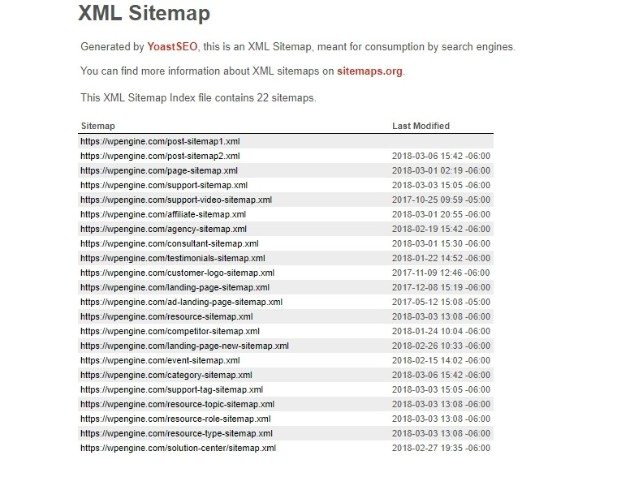
XML sitemaps list all important pages on your site. They are made for search engines, not humans. These sitemaps help search engines crawl your site faster. WordPress can generate XML sitemaps automatically or with plugins. They include URLs, update dates, and priorities. This data guides search engines on which pages to index first.
Html Sitemaps
HTML sitemaps are designed for website visitors. They show a clickable list of your site’s pages. This helps users find content easily. HTML sitemaps improve navigation and user experience. They also help search engines by linking pages clearly. WordPress users can create HTML sitemaps manually or with plugins.
Creating A Sitemap In WordPress
Creating a sitemap in WordPress helps search engines find and index your pages faster. It improves your site’s visibility on search results. A sitemap lists all important pages so search engines understand your site structure.
You can create a sitemap in WordPress in two main ways. Use SEO plugins for an easy setup or create one manually. Both methods are useful depending on your needs and skills.
Using Seo Plugins
SEO plugins make sitemap creation simple. Popular plugins like Yoast SEO or All in One SEO generate sitemaps automatically. You only need to install and activate the plugin.
These plugins update sitemaps whenever you add or change content. They also notify search engines about updates. This keeps your sitemap current without extra work.
Most plugins allow customization. You can exclude pages or posts you don’t want in the sitemap. This helps keep the sitemap clean and focused on important content.
Manual Sitemap Creation
Manual sitemap creation requires more effort but gives full control. You create a sitemap file in XML format. This file lists URLs of your important pages.
Use a text editor to write the sitemap code. Follow the XML sitemap protocol to format it correctly. Then upload the file to your WordPress root directory using FTP.
After uploading, submit the sitemap URL to Google Search Console. This helps Google find your sitemap fast. Update the file manually whenever you add new pages or posts.
Submitting Sitemap To Search Engines
Submitting your sitemap to search engines helps them find and index your website pages faster. This process improves your site’s visibility in search results. Most search engines offer tools to submit sitemaps easily. These tools also provide insights about your site’s performance.
Google Search Console
Google Search Console is the main tool to submit your sitemap to Google. First, log in to your Google account. Then, go to the Search Console website. Add your website if you haven’t done this before. Select your site from the dashboard.
Click on “Sitemaps” in the menu. Enter the URL of your sitemap, usually “sitemap.xml”. Click “Submit” to send your sitemap to Google. You can check the status and see if Google found any errors.
Bing Webmaster Tools
Bing Webmaster Tools lets you submit your sitemap to Bing search engine. Sign in with your Microsoft account. Add and verify your website if not done yet. Open the “Sitemaps” section in the dashboard.
Type your sitemap URL in the box. Click “Submit” to upload your sitemap to Bing. You can monitor the sitemap status and fix any problems Bing finds. This helps improve your site’s presence on Bing search results.
Maintaining And Updating Sitemaps
Maintaining and updating your sitemap is important for keeping search engines aware of your site’s structure. A current sitemap helps search engines find new content and changes quickly. Without updates, search engines might miss fresh pages or important edits.
Regular updates keep your sitemap accurate. This improves your website’s visibility and indexing speed. It also prevents errors that can harm your SEO efforts.
Automatic Updates With Plugins
Many WordPress plugins update sitemaps automatically. They detect new posts, pages, or changes and update the sitemap file. This saves time and ensures your sitemap stays fresh without manual work. Popular plugins like Yoast SEO or Google XML Sitemaps handle this smoothly. Set the plugin once, and it manages updates in the background.
Handling Sitemap Errors
Sitemap errors can block search engines from reading your sitemap correctly. Common issues include broken links, incorrect URLs, or syntax mistakes. Use tools like Google Search Console to spot these errors fast. Fix broken links and remove outdated URLs regularly. Clean sitemaps help search engines crawl your site better and improve rankings.
Credit: wpengine.com
Common Sitemap Issues And Fixes
Creating a sitemap is important for your WordPress site’s SEO. But sitemaps can have common problems that stop search engines from crawling your site properly. Fixing these issues helps improve your site’s visibility and ranking.
Below are some frequent sitemap problems and simple ways to fix them. This will keep your sitemap clean and useful for search engines.
Broken Links
Broken links in your sitemap confuse search engines and users. They point to pages that no longer exist or have moved. This lowers your SEO score.
Check your sitemap for broken links regularly. Use free tools like Google Search Console or online broken link checkers. Remove or update any broken URLs you find. This keeps your sitemap accurate and reliable.
Incorrect Urls
Incorrect URLs include typos, wrong domains, or outdated links. These errors stop search engines from finding your pages.
Make sure URLs in your sitemap match your live site URLs exactly. Avoid extra characters or spaces. Use plugins like Yoast SEO or Google XML Sitemaps to generate correct URLs automatically. This helps search engines index your pages properly.
Tips For Optimizing Sitemaps
Optimizing your sitemap helps search engines find your best content fast. A clear sitemap improves your site’s crawl efficiency and ranking potential. Focus on quality over quantity. Keep your sitemap clean and relevant.
Prioritizing Important Pages
Highlight pages that matter most for your business or blog. These pages get more attention from search engines. Assign higher priority to main pages like your homepage, product pages, and top blog posts. This guides search engines to crawl these pages first. It helps improve their visibility in search results.
Excluding Low-value Content
Remove pages that add little value to your sitemap. This includes thank-you pages, admin pages, or duplicate content. Excluding these pages keeps your sitemap tidy and focused. It prevents search engines from wasting time on unimportant pages. Clean sitemaps help boost your website’s overall SEO strength.
Credit: aioseo.com
Frequently Asked Questions
What Is A Sitemap In WordPress?
A sitemap is a file that lists all your website’s pages. It helps search engines index your content faster and better. WordPress sitemaps improve SEO by guiding crawlers through your site structure efficiently.
How Do I Create A Sitemap In WordPress?
You can create a sitemap using plugins like Yoast SEO or Google XML Sitemaps. These tools automatically generate and update sitemaps without manual work. Simply install, activate, and configure the plugin to start.
How To Submit A WordPress Sitemap To Google?
First, log in to Google Search Console. Go to the Sitemaps section, enter your sitemap URL, and click Submit. Google will then crawl your site using the sitemap for better indexing.
Can I Add Sitemap Without A Plugin In WordPress?
Yes, WordPress 5. 5+ has built-in sitemap support. You can access it at yourdomain. com/wp-sitemap. xml. However, plugins offer more customization and control over sitemap content.
Conclusion
Adding a sitemap to WordPress helps search engines find your pages fast. It improves your site’s visibility and indexing. Creating and submitting a sitemap is simple and takes just a few steps. Use plugins or manual methods based on your comfort level.
Keep your sitemap updated as you add new content. This small effort can boost how well your site appears online. Try it today and watch your website get noticed more easily.


