
Are you wondering if WordPress updates on its own or if you need to do it yourself? Keeping your website secure and running smoothly depends a lot on timely updates.
But what if you miss one? Could your site be at risk? You’ll discover how WordPress handles updates, what happens behind the scenes, and what you need to do to keep your site safe and fast. By the end, you’ll know exactly how to manage updates without stress.
Keep reading to make sure your website stays in top shape!
Credit: www.wpbeginner.com
How WordPress Updates Work
WordPress updates are essential for keeping websites secure and running smoothly. These updates fix bugs, add new features, and improve performance. Understanding how WordPress updates work helps you manage your site better and avoid problems.
Types Of WordPress Updates
WordPress has three main types of updates. Core updates improve the WordPress software itself. They include security patches and new features. Plugin updates fix issues and add functions to plugins. Theme updates improve the design and layout of your site. Each update type plays a role in keeping your website healthy and safe.
Automatic Vs Manual Updates
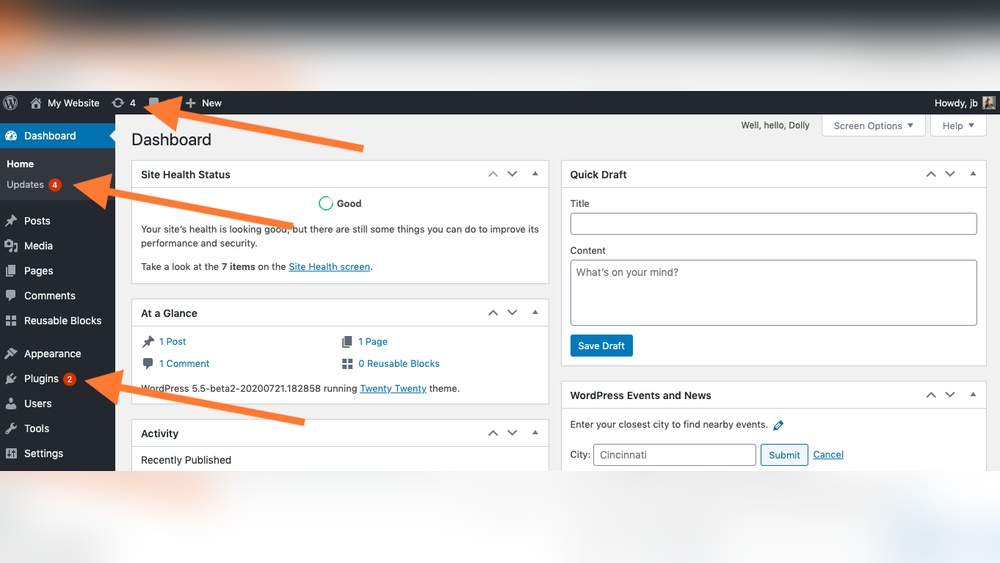
WordPress can update itself automatically or let you do it manually. Automatic updates happen in the background. They apply small security fixes and minor improvements without your input. Manual updates require you to click buttons in your dashboard. You control when and what to update. Both methods help keep your site secure. Choosing the right option depends on your comfort and website needs.

Credit: make.wordpress.org
Default Automatic Update Settings
WordPress has default settings that manage updates automatically. These settings help keep your site safe and running well. Updates cover different parts of WordPress, such as the core system, plugins, themes, and translation files. Knowing what updates happen by default can help you manage your site better.
Core Updates
WordPress automatically updates the core software for security and maintenance. Minor updates, like bug fixes and security patches, happen without user action. Major updates, with new features, usually need manual approval. This balance protects your site while keeping it up-to-date.
Plugin And Theme Updates
Plugins and themes do not update automatically by default. You must update them manually from the dashboard. Some plugins offer their own auto-update option, but it is not standard. Manual updates give you control and reduce risks from incompatible changes.
Translation Files
Translation files update automatically with WordPress core updates. This ensures your site’s language files stay current. Automatic updates fix errors and add new language support. This process helps maintain a smooth user experience for visitors.
Benefits Of Automatic Updates
Automatic updates in WordPress bring many advantages. They help keep your site safe and running smoothly. Updates happen without needing your action. This saves time and reduces worries.
Improved Security
Automatic updates fix security holes fast. Hackers often attack sites with old software. Updates close these gaps quickly. Your site stays protected from threats. This reduces risks of hacks and data loss.
Bug Fixes
Software can have bugs that cause problems. Updates fix these bugs to improve performance. Automatic updates ensure bugs get fixed soon. Your website works better and faster with fewer errors.
New Features
WordPress updates bring new tools and options. These features help you manage your site easier. Automatic updates keep your site modern and useful. You get the latest improvements without extra effort.
Potential Risks Of Automatic Updates
Automatic updates in WordPress save time and improve security. Yet, they carry some risks. Understanding these risks helps you manage your site better. Let’s explore common issues that may arise with automatic updates.
Compatibility Issues
Automatic updates can cause compatibility problems. New WordPress versions might not work well with old plugins or themes. This mismatch can break site features or cause errors. Testing updates first can help avoid these issues.
Update Failures
Sometimes, updates do not complete properly. Server problems or poor internet connections can stop the update. This failure may leave your site in a broken state. Regular backups reduce damage if this happens.
Loss Of Customizations
Custom changes in themes or plugins risk being overwritten. Automatic updates replace files with default versions. This loss affects the look and function of your site. Using child themes or custom code snippets keeps custom work safe.
How To Manage Automatic Updates
Managing automatic updates in WordPress helps keep your site secure and running smoothly. You can control how updates happen. This control lets you choose what updates to apply automatically and which ones to check first. It is important to find a balance between convenience and caution.
Enabling Or Disabling Updates
You can turn automatic updates on or off in WordPress. By default, WordPress updates minor versions automatically. Major updates and plugin updates usually need manual approval. To enable or disable updates, edit the wp-config.php file or use filters in your theme’s functions.php file. This method gives you simple control over core, plugin, and theme updates.
Using Plugins For Update Control
Plugins offer an easier way to manage updates without coding. Some plugins let you choose which updates run automatically. You can schedule updates or delay them for testing. Popular update management plugins also allow bulk updates for plugins and themes. This helps site owners who prefer a user-friendly interface for managing updates.
Configuring Update Notifications
Update notifications keep you informed about new updates. WordPress can send emails when updates are available or completed. You can set up notifications for core, plugin, and theme updates. This helps you act fast if updates need your approval. Notifications reduce the risk of missing important updates and improve site security.

Credit: www.cloudways.com
Best Practices For WordPress Updates
Keeping WordPress updated is important for security and performance. Following best practices helps avoid problems during updates. It also ensures your website runs smoothly and stays safe from threats. Here are key steps to take before and after updating WordPress.
Regular Backups
Create backups before every update. Backups save your website data and files. They protect your site if an update causes issues. Use reliable backup plugins or hosting services. Store backups in a safe place outside your website.
Testing Updates On Staging Sites
Test updates on a staging site first. A staging site is a copy of your live website. This lets you check if updates cause errors or conflicts. Fix problems on the staging site, not the live one. This prevents downtime and loss of visitors.
Keeping Themes And Plugins Updated
Update themes and plugins regularly along with WordPress core. Outdated themes or plugins cause security risks and bugs. Always use versions compatible with your WordPress. Remove any unused themes or plugins to reduce risks.
Frequently Asked Questions
Does WordPress Update Itself Automatically?
Yes, WordPress automatically updates minor releases and security patches by default. Major updates require manual installation unless configured otherwise.
How Can I Enable Automatic WordPress Updates?
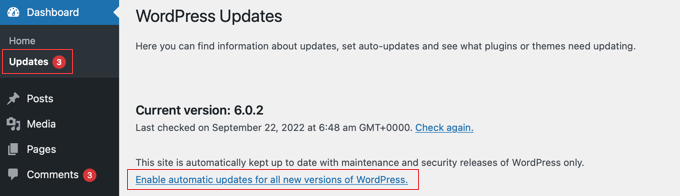
You can enable automatic updates by modifying the wp-config. php file or using plugins designed for this purpose.
Are Automatic Updates Safe For My WordPress Site?
Automatic updates are generally safe and improve security. However, always back up your site before updates to avoid issues.
Do WordPress Plugins Update Automatically Too?
No, WordPress core updates automatically for minor releases, but plugins require manual updates or separate automatic update settings.
Conclusion
WordPress often updates itself automatically to keep sites safe. These updates fix bugs and add new features. You can check your settings to see if auto-updates are on. Staying updated helps protect your site from hackers. Manual updates give you more control but need more effort.
Either way, regular updates keep your website running well. Don’t ignore updates—they are important for site health and performance. Simple steps can make managing updates easy and stress-free. Keep your WordPress site fresh and secure with timely updates.


