
Have you ever wondered who is behind the website you’re visiting? Knowing who hosts a domain can reveal a lot—from the website’s reliability to how secure your data might be.
If you want to uncover the secrets behind your favorite sites or make smarter decisions about your own online presence, understanding domain hosting is key. Keep reading, and you’ll discover simple ways to find out exactly who is hosting any domain—and why that knowledge puts you in control.

Credit: www.elegantthemes.com
What Is Domain Hosting
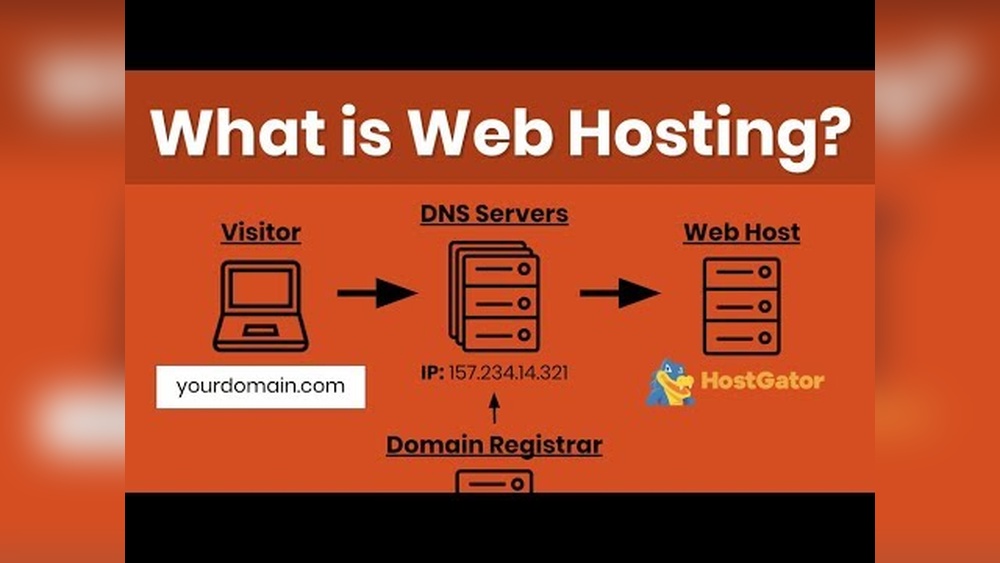
Domain hosting is a service that makes websites visible on the internet. It connects your domain name to a server where your website files are stored. Without hosting, your website cannot be accessed by users online.
Choosing the right hosting is important for website speed, security, and uptime. Understanding the basics helps you make informed decisions for your online presence.
Basics Of Web Hosting
Web hosting means storing website files on a server. Servers are powerful computers that run 24/7. They deliver your website content to visitors’ browsers.
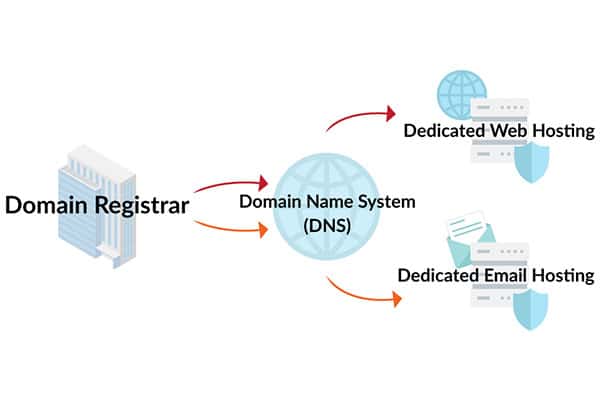
Hosting services provide space and technology for websites. They handle data transfer, security, and server maintenance. Your website’s domain name points to the hosting server.
Types Of Hosting Providers
Hosting providers offer different plans based on website needs. Shared hosting is common and affordable. Many websites share one server’s resources.
VPS hosting offers more control and power. It splits a server into virtual servers for better performance. Dedicated hosting gives a whole server to one user.
Cloud hosting uses multiple servers to host websites. It provides scalability and reliability. Each type fits different budgets and website sizes.
Credit: momentum3growth.com
Why Identify Hosting Providers
Knowing who hosts a website helps understand its background and setup. It reveals details about the server and company behind the site. This information benefits website owners and users alike. It builds trust and helps improve site management.
Benefits For Website Owners
Website owners gain clear insights into their hosting environment. It helps them choose better plans and services. Identifying the host allows for quick troubleshooting during issues. Owners can compare their provider with others to find cost savings. It also aids in planning upgrades or migrations smoothly.
Security And Trust Factors
Knowing the hosting provider shows if the site uses reliable security. Trusted hosts often provide better protection against attacks. This knowledge reassures visitors about data safety and privacy. It helps spot suspicious or fake websites hosted by shady companies. Security-conscious owners prefer hosts with strong safety records.
Methods To Find Hosting Providers
Finding out who hosts a domain helps understand its web service setup. Several simple methods exist to identify hosting providers. These methods use public data and online resources. They are easy to follow and require no special skills.
Using Whois Lookup
WHOIS lookup shows domain registration details. It often includes the hosting provider’s name or server information. Enter the domain name into a WHOIS search tool. Review the results for hosting clues. Sometimes, the registrar and host are the same company.
Checking Dns Records
DNS records link domain names to IP addresses. Use DNS lookup tools to find these records. Look for “A” records that show the IP address of the host. Reverse IP lookup can reveal the hosting company. This method gives technical data about the domain’s server.
Utilizing Online Tools
Many free websites identify hosting providers automatically. These tools scan domain information and DNS data. They show the hosting company name and server location. Some popular tools also provide additional website stats. Such tools save time and simplify the search process.

Credit: www.temok.com
Challenges In Tracing Hosting
Tracing a domain’s hosting can be tricky. Many tools claim to show where a site is hosted. Yet, several factors make this task complex. These challenges often hide the true host behind layers of protection.
Understanding these obstacles helps in finding accurate hosting information. Below are some common issues that hide hosting details.
Privacy Protection Services
Many domain owners use privacy protection services. These services hide the real owner’s details. They also mask the hosting provider’s information. This makes it hard to trace the real host. Whois records often show the privacy service’s data instead.
Content Delivery Networks
Content Delivery Networks (CDNs) improve site speed and security. They store copies of a website on many servers worldwide. Visitors connect to the nearest server, not the main host. This setup hides the original hosting location. Tracing through CDNs leads to their servers, not the real host.
Shared Hosting Issues
Shared hosting means many sites share one server. The server’s IP address points to multiple websites. Identifying the exact host from the IP is difficult. Some tools show the server provider, not the domain’s actual user. This creates confusion in tracing hosting details.
Advanced Techniques For Discovery
Discovering who hosts a domain can be tricky. Basic tools may not give full answers. Advanced techniques help find more details. These methods reveal the server’s location and hosting provider. They also show relationships between sites on the same server. Let’s explore some effective ways to dig deeper.
Reverse Ip Lookup
Reverse IP lookup shows all websites on one server. It helps find other domains hosted together. This method reveals shared hosting services. Use free tools online to perform this search. It gives clues about the hosting provider’s network. This technique works well for small and medium websites.
Analyzing Website Headers
Website headers hold key information about hosting. They include server type, software, and security details. Check headers using browser tools or online services. Headers often reveal the web server’s name. This info narrows down the hosting company. Headers also show if a site uses a content delivery network.
Traceroute And Ping Tests
Traceroute tracks the path data takes to reach a server. It shows each step between your computer and the site. Ping tests measure server response time and availability. These tests help locate the server’s geographic region. They expose the hosting provider’s network structure. Use simple command line tools for these checks.
Popular Tools And Resources
Discovering who hosts a domain is easier with the right tools. Many resources help identify hosting providers quickly. These tools serve different needs, from casual checks to professional analysis. Understanding popular tools aids in making informed decisions about websites and their hosting.
Free Hosting Checker Websites
Free hosting checker websites provide quick information about a domain’s host. They work by scanning the domain’s data and showing hosting details. Users can find hosting company names, IP addresses, and server locations. These sites are useful for basic research or quick checks.
Browser Extensions
Browser extensions simplify the process by showing hosting info directly in your browser. They add a small icon or panel for instant access to hosting data. Extensions often provide extra details like DNS info and SSL certificates. These tools save time for regular users and researchers.
Professional Services
Professional services offer in-depth analysis of domain hosting. They provide detailed reports, including server performance and history. These services suit businesses and experts needing accurate hosting data. Professional tools often include customer support and advanced features.
Practical Tips For Accurate Results
Finding out who hosts a domain can be tricky. Many tools give different results. Getting the right information helps in many ways. Use practical tips for accurate results. These tips reduce mistakes and save time.
Cross-verification Methods
Check the domain with more than one tool. Use Whois lookup and hosting checker sites. Compare the hosting IP addresses from different sources. Look at DNS records for hosting clues. Check the domain’s name servers. These often point to the hosting provider.
Use traceroute tools to see the server’s location. This helps confirm the hosting company. Confirm the hosting details through multiple sources. This cross-checking gives confidence in the results. Avoid relying on just one source.
Understanding False Positives
Sometimes tools show wrong hosting info. This is called a false positive. It happens when the domain uses services like CDN or proxies. These services hide the real host. A false positive can cause confusion.
Know that some domains share servers. Shared hosting can look like one provider. But the website owner may use a different service. Check hosting history to spot changes. Watch for patterns that suggest false info.
Use tools that show detailed data. Look for IP ownership and server location. This helps spot false positives. Understanding these limits leads to better decisions.
Frequently Asked Questions
What Does “who Is This Domain Hosted” Mean?
It refers to identifying the web hosting provider of a specific domain. This helps understand where a website is stored and managed.
How Can I Find Where A Domain Is Hosted?
Use online tools like WHOIS lookup or hosting checker websites. These reveal the hosting company and server details quickly.
Why Is Knowing Domain Hosting Important?
It helps with troubleshooting, security analysis, and competitive research. Knowing hosting details aids in better website management decisions.
Can I Change My Domain Hosting Provider?
Yes, you can transfer your domain to a new hosting provider. This usually involves updating DNS settings and migrating website files.
Conclusion
Knowing who hosts a domain helps understand its origin and reliability. It reveals where a website stores its data and who manages it. This info can guide decisions about trust and security. Checking domain hosting is simple and useful for anyone online.
Keep these points in mind when exploring websites next time. It makes browsing smarter and safer.


