
Are you ready to make your website live but stuck wondering, “What do I need to point my domain to my hosted site?” You’re not alone. Connecting your domain to your hosting is a crucial step that can feel confusing if you don’t know where to start.
But once you get it right, your site will be up and running smoothly, ready for visitors to find you. You’ll discover exactly what you need to do, step by step, to link your domain to your hosted site without hassle.
Keep reading, and you’ll gain the confidence to take control of your website setup today.

Credit: support.wix.com
Domain And Hosting Basics
Understanding the basics of domain and hosting is important before pointing a domain to a hosted site. These two parts work together to make your website accessible online. Knowing what each one does helps you manage your website better.
What Is A Domain Name
A domain name is the address of your website on the internet. It is what people type in the browser to visit your site. Examples include google.com or facebook.com. Domains make it easy to find websites without using numbers.
What Is Web Hosting
Web hosting is the service that stores your website files. These files include text, images, and videos. Hosting keeps your website live and available 24/7. Without hosting, your website cannot be seen online.
How Domains And Hosting Work Together
The domain points visitors to the hosting server where your site lives. When someone types your domain, the domain tells the browser where to find your files. Together, domain and hosting create a complete website experience for users.

Credit: help.dreamhost.com
Choosing The Right Domain Registrar
Choosing the right domain registrar is key to pointing your domain to a hosted site. A good registrar makes managing your domain simple and secure. It affects your website’s performance and your control over your domain. Picking a reliable registrar saves time and avoids future problems.
Consider where you want to buy your domain. Not all registrars offer the same features or support. Some are better for beginners, while others suit advanced users. Knowing popular options and key factors helps you decide wisely.
Popular Domain Registrars
Many companies sell domain names. Some popular registrars include GoDaddy, Namecheap, and Google Domains. These companies have good reputations and easy-to-use websites. They offer clear pricing and helpful tools.
GoDaddy is known for wide domain choices and marketing services. Namecheap provides strong security and affordable prices. Google Domains offers easy integration with Google services.
Factors To Consider When Choosing
First, check the price. Some registrars charge extra for renewals or transfers. Look for transparent pricing without hidden fees. Next, examine customer support. Fast, helpful support is important when issues arise.
Security features like two-factor authentication protect your domain. Also, consider user experience. A simple dashboard helps you manage your domain easily. Finally, check if the registrar allows easy DNS changes for pointing your domain.
Setting Up Your Hosting Account
Setting up your hosting account is the first step to get your website online. It acts as the home for your website files. Without hosting, your site cannot be accessed by visitors on the internet. Choosing the right hosting plan and setting it up correctly is crucial. This process is simple when you know what to do. Below, we explain the types of hosting services and key features to check before you start.
Types Of Hosting Services
Shared hosting is the most common and affordable option. It means your site shares a server with others. This can slow down your site if traffic grows.
VPS hosting offers more power. You get a virtual server that gives you more control and speed. It is good for medium-sized websites.
Dedicated hosting gives you a whole server for your site alone. This is best for large websites that need high performance.
Cloud hosting uses many servers to keep your site online. It is flexible and can handle lots of visitors.
Key Features To Look For
Look for uptime guarantees. Your site should stay online most of the time. Aim for at least 99.9% uptime.
Check the storage space. Your hosting should have enough room for all your files and images.
Speed matters. Choose hosting that loads your site fast to keep visitors happy.
Good customer support is a must. You want help available 24/7 if problems arise.
Security features like SSL certificates and backups protect your site from threats.
Getting Dns Information From Your Host
Getting DNS information from your host is the first step to point your domain to a hosted site. This information tells the internet where to find your website. Without it, your domain cannot connect to your hosting server.
Hosts provide specific DNS details. These details include nameservers and IP addresses. You need these to update your domain settings correctly.
What Are Dns Records
DNS records are like instructions for the internet. They tell browsers where to find your site. Common types include A records, CNAME, and MX records. Each serves a different purpose. A records point to the IP address of your server. CNAME records link one domain to another. MX records handle email services.
Finding Nameservers Or Ip Addresses
Your host gives you nameservers or IP addresses. Nameservers look like ns1.example.com and ns2.example.com. These direct your domain to your hosting provider’s servers. IP addresses look like numbers, such as 192.168.1.1. You find these details in your hosting account dashboard or welcome email. Keep this information ready before changing your domain settings.
Configuring Domain Dns Settings
Configuring your domain DNS settings is essential to connect your domain with your hosted website. DNS settings tell the internet where to find your site. Correct setup ensures visitors reach your content without trouble. This process involves changes in your domain control panel, like updating nameservers and adding records.
Accessing Your Domain Control Panel
Start by logging into your domain registrar’s website. Use the credentials you created when buying the domain. Look for a section called “Domain Management” or “DNS Settings.” This area lets you change how your domain points to your website. If unsure, check help guides or contact support.
Updating Nameservers
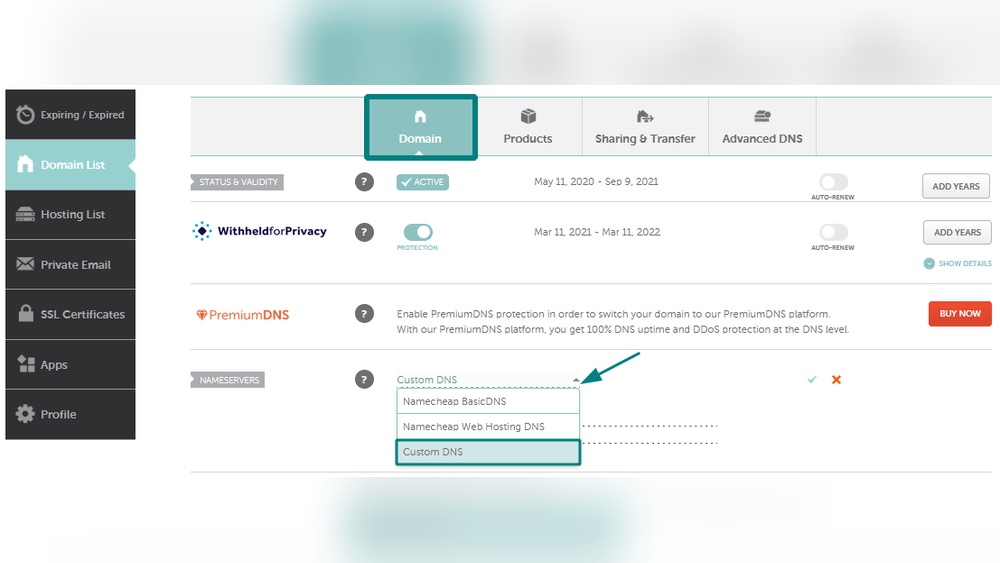
Nameservers link your domain to your hosting provider’s servers. Find the nameservers provided by your host. Replace the current nameservers in your domain control panel with these new ones. Save the changes. It may take some hours for the update to spread across the internet.
Adding A Records And Cnames
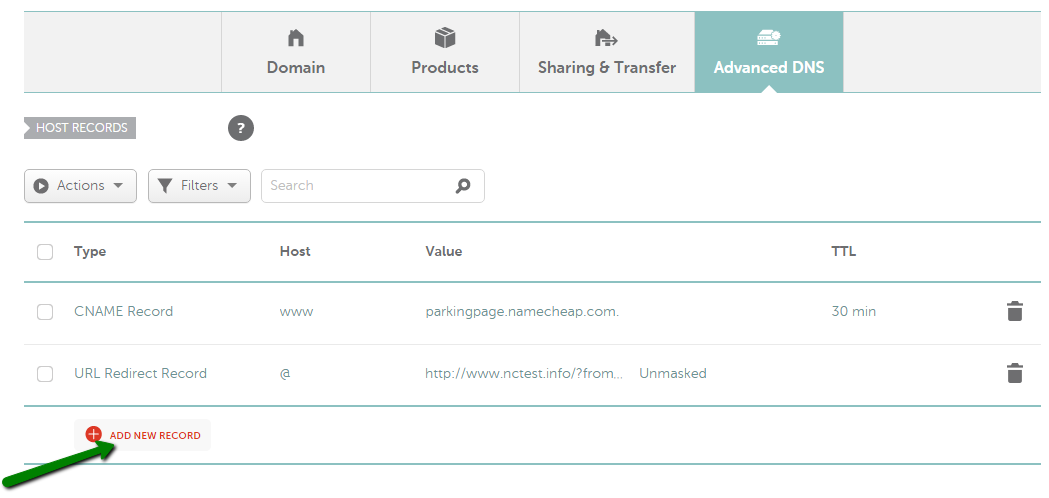
A records and CNAMEs direct your domain to specific servers or services. An A record points your domain to an IP address. A CNAME links one domain name to another. Add these records in the DNS settings if your host requires them. Enter the exact details given by your hosting provider. This step ensures your domain works correctly with your website.
Verifying Domain Pointing
Verifying domain pointing is a key step after you update your domain settings. It ensures your domain correctly directs visitors to your hosted website. This process confirms that your domain and hosting server communicate properly. Without verification, your site may not appear as expected. Understanding how to check this saves time and avoids errors.
Using Dns Lookup Tools
DNS lookup tools help you see where your domain points. Enter your domain name, and the tool shows the current IP address or server. This confirms if the domain points to your hosting provider. Use reliable tools like MXToolbox or WhatsMyDNS. These tools are free and easy to use. They provide clear information about your domain’s DNS records.
Propagation Time And What To Expect
Domain pointing changes need time to spread worldwide. This process is called propagation. It can take from a few minutes to 48 hours. During propagation, some users see the old site while others see the new one. Be patient and check your site from different locations. Use DNS lookup tools to track the update progress.
Troubleshooting Common Issues
Troubleshooting common issues is a key step when pointing a domain to a hosted site. Problems can stop your site from showing correctly or cause delays. Understanding these issues helps you fix them fast and keep your site online.
Incorrect Dns Settings
DNS settings tell the internet where to find your website. Wrong entries can block access. Check your A record and CNAME carefully. Make sure they match the hosting provider’s instructions. Typos and missing dots cause errors. Double-check each field for accuracy.
Cache And Propagation Delays
DNS changes do not take effect instantly. They need time to spread across the internet. This is called propagation. It can take from a few minutes to 48 hours. Clear your browser cache to see updates faster. Use tools like DNS checkers to track progress.
Ssl And Security Considerations
Secure sites use SSL certificates. Without SSL, browsers may block your site or show warnings. Obtain and install an SSL certificate for your domain. Some hosts offer free SSL. Match the certificate with your domain name. Check for mixed content issues that cause security alerts.
Tips For Smooth Domain Pointing
Pointing your domain to a hosted site can be easy with the right steps. Simple actions help avoid problems and keep your site live. These tips make domain pointing smooth and stress-free.
Backing Up Dns Records
Save your current DNS records before making changes. This backup helps restore settings if something goes wrong. Keep a copy in a safe place. It prevents downtime and keeps your site running.
Keeping Contact Info Updated
Update your domain contact details regularly. Accurate info ensures you get important emails from your domain provider. Missed messages can cause domain suspension or loss. Check your email and phone number often.
Regular Monitoring
Check your domain status and website regularly. Look for errors or downtime. Early detection helps fix issues fast. Use simple tools or ask your hosting provider for help. Stay alert to keep your site online.
Credit: www.namecheap.com
Frequently Asked Questions
What Is Required To Point A Domain To A Hosted Site?
You need access to your domain registrar and hosting provider. Update the domain’s DNS settings with the hosting server’s IP or nameservers. This links your domain to the hosted site, making it accessible online.
How Do I Update Dns Settings For My Domain?
Login to your domain registrar’s dashboard. Find DNS management or nameserver settings. Replace existing records with hosting provider’s nameservers or A record IP address. Save changes and wait for propagation, which usually takes a few hours.
Can I Point A Domain Without Changing Nameservers?
Yes, you can use DNS records like A, CNAME, or ALIAS. Update these records at your domain registrar to match your hosting server’s details. This method keeps your existing nameservers intact while pointing the domain correctly.
How Long Does Domain Pointing Take To Work?
Domain pointing typically takes 24 to 48 hours to propagate fully. DNS updates must spread across global servers. However, some changes appear much sooner, often within a few hours.
Conclusion
Pointing your domain to a hosted site is simple and important. You need the right DNS settings and the correct IP address. Always double-check your information before making changes. It may take some time for the updates to show online.
Patience helps avoid confusion. With these steps, your website will become accessible to visitors. Stay calm and follow the process carefully. Your site will be live and ready soon.


