
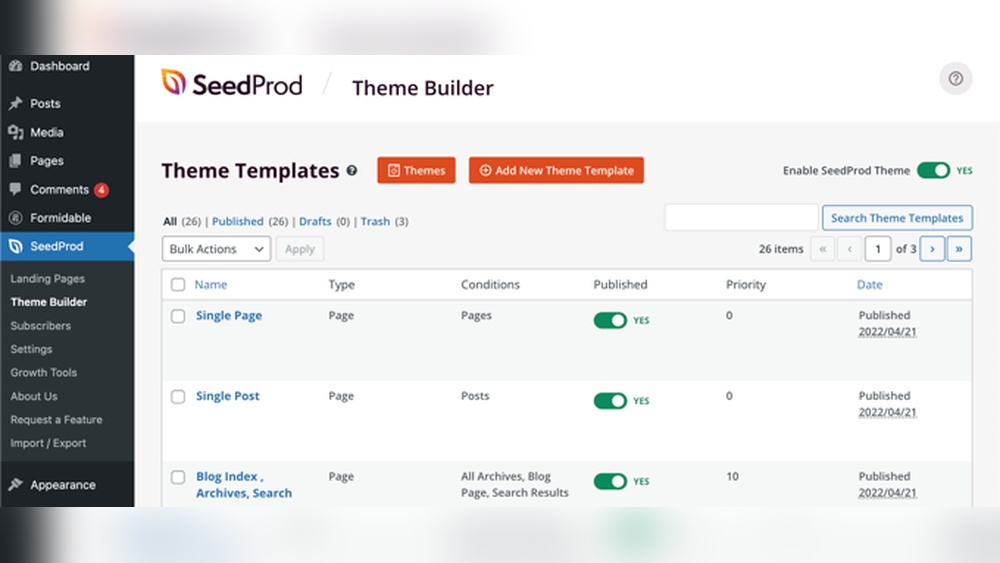
Are you curious about how many templates WordPress offers for your website? Choosing the right design can feel overwhelming, especially with so many options out there.
But knowing exactly how many templates are available can help you make a confident decision. You’ll discover the range of WordPress templates and learn how to pick the perfect one that fits your style and goals. Keep reading to unlock the secret to a stunning website that truly represents you.
Credit: startertemplates.com
WordPress Template Basics
WordPress uses templates to control how your website looks. Each template is a file that tells WordPress what to show and how to show it. Templates work together to create the pages you see on a site.
Understanding templates helps you customize your site better. You can change templates or add new ones to fit your needs. Templates are a key part of WordPress themes.
What Are WordPress Templates
WordPress templates are files that define the layout of your website. They control the design and structure of each page. Templates can show posts, pages, headers, footers, and more.
Each template file has a specific job. For example, one template shows the homepage, another shows blog posts. WordPress uses these templates to build your site automatically.
Role Of Templates In WordPress Themes
Themes in WordPress are made up of many templates. These templates work together to create a complete design. A theme controls the look and feel of your website by using these templates.
Templates decide how content is displayed on different pages. They help keep a consistent style across the whole site. Changing a template changes part of the site’s appearance.

Credit: developer.wordpress.org
Types Of WordPress Templates
WordPress uses different types of templates to show your content. Each template controls how a part of your website looks. Understanding these templates helps you customize your site better. Here are the main types of WordPress templates.
Default Templates
Default templates are the basic files WordPress uses to display pages. They include templates like index.php and single.php. These templates work automatically if no custom template is set.
Custom Templates
Custom templates are made by users or developers. They let you create unique layouts for specific pages. You can assign these templates to individual pages for a special look.
Page Templates
Page templates control how individual pages appear. You can create different designs for about pages, contact pages, or landing pages. This gives flexibility in page presentation.
Post Templates
Post templates manage how blog posts display on your site. They include templates for single posts and their content layout. This helps keep your blog posts consistent.
Archive Templates
Archive templates show lists of posts, categories, or tags. They help organize content for easier navigation. Examples include category.php and archive.php files.
Specialty Templates
Specialty templates cover unique content types like search results or 404 error pages. They improve user experience by customizing these special pages. Examples are search.php and 404.php.
Template Count In WordPress Core
WordPress comes with a variety of templates built into its core system. These templates help control how your website looks and functions. Understanding the number and types of templates can help you customize your site better. WordPress uses a system called the template hierarchy to decide which template to show on each page.
Built-in Templates Overview
WordPress includes several default templates. These templates cover common pages like the homepage, single posts, and archives. Some key templates are:
- index.php – the main fallback template
- single.php – for individual blog posts
- page.php – for static pages
- archive.php – for category and date archives
- search.php – for search results
- 404.php – for pages not found
Each template file has a specific role in displaying content. Together, they form the core template set in WordPress.
Template Hierarchy Explained
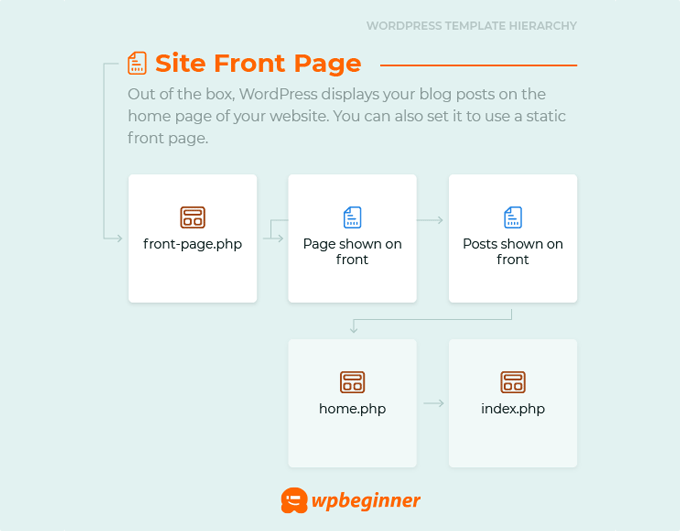
WordPress uses a template hierarchy to pick the right template. It checks for the most specific template first. If it is not found, WordPress moves down the list to a more general template.
For example, when showing a single post, WordPress looks for single-{post-type}.php first. If missing, it uses single.php. If that is not available, it falls back to index.php.
This system helps developers create custom templates for different content types. The hierarchy ensures WordPress always finds a template to display your content properly.
Templates In Popular WordPress Themes
WordPress themes come with different templates that help shape your website. These templates control the layout and design of pages and posts. Popular WordPress themes offer various template options to fit many needs. Templates can vary in number and style depending on the theme type.
Templates in popular themes let you create blogs, portfolios, shops, and more. They make building a website easier without coding. Understanding the types of templates available helps you pick the right theme.
Templates In Free Themes
Free WordPress themes usually include basic templates. You will find templates for the homepage, blog posts, and contact pages. Some free themes offer a few extra layouts for archives or galleries. These templates cover the essential parts of most websites. They are simple and easy to customize.
Templates In Premium Themes
Premium themes come with many more templates than free ones. They often include multiple homepage designs and custom page layouts. Templates for portfolios, e-commerce, and landing pages are common. These themes provide more style and functionality options. They suit websites with specific needs and unique designs.
Templates In Theme Builders
Theme builders give the most flexible template options. You can create and edit templates visually without coding. They offer templates for headers, footers, single posts, and archives. Theme builders let you design custom layouts for every part of your site. This makes your website truly unique and tailored to your needs.
Using Template Kits And Packs
Using template kits and packs is a smart way to build a WordPress site fast. These kits offer ready-made designs for pages, sections, and elements. They help users save time and effort while keeping the site professional and attractive. Template kits fit well with page builders like Elementor, making customization easy even for beginners.
What Are Template Kits
Template kits are sets of pre-designed templates for websites. They include pages like home, about, contact, and blog layouts. Users can import these templates into WordPress and adjust the content. Template kits provide a consistent look across the whole site. They reduce the need to design each page from scratch.
These kits work well with popular page builders. You can mix and match templates to suit your needs. Template kits often come with design elements like buttons, headers, and footers. This helps create a cohesive website design quickly and easily.
Top Template Kits For 2025
Several template kits stand out for 2025. Astra Starter Templates offer a wide range of styles for many business types. OceanWP Template Kits provide clean, modern designs suitable for portfolios and shops. GeneratePress Kits focus on speed and simplicity.
Elementor Template Kits remain popular due to their ease of use and flexibility. Kadence Template Packs offer stylish and professional designs for various niches. Each kit supports fast setup and smooth editing.
Choosing the right template kit depends on your site goals and style. These kits help create a polished website without needing deep design skills.
Creating Custom Templates
Creating custom templates in WordPress gives you full control over your website’s design. It lets you build pages that fit your exact needs. Custom templates can change how content looks and works on different parts of your site.
You can use custom templates to make unique layouts for blogs, portfolios, or product pages. This helps your site stand out and better serve your visitors. Understanding how to create these templates is key to a flexible and professional website.
Tools For Template Creation
WordPress offers many tools for creating custom templates. The built-in Theme Editor lets you modify template files directly. Code editors like Visual Studio Code or Sublime Text help write clean and organized code. Page builder plugins such as Elementor or Beaver Builder allow drag-and-drop template design without coding.
Using these tools simplifies the process. They help you preview changes live and fix errors quickly. Some tools support PHP, HTML, CSS, and JavaScript, essential for custom templates.
Best Practices For Custom Templates
Keep your custom templates simple and focused on user experience. Use clear, consistent code to avoid errors. Test templates on different devices to ensure responsiveness. Backup original theme files before making changes.
Use child themes to protect your custom work from theme updates. Name your template files clearly to avoid confusion. Clean and well-commented code makes future edits easier.
Managing Templates In WordPress
Managing templates in WordPress is simple and flexible. Templates control the design and layout of your site. Changing or editing them lets you customize your website’s look. WordPress offers many options to manage templates easily. You can switch templates or make small edits without coding. Understanding how to handle templates helps keep your site fresh and user-friendly.
Switching And Editing Templates
Switching templates is quick. Go to your WordPress dashboard and select Appearance > Themes. Here, you can activate a new template with one click. Editing templates can be done through the Theme Editor or by using a child theme. A child theme keeps your changes safe during updates. Small edits like colors or fonts can be done in the Customizer.
Template Compatibility Issues
Not all templates work well with every plugin or WordPress version. Some older templates may cause display problems. Always check if the template supports your current WordPress version. Test new templates on a staging site to avoid errors. Compatibility issues can slow down your site or break features. Choose templates with good reviews and regular updates.
Credit: www.wpbeginner.com
Future Trends In WordPress Templates
The future of WordPress templates looks exciting. New technologies are changing how templates are built and used. These changes will make designing websites easier and faster. They also offer more control over how a site looks and works. Let’s explore two key trends shaping WordPress templates.
Block-based Templates
Block-based templates use small blocks for different parts of a page. Each block can hold text, images, or buttons. Users can move or change these blocks easily. This method makes website design more flexible. People can create unique layouts without coding skills. It also speeds up the design process. More themes will use block-based templates soon.
Full Site Editing Impact
Full Site Editing (FSE) lets users change every part of their website. Not just posts or pages, but headers, footers, and sidebars too. FSE uses a visual editor with blocks to build the entire site. This gives complete design control without programming. Themes will adapt to support FSE fully. It means easier customization and more creative freedom for users.
Frequently Asked Questions
How Many Default Templates Come With WordPress?
WordPress includes several default templates like index. php, single. php, and page. php. These templates control different page types and layouts automatically.
Can I Use Free Templates From The WordPress Repository?
Yes, the WordPress theme repository offers thousands of free templates. These are easy to install and customize for your website.
Are Premium WordPress Templates Worth Buying?
Premium templates offer advanced features, better design, and support. They provide more customization options and regular updates compared to free ones.
How Often Does WordPress Add New Templates?
WordPress updates its default templates occasionally with major releases. New themes and template parts may be added to improve functionality.
Conclusion
WordPress offers thousands of templates for websites. You can find free and paid options to fit any style. Templates help create a site quickly without coding skills. They come in many designs for blogs, shops, and portfolios. Choosing the right template makes your site look professional.
Explore the WordPress theme directory or trusted marketplaces. Keep your site updated and secure after choosing a template. Templates make building a website easier and faster. Start with a simple design and customize as you grow.


