

Have you ever wondered what domain a website is hosted on? Knowing this can unlock important details about the site’s origin, reliability, and even security.
Whether you’re curious about a competitor’s site or just want to learn more about your favorite online spots, understanding how to find a site’s hosting domain puts you in control. You’ll discover simple ways to uncover the domain behind any website and why this knowledge matters for your online experience.
Keep reading—you’re about to gain insights that can change how you navigate the web.

Credit: dorik.com
Check Domain With Whois Lookup
Checking the domain of a website helps you learn who owns it and where it is hosted. Whois lookup is a tool that gives you this information quickly. It reveals details like registration date, expiry date, and contact info. This data helps in understanding the background of the website.
Using Online Whois Tools
Many websites offer free Whois lookup services. You just enter the domain name, and the tool shows the details. Popular tools include Whois.net, ICANN Lookup, and DomainTools. These tools work fast and are easy to use. They provide clear information about the domain owner and hosting details.
Interpreting Whois Data
Whois data includes the registrant’s name, email, and phone number. It also shows the domain registrar and dates of registration and expiry. Technical details like DNS servers appear too. Understanding this data helps verify the domain’s authenticity. It can also reveal if the domain is active or near expiration.
Privacy Protection And Its Impact
Some domain owners use privacy protection services. These services hide personal information in the Whois data. Instead of the owner’s name, you see the privacy service’s details. This protects the owner’s identity but limits the information you get. It is common for personal and business websites to use this feature.
Use Dns Records To Trace Hosting
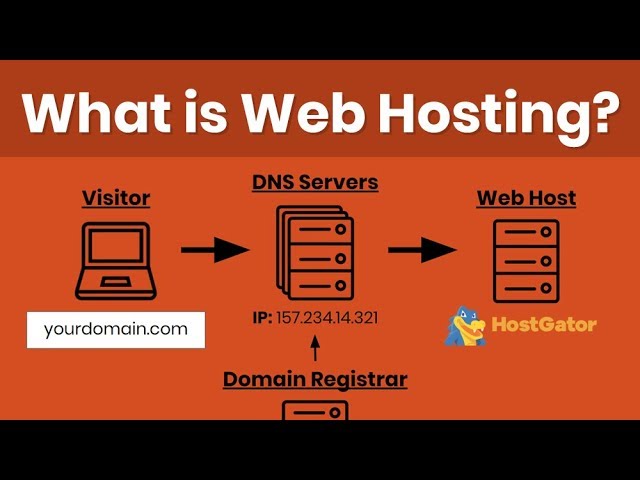
Tracing where a website is hosted can be simple by using DNS records. DNS records hold key information about the domain and its connection to servers. They help reveal the hosting details behind a website. This method provides clear insight without needing deep technical skills.
Finding Ip Address From Dns
Every website has an IP address linked to its domain. This IP shows the physical server hosting the site. DNS records store this IP address. By extracting it, you learn where the site lives online. The IP acts like a digital home address for the website.
Understanding A And Cname Records
A records point a domain to an IP address directly. They are the main way to find the hosting server. CNAME records, on the other hand, link a domain to another domain. This helps in managing multiple domains easily. Both records are vital for tracing hosting through DNS.
Using Dns Lookup Tools
Many free tools let you check DNS records quickly. These tools show A and CNAME records clearly. You enter the domain name and get server details. This process reveals the hosting IP and related information. DNS lookup tools make tracing hosting accessible to all users.
Identify Hosting Provider
Identifying the hosting provider of a website helps understand where the site lives online. This knowledge can aid in troubleshooting, improving site speed, or deciding on hosting services. Several methods exist to find out who hosts a website. Each way offers quick, clear answers.
Ip Address Lookup Services
Every website has an IP address linked to its hosting server. IP address lookup tools show this address and provide hosting details. Enter the website URL into these tools for instant results. They reveal the server location and sometimes the hosting company name.
Using Hosting Checker Websites
Hosting checker websites specialize in identifying hosting providers. They scan the domain and reveal the hosting service used. These tools are easy to use and require only the website’s URL. They also provide extra details like DNS records and server type.
Recognizing Popular Hosting Companies
Many websites use well-known hosting companies. Names like Bluehost, GoDaddy, and SiteGround often appear in server data. Recognizing these names helps confirm the hosting provider quickly. Common hosting companies have distinct IP ranges and server signatures.
Leverage Browser Extensions
Browser extensions are useful tools to find out where a site is hosted. They work directly in your browser. You do not need to visit other websites or use complex tools. These extensions quickly show hosting details. They save time and simplify the process.
Using browser extensions is simple. Just install the extension and visit the site you want to check. The extension will display hosting information instantly. This helps you learn about a site’s server, IP address, and hosting provider easily.
Popular Extensions For Hosting Info
Several extensions provide hosting data. “BuiltWith” shows technologies and hosting details. “Wappalyzer” reveals server info and hosting platform. “WhoIsHostingThis” directly tells you the hosting company. These tools are free or offer free versions. They work on popular browsers like Chrome and Firefox.
How Extensions Extract Data
Extensions collect data from the website’s code and server response. They analyze DNS records, IP addresses, and HTTP headers. Some extensions connect to external databases for more details. This process happens in seconds. You get a clear picture of the site’s host without technical knowledge.
Advantages Of Browser Tools
Browser tools are fast and easy to use. No special skills are needed. They provide accurate hosting information instantly. You can check multiple sites quickly. These tools also reveal other useful data like SSL certificates and CMS platforms. They help you make informed decisions about websites.
Use Command Line Tools
Using command line tools is a quick way to find out what domain a site is hosted on. These tools run on your computer and give direct information about the website’s server. They help you learn the domain’s IP address and network path. No special software is needed, just a simple command prompt or terminal.
Using Ping And Traceroute
Ping sends small data packets to a website’s server. It checks if the site is reachable and shows the IP address. Traceroute maps the path data takes to reach the server. It lists all the network points between your computer and the website. Both tools reveal the domain behind the site’s hosting.
Executing Nslookup Commands
Nslookup is a command to find DNS information. It tells which domain name matches an IP address. Enter the website’s URL and run nslookup. The tool returns the domain’s server details. This helps confirm where the site is hosted online.
Reading Command Line Outputs
Command line outputs show important data in plain text. Look for IP addresses and domain names. The first few lines usually contain the main server’s address. Details like server response time appear in ping results. Understanding this output helps identify the hosting domain easily.
Credit: www.youtube.com
Identify Cdn Usage
Identifying if a site uses a Content Delivery Network (CDN) helps understand its hosting setup. CDNs speed up websites by storing copies of content worldwide. This section explains how to spot CDN usage and why it matters for hosting detection.
What Is A Cdn?
A CDN is a group of servers placed in many locations. These servers deliver website content closer to visitors. This reduces loading time and improves site speed. CDNs also protect sites from traffic spikes and attacks. Many popular sites use CDNs to serve users faster and more reliably.
Tools To Detect Cdn Providers
Several online tools help find out if a site uses a CDN. Services like CDN Finder and BuiltWith scan website data. They show if a CDN is active and name the provider. You can also check DNS records or IP addresses. These methods reveal if content comes from a CDN network or the main server.
How Cdn Affects Hosting Detection
CDNs can hide the real hosting server of a website. The site’s IP address might show the CDN instead of the original host. This makes it harder to identify where the site is hosted. Some tools may report the CDN’s location, not the true server’s. Knowing about CDN use helps interpret hosting information correctly.
Tips For Quick And Accurate Results
Finding the domain a site is hosted on can be tricky. Quick and accurate results save time and reduce confusion. Following some simple tips helps you get clear answers fast. These tips improve your search process and reduce mistakes.
Combining Multiple Methods
Use different tools and techniques together. Check the website’s “About” or “Contact” page for clues. Use online domain lookup tools like WHOIS. Try IP address lookup services. Each method gives a piece of the full picture.
Verifying With Multiple Sources
Confirm your results by checking more than one site. Compare information from domain registrars and hosting providers. Look at website analytics or security services for hosting details. Different sources help ensure your answer is correct.
Avoiding Common Pitfalls
Don’t rely on just one tool or source. Watch out for outdated or incomplete data. Avoid guessing based on similar domain names. Be cautious with free tools that may show wrong results. Careful checking avoids errors and saves time.
Credit: wegic.ai
Frequently Asked Questions
What Is A Domain In Website Hosting?
A domain is the web address where a site is found online. It directs users to the server hosting the website content. Domains are unique and registered through domain registrars to ensure exclusive use.
How Can I Find Which Domain Hosts A Site?
You can check the domain hosting a site using online WHOIS lookup tools. These tools reveal domain registrant and hosting information quickly and easily.
Does Hosting Depend On The Domain Name?
No, hosting and domain are separate. The domain points to the hosting server, but hosting is where website files reside and operate.
Can Multiple Sites Share One Domain?
Yes, multiple sites can share one domain using subdomains or subdirectories. This helps organize content under a single domain efficiently.
Conclusion
Knowing the domain where a site is hosted helps understand its origin and reliability. It also assists in finding related information about the website’s owner or services. This knowledge supports safer browsing and better trust in online sources. Checking domain details is simple and useful for everyday internet users.
Keep exploring to stay informed and secure online.


