
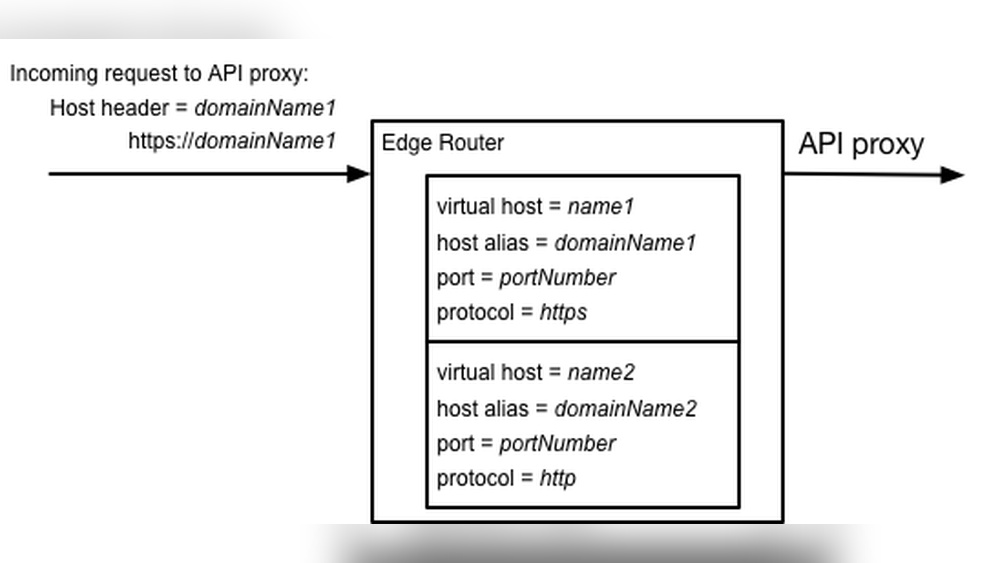
Have you ever wondered how multiple websites can run smoothly on a single server without mixing up their content? The answer lies in something called a Domain Virtual Host.
If you manage a website or plan to launch one, understanding this concept can save you time and headaches. You’ll discover exactly what a Domain Virtual Host is, how it works, and why it matters for your online presence. Keep reading to unlock the secrets that can make your website management simpler and more efficient.

Credit: bdwebit.com
Domain Virtual Host Basics
Understanding the basics of domain virtual hosting helps you manage multiple websites on one server. It saves money and makes site management easier. This section explains what a virtual host is, the types available, and its role in web hosting.
What Is A Virtual Host
A virtual host allows a single server to host many websites. It uses the same IP address but serves different websites based on domain names. This way, one server handles multiple websites without confusion.
Types Of Virtual Hosting
There are mainly two types: name-based and IP-based virtual hosting. Name-based uses the website’s domain name to decide which site to show. IP-based assigns a unique IP address to each website on the server.
Role In Web Hosting
Virtual hosting saves resources by sharing one server for many sites. It helps small businesses and individuals run websites affordably. It also simplifies server management by grouping multiple sites on one machine.
Credit: forum.virtualmin.com
Setting Up Domain Virtual Hosts
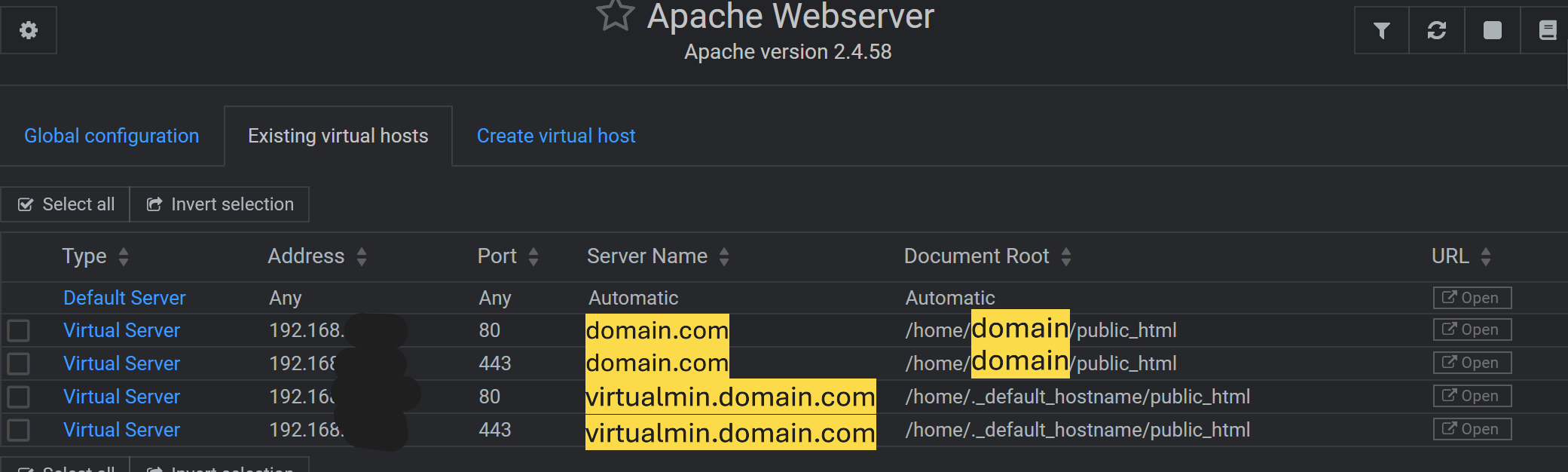
Setting up domain virtual hosts allows you to run multiple websites on a single server. Each site can have its own domain and content. This setup saves resources and simplifies management.
You must configure your web server to recognize different domains. This process involves creating virtual host files with specific settings for each domain. The two most common web servers are Apache and Nginx. Both require different configuration steps.
Configuring Apache Virtual Hosts
Start by creating a virtual host file in the Apache configuration directory. The file usually lives in /etc/apache2/sites-available/. Define the domain name and the document root. The document root is the folder where your website files are stored.
Use the a2ensite command. Restart Apache to apply changes. Apache reads these settings and serves the right site based on the domain.
Configuring Nginx Virtual Hosts
In Nginx, virtual hosts are called server blocks. Create a server block file in /etc/nginx/sites-available/. Specify the domain name with the server_name directive. Set the root directive to the website folder.
Link the file to /etc/nginx/sites-enabled/ using ln -s. Reload Nginx to activate the new site. Nginx uses these server blocks to serve the correct website based on the domain in the request.
Common Configuration Files
Both Apache and Nginx store virtual host configurations in specific directories. Apache uses sites-available and sites-enabled. Nginx uses the same structure. This separation helps manage active and inactive sites.
Configuration files include domain names, root directories, and access rules. Correct syntax is crucial to avoid errors. Use commands like apachectl configtest or nginx -t to check configurations before restarting the server.
Benefits Of Using Domain Virtual Hosts
Domain virtual hosts offer several important benefits for website owners and administrators. They allow hosting multiple websites on a single server using different domain names. This approach brings efficiency and ease to managing web hosting.
Using domain virtual hosts saves money, optimizes server resources, and simplifies administration. These advantages make them a practical choice for many businesses and developers.
Cost Efficiency
Domain virtual hosts reduce the need for multiple physical servers. This cuts hardware and maintenance costs. Shared hosting lowers electricity bills and space usage as well. Paying for one server to host many sites is budget-friendly. It suits small businesses and startups with limited funds.
Resource Optimization
Virtual hosts use server resources wisely. CPU, memory, and bandwidth are shared among sites. This prevents waste and improves performance. Server capacity is fully utilized without overloading. Websites run smoothly even with limited hardware. This balance boosts overall efficiency.
Simplified Management
Managing several websites on one server is easier with virtual hosts. Admins update and configure sites from one control panel. This saves time and reduces errors. It also simplifies backups and security setups. Centralized management helps keep everything organized and secure.
Domain Virtual Host Vs Ip-based Hosting
Domain Virtual Host and IP-Based Hosting are two common ways to host websites on a server. Both methods let multiple websites run on a single server. Each method uses a different approach to handle web traffic and site addresses.
Understanding their differences helps you choose the right hosting for your needs. Below, we explore their setup, performance, and best use cases.
Differences In Setup
Domain Virtual Host uses a single IP address for many websites. It relies on the domain name to direct visitors to the correct site. This setup saves IP addresses and is easier to manage for many sites.
IP-Based Hosting assigns a unique IP address to each website. Each site is linked directly to its own IP. This setup needs more IPs but can offer clearer separation between sites.
Performance Considerations
Domain Virtual Host shares server resources among all sites on one IP. This can slow down if many sites get heavy traffic. Still, for small to medium sites, this sharing works well.
IP-Based Hosting isolates websites by IP address. It can improve performance for high-traffic sites. It also helps with some security and SSL certificate setups.
Use Cases For Each
Domain Virtual Host suits blogs, small business sites, and personal pages. It is cost-effective and simple for most users. Hosting many sites on one IP is common in shared hosting.
IP-Based Hosting fits businesses needing unique IPs for security or SEO. It suits sites with SSL certificates that require dedicated IPs. Also good for large or resource-heavy websites.
Troubleshooting Common Issues
Troubleshooting domain virtual host issues can feel tricky. Many common problems arise from DNS, configuration, or SSL settings. Understanding these areas helps fix errors fast and keeps websites running smoothly.
Problems often show up as site not found errors, wrong websites loading, or security warnings. Each issue points to a specific cause. Identifying the root makes solving easier.
Resolving Dns Problems
DNS issues stop your domain from pointing to the right server. Check if your domain’s DNS records are correct. The A record must match your server IP address. Use online tools to test DNS propagation. Clear local DNS cache to see updated records. Wrong or missing DNS records often cause virtual host errors.
Fixing Configuration Errors
Virtual host configuration mistakes cause sites to load incorrectly. Look for typos in your config files. Ensure each virtual host has a unique ServerName. Confirm the DocumentRoot path points to the correct folder. Restart the web server after changes. Check error logs for clues. Small syntax errors often break virtual hosts.
Handling Ssl With Virtual Hosts
SSL problems lead to security warnings on your site. Each virtual host needs its own SSL certificate or a multi-domain certificate. Make sure SSL directives are inside the right virtual host block. Use tools to test SSL setup and find issues. Renew certificates before they expire. Proper SSL setup keeps users safe and boosts trust.
Advanced Virtual Host Features
Advanced virtual host features improve how servers handle websites. These features allow better control and flexibility. They help manage multiple sites on one server efficiently. Using these options, you can handle complex hosting needs with ease.
Using Wildcard Virtual Hosts
Wildcard virtual hosts serve many subdomains with one setup. Instead of creating separate entries for each subdomain, one wildcard entry covers all. This saves time and simplifies server management. It is useful for sites with many subdomains or dynamic content.
Implementing Security Measures
Virtual hosts can enhance security by isolating websites. Each host can have its own security rules and certificates. This stops one site’s problems from affecting others. Setting HTTPS and firewalls per virtual host protects data and users.
Load Balancing With Virtual Hosts
Load balancing shares traffic among several servers. Virtual hosts can direct visitors to different servers based on rules. This reduces server overload and speeds up response time. It keeps websites running smoothly during high traffic.

Credit: docs.rackspace.com
Frequently Asked Questions
What Is A Domain Virtual Host In Web Hosting?
A domain virtual host allows multiple websites to share one server IP. Each site uses a unique domain name for access. This setup saves resources and makes managing several sites easier and more efficient on a single server.
How Does Domain Virtual Hosting Work?
Domain virtual hosting directs requests based on the domain name. The server identifies the requested domain and loads the corresponding website files. This lets multiple websites run independently on the same IP address without conflicts.
Why Use Domain Virtual Hosts For Websites?
Domain virtual hosts save server costs by hosting many sites on one server. They simplify website management and improve resource usage. This method is ideal for businesses or developers managing multiple domains efficiently.
Can Domain Virtual Hosts Improve Seo?
Yes, domain virtual hosts can improve SEO by supporting unique domain names. Each domain can have its own SEO settings and content. This helps search engines index sites separately, enhancing visibility and rankings.
Conclusion
Domain virtual hosting lets one server host many websites easily. Each site has its own domain name but shares the same IP address. This saves money and makes managing websites simpler. It suits small businesses and personal projects well. Understanding domain virtual hosts helps in setting up efficient web servers.
It also improves your website organization without extra hardware. Try using domain virtual hosting to get the most from your server space. Simple, effective, and widely used technology.


