
Do you ever wonder where your domain is actually hosted? Knowing who hosts your domain is crucial for managing your website smoothly and keeping it secure.
If you’re unsure about where your domain lives or how to find this information, you’re not alone. You’ll discover simple steps to uncover your domain host and why this knowledge matters for your website’s success. Keep reading to take control of your online presence today.
Check Your Domain Registrar
Checking your domain registrar is a key step in managing your website. The domain registrar is the company where you bought your domain name. Knowing this helps you control your domain settings, renew your domain, and protect your site.
This section shows simple ways to find your domain registrar details. It uses easy tools anyone can use. Understanding these details helps you keep your website safe and under your control.
Locate Your Registrar Details
Start by visiting the website where you think you registered your domain. You may have an account with them. Log in and check your domain list. The registrar name usually appears on your billing or account page.
If you do not remember the site, check your email for domain purchase messages. These emails often show the registrar’s name. Keep these details safe for future reference.
Using Whois Lookup
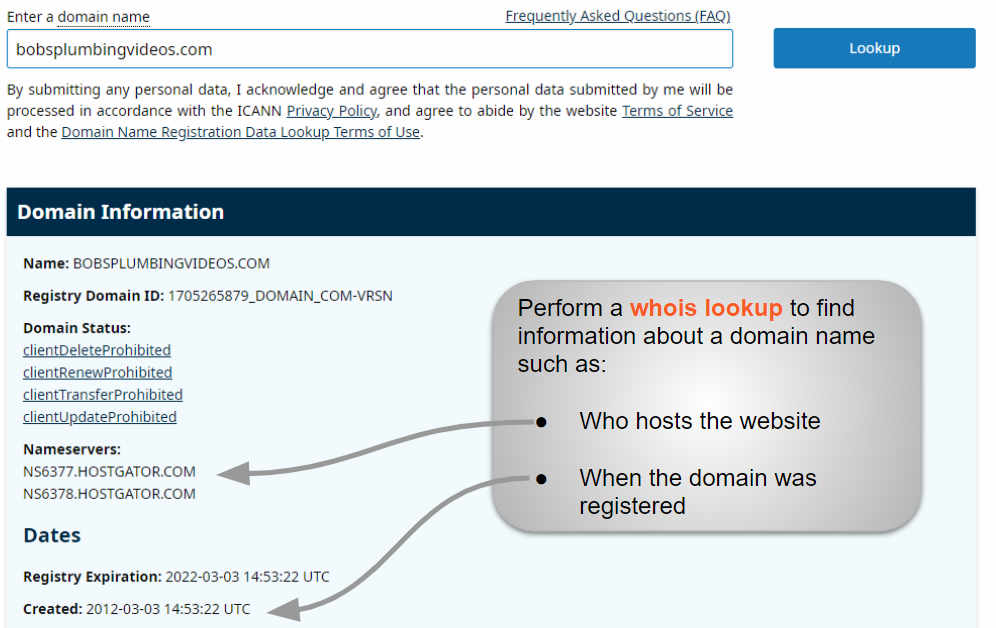
WHOIS Lookup is a free tool that shows domain registration details. Enter your domain name into a WHOIS search box. The results include the registrar’s name, contact info, and registration dates.
Many websites offer WHOIS Lookup services. Use any trusted site for quick results. This method works even if you lost your registrar login information.
Credit: www.boldgrid.com
Identify Your Hosting Provider
Identifying your hosting provider is the first step to managing your website effectively. Knowing who hosts your domain helps you handle technical issues and billing. It also guides you in making updates or moving to a new host. This section explains simple ways to find out your hosting provider.
Use Dns Records To Find Hosting
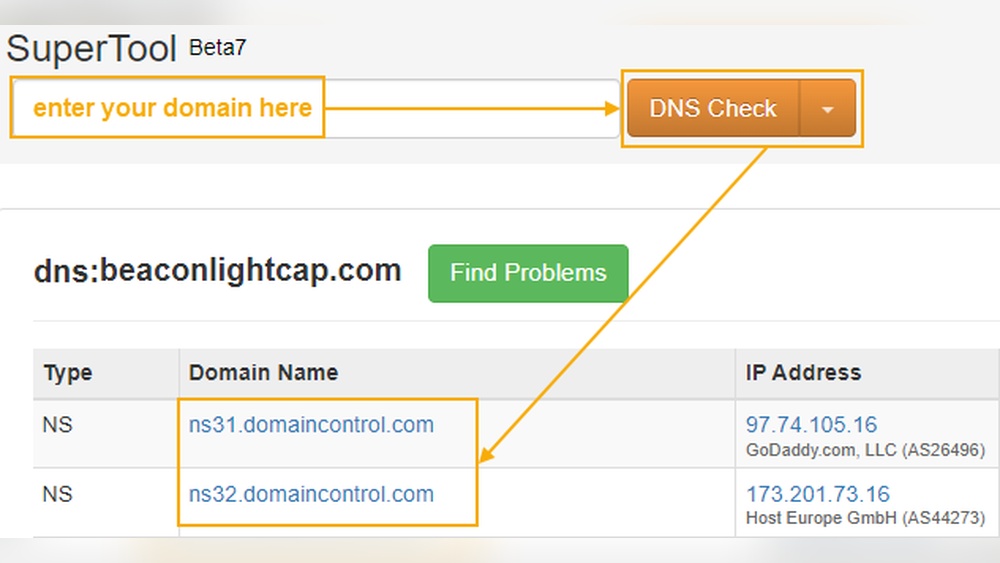
DNS records hold important details about your domain. They show the servers that manage your website data. You can check the DNS records using online tools or command line commands like “nslookup” or “dig”. Look for the “A” record or “CNAME” record. These records point to the server IP address or hostname. This information often reveals your hosting provider.
Tools To Trace Hosting Provider
Several online tools help trace your hosting provider quickly. Websites like WhoIsHostingThis or HostingChecker scan your domain. They analyze DNS and IP data to find the host. These tools offer a simple interface. Just enter your domain name. The results show your hosting company’s name and details. These tools save time and avoid technical steps.
Analyze Your Website’s Ip Address
Your website’s IP address is a key detail for finding your hosting provider. It acts like a digital address that points to your website’s location on the internet.
By analyzing the IP address, you gain clues about the company hosting your website. This helps with technical support and managing your site better.
Find Your Website’s Ip
Start by identifying the IP address linked to your website’s domain name. You can do this on your computer using simple tools.
On Windows, open Command Prompt and type ping yourwebsite.com. On Mac or Linux, open Terminal and do the same.
The response will show a number like 192.0.2.1. This is your website’s IP address.
Use Ip Lookup Services
After you get the IP address, use an online IP lookup service. These tools reveal details about the IP’s owner and location.
Enter your IP address into websites like whois.domaintools.com or iplocation.net. They will show the hosting company name and contact info.
This information helps you know who hosts your site and where their servers are based.
Consult Your Website Control Panel
Consulting your website control panel is a simple way to find out who hosts your domain. This panel holds key details about your web hosting service. Accessing it lets you see the hosting provider’s name and other important info.
Most control panels offer clear and easy options to check your hosting details. Understanding where to look saves time and prevents confusion. You don’t need special skills to navigate these panels.
Accessing Hosting Information
Start by logging into your website control panel. Use the username and password given by your hosting provider. Once logged in, look for sections like “Account Info,” “Server Info,” or “Domain Details.”
These sections often display the hosting company’s name and contact info. You might also see your server’s IP address and hosting plan. Save this information for future reference.
Common Control Panels Explained
Many websites use popular control panels such as cPanel, Plesk, or DirectAdmin. cPanel is user-friendly and widely used by hosting companies. It shows hosting details under “General Information” or “Server Information.”
Plesk has a clean interface with clear categories for domains and hosting info. DirectAdmin is simpler but still provides essential hosting data easily. Knowing your control panel helps you find hosting details faster.
Contact Support For Clarification
Contacting support can clear up confusion about where your domain is hosted. Support teams have the right tools to check your domain details. They can guide you through finding your domain’s hosting provider. Reach out with your domain name and any account information you have. This makes the process faster and easier.
Reaching Out To Your Registrar
Your domain registrar is the company where you bought your domain. They keep records of your domain registration and renewal. Contact their support to ask about your domain host. Use the contact form or phone number on their website. Provide your domain name and account details for quick help. They can tell you if your domain is hosted with them or elsewhere.
Contacting Hosting Providers
Hosting providers manage the servers where your website lives. If you know your hosting company, contact their support team. Ask them to confirm if your domain is hosted on their servers. Use chat, email, or phone for clear communication. Keep your account and domain details ready. They can help with domain hosting questions and technical support.
Avoid Common Confusions
Knowing who hosts your domain can be tricky. Many people confuse domain registration with hosting. This confusion leads to unnecessary trouble. Clear understanding helps manage your website smoothly. Avoid common mistakes by learning key differences.
Differences Between Registrar And Host
A domain registrar sells and manages domain names. They handle your domain’s registration and renewal. Hosting providers store your website files online. They make your site visible on the internet. Your domain registrar and host can be different companies. Knowing this stops you from mixing up roles.
Handling Multiple Hosting Services
You might use more than one hosting service. For example, email hosting and website hosting can be separate. Each service has its own control panel. Keep track of login details for each service. Mixing them up can cause confusion and downtime. Organize your services clearly to avoid problems.
Prevent Future Hosting Confusion
Preventing hosting confusion saves time and stress later. Knowing exactly where your domain is hosted helps avoid technical problems. Clear records and smart tools keep your domain organized. This way, you always have control and quick access.
Keeping Records Updated
Write down your hosting details as soon as you buy a domain. Include the provider’s name, login info, and purchase date. Update these records whenever you switch hosts or change settings. Store this information in a safe place you can reach anytime. Accurate records reduce mistakes and speed up support calls.
Using Hosting Management Tools
Many tools show your domain’s hosting details in one place. They track renewals, DNS settings, and server status. Use these tools to monitor your domain’s health regularly. Alerts help you fix problems before they grow. These management tools simplify hosting tasks and keep everything clear.

Credit: www.designsforgrowth.ie

Credit: hostarmada.com
Frequently Asked Questions
How Can I Find Who Hosts My Domain?
You can find your domain host by using online WHOIS lookup tools. These tools display domain registration and hosting information quickly and accurately.
What Details Does A Whois Lookup Provide?
A WHOIS lookup shows domain owner, registration date, expiry, and hosting provider details. It helps identify where your domain is hosted.
Can I Change My Domain Hosting Provider Easily?
Yes, you can change hosting by transferring your domain to a new provider. Ensure DNS records are updated to avoid downtime.
Is Domain Registrar Always The Same As Hosting Provider?
Not always. Your domain registrar registers your domain, but hosting can be with a different company. They can be separate entities.
Conclusion
Knowing where your domain is hosted helps you manage your website better. You can update settings and fix issues fast. It also keeps your site safe and running smooth. Use simple tools to find your host easily. Keep your login info secure and updated.
Understanding hosting gives you more control over your online presence. Take small steps to stay organized and informed. Your website’s success depends on good hosting choices. Stay confident and keep your site working well.


