

Choosing the right primary domain for your hosting account can feel confusing. But it’s one of the most important decisions you’ll make for your online presence.
Your primary domain is the first thing visitors see. It shapes how people find you, remember you, and trust your website. If you pick the wrong one, you could miss out on visitors and lose potential customers. You’ll discover exactly what your primary domain should be and why it matters so much.
By the end, you’ll know how to pick a domain that boosts your website’s success and makes your life easier. Keep reading—you don’t want to make this decision without these key insights.
Credit: www.webhostinghub.com
Choosing Your Primary Domain
Choosing the primary domain for your hosting account is a key step. It defines your website’s main address and identity on the web. Picking the right domain affects your site’s success and how visitors find you. Take time to consider important factors before making this choice.
Factors To Consider
Pick a domain that is easy to spell and remember. Shorter names work better for users. Avoid numbers and hyphens as they cause confusion. Check if the domain is available and not trademarked. Think about future growth and whether the name fits your brand long term.
Impact On Branding
Your primary domain reflects your brand’s image. It should match your business name closely. Consistent branding helps visitors trust your site. A clear domain name builds recognition and loyalty. Make sure it sounds professional and suits your market.
Seo Implications
The domain plays a role in search engine rankings. Using keywords in your domain can help, but avoid stuffing. A clean, relevant domain is easier for search engines to index. Keep the domain consistent to build authority over time. Changing domains later can hurt your SEO progress.
Types Of Domains To Use
Choosing the right domain for your hosting account is important. It affects your website’s identity and how people find you online. Different domain types serve different purposes. Understanding these types helps you pick the best primary domain.
Main Brand Domain
The main brand domain matches your business name or brand. It builds trust and recognition with visitors. People remember your brand domain easily. It also helps in creating a strong online presence.
Use your brand domain as the primary domain. It keeps your site professional and consistent. Avoid changing it often to keep your audience loyal.
Keyword-rich Domains
Keyword-rich domains include words that describe your products or services. They help improve search engine rankings. For example, a bakery might use “bestcupcakes.com.”
These domains can attract visitors searching for specific items. Use keywords naturally to avoid looking spammy. They work well for niche markets.
Geographic Domains
Geographic domains include city, region, or country names. They target local audiences effectively. For example, “nycplumbing.com” focuses on New York City customers.
Local domains help in local SEO and bring nearby visitors. They suit businesses serving specific areas. Geographic domains strengthen local brand identity.
Setting Up Your Primary Domain
Setting up your primary domain is an important step in managing your hosting account. This domain will be the main address visitors use to find your website. Choosing and configuring the right primary domain helps your site run smoothly and appear professional. Follow these guidelines to assign your domain correctly and manage its settings.
How To Assign Primary Domain
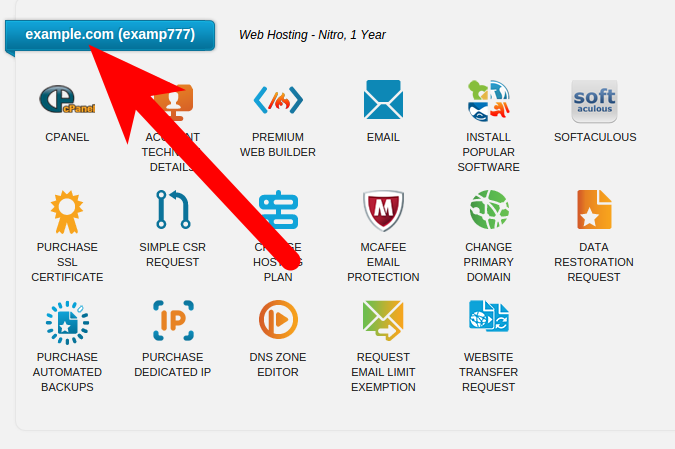
Start by logging into your hosting account dashboard. Look for the section labeled “Domains” or “Domain Management.”
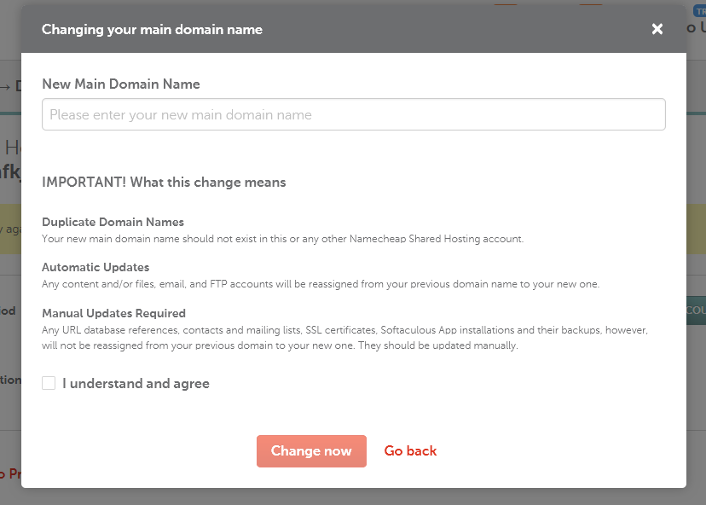
Select the option to set or change your primary domain. Enter the domain name you want as the main address. Save the changes to update your hosting settings.
The primary domain should be a domain you own and is active. Make sure it points to your hosting server using the correct DNS records.
Common Hosting Control Panels
Many hosts use control panels to manage domains easily. cPanel is the most popular and user-friendly option. It has a clear interface for domain settings.
Plesk is another control panel used by many providers. It offers similar tools but with a different layout. Both allow quick domain assignment and management.
Look for options like “Addon Domains,” “Primary Domain,” or “Domain Settings” in these panels. They guide you through setting up your domain properly.
Managing Domain Redirects
Redirects help send visitors from one domain to another. Use redirects if you want to point old domains to your new primary domain.
Set up 301 redirects for permanent moves. This helps maintain search engine rankings and user experience.
Control panels provide easy ways to create and manage redirects. Find the “Redirects” section and enter source and target URLs. Save changes to activate the redirect.
Domain Management Best Practices
Managing your domain well keeps your website safe and running smoothly. It helps avoid problems like downtime and loss of traffic. Good domain management saves money and protects your brand online.
Follow clear steps to keep control over your domains. Check dates, avoid conflicts, and organize subdomains smartly. These actions help your site stay strong and easy to manage.
Domain Renewal Tips
Always know your domain’s expiration date. Set reminders early to renew before it expires. Renewing on time stops your site from going offline. Consider auto-renewal to avoid missing dates. Keep your payment info updated in your hosting account. This prevents failed renewals and service interruptions.
Avoiding Domain Conflicts
Choose a unique domain name that matches your brand. Check for trademarks and similar names to avoid legal issues. Use privacy protection to keep your contact details safe. Monitor domain status regularly for unauthorized changes. Keep passwords strong and update them often for security.
Using Subdomains Vs Addon Domains
Subdomains work well for different site sections or languages. They keep everything under one main domain. Addon domains let you host separate websites on the same account. Use addon domains for distinct businesses or projects. Plan carefully to avoid confusion between subdomains and addon domains.
Troubleshooting Domain Issues
Domain issues can stop your website from working well. These problems affect visitors and email services. Fixing them fast helps keep your site online and trusted.
Resolving Dns Problems
DNS controls how your domain points to your website. Errors here can make your site unreachable. Check your DNS settings in your hosting account. Make sure the nameservers match your host’s details. Clear the DNS cache on your computer to see changes. Use online DNS checkers to find issues. Correct any wrong IP addresses or missing records.
Fixing Ssl Certificate Errors
SSL certificates protect data on your site. Errors cause browsers to warn visitors. Confirm your SSL is active and linked to your primary domain. Renew expired certificates immediately. Use your hosting panel to install or reinstall SSL. Check for mixed content on your pages. Ensure all links use “https” instead of “http.”
Handling Email Domain Conflicts
Email problems may arise if domain settings clash. Verify your MX records in DNS settings. These control where emails are sent and received. Remove old or incorrect MX entries. Confirm SPF, DKIM, and DMARC records exist to stop spam. Test sending and receiving emails after changes. Contact your hosting support if emails still fail.
Credit: www.namecheap.com

Credit: kb.hosting.com
Frequently Asked Questions
What Is A Primary Domain In Hosting Accounts?
A primary domain is the main website address linked to your hosting account. It represents your brand and is the default domain for your web content.
How To Choose The Best Primary Domain Name?
Pick a domain that is short, memorable, and relevant to your business. Avoid numbers or hyphens for better SEO and user recall.
Can I Change My Primary Domain Later?
Yes, most hosting providers allow changing the primary domain. However, it may affect SEO and require site configuration updates.
Why Is The Primary Domain Important For Seo?
Search engines prioritize your primary domain for ranking. A clear, relevant domain improves your site’s credibility and search visibility.
Conclusion
Choosing the right primary domain helps your website stand out. It builds trust with visitors and search engines alike. Keep it simple, clear, and related to your brand. Avoid complicated or long domain names that confuse users. The right choice supports your site’s growth and online presence.
Take time to pick a domain that fits your goals well. This small step makes a big difference in hosting success.


