
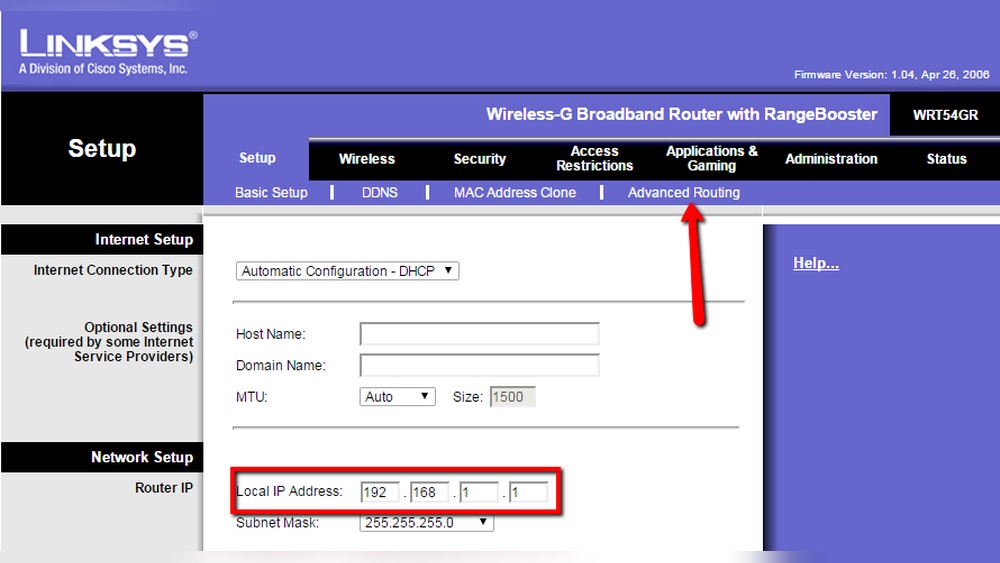
Are you setting up your Linksys router and wondering what exactly a Host Name and Domain Name are? These terms might sound technical, but understanding them is simpler than you think—and crucial for getting your network running smoothly.
Knowing the difference between your Host Name and Domain Name can help you customize your device, improve security, and troubleshoot connection issues faster. Keep reading, and you’ll discover clear, easy-to-follow explanations that will make managing your Linksys router feel like second nature.
Host Name Basics
Understanding host names is key to managing your Linksys network. Host names help identify devices clearly. They make connecting and organizing devices easier. This section breaks down the basics of host names.
Definition And Role
A host name is a label given to a device on a network. It helps to identify the device uniquely. Each device, like a computer or printer, has its own host name. This name is used instead of an IP address for easy recognition.
Host names play a role in naming devices so users can find them quickly. They help in managing networks by giving devices clear, human-friendly names.
How Host Names Work
Host names work by linking a readable name to an IP address. When you type a host name, the network finds the matching IP address. This process is called name resolution.
In Linksys routers, host names can be set or viewed in the settings. This helps you see all connected devices by their names, not just numbers.
Importance In Networking
Host names simplify network management and device identification. They reduce the need to remember complex IP addresses. This is helpful in home and office networks.
Networks with many devices rely on host names for smooth communication. They improve network monitoring and troubleshooting tasks. Overall, host names make networking more user-friendly.
Credit: www.noip.com
Domain Name Essentials
Understanding domain names is key to managing Linksys devices and networks. Domain names help identify websites and services on the internet. They make it easier to find and connect to online resources without using complex IP numbers.
What Is A Domain Name
A domain name is a unique address for a website on the internet. It is made of words separated by dots, like example.com. This name points to a specific location on the web, where the website or service is hosted.
Difference Between Domain And Host Names
A domain name covers a wider area on the internet, like a website or network. A host name is a part of that domain, identifying a specific device or service. For example, in mail.example.com, “example.com” is the domain, and “mail” is the host name.
Function In Internet Addressing
Domain names translate into IP addresses that computers use to communicate. They act as easy-to-remember labels for complex number sequences. This system helps users reach websites without typing long numbers.
Linksys Routers And Host Names
Linksys routers use host names to identify devices on a network. These names help users manage and find devices easily. Each device connected to a Linksys router has a host name. This name can be set by the user or assigned automatically by the router. Understanding host names helps keep networks organized and simple to control.
Default Host Name Settings
Linksys routers assign default host names to connected devices. These names often include the device type or model. The router uses these default names to recognize devices quickly. Default host names help users identify devices without extra setup. Sometimes, these names can be generic or unclear.
Changing Host Names On Linksys
Users can change host names in the Linksys router settings. This process is quick and easy through the router’s web interface. Changing names makes devices easier to recognize. Clear names help avoid confusion in busy networks. Users should pick simple, descriptive names for each device.
Benefits Of Custom Host Names
Custom host names improve network management and security. They help users spot devices fast and fix issues quicker. Custom names reduce the chance of mistakes in device control. They make it easier to share network access safely. Overall, custom host names keep networks neat and user-friendly.
Credit: workendtech.com
Linksys Domain Name Configuration
Configuring the domain name on a Linksys router helps manage network access easily. It links your network devices with an easy-to-remember address. This setup supports smooth communication inside and outside your home or office network.
Proper domain name configuration improves how you reach your devices remotely. It also helps run services like web servers or email servers on your network. Understanding this process makes managing your Linksys router simpler and more effective.
Setting Up Domain Names
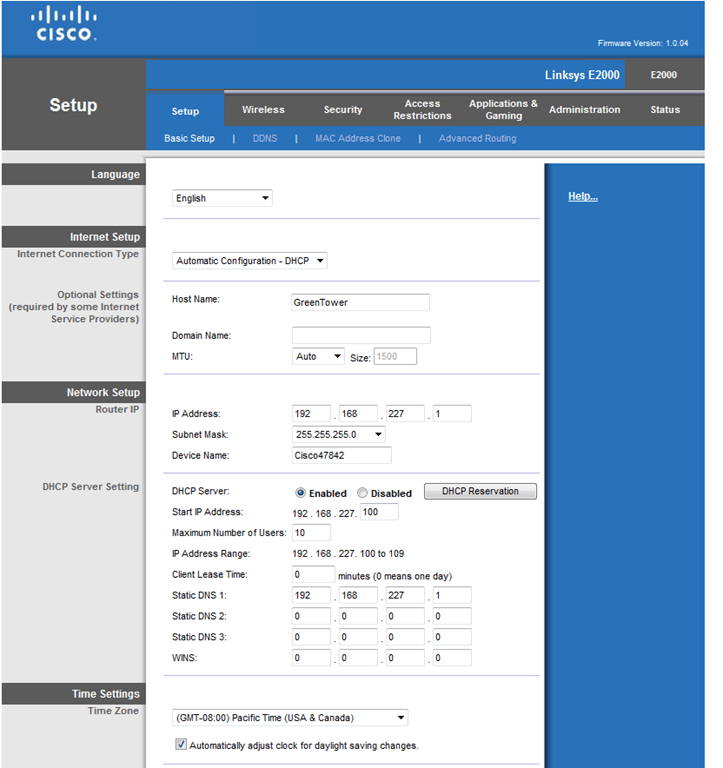
First, access your Linksys router’s web interface. Enter the router’s IP address in a browser. Login with your username and password.
Find the “Setup” or “Basic Setup” tab. Locate the “Domain Name” field. Enter your desired domain name carefully.
Save the changes to apply the new domain name. This setting helps identify your network on the internet.
Using Dynamic Dns With Linksys
Dynamic DNS (DDNS) updates your domain name automatically. It matches your changing IP address with your domain name.
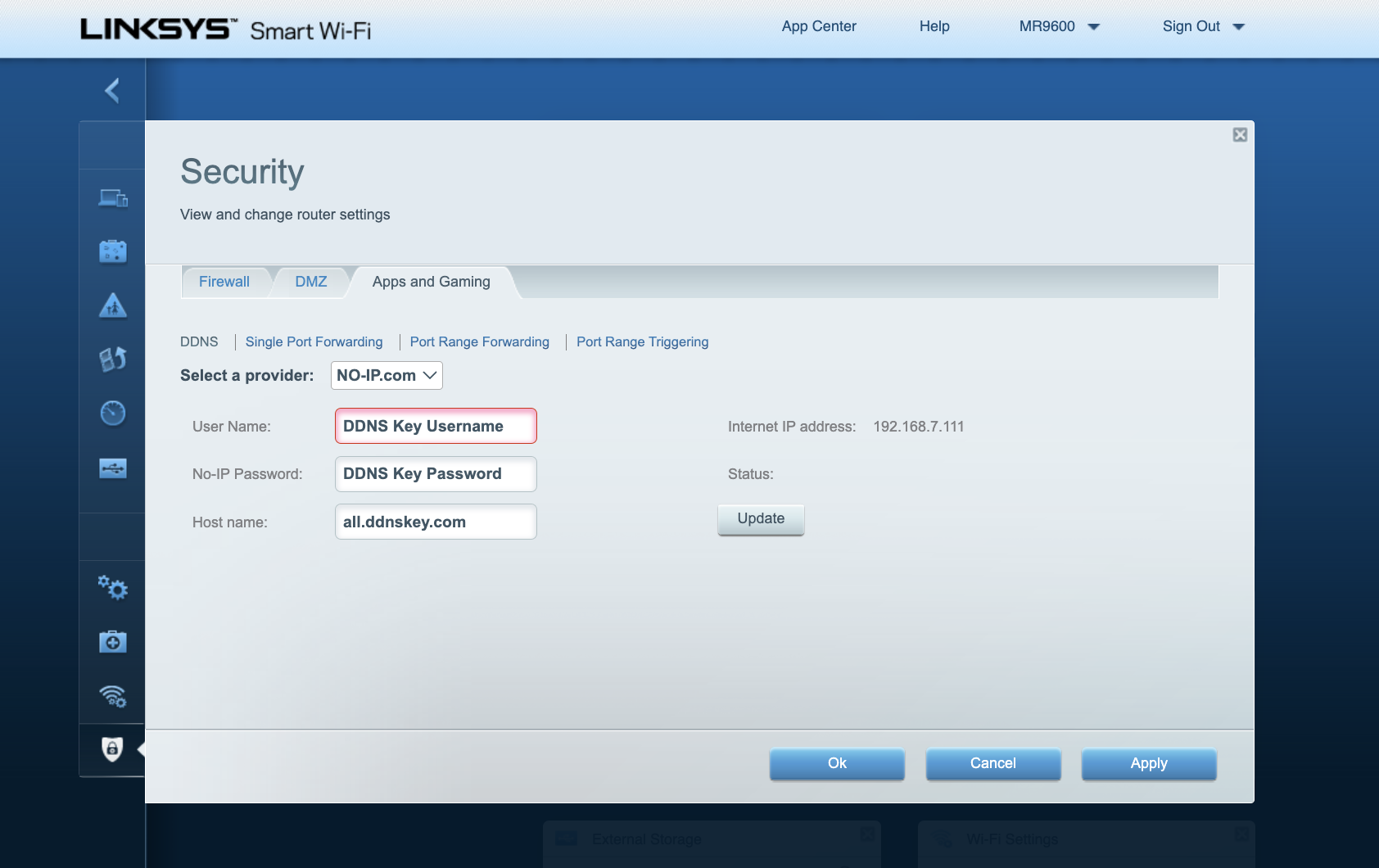
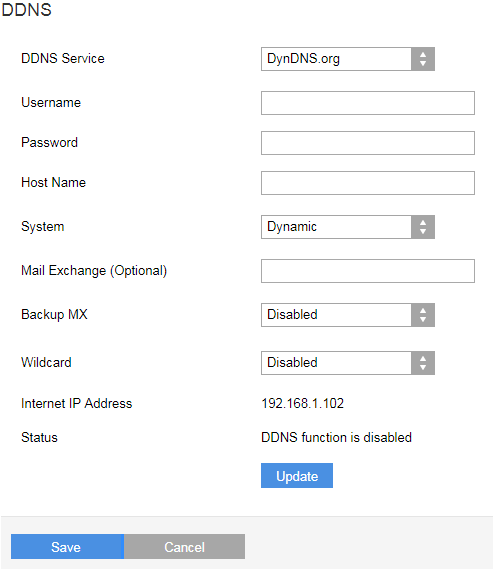
Go to the DDNS section in your router’s settings. Choose a DDNS service provider supported by Linksys.
Enter your DDNS account details. Enable the DDNS feature and save the settings. This keeps your domain name active and reachable.
Troubleshooting Domain Issues
Check if the domain name is correctly entered in the router settings. Mistakes cause connection problems.
Restart your router after any changes. This refreshes the network and applies new settings.
Verify your DDNS account status. Expired accounts stop domain updates.
Clear your browser cache if the domain does not resolve. This removes outdated information.
Security Considerations
Security is a key factor when setting host names and domain names for your Linksys router. These names help identify your network and devices. Wrong names can expose your network to risks. Careful naming helps protect your privacy and safety online.
Risks Of Incorrect Naming
Incorrect host or domain names can reveal sensitive information. Hackers can guess your network type or device by the names. This makes it easier to attack your network. Simple or default names invite unwanted access. Names that show your location or device model increase risks.
Best Practices For Host And Domain Names
Use unique and generic names for your devices and network. Avoid personal details like your name or address. Choose names that do not reveal device types or functions. Regularly update names to reduce tracking chances. Keep names short, simple, and hard to guess.
Protecting Your Network Identity
Changing default host and domain names is a smart move. Use strong passwords with your router settings. Enable encryption to secure data transmission. Monitor your network for unknown devices or activity. These steps help keep your network identity safe from threats.
Future Trends For 2025
The future of host names and domain names is changing fast. By 2025, new trends will shape how devices like Linksys routers connect online. These trends focus on better naming systems and adapting to new technology needs.
Evolving Naming Conventions
Host and domain names will become simpler and more flexible. Shorter names will help users remember addresses easily. New formats may include more characters or symbols. This change helps handle the growing number of internet devices. Naming will focus on clarity and speed for all users.
Impact Of Iot On Host And Domain Names
The Internet of Things (IoT) will add millions of devices online. Each device needs a unique host name to communicate. Domain names will also adapt to manage many small devices. Linksys routers will support many IoT devices at once. Managing these names efficiently is key for smooth connections.
Preparing Linksys Devices For Future
Linksys devices will need updates to handle new naming systems. Firmware upgrades will improve compatibility with future domain rules. Users should check for regular updates to keep devices secure. Preparing devices now ensures they work well with future networks. This readiness supports faster and safer internet access.
Credit: support.linksys.com
Frequently Asked Questions
What Is A Host Name In Linksys Routers?
A Host Name in Linksys routers identifies your device on a local network. It helps to differentiate your router from others connected to the same network. This name can be customized in the router settings for easier management and identification.
How Does Domain Name Work With Linksys Routers?
The Domain Name in Linksys routers specifies the network’s domain. It helps organize devices under one network name, facilitating easier access and communication between devices. You can set or change this domain name in the router’s advanced settings.
Why Is Host Name Important For Linksys Setup?
The Host Name is crucial for network organization and device identification. It allows network administrators to track and manage devices easily. Without a unique Host Name, devices might face conflicts or connectivity issues on the network.
Can I Change The Domain Name On Linksys Routers?
Yes, you can change the Domain Name on Linksys routers through the administration interface. Changing it helps customize your network and improve device management. Make sure the new domain name follows standard naming conventions to avoid conflicts.
Conclusion
Understanding the host name and domain name helps with Linksys setup. These names make devices easy to find on a network. Knowing their purpose saves time and avoids confusion. Use simple names that match your network needs. This keeps your connection smooth and clear.
Keep settings consistent for better performance. Now, managing your Linksys router feels less tricky. Easy steps lead to a stronger network. Try these tips to improve your internet use today.


