
Are you struggling to get your WordPress site noticed by search engines? Adding a sitemap can be the simple fix you need.
A sitemap helps search engines find and understand your content faster, boosting your chances to rank higher. In this guide, you’ll learn exactly how to add a sitemap to your WordPress site—step by step. By the end, you’ll have a powerful tool working quietly behind the scenes to improve your site’s visibility.
Ready to make your website more discoverable? Let’s dive in!
Credit: www.cloudways.com
Importance Of Sitemaps
Sitemaps help search engines find and understand your website pages. They show the structure of your site clearly. This makes it easier for search engines to index your content. A good sitemap can improve how your site appears in search results.
Websites with many pages or new sites especially need sitemaps. They guide search engines to all important pages. This helps your content get discovered faster. Without a sitemap, some pages might remain hidden from search engines.
Role In Seo
Sitemaps help search engines crawl your website efficiently. They list all pages and updates in one place. This ensures search engines do not miss new or changed pages.
Search engines use sitemaps to prioritize pages. Important pages get noticed and ranked better. This can increase your site’s visibility in search results.
Sitemaps also help with indexing multimedia content. Images and videos get included in search results. This can bring more visitors to your site.
Types Of Sitemaps
XML sitemaps are the most common. They are designed for search engines to read easily. These sitemaps list URLs and metadata like update dates.
HTML sitemaps help users navigate your website. They show a simple list of pages for visitors. This improves user experience and site navigation.
There are also specialized sitemaps for images, videos, and news. These help search engines understand specific content types better.
Credit: wpengine.com
Preparing WordPress For A Sitemap
Preparing WordPress for a sitemap is a key step for better site indexing. A sitemap helps search engines find and understand your pages. Before creating one, make sure your WordPress site is ready. This ensures the sitemap works well and improves your SEO.
Checking Existing Sitemap
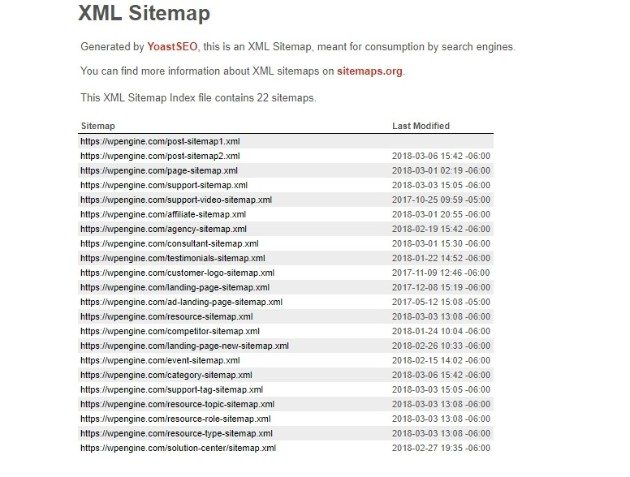
First, check if your WordPress site already has a sitemap. Some themes or plugins add sitemaps automatically. Visit yoursite.com/sitemap.xml or yoursite.com/sitemap_index.xml to see if a sitemap exists. If you find one, review its contents to confirm it covers all important pages. Avoid duplicate sitemaps, as they can confuse search engines and harm your SEO.
Choosing The Right Plugin
Select a plugin that creates sitemaps easily and reliably. Popular options include Yoast SEO, All in One SEO, and Google XML Sitemaps. Check if the plugin updates sitemaps automatically when you add new content. Also, ensure the plugin is compatible with your WordPress version. Read user reviews to find a plugin that is simple and effective. The right plugin saves time and ensures your sitemap stays accurate.
Creating A Sitemap With Plugins
Creating a sitemap with plugins is an easy way to help search engines find your website pages. Plugins generate sitemaps automatically. They keep the sitemap updated as you add or change content. This saves time and ensures your site stays visible to search engines.
Many WordPress plugins offer simple sitemap setup. They guide you through the process with clear options. Some plugins do more than just create sitemaps. They also improve your SEO in other ways.
Using Yoast Seo
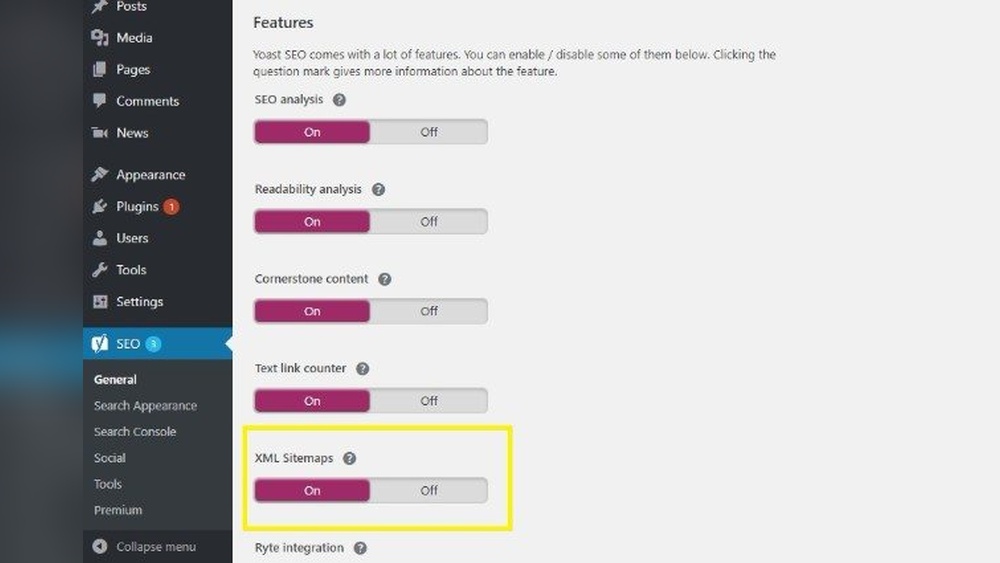
Yoast SEO is a popular plugin for WordPress. It creates an XML sitemap automatically once you activate the feature. The sitemap updates itself when you publish new posts or pages. You can find the sitemap by adding /sitemap_index.xml to your website URL.
Yoast SEO also lets you control which content types appear in the sitemap. This helps you focus on important pages. The plugin is easy to use, even for beginners.
Using Google Xml Sitemaps
Google XML Sitemaps is a simple plugin focused solely on sitemaps. It creates a sitemap that works well with all major search engines. The plugin updates the sitemap automatically after each new post.
It offers customization options, like excluding certain pages. You can also notify search engines when the sitemap changes. This plugin is lightweight and easy to configure.
Other Popular Plugins
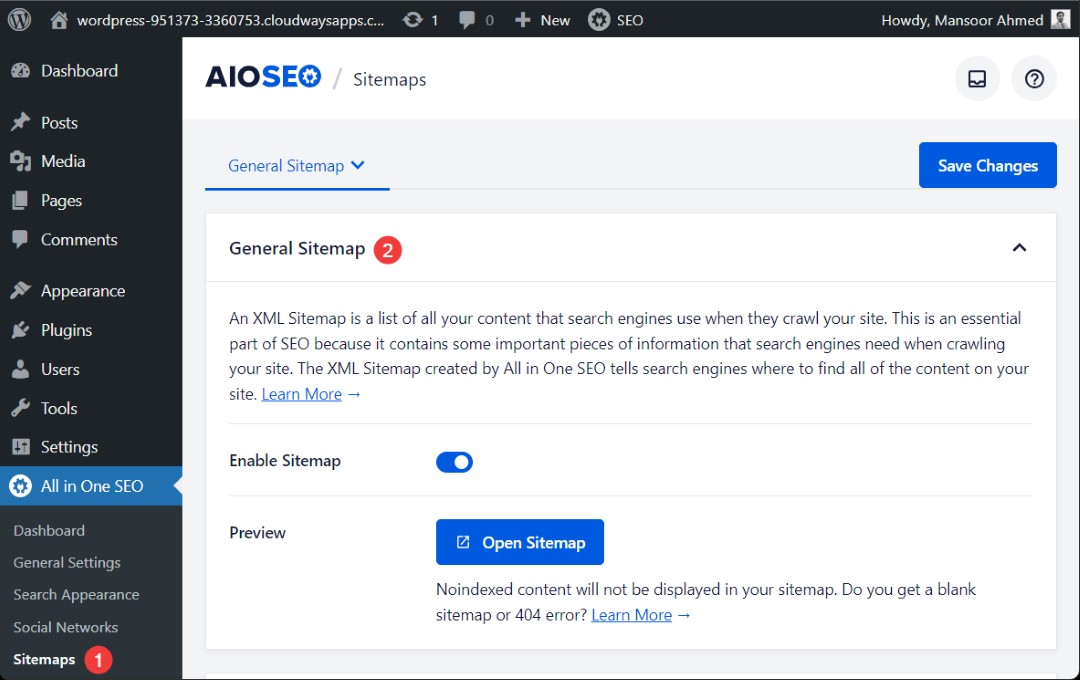
Several other plugins can create sitemaps for WordPress. All in One SEO Pack is a good choice with sitemap features. Rank Math is another plugin that offers sitemap creation with SEO tools. These plugins provide extra settings for advanced users.
Choose a plugin that fits your needs and skill level. Most plugins work well and help search engines understand your site.
Submitting Sitemap To Search Engines
Submitting your sitemap to search engines helps them find and index your website pages faster. It improves your site’s visibility in search results. This step is crucial for effective SEO. Two popular tools for submitting sitemaps are Google Search Console and Bing Webmaster Tools.
Google Search Console
Google Search Console is a free tool by Google to manage your site’s presence. To submit your sitemap, log in or create an account. Add your website and verify ownership. In the dashboard, find the “Sitemaps” section.
Enter your sitemap URL, usually like yoursite.com/sitemap.xml. Click “Submit.” Google will start crawling your pages. Check back to see crawl status and errors if any.
Bing Webmaster Tools
Bing Webmaster Tools helps manage your site on Bing search engine. Sign in or sign up for a free account. Add your site and verify it using the recommended method.
Go to the “Sitemaps” section in the dashboard. Enter your sitemap URL and click “Submit.” Bing will process your sitemap and begin indexing your pages. Monitor the tool for crawl reports and issues.
Maintaining Your Sitemap
Maintaining your sitemap is key for keeping your WordPress site visible to search engines. A well-kept sitemap helps search engines find new content faster. It also removes outdated pages, avoiding indexing errors. Regular updates ensure your site stays organized and easy to crawl.
Proper maintenance saves time and improves SEO results. Let’s explore how to keep your sitemap fresh and error-free.
Updating Sitemap Automatically
Use plugins that update your sitemap with every new post or page. Popular plugins like Yoast SEO or Google XML Sitemaps handle this well. They add new URLs and remove deleted ones automatically. This keeps your sitemap current without manual work. Enable auto-update settings in your chosen plugin for best results.
Troubleshooting Common Issues
Check your sitemap regularly for errors using Google Search Console. Look for broken links or pages that should not appear. Clear plugin cache if the sitemap shows old content. Sometimes, conflicts with other plugins can cause issues. Disable plugins one by one to find the problem. Fix errors quickly to keep search engines crawling smoothly.
Credit: aioseo.com
Frequently Asked Questions
What Is A Sitemap In WordPress?
A sitemap is a file listing your site’s important pages. It helps search engines crawl and index your WordPress site effectively.
How Do I Create A Sitemap For WordPress?
You can create a sitemap using SEO plugins like Yoast SEO or Google XML Sitemaps. These tools generate sitemaps automatically.
How To Add A Sitemap Url To Google Search Console?
Log in to Google Search Console, select your site, go to Sitemaps, enter your sitemap URL, and click Submit.
Can I Use Yoast Seo To Add A Sitemap?
Yes, Yoast SEO automatically creates and updates your sitemap. You can access it via yoursite. com/sitemap_index. xml.
Conclusion
Adding a sitemap to WordPress helps search engines find your pages fast. It makes your site easier to explore and index. This can bring more visitors to your website over time. Keep your sitemap updated as you add new content.
Use simple plugins or tools for easy setup. A clear sitemap supports your site’s growth and visibility. Start today to help your website reach more people online.


