
Are you planning to build a website with WordPress but unsure about the hosting costs? You’re not alone.
Knowing exactly how much WordPress charges for hosting can save you time and money. You’ll discover clear, straightforward answers that help you make smart decisions for your site. Keep reading to find out what to expect, so you avoid surprises and get the best value for your investment.
Your website’s success starts here.
WordPress Hosting Basics
Understanding WordPress hosting is key for your website’s success. Hosting affects your site’s speed, security, and uptime. Choosing the right hosting plan saves money and improves performance.
Types Of Hosting Options
WordPress offers several hosting types. Shared hosting is the most common and affordable. It means many websites share one server’s resources. This option works for small or new sites.
VPS hosting provides more power and control. It uses virtual servers that act like separate machines. This suits growing websites with more traffic and needs.
Dedicated hosting gives you an entire server. This is ideal for large sites with high traffic. It offers the best performance but costs more.
Cloud hosting uses multiple servers to host your site. It offers great flexibility and reliability. Many businesses choose cloud hosting for scalability.
Shared Vs Managed Hosting
Shared hosting is simple and cheap. You share server space with others. You manage your site and updates yourself.
Managed hosting is more expensive but easier. The host handles updates, backups, and security. It frees you from technical tasks.
Managed hosting suits users without technical skills. Shared hosting fits those who want to save money. Both have pros and cons to consider.
Pricing Plans Breakdown
Understanding WordPress hosting costs helps you pick the best plan. Plans vary by features and price. Each suits different needs and budgets.
Explore the details below to find the right hosting option for your website.
Free Hosting Options
WordPress offers a free hosting plan with basic features. It includes a WordPress.com subdomain and limited storage space. This plan is good for simple blogs or small sites. It does not support custom domains or plugins. Ads may appear on your site with free hosting. It is a good way to start without spending money.
Personal And Premium Plans
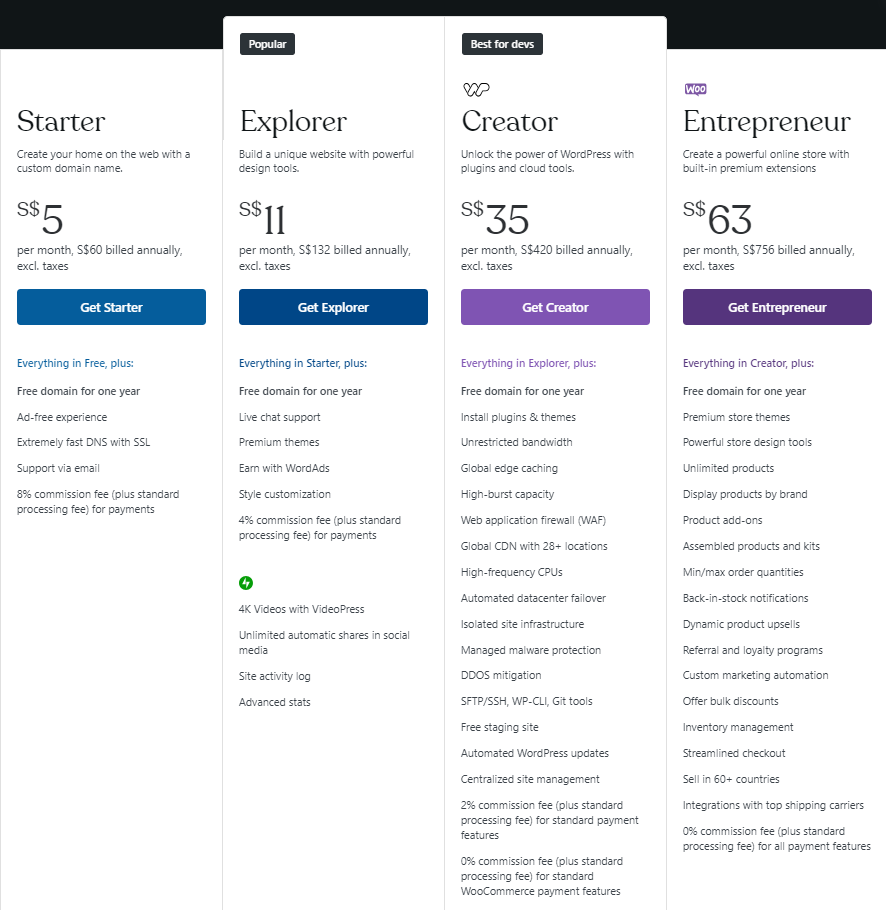
Personal plans cost around $4 to $8 per month. These remove ads and let you use a custom domain name. Premium plans, costing about $8 to $15 monthly, include more storage and design tools. You can upload videos and use simple plugins. These plans suit bloggers and small business owners. They provide better performance and support.
Business And Ecommerce Plans
Business plans start near $25 per month. They include advanced tools like SEO and Google Analytics. You can install third-party plugins and themes. Ecommerce plans cost about $45 monthly and focus on online stores. They offer payment processing and inventory management. These plans fit growing businesses and online shops. They give full control over your website.
Factors Influencing Hosting Costs
Hosting costs on WordPress vary widely. Several key factors influence the price. These elements determine how much you pay and what you get. Understanding these can help you choose the right plan.
Storage And Bandwidth Limits
Storage refers to the space your website files use on a server. More storage means you can upload more images, videos, and content. Bandwidth is the amount of data your site can send to visitors. Higher bandwidth supports more visitors without slowdowns. Plans with larger storage and bandwidth usually cost more.
Security Features
Security is crucial for any website. Hosting plans that include strong security features often cost more. These features may include SSL certificates, malware scanning, and automatic backups. Secure hosting protects your site and visitors from threats. Basic plans may offer limited security, while advanced plans provide full protection.
Customer Support Levels
Support quality varies between hosting providers. Some offer 24/7 live chat or phone support. Others provide email support or limited hours. Plans with premium support cost more. Good support helps solve problems quickly and keeps your site running smoothly.
Credit: elementor.com
Comparing WordPress Hosting Providers
Choosing the right hosting provider is key for a smooth WordPress experience. Hosting affects speed, security, and site uptime. Different providers offer various plans and features. Understanding these differences helps you pick the best option for your needs and budget.
This section compares official WordPress hosting with third-party providers. It also weighs costs against features to guide your decision.
Official WordPress Hosting Vs Third-party
Official WordPress hosting comes directly from WordPress.com. It offers easy setup and automatic updates. The platform is optimized for WordPress sites. This ensures reliability and strong security.
Third-party hosts offer more variety. Popular options include Bluehost, SiteGround, and HostGator. They often provide more control over your site. You can choose different server types and install plugins freely.
Official hosting is simpler but less flexible. Third-party hosts require more setup but offer custom options. Your choice depends on your technical skill and site needs.
Cost Vs Features Analysis
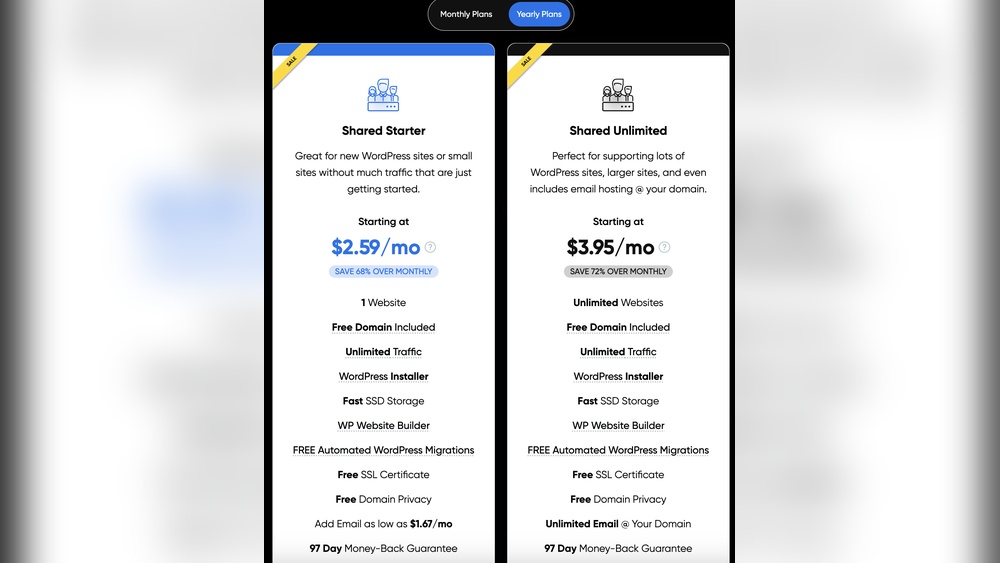
Official WordPress hosting plans start around $4 per month. Basic plans cover essential features like SSL and backups. Higher plans offer extra storage and advanced tools.
Third-party hosts vary widely in price. Some plans start as low as $2.95 monthly. More expensive plans include better performance and support.
Official hosting limits some plugins and themes. Third-party hosts allow full customization. They also offer options like email hosting and staging sites.
Consider what features matter most. Balance cost with flexibility and support. Choose a provider that fits your website goals and budget.
Hidden Charges To Watch For
WordPress hosting may look simple at first. The price you see is not always the full cost. Some extra charges can appear after you sign up. These costs can surprise many users. Knowing about these hidden fees helps you plan better. It also prevents unexpected bills later.
Renewal Fees
Many hosting plans offer low prices for the first term. After that, the renewal price can jump higher. This increase often catches users off guard. Always check the renewal cost before buying. This fee applies every year or every billing cycle. It is not a one-time payment. Renewal fees can sometimes be double or more than the starting price.
Add-ons And Upgrades
WordPress hosting often includes basic features only. Extra services like backups, security, or extra storage cost more. These add-ons improve your website but add to your bill. Upgrades to faster servers or more bandwidth also cost extra. Some hosting providers charge for email accounts or SSL certificates. Review the full list of add-ons before choosing a plan. These small costs add up quickly over time.
Credit: www.bluehost.com
Tips For Choosing Cost-effective Hosting
Choosing the right hosting for your WordPress site saves money and improves performance. Cost-effective hosting fits your needs without extra expenses. Focus on what your website requires now and what it might need later. This approach helps avoid paying for features you do not use.
Assessing Your Website Needs
Start by listing your website’s key features. Consider the type of content you will share. Will you use many images or videos? These require more storage and bandwidth. Check how much traffic you expect each month. Small blogs need less power than online stores.
Think about website speed and uptime. Faster hosting keeps visitors happy. Reliable hosting means fewer interruptions. Look for plans offering enough space and good security. Some hosts provide free SSL certificates, important for safety.
Long-term Cost Considerations
Look beyond the initial price. Many hosts offer low starting rates that rise later. Check renewal fees before buying. Some providers charge extra for backups and support. Include these in your budget.
Consider hosting that grows with your site. Upgrading plans can be cheaper than switching hosts. Avoid plans with hidden costs. Choose clear pricing and flexible contracts. This saves money and stress over time.
Credit: www.hostinger.com
Frequently Asked Questions
How Much Does WordPress Hosting Typically Cost?
WordPress hosting costs vary from $3 to $45 per month. Shared hosting plans start around $3-$10. Managed WordPress hosting ranges $15-$45 monthly. Prices depend on features, speed, support, and storage. Choose a plan based on your website size and needs.
Does WordPress Offer Free Hosting Plans?
WordPress. com offers a free basic hosting plan. It includes a WordPress subdomain and limited storage. However, free plans have ads and fewer customization options. For professional use, paid hosting is recommended for better performance and control.
What Affects The Price Of WordPress Hosting?
Hosting price depends on server type, speed, security, and support. Shared hosting is cheaper but slower. Managed hosting costs more but includes automatic updates and backups. Additional features like SSL certificates and CDN can also raise prices.
Are There Hidden Fees In WordPress Hosting?
Most WordPress hosting providers are transparent about costs. Some may charge setup fees or renewal price increases. Extras like domain registration, SSL certificates, and backups might add costs. Always review terms before purchasing to avoid surprises.
Conclusion
WordPress hosting costs vary depending on the plan you choose. Basic plans are usually affordable and good for small sites. More advanced plans cost more but offer extra features and support. Consider what your website needs before picking a plan.
Remember, the right hosting helps your site run smoothly. Check prices carefully to avoid surprises later. Hosting is a key part of your website’s success. Choose wisely for the best balance of cost and value.


