
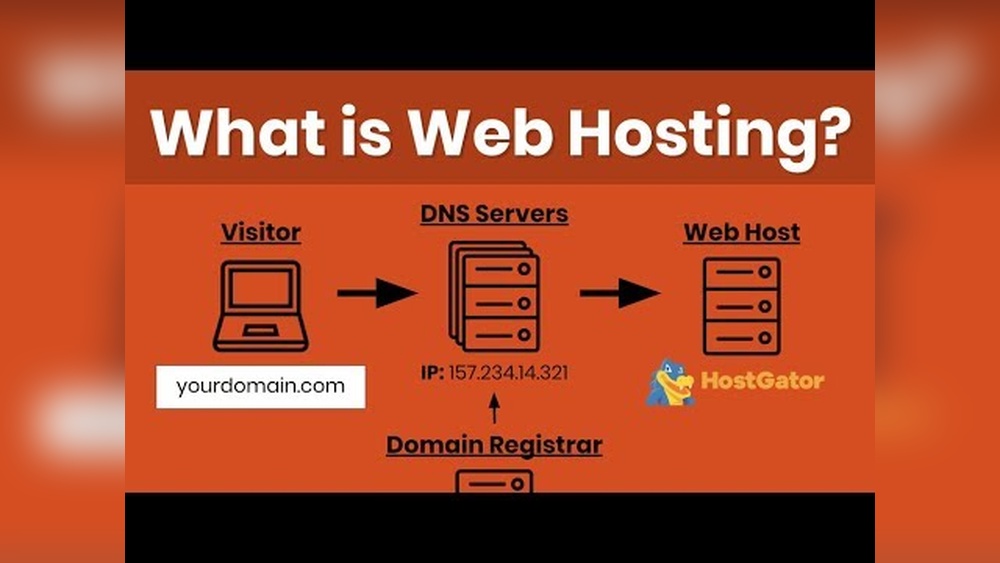
Are you ready to take your idea online but don’t know where to start? Getting a website domain and hosting might sound tricky, but it’s simpler than you think.
Imagine having your own space on the internet—your website, your rules. This guide will show you exactly how to pick the perfect domain name and choose the right hosting service, step by step. By the end, you’ll have the confidence to make your website live and start reaching your audience.
Keep reading, and let’s make your online presence happen.
Credit: momentum3growth.com
Choosing The Right Domain Name
Choosing the right domain name is key to your website’s success. It shapes your brand identity and helps visitors find you easily. A good domain name is short, clear, and easy to remember. It reflects your business or topic well. Take time to pick a name that fits your goals and audience.
Tips For Memorable Domains
Keep your domain name simple and easy to spell. Avoid numbers and hyphens. Use common words that people recognize quickly. Try to make it catchy but not confusing. Short names work best because they are easier to type and recall. Consider using keywords related to your site’s content. This can help with search engines and user trust.
Domain Name Extensions
The extension is the ending part of your domain, like .com or .net. The .com extension is the most popular and trusted by users. Other extensions like .org, .info, or country codes (.us, .uk) serve specific purposes. Choose an extension that fits your site’s type and audience. New extensions like .shop or .blog can also work for certain niches. Stick to well-known extensions for better credibility.
Avoiding Trademark Issues
Check if your chosen domain name conflicts with any trademarks. Using a name similar to a famous brand can cause legal problems. Use online tools to search for trademarks before buying your domain. Pick unique names to avoid confusion and protect your brand. This step saves money and trouble later.
Credit: www.inmotionhosting.com
Where To Buy A Domain
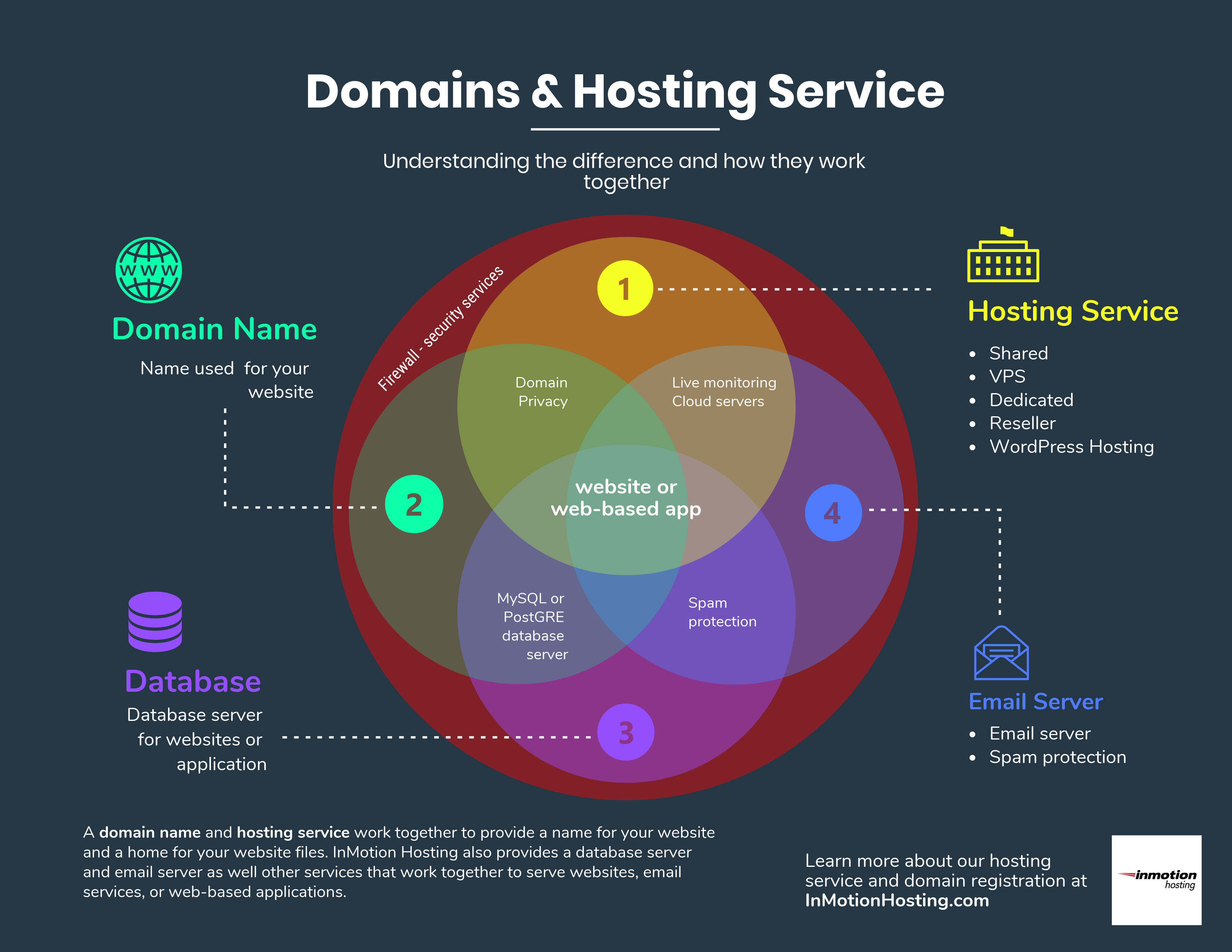
Choosing where to buy your domain is an important step for your website. A domain name is your address on the internet. It should be easy to remember and match your brand. Many companies sell domain names, but some are better for beginners.
Picking the right place helps avoid issues later. You get support, good prices, and useful features. Some providers also offer hosting, which can save time.
Popular Domain Registrars
Popular domain registrars include GoDaddy, Namecheap, and Google Domains. These companies are trusted by millions worldwide. They offer simple tools to search and buy domains. Their websites are easy to use for people new to domains. Each registrar supports many domain extensions like .com, .net, and .org.
Comparing Prices And Features
Prices for domain names vary between registrars. Some charge low fees for the first year but higher renewals. Others keep prices steady. Look for discounts but check renewal costs. Features like free email, DNS management, and easy transfers add value. Choose a registrar with clear pricing and useful tools.
Domain Privacy Protection
Domain privacy protection hides your personal contact details. Without it, your name, address, and phone appear in the public WHOIS database. Privacy protection keeps your information safe from spammers and scammers. Some registrars include this service free, others charge extra. It is a good idea to add privacy to protect your identity.
Basics Of Web Hosting
Understanding web hosting is important when starting a website. Web hosting stores your website files on a server. This makes your website visible on the internet. Choosing the right hosting affects your website’s speed and reliability. It also impacts how much traffic your site can handle. Learn the basics to make a smart choice.
Types Of Hosting Services
There are several types of hosting services. Shared hosting is the most common and affordable. Many websites share one server here. VPS hosting offers more power by splitting a server into virtual parts. Dedicated hosting gives you an entire server for your site. Each type fits different needs and budgets.
Shared Vs Vps Vs Dedicated
Shared hosting is good for small sites with low traffic. It is simple and cheap. VPS hosting suits growing websites that need more control and speed. It costs more than shared hosting. Dedicated hosting is best for big websites with high traffic. You get full server control but pay the highest price.
Cloud Hosting Advantages
Cloud hosting uses many servers working together. It offers great speed and reliability. Your website stays online even if one server fails. Cloud hosting also allows easy upgrades. You pay only for what you use. This option fits websites that expect to grow fast.
Selecting A Hosting Provider
Choosing the right hosting provider is key for your website’s success. It affects how fast your site loads and how often it stays online. Picking a good host ensures visitors have a smooth experience. This section covers important points to check before buying hosting.
Evaluating Uptime And Speed
Uptime means how often your website stays online. Aim for hosts with 99.9% uptime or higher. Downtime can lose visitors and harm your ranking. Speed is just as crucial. Slow loading sites frustrate users. Choose hosts with fast servers and good reviews on speed. Fast websites keep visitors happy and boost search rankings.
Customer Support Importance
Good customer support helps solve problems fast. Look for providers with 24/7 support through chat, phone, or email. Quick help prevents long website outages. Test support by asking simple questions before buying. Friendly and clear answers are a good sign. Support matters most when you face technical issues.
Scalability Options
Your website can grow over time. Start small but pick a host that offers easy upgrades. Scalability means adding more resources like storage and bandwidth. A flexible plan saves you from switching hosts later. Check if they offer shared hosting, VPS, or dedicated servers. This allows your site to handle more visitors smoothly.
Registering Your Domain And Hosting
Registering your domain and hosting is the first step to building a website. This process gives your site a unique address and a place to live on the internet. Choosing the right domain name and hosting plan is important. It helps your site run smoothly and be easy to find.
Step-by-step Registration Process
Start by choosing a domain name that fits your website. Use a domain registrar like GoDaddy or Namecheap. Enter the name to see if it is available. If it is free, add it to your cart.
Next, pick a hosting provider. Many registrars offer hosting too. Select a plan based on your website size and traffic. Create an account and complete the payment.
After payment, you will get access to your domain and hosting control panels. Keep your login details safe for future use.
Configuring Dns Settings
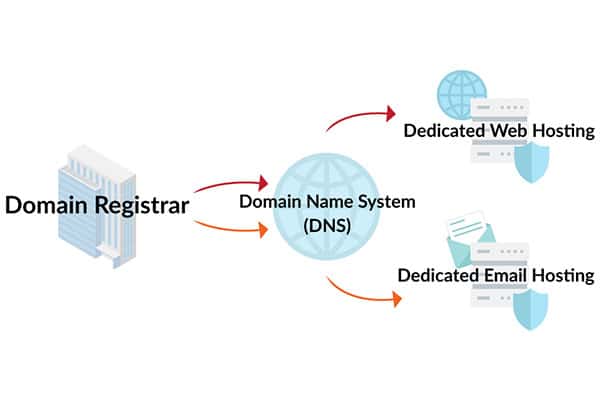
DNS settings connect your domain to your hosting. Log in to your domain registrar’s control panel. Find the DNS or Nameservers section.
Replace the default nameservers with those from your hosting provider. Save the changes. It can take a few hours to update worldwide.
Check your DNS settings with online tools to make sure they point correctly. This step is key to making your website visible.
Linking Domain To Hosting
Linking your domain to hosting lets visitors find your website. Access your hosting control panel. Look for the section to add a domain or manage domains.
Add your registered domain to the hosting account. This tells the server to serve your website files when users visit your domain.
Upload your website files or install a CMS like WordPress. Test your domain by entering it in a browser. Your site should load properly.
Setting Up Your Website
Setting up your website is the next step after buying a domain and hosting. This stage brings your site to life. It involves putting your content online and making your site easy to manage. There are several ways to do this, depending on your skills and needs.
Installing Content Management Systems
Content Management Systems (CMS) help you build and manage websites without coding. Popular CMS options include WordPress, Joomla, and Drupal. Most hosting providers offer one-click CMS installations. This process is quick and simple. After installation, you can add pages, posts, and images easily. CMS platforms also offer themes and plugins to customize your site’s look and functions.
Using Website Builders
Website builders are tools designed for beginners. They provide drag-and-drop interfaces to create websites visually. Builders like Wix, Squarespace, and Weebly host your site and handle technical tasks. This option is great for users who want fast results with minimal effort. Many hosting services include built-in website builders. Choose templates, add your content, and your website is ready to go.
Uploading Files Via Ftp
File Transfer Protocol (FTP) lets you upload website files directly to your server. This method suits users with custom-built sites or advanced needs. To use FTP, install an FTP client like FileZilla. Connect to your hosting account with provided credentials. Then, upload your HTML, CSS, and image files into the public directory. This gives you full control over your website’s structure and content.
Maintaining Your Domain And Hosting
Maintaining your domain and hosting is crucial for a smooth online presence. It ensures your website stays live and runs without problems. Regular care helps prevent downtime and loss of data. Simple steps can keep your site safe and reliable.
Renewal Tips
Always renew your domain and hosting before the expiration date. Set reminders a month ahead to avoid missing the deadline. Consider opting for auto-renewal to save effort. Check your email often for renewal notices from your provider. Keep your payment details up to date to prevent service interruptions.
Backup Strategies
Regular backups protect your website from data loss. Schedule automatic backups weekly or daily, based on your site’s activity. Store backups in multiple places, like cloud storage and external drives. Test backup files to ensure they work correctly. Quick restoration minimizes downtime during emergencies.
Security Best Practices
Use strong, unique passwords for your domain and hosting accounts. Enable two-factor authentication for extra protection. Keep your website software and plugins updated to fix security gaps. Monitor your site for unusual activity regularly. Use SSL certificates to secure data transfer between users and your site.

Credit: wegic.ai
Frequently Asked Questions
What Is The Difference Between Domain And Hosting?
A domain is your website’s address, while hosting stores your website files. Both are essential to launch a website. The domain directs users to your website, and hosting ensures your site is accessible online 24/7.
How Do I Choose The Best Domain Name?
Pick a domain that is short, memorable, and relevant to your brand. Avoid numbers and hyphens. Use keywords if possible to improve SEO and make it easy for visitors to find you.
Can I Get Free Web Hosting And Domain?
Yes, some providers offer free hosting and subdomains. However, free plans often have limitations like ads, less storage, and no custom domain. For a professional website, paid options are recommended for reliability and control.
How Much Does Domain And Hosting Cost?
Domain prices typically range from $10 to $15 per year. Hosting costs vary, starting around $3 to $10 monthly. Costs depend on the provider, plan features, and website needs.
Conclusion
Getting a website domain and hosting is simple with the right steps. Choose a domain name that fits your site well. Pick hosting that matches your needs and budget. Register your domain and set up hosting quickly. Keep your login details safe and easy to find.
Your website will be ready to share with the world soon. Start small, learn as you go, and grow your site over time. A good domain and hosting lay the foundation for online success.


