
Are you thinking about building a website but unsure if WordPress is the right choice for you? You’re not alone.
With so many options out there, it’s easy to feel overwhelmed. But what if there was a platform that’s easy to use, flexible, and trusted by millions? WordPress might just be that solution. By the time you finish reading, you’ll know whether WordPress fits your needs and how it can help you create a website that stands out.
Let’s dive in and find out if WordPress is a good website platform for you.
Why WordPress Stands Out
WordPress stands out as a top choice for building websites. It offers a mix of power and simplicity that suits many users. From beginners to experts, WordPress adapts well to different needs.
The platform’s strength lies in its flexibility, ease of use, and rich features. These qualities make it a favorite for personal blogs, business sites, and online stores.
Open-source Flexibility
WordPress is open-source software. This means anyone can use and change it freely. Developers worldwide contribute to its growth. This constant improvement keeps WordPress fresh and reliable.
Users can customize themes and code to fit their needs. This freedom allows unique websites without starting from scratch.
User-friendly Interface
The WordPress dashboard is simple and clear. It lets users add pages, posts, and images easily. No coding skills are required to create content.
Editing and updating a site is quick. This saves time and effort. Beginners find it easy to learn and manage their sites.
Extensive Plugin Library
WordPress has thousands of plugins available. These tools add features like contact forms, SEO, and security.
Plugins make sites more functional and professional. Most plugins install with just a few clicks. This expands what a site can do without extra cost.
Customization Options
WordPress offers strong customization options for websites. It allows users to create unique sites without needing expert skills. These options help match your site to your brand or style perfectly.
Themes For Every Style
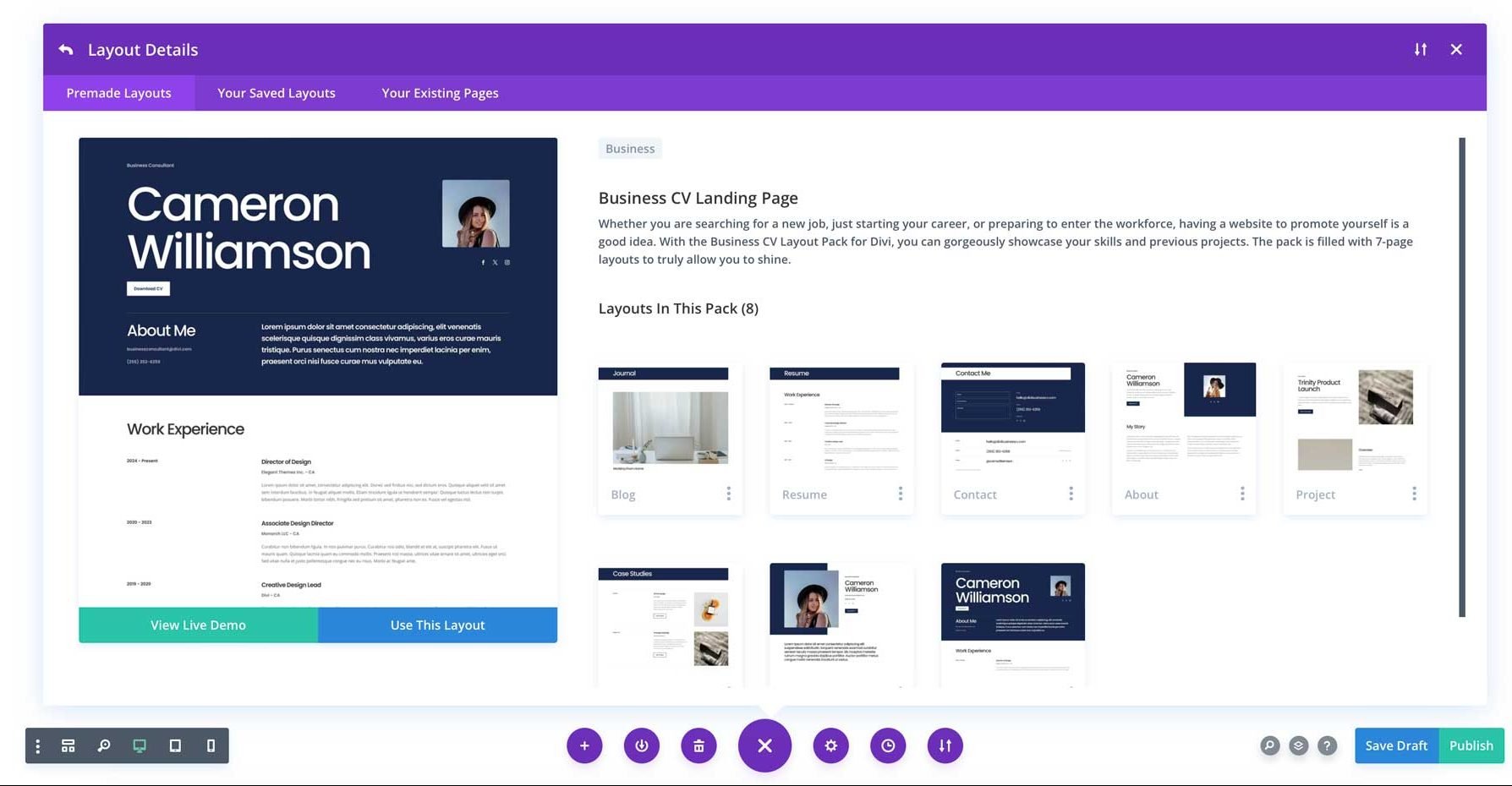
WordPress has thousands of themes. Each theme changes how your website looks and feels. You can find themes for blogs, shops, portfolios, and more. Many themes are free, while some come with extra features for a small price. Themes are easy to install and switch anytime.
Drag-and-drop Builders
Drag-and-drop builders make site design simple. These tools let you move parts of your page with your mouse. You don’t need to write any code. Popular builders include Elementor and Beaver Builder. They come with ready-made blocks for text, images, and buttons. This helps build pages quickly and easily.
Custom Code Integration
WordPress also supports custom code. You can add HTML, CSS, or JavaScript to your site. This option helps advanced users tweak designs or add special features. Custom code gives full control over your website’s look and behavior. It works well for users who want a very specific design.
Seo Benefits
WordPress offers strong SEO benefits that help websites rank better on search engines. It includes features that guide search engines to understand your content. These benefits make it easier to attract visitors and grow your site.
Built-in Seo Features
WordPress has built-in tools for SEO. It creates clean URLs that search engines like. The platform supports easy editing of titles and descriptions. It also allows you to add alt text to images. These features improve how search engines read your site.
Seo Plugin Support
WordPress supports many SEO plugins. Plugins like Yoast SEO and Rank Math help optimize content. They offer tips to improve keywords and readability. Plugins also create XML sitemaps automatically. This helps search engines find all your pages quickly.
Optimized Site Performance
Fast websites rank better on search engines. WordPress themes and plugins focus on speed. You can use caching and image optimization tools easily. Mobile-friendly designs also improve user experience. These factors boost your site’s SEO performance.
Credit: www.elegantthemes.com
Community And Support
Cost-effectiveness is a key reason many choose WordPress for their websites. It offers strong value without high expenses. This platform helps save money while building a professional site. Let’s explore the main cost benefits.
Free Core Software
WordPress itself is free to download and use. The core software has no charge at all. This means you can start creating your website without paying for the platform. Free themes and plugins add more features without extra cost.
Affordable Hosting Options
WordPress works with many hosting providers. Some offer plans for just a few dollars each month. These low prices make hosting a website easy on your budget. You can pick a plan that fits your needs and costs less.
Low Maintenance Costs
Maintaining a WordPress site requires little money. Updates to software and plugins are free. You can manage your site yourself without hiring help. This keeps ongoing costs low and manageable for any budget.
Cost-effectiveness
Security is a key factor for any website. WordPress offers strong security features that help protect your site from threats. These features work together to keep your content safe and your visitors secure.
Regular Security Updates
WordPress releases updates often. These updates fix bugs and close security gaps. Keeping WordPress updated reduces risks from hackers. Updates also improve performance and add new protections. Updating your site is simple and important.
Security Plugins
WordPress has many security plugins. These tools add extra layers of protection. Plugins can scan for malware and block suspicious activity. They help monitor login attempts and set firewalls. Choosing the right plugin boosts your site’s defense.
Best Practices For Protection
Strong passwords are a must. Change them regularly and avoid common words. Limit login attempts to stop hackers from guessing passwords. Use two-factor authentication for extra security. Regular backups protect your data if problems occur.

Credit: kinsta.com
Security Features
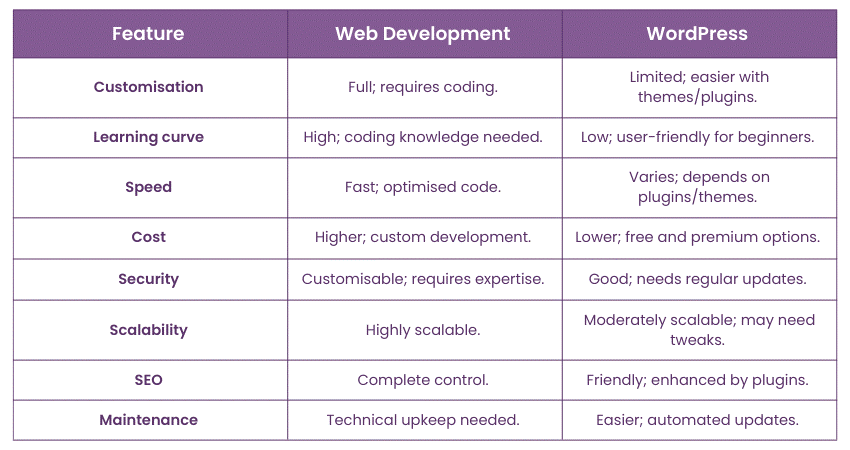
WordPress grows with your website. It supports small blogs and big business sites alike. The platform adapts as your needs change. This makes WordPress a solid choice for long-term projects. Scalability and growth are key factors for success online.
Handling Traffic Spikes
WordPress can handle sudden bursts of visitors. Using caching plugins reduces server load effectively. Content delivery networks (CDNs) speed up site access worldwide. Hosting upgrades also help manage high traffic. These tools keep your site fast and stable during peak times.
E-commerce Integration
WordPress supports many e-commerce plugins like WooCommerce. These tools let you sell products easily. You can manage inventory, payments, and shipping all in one place. The platform grows with your store, from a few items to thousands. It offers flexibility and control over online sales.
Multilingual Capabilities
WordPress supports multiple languages through plugins. This helps reach a wider audience globally. You can create and manage translations in a simple way. Multilingual sites improve user experience and boost engagement. WordPress makes expanding into new markets easier and faster.
Credit: www.theknowledgeacademy.com
Frequently Asked Questions
Is WordPress Suitable For Beginners?
Yes, WordPress is beginner-friendly with a simple interface. It offers easy setup and many tutorials, making website creation accessible.
Can WordPress Handle Large Websites?
WordPress can manage large websites efficiently. It supports scalability with plugins and themes, suitable for blogs, e-commerce, and business sites.
How Secure Is A WordPress Website?
WordPress is secure with regular updates and security plugins. Users must follow best practices to protect their sites from threats.
Does WordPress Support Seo Optimization?
WordPress supports SEO well with built-in features and plugins like Yoast SEO. It helps improve website visibility on search engines.
Conclusion
WordPress offers a simple way to build websites. It fits beginners and experts well. You can add many features with plugins. Themes help make your site look good. It works for blogs, stores, and portfolios. You control your content fully.
Support is easy to find online. WordPress keeps updating for better use. It stands as a solid choice for websites. Consider your needs, then decide if WordPress suits you.



