Want to make your website more engaging and attract more visitors? Adding a WordPress blog to your site can be the game-changer you need.
Imagine having a space where you can share your ideas, updates, and stories directly with your audience. It’s easier than you think, even if you’re not a tech expert. You’ll discover simple, step-by-step tips to add a WordPress blog to your website quickly and effectively.
Keep reading to unlock the secret to boosting your online presence and connecting with your visitors like never before.
Choosing The Right WordPress Setup
Choosing the right WordPress setup is the first step to adding a blog to your website. The setup affects how easy your blog is to manage and how it performs. It also affects costs and control over your site. Understanding the differences helps you pick the best option for your needs.
Self-hosted Vs WordPress.com
Self-hosted WordPress means you install WordPress on your own web server. You have full control over your site’s design and features. You can use any plugin or theme you want. You pay for hosting and domain separately.
WordPress.com hosts your blog for you. It is easier to start and needs less technical work. Some features and plugins may be limited. The free plan has ads and restrictions. Paid plans offer more tools but less freedom than self-hosted.
Choosing depends on how much control you want and your budget. Self-hosted suits those wanting full control. WordPress.com fits users who want a simple setup.
Selecting A Domain And Hosting
A domain is your blog’s web address. It should be easy to remember and related to your content. Choose a domain that matches your brand or topic.
Hosting is where your website lives online. Good hosting keeps your site fast and secure. Look for hosts that offer WordPress support and good uptime.
Shared hosting is affordable and fits small blogs. Managed WordPress hosting costs more but offers better speed and help. Pick hosting that fits your blog’s expected size and traffic.
Credit: www.ipage.com
Installing WordPress On Your Website
Installing WordPress on your website is the first step to creating a blog. It sets the base for your content and design. You can install WordPress using two main methods. One is quick and easy, while the other offers more control. Both methods help you get your blog online fast.
Using Auto-installers
Many web hosts offer auto-installers for WordPress. These tools simplify the setup process. You just need to fill in a few details like site name and admin info. The installer does the rest, setting up the database and files automatically. This method saves time and avoids technical steps. It is perfect for beginners or those who want to start quickly.
Manual Installation Steps
Manual installation gives you full control over the setup. First, download the WordPress package from the official website. Next, upload the files to your web server using FTP. Create a database and user in your hosting control panel. Then, run the WordPress installer by visiting your site URL. Follow the on-screen instructions to complete the setup. This method requires more effort but works well for custom setups.
Configuring Basic Settings
Configuring basic settings in WordPress is the first step to making your blog work well. These settings help your site look professional and run smoothly. Taking time here saves problems later. Focus on important parts like permalinks and user roles. These control how your site appears and who can do what.
Permalinks And Site Title
Permalinks are the web addresses for your posts and pages. Clear URLs help visitors and search engines find your content. Use a simple format like “post name” to make links easy to read. This also helps your blog rank better in search results.
The site title shows your blog’s name in the browser and search results. Pick a title that matches your blog’s topic. It should be short and easy to remember. You can change the title anytime in the WordPress settings.
Setting Up User Roles
User roles control who can edit or add content on your blog. WordPress has roles like Administrator, Editor, Author, and Subscriber. Assign roles carefully to keep your site safe. Give only trusted users the power to change important settings.
Administrators manage the whole site. Editors can publish and edit all posts. Authors write their own posts. Subscribers only read and comment. Choose roles based on what each person needs to do.
Designing Your Blog Layout
Designing your blog layout shapes how visitors see your content. A clear layout helps readers find posts easily. It also builds your site’s style and mood.
Focus on a clean design that fits your topic. Avoid clutter to keep visitors interested. The right layout makes your blog look professional.
Choosing A Theme
Pick a theme that matches your blog’s purpose. Themes control the overall look and structure. Choose one that is simple and easy to read.
Select themes that load fast and work well on phones. Responsive design helps visitors on all devices. Many free and paid themes offer good options.
Check theme reviews and updates before picking. A well-supported theme stays compatible with WordPress updates. This keeps your blog running smoothly.
Customizing Appearance
Adjust colors, fonts, and layouts to fit your brand. Use simple colors that are easy on the eyes. Pick fonts that are clear and large enough.
Use widgets to add extra features like recent posts or search bars. Place them where visitors expect to find them. Keep the sidebar and footer neat.
Add a logo or header image for a unique touch. This helps visitors remember your blog. Test your design on different devices for best results.
Adding Essential Plugins
Adding essential plugins helps your WordPress blog work better. Plugins add new features and improve your site’s performance. They make managing your blog easier and keep it safe. Choose plugins that fit your blog’s needs. Focus on plugins for SEO and security first.
Seo Plugins
SEO plugins help your blog get found on search engines. They guide you to use keywords correctly. They also create sitemaps and improve site speed. Popular SEO plugins offer easy tools for beginners. Use them to write better titles and descriptions. This helps more people visit your blog.
Security And Backup Tools
Security plugins protect your blog from hackers and malware. They scan your site for threats and block suspicious activity. Backup tools save copies of your site regularly. This lets you restore your blog if something goes wrong. Choose reliable security and backup plugins. Keep your blog safe and your work protected.
Creating And Publishing Blog Posts
Creating and publishing blog posts on WordPress is simple and effective. It lets you share your ideas and connect with readers quickly. Writing clear posts and adding media makes content more interesting. This section guides you through writing and formatting content and adding images or media to your posts.
Writing And Formatting Content
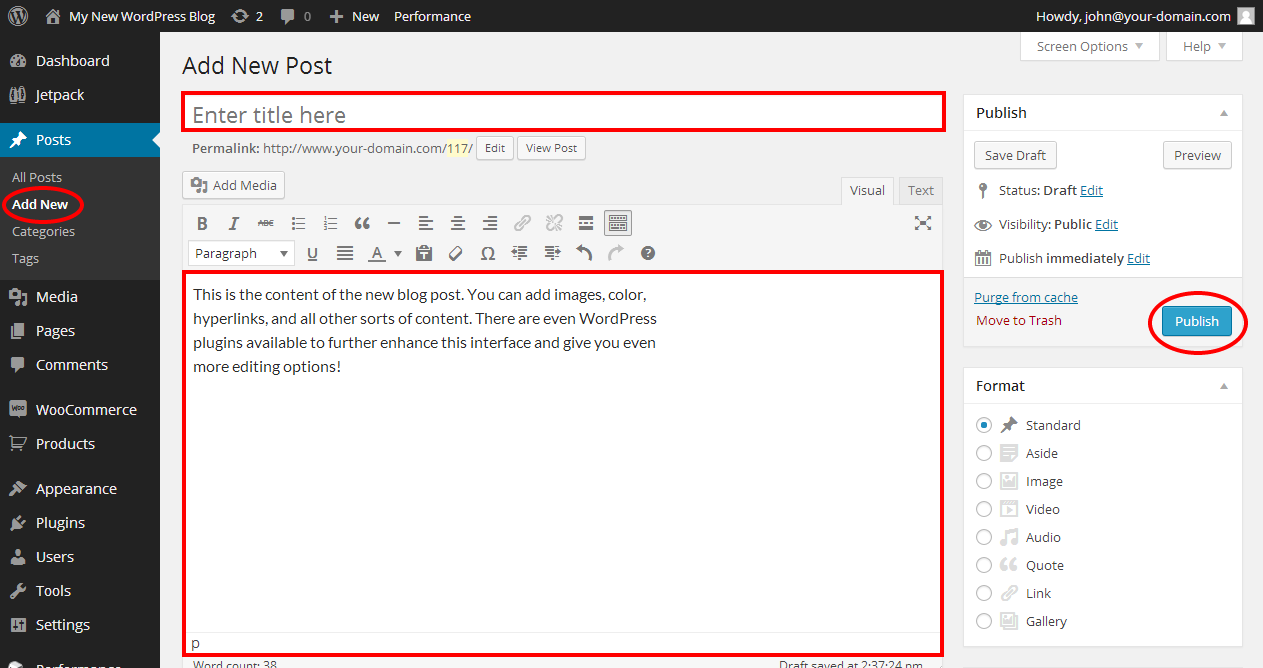
Start by clicking “Add New Post” in your WordPress dashboard. Write a clear and catchy title. Keep paragraphs short for easy reading. Use headings to organize your ideas. Bullet points help list important details. Use simple words to explain your points. Avoid long sentences and complex terms. Check spelling and grammar before publishing. Preview your post to see how it looks on the website.
Adding Images And Media
Images and media make your posts more engaging. Click the “Add Media” button above the text editor. Upload images from your computer or choose from the media library. Use images that relate to your content. Add a short description or “alt text” for each image. This helps search engines and improves accessibility. You can also add videos or audio files. Embed links to other websites if needed. Arrange media to support your message without clutter.
Integrating Blog With Existing Website
Integrating a blog with an existing website helps keep visitors engaged. It also improves your site’s SEO by adding fresh content regularly. A well-integrated blog looks natural and fits the website’s style. This section explains easy ways to link your blog to your current site.
Linking Blog To Navigation Menu
Adding your blog to the main menu makes it easy for visitors to find. Most website builders and WordPress themes allow quick menu edits. Go to your website’s dashboard and open the menu settings.
Find the option to add a new menu item. Choose “Blog” or add the URL of your blog page. Save your changes and check the website to see the blog link in the menu. This method keeps your navigation clear and simple for users.
Embedding Blog On Homepage
Embedding your blog posts on the homepage shows fresh content to visitors right away. WordPress offers widgets or blocks to display recent posts. Open the homepage editor and add the “Latest Posts” block.
Customize the block to show the number of posts and post summaries. This way, visitors get a quick view of your blog without leaving the homepage. It increases blog visibility and encourages more reading.
Optimizing For Performance And Seo
Optimizing your WordPress blog for performance and SEO is crucial for attracting visitors and keeping them engaged. Fast loading pages and well-placed keywords help improve your site’s visibility on search engines. A smooth user experience encourages visitors to stay longer and explore more content.
Improving Site Speed
Site speed affects both user experience and search rankings. Use a reliable hosting service to reduce server response time. Compress images to lower file sizes without losing quality. Enable caching to serve pages faster to repeat visitors. Limit the number of plugins to avoid slowdowns. Use a content delivery network (CDN) to distribute content worldwide quickly.
Keyword Optimization Techniques
Choose keywords that match what your audience searches for. Use them naturally in titles, headings, and content. Add keywords to meta descriptions and image alt texts. Avoid keyword stuffing, as it can hurt rankings. Focus on long-tail keywords for better targeting. Regularly update content to keep keywords relevant and fresh.
Maintaining And Updating Your Blog
Maintaining and updating your WordPress blog keeps it safe and running smoothly. Regular care helps avoid problems and keeps readers happy. Small tasks done often make a big difference over time.
Regular Backups
Backups save a copy of your blog’s data and files. They protect your work from loss or damage. Schedule backups at least once a week. Use plugins or your hosting service for easy backups. Store backup files in a safe place, separate from your website.
Updating WordPress And Plugins
Updates fix bugs and add new features to WordPress and plugins. Running old versions can cause security risks. Check for updates regularly, at least once a week. Update your WordPress core first, then plugins and themes. Always test your site after updates to ensure everything works well.

Credit: libroediting.com
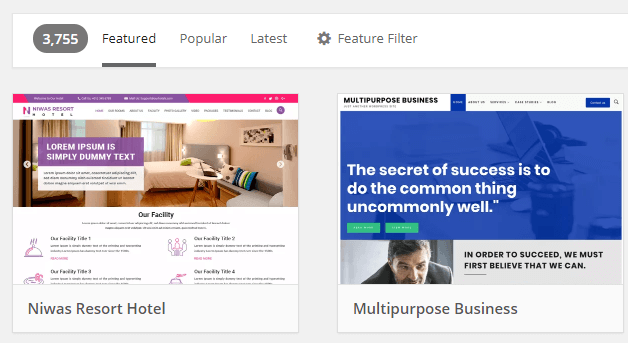
Credit: wpengine.com
Frequently Asked Questions
How Do I Integrate A WordPress Blog Into My Website?
To integrate a WordPress blog, install WordPress in a subdirectory or subdomain. Then, link it seamlessly to your main site using menus or widgets.
Can I Add A WordPress Blog Without Redesigning My Site?
Yes, you can match your blog’s theme to your website’s style. Use similar colors and fonts for a consistent look.
What Are The Benefits Of Adding A WordPress Blog?
Adding a WordPress blog boosts SEO, engages visitors, and allows easy content updates. It helps grow your site’s audience effectively.
Is It Necessary To Use Plugins For Blog Integration?
Plugins can simplify integration, like displaying recent posts or sharing buttons. However, basic linking often works without extra plugins.
Conclusion
Adding a WordPress blog to your website is simple and effective. It helps share updates and connect with visitors easily. You can customize the blog to match your site’s look. Regular posts keep your site fresh and interesting. This also improves your search engine visibility.
Start small, then grow your blog step by step. Enjoy the process and watch your website become more engaging.