
Are you wondering if hosting your domain on AWS is the right move? Choosing where to host your website can feel overwhelming.
You want a solution that’s reliable, fast, and fits your budget. But with so many options out there, how do you know if AWS is the best choice for you? You’ll discover the real benefits and possible drawbacks of using AWS for your domain.
By the end, you’ll have a clear idea of whether AWS matches your needs and how it can impact your website’s success. Keep reading to make an informed decision that could boost your online presence.
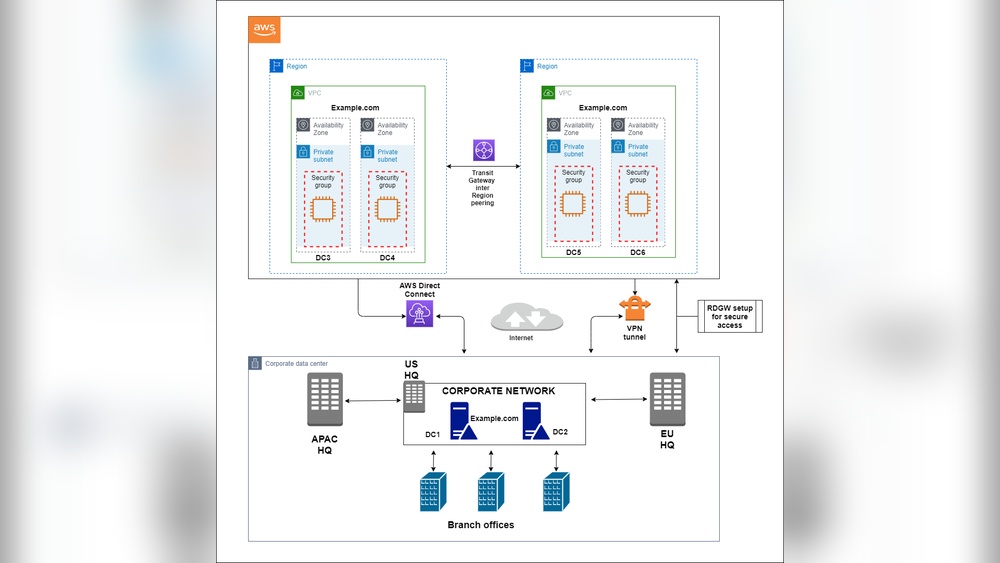
Credit: medium.com
Benefits Of Hosting On Aws
Hosting your domain on AWS offers many benefits that can help your website perform better. AWS provides strong tools and services for websites of all sizes. This makes it a popular choice for hosting domains.
Many businesses trust AWS for its reliability, security, and cost control. It also adapts easily to changes in website traffic and needs. These advantages make AWS a smart option for hosting your domain.
Scalability And Flexibility
AWS lets you scale your resources up or down quickly. You can handle more visitors without slowdowns. This helps your website stay fast during busy times.
You only pay for what you use. This flexible system saves money and avoids wasted resources.
Global Infrastructure
AWS has data centers around the world. This global network helps your website load faster for visitors everywhere. It also improves uptime and reduces delays.
Having servers near users makes the website experience better. This is important for reaching a wide audience.
Security Features
AWS offers strong security tools to protect your domain and data. It includes firewalls, encryption, and monitoring. These features help keep your site safe from attacks.
Regular updates and compliance with security standards add extra protection.
Cost Efficiency
AWS uses a pay-as-you-go pricing model. You avoid large upfront costs and long contracts. This makes it easier to manage hosting expenses.
You can choose services that fit your budget and needs. This control helps keep costs low without sacrificing quality.
Common Aws Hosting Services
AWS offers several hosting services to manage your domain efficiently. Each service targets different needs and scales. Understanding these options helps you choose the right one for your website or app.
These services range from domain management to virtual servers and storage. They provide flexibility and control over your hosting environment.
Amazon Route 53
Amazon Route 53 is a domain name system (DNS) web service. It helps direct internet traffic to your website by translating domain names to IP addresses. Route 53 also offers domain registration and health checks. This service ensures your site stays online and reachable.
Amazon Ec2
Amazon EC2 provides virtual servers in the cloud. You get full control over the server’s operating system and software. It suits websites needing custom setups or high performance. EC2 can scale up or down based on traffic demands.
Amazon S3
Amazon S3 is a storage service for hosting static websites. It stores files like HTML, CSS, and images securely. S3 offers high durability and availability. It works well for simple websites without server-side code.
Aws Lightsail
AWS Lightsail is an easy-to-use cloud platform. It bundles compute, storage, and networking into simple plans. Lightsail is perfect for beginners or small projects. It provides quick setup and predictable pricing.
Setting Up Your Domain On Aws
Setting up your domain on AWS is a straightforward process. It gives you control and reliability for your website. AWS offers tools to register, configure, and link your domain easily. Understanding each step helps you manage your online presence better.
Registering A Domain
Start by visiting the AWS Route 53 console. Search for the domain name you want. If available, you can register it directly through AWS. The registration process includes entering your contact details and payment information. AWS handles domain ownership and renewals securely.
Configuring Dns Settings
After registration, set up your DNS settings in Route 53. Create hosted zones for your domain to manage DNS records. Add records like A, CNAME, and MX to point to the correct servers. Proper DNS setup ensures your site loads quickly and correctly.
Linking Domain To Hosting Services
Connect your domain to your hosting service next. Use the DNS records to link your domain with AWS EC2, S3, or other hosting platforms. This connection makes your website accessible to visitors using your domain name. Test your site to confirm the link works properly.
Performance And Reliability
Performance and reliability are key factors in choosing where to host your domain. Your website needs to load fast and stay online without interruptions. AWS offers tools and services to help maintain strong performance and high reliability.
Uptime Guarantees
AWS provides strong uptime guarantees to keep your site running. Their service level agreements promise 99.99% uptime. This means your website will be available almost all the time. Less downtime means happier visitors and better search rankings.
Load Balancing
Load balancing spreads traffic across multiple servers. AWS Elastic Load Balancing helps manage sudden traffic spikes. This avoids server overload and keeps your site responsive. Visitors get a smooth experience, even during busy periods.
Content Delivery With Cloudfront
AWS CloudFront speeds up content delivery by using a global network of servers. It caches your content close to visitors. This reduces loading times for images, videos, and web pages. Faster sites improve user satisfaction and SEO.
Cost Considerations
Cost is a key factor when choosing to host your domain on AWS. Understanding how AWS pricing works helps you avoid surprises. You can control expenses by learning what affects your bill.
Different AWS services have unique pricing structures. Knowing these can guide your decision on hosting your domain there.
Pricing Models
AWS uses pay-as-you-go pricing. You pay only for what you use. There are no upfront fees or long-term contracts. Some services offer free tiers for small usage. You can choose between on-demand and reserved instances. Reserved instances give discounts for longer commitments. Pricing varies by region and service type.
Estimating Monthly Costs
Start by listing all needed AWS services. Use the AWS Pricing Calculator to estimate costs. Include domain registration, DNS management, and hosting fees. Don’t forget data transfer and storage charges. Monitor your usage regularly to track expenses. This helps avoid unexpected high bills.
Cost Optimization Tips
Choose the right instance size for your needs. Avoid over-provisioning resources. Use AWS free tier if eligible. Set up billing alerts to catch spikes early. Delete unused resources to save money. Consider reserved instances for steady workloads. Optimize data transfer by using caching. Regularly review your setup to find savings.

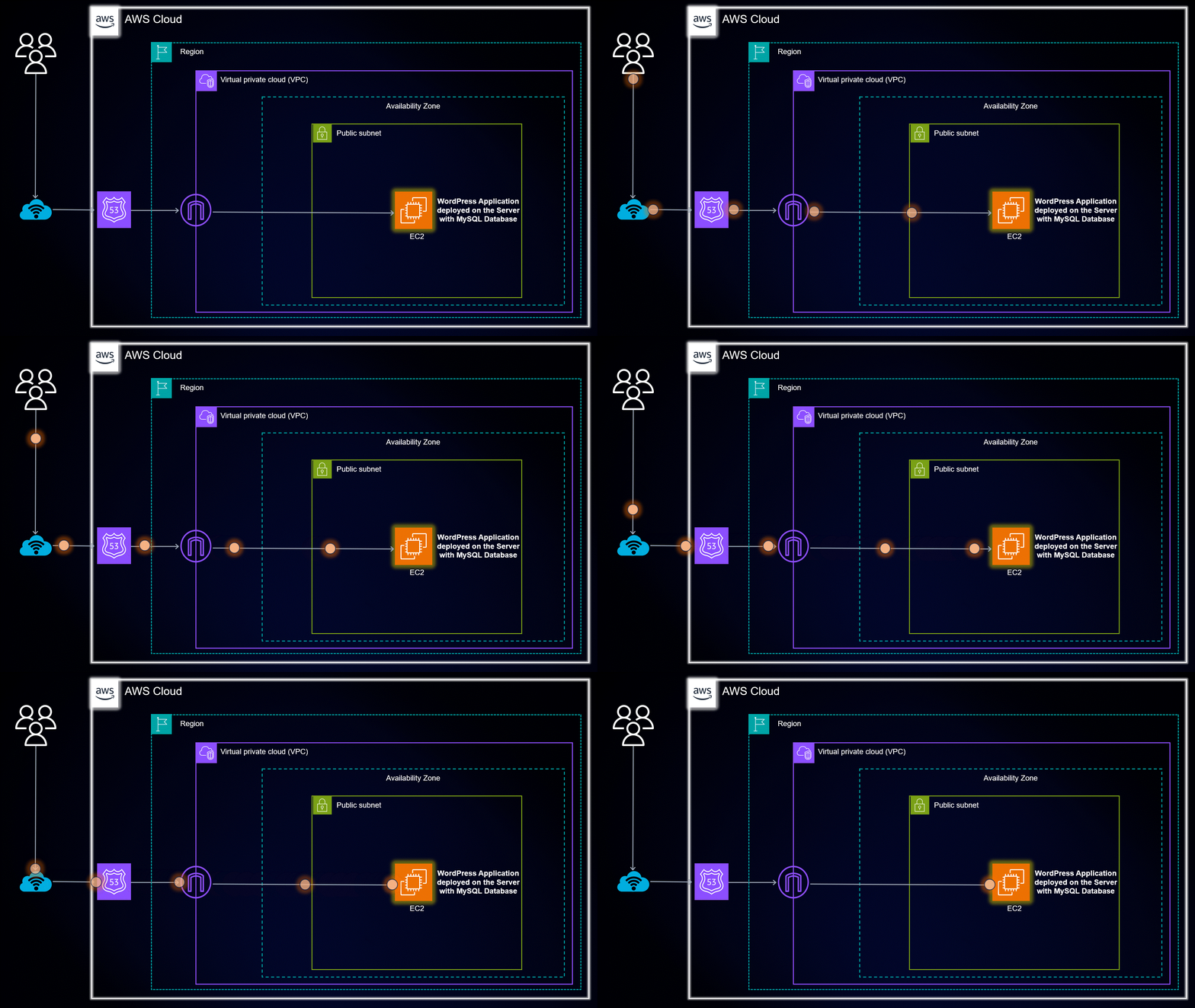
Credit: mxd.codes
Alternatives To Aws Hosting
Choosing where to host your domain is important. AWS offers many services, but it may not be the best fit for everyone. Exploring other options can help find the right balance of cost, ease, and features.
Many alternatives provide good performance and simple setups. These options suit small websites or those new to hosting. Understanding each type helps make a smart choice for your site.
Shared Hosting Providers
Shared hosting is a popular choice for beginners and small websites. It means many websites share the same server. This lowers the cost and simplifies management. Companies like Bluehost, HostGator, and SiteGround offer reliable shared hosting. You get easy control panels and automatic updates. Shared hosting works well for blogs, portfolios, and small businesses.
Other Cloud Providers
Cloud hosting offers flexibility and scalability. Alternatives to AWS include Google Cloud and Microsoft Azure. These platforms provide global data centers and strong security. They offer pay-as-you-go pricing to control costs. Cloud providers suit sites that expect growth or need special tools. Setting up may require some technical skill.
Managed WordPress Hosting
Managed WordPress hosting is perfect for WordPress users. Providers handle updates, security, and backups. Examples are WP Engine, Kinsta, and Flywheel. These services focus on speed and uptime for WordPress sites. They remove technical tasks, so you focus on content. Managed hosting costs more but saves time and hassle.
Common Challenges With Aws Hosting
Hosting your domain on AWS offers many benefits but also comes with some challenges. These challenges can affect your experience and success. Understanding them helps you prepare better. Here are some common issues users face with AWS hosting.
Complexity Of Setup
AWS provides many services and options. This variety can confuse new users. Setting up a domain requires several steps. You must configure DNS, SSL certificates, and routing correctly. Missing one step can cause your site to fail. The setup process is not straightforward. It demands attention to detail and patience.
Learning Curve
AWS has a steep learning curve. The platform uses unique terms and concepts. New users need time to understand them. The dashboard can feel overwhelming. Many features require technical knowledge. Beginners may struggle to use AWS effectively. Training and tutorials are often necessary. This learning phase can slow down your project.
Managing Security
Security is a critical concern on AWS. You must manage permissions and access controls carefully. Incorrect settings can expose your domain to risks. AWS provides tools for security, but you must use them properly. Regular updates and monitoring are essential. Security management demands ongoing effort. Neglecting it can lead to data breaches and downtime.

Credit: aws.amazon.com
When Aws Hosting Makes Sense
AWS hosting fits certain needs better than others. It offers powerful tools and flexible options. This makes it a strong choice for specific types of websites and apps.
Choosing AWS is smart when your project needs growth, high traffic, or fast changes. Understanding these situations helps pick the right hosting.
Startups And Growing Businesses
Startups benefit from AWS due to low upfront costs. You pay for only what you use. This helps keep budgets tight at first.
Growing businesses need room to expand quickly. AWS lets you add resources without downtime. It supports growth without extra hassle.
High Traffic Websites
Websites with many visitors require strong, reliable hosting. AWS handles large traffic spikes smoothly. This avoids slow loading or crashes.
Its global network means content loads fast worldwide. Visitors get a good experience no matter their location.
Applications Requiring Scalability
Apps that change user demands need flexible hosting. AWS scales resources up or down automatically. This keeps apps running well at all times.
Developers can test and deploy updates quickly. AWS supports continuous improvement and fast changes.
Frequently Asked Questions
What Are The Benefits Of Hosting A Domain On Aws?
Hosting a domain on AWS offers scalability, reliability, and global reach. AWS provides secure infrastructure and easy integration with other services. It supports high traffic and offers cost-effective pay-as-you-go pricing, making it ideal for businesses of all sizes.
Is Aws Domain Hosting Cost-effective For Small Businesses?
AWS allows small businesses to pay only for what they use, reducing upfront costs. Its flexible pricing and free tier options help manage budgets effectively. However, monitoring usage is important to avoid unexpected charges.
How Secure Is Domain Hosting On Aws?
AWS uses advanced security measures, including encryption, firewalls, and DDoS protection. It complies with global security standards and offers tools to manage access control. This ensures your domain and data remain safe from threats.
Can I Easily Manage Dns With Aws Route 53?
Yes, AWS Route 53 provides a user-friendly interface to manage DNS settings. It supports domain registration, DNS routing, and health checks. This simplifies domain management and improves website performance and availability.
Conclusion
Choosing to host your domain on AWS depends on your needs and skills. AWS offers reliable service and many tools. It suits those who want control and scalability. Costs can vary, so watch your budget closely. Support options exist but may require extra fees.
For beginners, the learning curve might feel steep. Think about your goals and resources before deciding. AWS can work well, but it is not for everyone. Consider other hosting providers if you want simplicity or lower costs. Make the choice that fits you best.


