
Have you ever wondered how websites actually appear on the internet? It all starts with two key things: a web domain and hosting.
Understanding these can seem tricky, but once you get it, building your own website becomes much easier. This article will clear up the confusion and help you grasp exactly what a web domain is and why hosting is essential for your site.
By the end, you’ll feel confident about taking the next step to create your online presence. Keep reading—you’re about to unlock the foundation of the digital world!
Web Domain Basics
Understanding web domains is essential for anyone starting a website. A domain is the address users type to visit a site. It helps people find your website easily on the internet. Knowing how domains work can make setting up a website simpler.
Definition And Purpose
A web domain is a website’s unique name on the internet. It acts like a home address for your site. Domains help users remember and access websites easily. Without domains, users would need to use complicated IP numbers.
The main purpose of a domain is to point users to the right website. It makes your site easy to find and brand. Domains also build trust and credibility with visitors.
Types Of Domains
Domains come in many types and endings. The most common are .com, .org, and .net. Each type serves different groups or purposes. For example, .com is for commercial sites, .org for organizations.
Country codes like .uk, .us show the site’s location. New domain endings like .blog or .shop describe the site’s content. Choosing the right domain type helps visitors understand your website.
How Domains Work
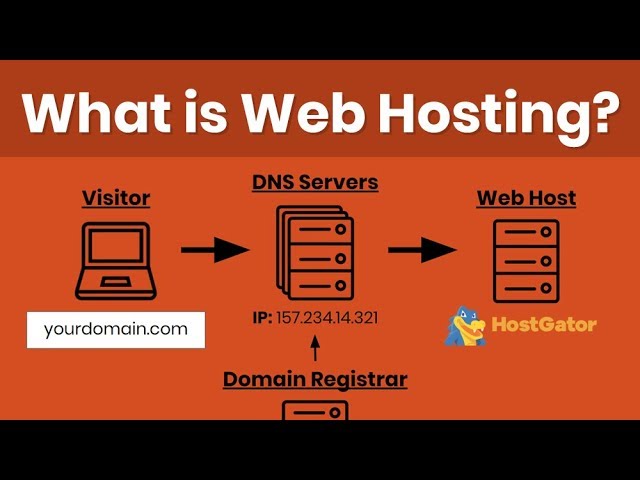
Domains connect to servers where websites live. When users type a domain, the internet looks up its IP address. This process happens fast and guides users to the site.
The Domain Name System (DNS) manages this lookup. It acts like a phone book for the internet. DNS translates domain names into IP addresses automatically.
Each domain must be registered with a domain registrar. This keeps the domain unique and linked to your website.
Credit: www.youtube.com
Domain Name Registration
Domain name registration is the first step to create your website’s address on the internet. It gives your site a unique name that people type to visit you. This process involves picking a name and reserving it so no one else can use it. The name connects visitors to your website’s content.
Choosing A Domain Name
Select a name that is short, easy to remember, and related to your business or topic. Avoid using numbers or hyphens because they can confuse visitors. Use keywords that describe your site’s purpose to help with search engines. Check that the name is not trademarked or copyrighted.
Where To Register
Domain names are registered through companies called registrars. Choose a registrar that is reliable and offers good customer support. Popular options include GoDaddy, Namecheap, and Google Domains. Some web hosting providers also offer domain registration services, which can simplify managing your website.
Costs And Renewal
Domain registration usually costs between $10 and $20 per year. Prices vary based on the domain extension and registrar. Remember to renew your domain before it expires to keep ownership. Some registrars offer discounts for multi-year registrations or bundled services with hosting.
Web Hosting Fundamentals
Understanding web hosting is key to creating a website. Hosting lets your site live on the internet. It stores all your website files on a server. Without hosting, your website cannot be seen by others.
What Is Hosting
Hosting is a service that stores website data. It keeps your web pages, images, and videos safe. Servers are powerful computers that run 24/7. They deliver your website content to visitors quickly. Hosting makes your website accessible anytime and anywhere.
Types Of Hosting Services
There are several hosting types to choose from. Shared hosting is affordable and easy to use. Many websites share one server in this type. VPS hosting offers more power with fewer users. Dedicated hosting gives you a whole server alone. Cloud hosting uses many servers for better speed. Each type suits different needs and budgets.
How Hosting Works
Hosting works by connecting your website to the internet. You buy a hosting plan and upload your files. The server stores your data safely. When someone types your domain, the server sends your site to their browser. The server runs all the time to keep your site online.
Credit: blog.templatetoaster.com
Connecting Domain And Hosting
Connecting a domain to hosting is a key step in building a website. The domain is your website’s address on the internet. Hosting is where all your website files live. Linking them makes your website visible online. This connection lets users type your domain and see your site content.
Dns And Name Servers
DNS stands for Domain Name System. It works like a phone book for the internet. DNS translates your domain name into the IP address of your hosting server.
Name servers hold DNS records. They tell the internet where to find your website. Usually, your hosting provider gives you name servers. You must update your domain settings to use these name servers.
Pointing Domain To Hosting
Pointing means directing your domain to your hosting server. You do this by changing the name servers in your domain registrar’s control panel. Enter the name servers provided by your hosting company.
Once updated, it may take some time to work. This delay is called propagation. It can last from a few minutes to 48 hours. After propagation, your domain will load your website from the hosting server.
Common Issues And Fixes
A common issue is incorrect name server settings. Double-check the name servers you entered. Typos or missing entries cause your site to not load.
Another problem is DNS propagation delay. Patience is needed. Clear your browser cache to avoid old data.
If the site still does not load, contact your hosting provider or domain registrar. They can help find and fix the problem quickly.
Selecting The Right Hosting
Selecting the right hosting is key to your website’s success. Hosting stores your site’s files and makes them available online. A good host keeps your site fast and secure. Choosing the wrong hosting can cause slow loading and downtime. Understand your needs before picking a hosting type. Consider your budget, traffic, and technical skill. The right choice fits your current and future goals.
Factors To Consider
Start by checking the host’s reliability and uptime. Your website must stay online almost all the time. Look for good customer support that is easy to reach. Storage space and bandwidth matter for your site size and visitors. Security features protect your site from hackers and malware. Think about scalability to handle more traffic later. Ease of use is important if you are a beginner.
Shared Vs Dedicated Hosting
Shared hosting means your site shares a server with others. It is cheaper but can be slower during high traffic. Dedicated hosting gives you a whole server alone. It costs more but offers better speed and control. Small blogs or startups do well with shared hosting. Large businesses or high traffic sites need dedicated servers. Choose based on your website size and growth plans.
Cloud And Vps Hosting
Cloud hosting uses many servers to keep your site online. It offers high uptime and can handle traffic spikes. VPS hosting splits a server into virtual parts for more control. It is more powerful than shared hosting but cheaper than dedicated. Both options provide flexibility and better performance. Ideal for growing websites that need reliability and speed.
Managing Your Domain And Hosting
Managing your domain and hosting is key to keeping your website online and secure. It involves using tools to control your settings, protecting your site from threats, and regularly saving your data. Simple steps help avoid big problems later.
Good management keeps your website running smoothly and your visitors happy.
Control Panels And Tools
Control panels let you manage your domain and hosting easily. They show options to edit your site, set up emails, and update settings. Popular panels like cPanel or Plesk are user-friendly and help handle tasks fast. These tools save time and reduce errors for beginners and experts alike.
Security Measures
Security protects your site from hackers and malware. Use strong passwords and change them often. Enable SSL certificates to encrypt data and build trust. Regularly update software to fix security holes. Some hosts offer firewalls and scans to detect threats early.
Backup And Maintenance
Backups save copies of your website data. They help restore your site after crashes or attacks. Schedule backups regularly and store them safely. Maintenance includes checking for broken links, updating content, and fixing errors. These tasks keep your website fresh and reliable.

Credit: www.geeksforgeeks.org
Frequently Asked Questions
What Is A Web Domain In Simple Terms?
A web domain is the address of a website on the internet. It helps users find and access websites easily. Domains are unique and end with extensions like. com or. org.
How Does Web Hosting Work For Websites?
Web hosting stores your website files on a server. It makes your site accessible online 24/7. Without hosting, your website cannot be viewed on the internet.
What Is The Difference Between Domain And Hosting?
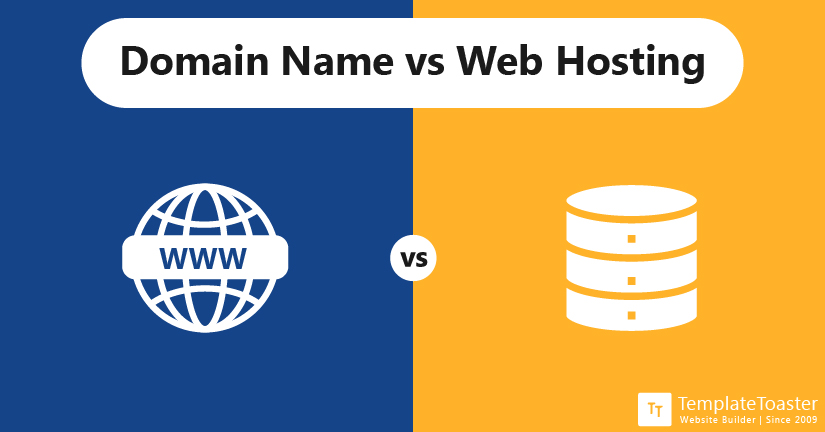
A domain is your website’s name or address. Hosting is the space where your website lives online. Both are needed to make a website accessible.
Can I Register A Domain Without Hosting?
Yes, you can register a domain without hosting. However, your website won’t be live without hosting services. Hosting is required to publish your website content.
Conclusion
A web domain is your website’s address on the internet. Hosting stores your website files so people can visit. Both work together to make a website accessible. Choosing the right domain and hosting matters for your site’s success. Understanding these basics helps you build a strong online presence.
Now, you can start creating your own website with confidence. Simple steps lead to great results. Keep learning and exploring to improve your site over time.


