
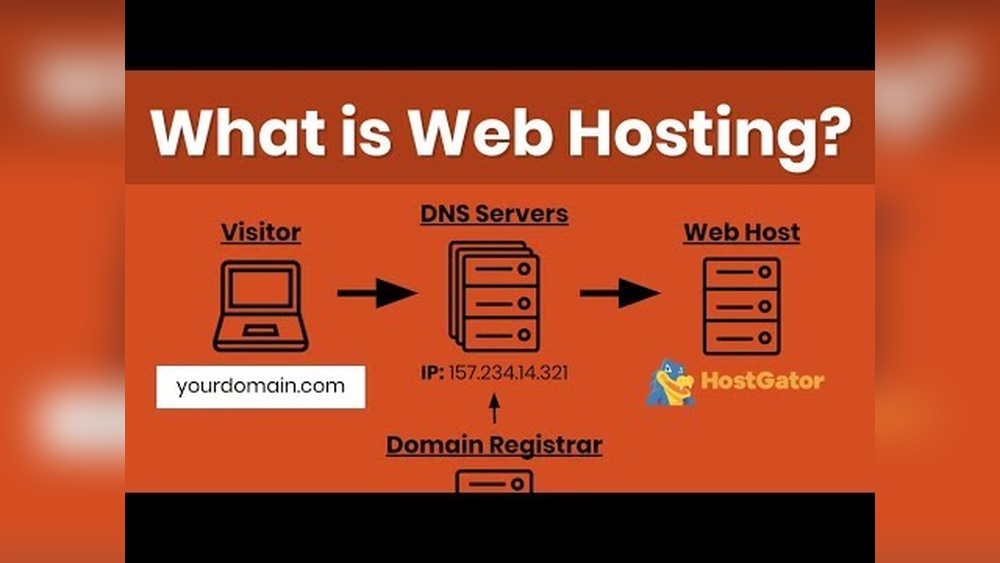
Have you ever wondered what makes a website live and accessible to everyone on the internet? It all starts with something called domain hosting.
If you’re planning to create your own website or online business, understanding what domain hosting is can save you time, money, and frustration. You’ll discover exactly what domain hosting means, why it matters for your online presence, and how it can help your website succeed.
Keep reading to unlock the secrets behind getting your site online quickly and easily.
Domain Hosting Basics
Domain hosting is a key part of having a website. It makes your site visible on the internet. Understanding the basics helps you choose the right service for your needs.
This section explains what domain hosting means, how it works, and the different types available.
What Domain Hosting Means
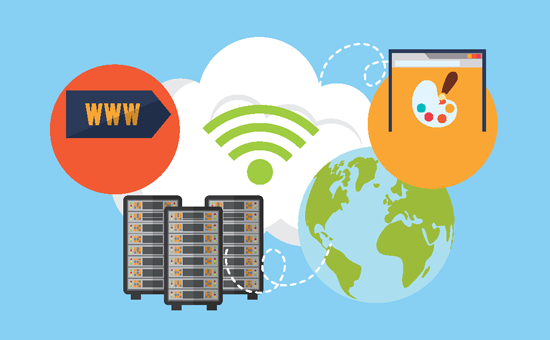
Domain hosting connects your website to the internet. It stores your website’s files and data. This service allows people to visit your site using your domain name.
The domain name is your website’s address, like www.example.com. Hosting keeps your site online and accessible 24/7.
How Domain Hosting Works
When someone types your domain name, hosting servers respond. These servers send the website files to the visitor’s browser. This process happens very fast.
Your website stays live because the hosting provider keeps the servers running. They also manage security and technical support.
Types Of Domain Hosting
There are several types of domain hosting. Shared hosting is common and affordable. Many websites share one server.
VPS hosting offers more power and control. It divides a server into virtual spaces for each user. Dedicated hosting provides an entire server for one website. It suits large sites with high traffic.
Cloud hosting uses many servers to host a website. It is flexible and reliable, adjusting to traffic changes easily.
Choosing The Right Domain
Choosing the right domain is a key step in building your website. It shapes how visitors see your site. A good domain name is easy to remember and fits your brand. It also helps your site rank better on search engines. Spend time picking a domain that suits your needs and goals.
Picking A Memorable Domain Name
Choose a domain name that people can recall easily. Keep it short and simple. Avoid using numbers or hyphens. Use words that relate to your business or topic. A clear name helps visitors find your site faster. It also makes your brand stronger over time.
Domain Extensions Explained
Domain extensions come after the name, like .com or .org. The .com extension is the most popular and trusted. Other options include .net, .info, and country codes like .uk or .ca. Pick an extension that fits your website’s purpose. For example, nonprofits often use .org, while businesses prefer .com.
Domain Registration Tips
Register your domain as soon as you decide on a name. Use a reliable domain registrar to avoid problems. Check if the name is available and not trademarked. Consider buying similar names to protect your brand. Set up automatic renewal to keep your domain active.
Hosting Options For Your Domain
Setting up domain hosting is the next step after buying a domain name. It links your domain to a web server, making your website visible online. This process involves a few key tasks that ensure your website loads correctly and securely.
Connecting Domain To Hosting
Connecting your domain to hosting means pointing your domain name to the hosting server. This is done by changing the domain’s nameservers to those provided by your hosting company. Nameservers act like an address book for the internet, telling browsers where to find your website.
After updating nameservers, it can take up to 48 hours for changes to spread worldwide. This delay is called DNS propagation. During this time, your website might be slow or unreachable.
Dns Management Basics
DNS stands for Domain Name System. It translates your domain name into an IP address that computers use. Managing DNS means editing records like A, CNAME, MX, and TXT.
The A record points your domain to a specific IP address. CNAME records link one domain name to another. MX records control email routing. TXT records add extra information for verification and security.
Proper DNS setup helps your website load fast and your emails work correctly.
Ssl Certificates And Security
SSL certificates protect your website by encrypting data between the user and server. This keeps information safe from hackers. Websites with SSL show “https” and a padlock icon in the browser.
Most hosting providers offer free SSL certificates. Installing SSL is usually a one-click process in your hosting dashboard. A secure site builds trust and improves search engine ranking.
Credit: www.wpbeginner.com
Setting Up Domain Hosting
Boosting website performance is key to a smooth online experience. Fast websites keep visitors happy and reduce bounce rates. Effective hosting and smart techniques improve site speed and reliability. These methods help your website run better and reach more people.
Optimizing Load Speed
Load speed means how fast your website appears on a screen. Slow sites lose visitors quickly. Compress images to make files smaller. Use simple design and clean code. Choose a hosting service with fast servers. These steps help pages load in seconds.
Using Content Delivery Networks
Content Delivery Networks (CDNs) store copies of your site worldwide. Visitors access data from the closest server. This reduces delay and speeds up loading. CDNs also handle large traffic without crashing. They improve performance for users everywhere.
Caching Techniques
Caching saves parts of your website temporarily on devices or servers. It avoids loading everything from scratch each visit. This cuts down waiting time. Use browser caching and server caching. Caching makes repeat visits much faster and smoother.
Boosting Website Performance
Maintaining your domain and hosting is essential for keeping your website live and secure. Regular care helps avoid unexpected downtime and data loss. It also ensures visitors can always access your site without issues. Simple steps can protect your investment and improve your online presence.
Renewal And Expiration
Domains and hosting services last for a set period. You must renew them before they expire. Missing renewal dates can cause your website to go offline. Renew early to avoid losing your domain or hosting space. Set reminders to check expiration dates regularly. Renewing on time keeps your website accessible to users.
Regular Backups
Backing up your website data is crucial. Backups save copies of your files and databases. If something breaks, you can restore your website quickly. Schedule backups often, at least once a week. Store backups in a safe place, separate from your hosting server. This practice protects your site from data loss or hacking.
Monitoring Uptime And Downtime
Website uptime means your site is online and working. Downtime means your site is offline or slow. Use tools to monitor your website’s uptime daily. Quick detection of downtime helps fix problems fast. A reliable hosting service offers high uptime rates. Keeping your site available improves user trust and SEO.
Maintaining Your Domain And Hosting
Troubleshooting common issues in IT domain hosting helps keep websites running smoothly. Many problems can occur, but most have simple solutions. Understanding these issues saves time and reduces stress.
Some of the most frequent problems involve DNS errors, website downtime, and security threats. Each affects website accessibility and performance. Solving these quickly protects your online presence.
Resolving Dns Errors
DNS errors stop users from reaching your website. These happen when domain names do not link correctly to IP addresses. Check DNS settings for typos or wrong entries. Refreshing the DNS cache often fixes the issue. Use online DNS tools to test domain resolution. Contact your hosting provider if errors persist.
Handling Website Downtime
Website downtime means your site is not available to visitors. This can hurt your reputation and traffic. First, check server status through your hosting control panel. Restarting the server may restore access. Review recent changes that might cause downtime. Use uptime monitoring tools to get alerts. Plan for regular backups to avoid data loss.
Dealing With Security Threats
Security threats put your website and data at risk. Common threats include malware, hacking, and phishing attacks. Keep your software and plugins updated. Use strong passwords and enable two-factor authentication. Scan your site regularly for malware. Choose hosting providers with solid security measures. Act fast to remove threats if detected.
Troubleshooting Common Issues
The future of domain hosting is evolving fast. New trends will change how websites work and perform. Hosting providers focus on speed, security, and eco-friendliness. These changes aim to improve user experience and support growing online needs.
Emerging Hosting Technologies
Cloud hosting grows popular for its flexibility and power. Serverless hosting reduces costs by charging only for used resources. Edge computing moves data closer to users, cutting delays. These technologies help websites load faster and stay online longer.
Impact Of Ai On Hosting
Artificial intelligence helps monitor servers for problems. AI can fix issues before they affect websites. It also improves security by spotting unusual activity. Smart automation makes hosting easier and more reliable.
Green Hosting Solutions
Green hosting uses renewable energy to power servers. It lowers carbon footprints and saves resources. Many companies adopt eco-friendly practices to support the planet. Choosing green hosts helps reduce environmental impact.

Credit: www.elegantthemes.com
Credit: www.youtube.com
Frequently Asked Questions
What Is It Domain Hosting?
IT domain hosting refers to services that store websites on servers. It enables websites to be accessible online via domain names. Hosting providers manage server maintenance, security, and uptime, ensuring reliable site availability. It’s essential for businesses wanting to establish an online presence.
How Does It Domain Hosting Work?
IT domain hosting works by linking a domain name to a server’s IP address. When users enter the domain, the server delivers website files to their browsers. Hosting providers maintain servers, handle data storage, and manage traffic to ensure smooth website performance.
Why Is It Domain Hosting Important?
IT domain hosting is crucial for online visibility. It ensures your website is accessible 24/7 globally. Reliable hosting improves website speed, security, and user experience. Without hosting, websites cannot be viewed on the internet or accessed by users.
What Are Common Types Of It Domain Hosting?
Common types include shared, VPS, dedicated, and cloud hosting. Shared hosting is cost-effective but less powerful. VPS offers more control and resources. Dedicated hosting provides exclusive server use. Cloud hosting delivers scalability and flexibility for growing sites.
Conclusion
Understanding IT domain hosting helps you start your online presence. It connects your website to the internet. Choosing the right hosting keeps your site fast and safe. Good hosting supports your website’s growth and traffic. Now, you know why domain hosting matters for every website.
Keep learning to make smart choices for your online space. Simple steps lead to strong digital foundations.


