
Imagine having a WordPress site that truly reflects your unique style and vision. You’re not alone in this desire, and customizing a WordPress theme is the key to achieving it.
Whether you’re a seasoned blogger or just starting out, understanding how to tailor your theme can make a world of difference. It’s about making your site not just functional, but exceptional. Are you tired of the same generic look that doesn’t quite capture your brand’s essence?
You have the power to transform it. By customizing your WordPress theme, you can create a website that feels just right. This guide is here to help you unlock that potential with simple, actionable steps. You’ll discover how easy it can be to adjust colors, fonts, layouts, and more, without needing to be a tech wizard. So, are you ready to take control and make your website truly yours? Let’s dive in and explore the exciting world of WordPress theme customization.
Choosing The Right Theme
Picking a theme is important. It sets your site’s look. First, check if it’s responsive. This means it works on all devices. Next, think about customization options. Can you change colors and fonts? Also, consider loading speed. Faster sites keep visitors happy. Another factor is support and updates. Does the theme get regular updates? Last, look at user reviews. Happy users mean a good theme.
Many themes are famous. Astra is a top choice. It’s fast and flexible. OceanWP is another good pick. It offers many features. Divi is great for beginners. It comes with a drag-and-drop builder. GeneratePress is known for speed. It’s lightweight and easy to use. Neve is simple and modern. Perfect for small blogs or shops.
Setting Up Your Theme
To install a new theme, go to your WordPress dashboard. Click on “Appearance” and then “Themes”. Find the “Add New” button at the top. You can see many themes here. You can search for a theme using the search bar. Once you find the theme you like, click on “Install”. Wait for a few seconds. Your theme will be ready to use.
After installing, you need to activate the theme. Go back to your dashboard and click on “Appearance”. You will see your new theme listed. Click on the “Activate” button below the theme. Once activated, your site will use this theme. You can now start customizing your new theme. Have fun exploring the options!
Using The Customizer Tool
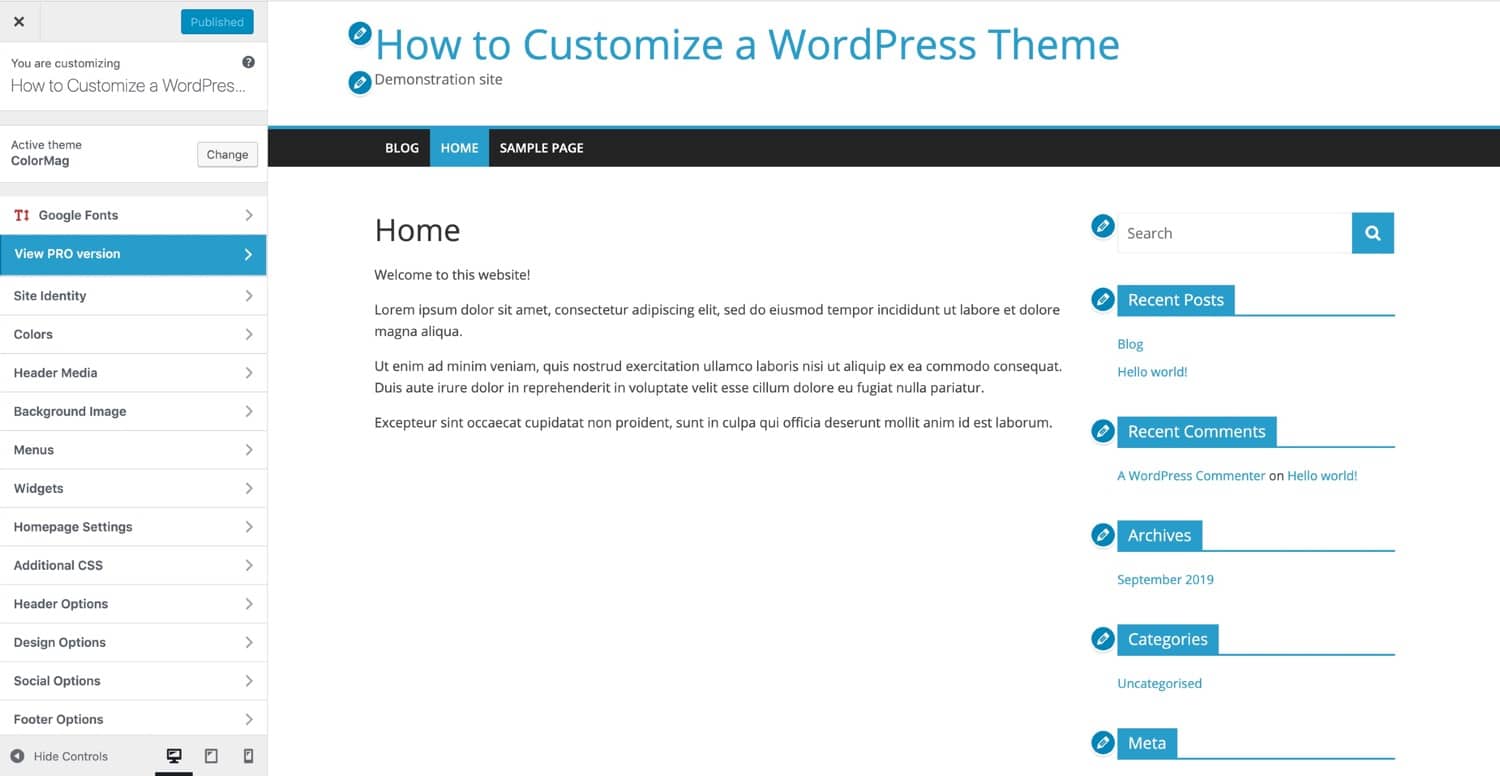
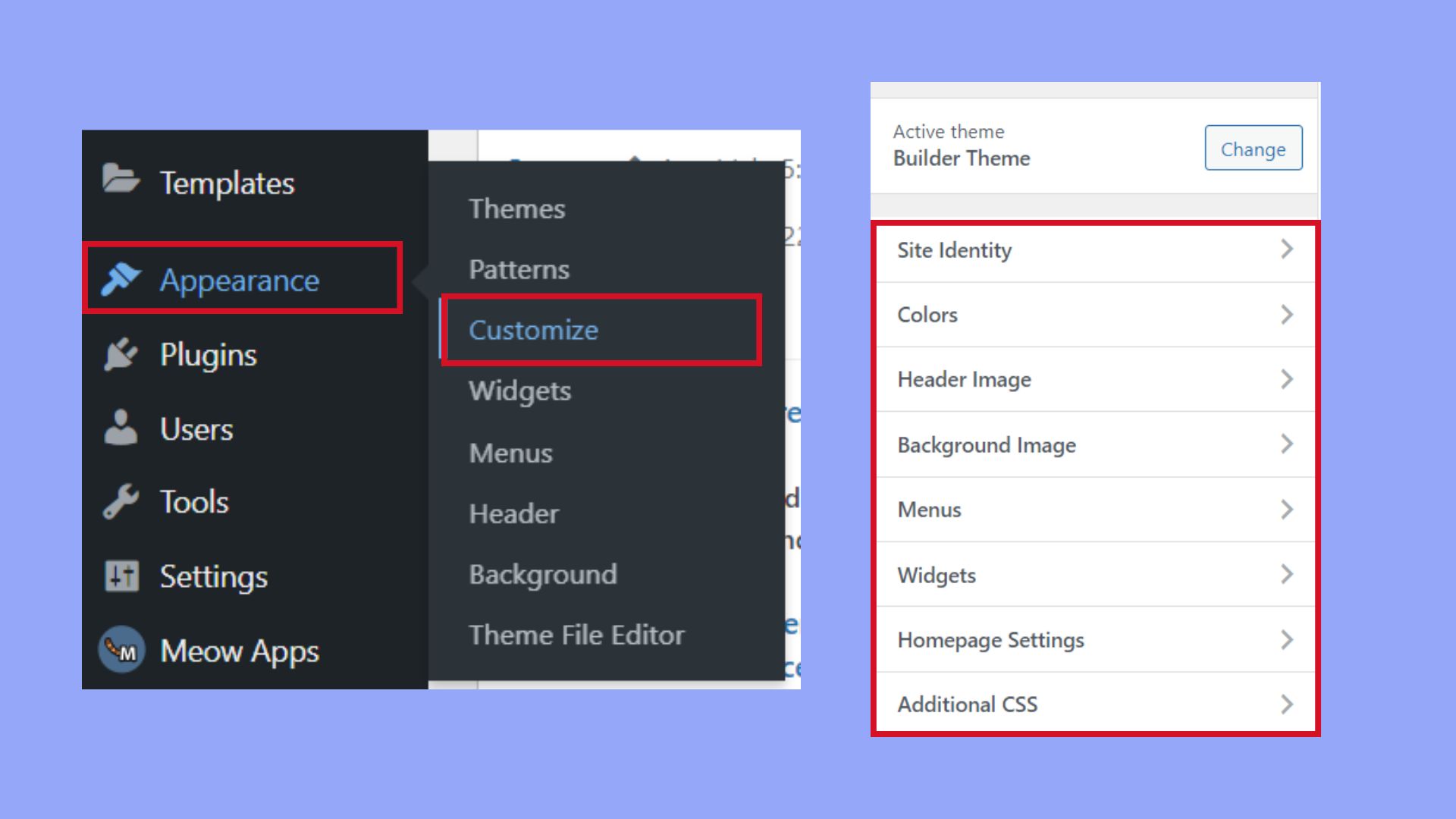
To start, log into your WordPress dashboard. On the left side, find Appearance. Click on it, then select Customize. The Customizer will open. You will see your site on the right. On the left, there are options to change your site. You can change colors, fonts, and layouts. Explore each option. It helps you make your site look unique.
The Customizer offers many features. Change your site’s title and tagline. Add a logo if you have one. Choose a new color scheme that fits your brand. Want to change the font? You can do that too. You can also set a background image. These changes are simple but make a big difference. Each change updates live. You can see how it looks right away. It’s easy and fun to make your site your own.
Credit: kinsta.com
Adjusting Theme Settings
Colors and fonts make your site look special. Choose color schemes that match your style. Bright colors or soft colors. Both look good. Pick fonts that are easy to read. Big letters for titles. Small letters for details. You can mix two or three fonts. Too many fonts look messy.
Layout helps your site look neat. Decide where your pictures go. Put text next to pictures. Use columns to organize. One column or two. Both look neat. Add space between items. Space makes things clear. Headers and footers guide visitors. Make them simple. Easy navigation means happy visitors.
Adding Custom Css
Adding custom CSS can change how your website looks. Open your WordPress dashboard. Go to Appearance and click on Customize. You will see a place called Additional CSS. Click on it. Now, you can add your CSS code here. This code will change the look of your site. Always save your work.
Advanced CSS helps you do more with your theme. Use media queries to make your site look good on phones. Add animations to make your site fun. Change CSS properties for hover effects. These tricks make your site better. Always test your changes.
Incorporating Plugins
Plugins are like special tools for your website. They add extra features. Some plugins help with design. Others improve speed. Choose plugins that match your needs. Be careful. Too many plugins can slow down your site.
Some plugins are very helpful. Elementor lets you design pages easily. Yoast SEO helps with search engines. WooCommerce is great for online stores. Pick plugins that fit your website’s goal. Always read reviews. This helps you choose wisely.
Setting up plugins is important. Always check settings after installing. Adjust settings to fit your needs. Explore all options. Backup your site before big changes. This keeps your data safe. Update plugins regularly. This ensures they work well. Keep your site running smoothly.
Modifying Theme Files
A child theme keeps your changes safe. It uses a parent theme but lets you add your own style. Start by making a new folder in the themes directory. Name it after your child theme. Next, create a file called style.css. Add a few lines of code to link it to the parent theme. Now, you can make changes without fear. Your main theme stays safe.
Editing PHP and HTML files can change how your site looks. First, find the file you want to edit. Open it in a text editor. Make small changes and save the file. Always keep a backup. This way, if something goes wrong, you can fix it. Test your changes on the site. If it looks good, you did it right.
Testing Your Customizations
Explore how to test customizations after altering a WordPress theme. Ensure changes appear correctly and work smoothly. Use previews and check for issues to maintain functionality and design consistency.
Cross-browser Testing
Websites can look different on each browser. It’s important to test on many browsers. Try Chrome, Firefox, and Safari. Ensure your site looks good on all. Sometimes a design may break on one browser. Fix these issues early. There are tools to help with this. BrowserStack is one. It lets you see your site on different browsers. Another tool is CrossBrowserTesting. These tools save you time and effort.
Mobile Responsiveness Checks
Many people use phones to browse. Your site must work on all devices. Test your site on a phone and a tablet. Make sure text is easy to read. Buttons should be easy to click. Images should fit the screen. Google’s Mobile-Friendly Test can help. Enter your site URL to check. This test shows if your site works on phones. It also gives tips to improve your site.
Backing Up Your Custom Theme
It’s vital to backup your custom WordPress theme. Saving your hard work is important. Use a plugin like UpdraftPlus. This helps you save your theme easily. You can also use File Transfer Protocol (FTP). Transfer theme files to your computer. Both methods are simple and effective. Choose the one you like best.
Restoring a theme is easy. Use your backup to restore the theme. If you used a plugin, follow its steps. FTP users can upload files back. Ensure everything looks right. Test your site. Make sure everything works. Always check after restoring. This keeps your site smooth.
Credit: kinsta.com
Seeking Help And Resources
Customizing a WordPress theme can seem daunting, but help is available. Explore online tutorials, forums, and guides. They offer step-by-step advice to make the process easier and more understandable. These resources can assist you in creating a website that fits your unique style and needs.
Community Forums
Many people find help in community forums. These forums have many users. Users share tips and tricks. You can ask questions. Get answers from experts. Learn from other users’ experiences. Forums like WordPress.org are popular. They have big communities. Find solutions faster. Interact with users worldwide. Get advice on customizing themes. Build knowledge step by step.
Professional Support Services
Sometimes, experts help with professional support services. These services can fix theme issues. They offer customization help. Services can save time. Get work done with less stress. Experts know the best ways. They make themes work better. Many services have good reviews. Choose one that fits your needs. They often have online support. Quick and easy help is available.
Credit: 10web.io
Frequently Asked Questions
Why Can’t I Customize My WordPress Theme?
Your WordPress theme may not be customizable due to restrictions set by the theme developer. Consider upgrading to a premium version or using a theme with more customization options. Ensure you have the correct permissions and tools, such as a child theme, for modifications.
How Do I Edit A Theme Page In WordPress?
To edit a theme page in WordPress, navigate to Appearance > Editor in your dashboard. Select the desired theme file from the right sidebar. Make your changes and click “Update File” to save. Always back up your theme before editing to prevent data loss.
Are WordPress Themes Fully Customizable?
Yes, WordPress themes are fully customizable. You can modify layouts, colors, fonts, and functionalities. Use the WordPress Customizer or theme settings to make changes. Advanced users can edit code for deeper customization. Choose themes with flexible options to ensure they meet your needs.
How Do I Customize The Theme Menu In WordPress?
To customize the theme menu in WordPress, go to Appearance > Menus. Select a menu to edit or create a new one. Add items from the left column, arrange them using drag-and-drop, then click “Save Menu. ” Use the “Manage Locations” tab to assign menus to different theme locations.
Conclusion
Customizing a WordPress theme can be straightforward. Start with small changes. Use the WordPress Customizer for easy edits. Experiment with colors and fonts. Try different layouts until it feels right. Always save your changes. Backup your site before big updates.
Seek help from WordPress forums if needed. Remember, practice makes perfect. Over time, you’ll become more confident. Customization enhances your site’s uniqueness. Keep learning, and your skills will grow. Stay patient and enjoy the process. Your site will reflect your personality and style.
Happy customizing!


