
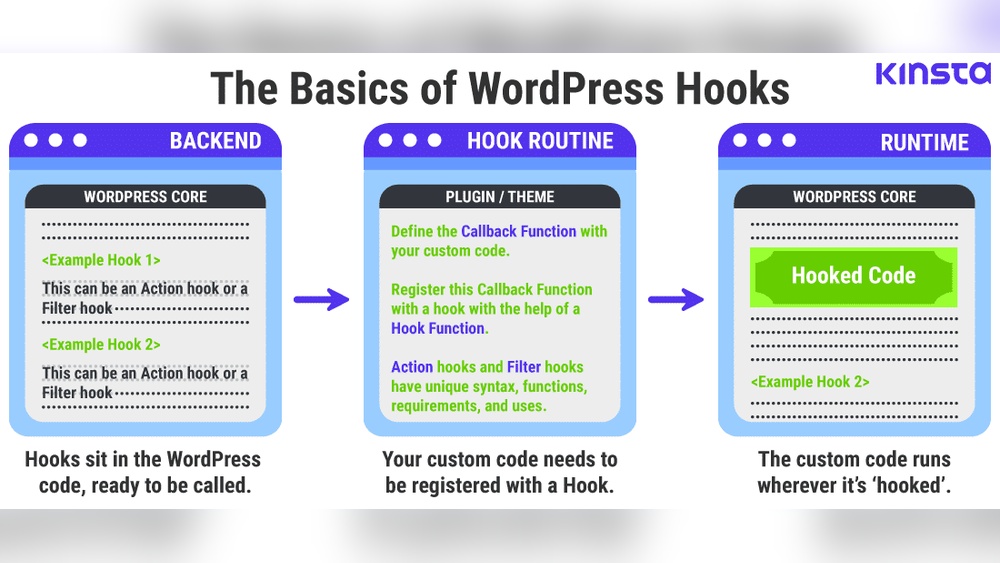
Have you ever wondered how WordPress lets you customize your website without changing its core code? The secret lies in something called WordPress hooks.
Understanding these hooks can unlock a whole new level of control over your site, making it easier to add features, tweak designs, and improve functionality exactly the way you want. If you want to take charge of your WordPress site and make it truly yours, learning about hooks is a game-changer.
Keep reading, and you’ll discover what WordPress hooks are and how they can transform your website experience.
WordPress Hooks Basics
WordPress hooks are a key part of customizing your website. They let you change how WordPress works without editing core files. Hooks allow you to add new features or change existing ones safely and easily.
Understanding the basics of hooks helps you use them better. Hooks come in two main types. Each type has a specific role in WordPress development. Knowing the difference is important for effective coding.
Actions Vs Filters
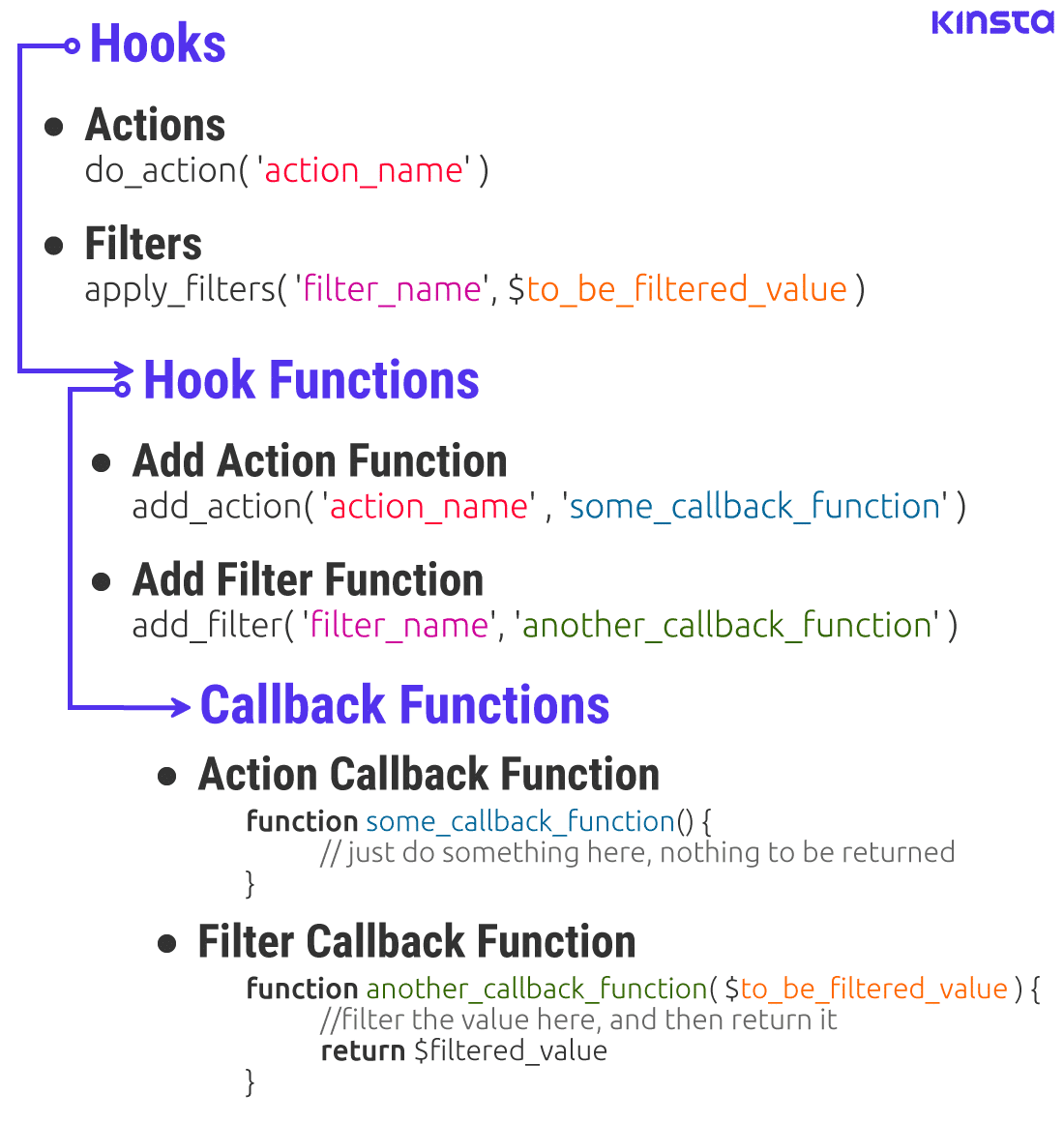
Actions let you add or change things at certain points in WordPress. They do not return anything. Instead, they run code to perform tasks like sending emails or adding scripts.
Filters change data before WordPress uses it. They always return a value. This allows you to modify content, such as changing text or images.
Both actions and filters help you customize your site. But they work in different ways and serve different purposes.
How Hooks Work
Hooks work by connecting your code to WordPress at specific points. WordPress calls these points “hook points.” When WordPress reaches a hook point, it runs your code.
This process lets developers insert custom code without changing core files. It keeps your site safe from updates that might overwrite changes.
Hooks make WordPress flexible. They let you build powerful features without touching the main code.
Hook Anatomy
Each hook has two parts: the hook name and the callback function. The hook name tells WordPress where to run your code. The callback function is your custom code.
You add hooks using functions like add_action() or add_filter(). These functions connect your callback to the hook name.
Hooks can also have priorities and accepted arguments. Priority controls the order hooks run. Arguments pass data to your callback.
Types Of WordPress Hooks
WordPress hooks let developers change or add code in WordPress. They help customize sites without changing core files. Hooks come in different types. Each type serves a unique purpose. Understanding these types helps in creating better websites.
Action Hooks
Action hooks run code at specific points in WordPress. They do not change data but trigger functions. You can add new features or run tasks. For example, sending an email after a post is published. Action hooks make WordPress flexible and dynamic.
Filter Hooks
Filter hooks modify data before it appears on the site. They let you change text, images, or settings. Filters return the changed data to WordPress. For example, changing the title of a post before display. Filters help customize content easily.
Custom Hooks
Custom hooks are created by developers for specific needs. They allow adding new action or filter points. You can use custom hooks in themes or plugins. Custom hooks make your code reusable and organized. They give more control over functionality.
Commonly Used WordPress Hooks
WordPress hooks are powerful tools that let developers change the site’s behavior. They help add custom features without editing core files. Hooks are split into two types: actions and filters. Actions let you add or change what happens. Filters let you modify data before it shows up.
Many hooks exist, but some are used more often. These common hooks work in themes, plugins, and widgets. Understanding these hooks helps you make better customizations easily.
Hooks For Themes
Themes use hooks to change design and content layouts. The wp_head hook adds extra code inside the
wp_footer hook places scripts or text before the closing tag. The the_content filter changes post content before it shows on the page.Hooks For Plugins
Plugins rely on hooks to add features without touching theme files. The init action runs early, perfect for loading plugin code. The admin_menu hook adds new menus in the WordPress dashboard. The wp_enqueue_scripts action loads styles and scripts properly.
Hooks For Widgets
Widgets also use hooks to manage their output and settings. The widget_display_callback filter changes widget content before display. The dynamic_sidebar_before and dynamic_sidebar_after actions wrap widgets with extra HTML. These hooks improve widget control and styling.
Credit: kinsta.com
Adding Hooks To Your Site
Adding hooks to your WordPress site allows you to change how it works. Hooks let you insert your own code at specific points. This helps customize your theme or plugin without changing core files. Using hooks keeps your site safe during updates and easy to maintain.
You can add hooks with simple functions. WordPress has two main types: actions and filters. Actions let you add new features or run code. Filters let you change data before it shows on the site. Removing hooks is also possible to stop certain code from running.
Using Add_action()
The add_action() function adds custom code to WordPress. You pick a hook name and a function to run. WordPress runs your function at the right time. For example, use add_action('wp_footer', 'my_footer_message'); to show a message in the footer.
This method helps add new content or scripts easily. You write your function and connect it with add_action(). WordPress takes care of running it for you.
Using Add_filter()
The add_filter() function changes data before WordPress shows it. You choose a filter hook and a function that edits the content. For example, use add_filter('the_content', 'my_custom_text'); to modify post content.
Your function gets the data, changes it, and returns it. WordPress then uses the new data on the site. Filters help adjust text, images, or other outputs without touching core code.
Removing Hooks
Sometimes you need to stop a hook from working. Use remove_action() or remove_filter() for this. You provide the hook name and the function you want to remove.
Removing hooks helps fix conflicts or clean up your site’s code. It keeps your site running smoothly by controlling what code runs and when.
Practical Hook Examples
WordPress hooks let you change how your site works. They help you add or change features without editing core files. Below are simple examples showing how hooks work in real situations. These examples can guide you to start customizing your site easily.
Customizing The Header
Use hooks to add code to your site’s header. For example, add custom styles or scripts without touching theme files. This keeps your changes safe during updates. A common hook for this is wp_head. It runs inside the
Modifying Content Output
Hooks can change the content before it appears on a page. The the_content filter lets you add text or images after a post. You can also remove unwanted parts from posts. This filter runs every time WordPress shows content. It gives you control over what visitors read on your site.
Enhancing User Experience
Hooks improve how users interact with your site. For instance, use login_redirect to send users to a custom page after login. This makes navigation easier and personal. Another example is wp_footer, where you can add chat widgets or extra info at the page bottom.

Credit: learn.wordpress.org
Debugging Hook Issues
Debugging hook issues in WordPress can be tricky. Hooks control how themes and plugins interact. When hooks do not work properly, features may break or not load. Understanding common errors helps fix problems faster. Testing hooks carefully ensures they run as expected. Following best practices reduces mistakes and improves site stability.
Common Hook Errors
One common error is using the wrong hook name. Misspellings cause hooks to fail silently. Another error is attaching functions to hooks too early or too late. This timing mistake stops code from running. Forgetting to pass required arguments also breaks hook functionality. Conflicts between plugins can disable hooks unexpectedly.
Testing Hooks
Test hooks by adding simple functions that output messages. This confirms the hook triggers correctly. Use debugging tools or plugins to trace hook execution. Check if all parameters are passed properly. Try disabling other plugins to find conflicts. Testing helps isolate the source of the problem.
Best Practices
Use clear and correct hook names. Always check the WordPress documentation for proper usage. Attach functions with proper priority and arguments. Keep functions small and focused on one task. Use debugging plugins to monitor hooks in real time. Regularly update WordPress and plugins to avoid compatibility issues.
Boosting Site Performance With Hooks
WordPress hooks help improve your site’s speed and user experience. They let you add or change features without changing core code. Using hooks smartly can make your site faster and smoother.
Hooks control when and how code runs. Proper use avoids slow loading and errors. Focus on clean, efficient hooks to keep your site quick and reliable.
Optimizing Hook Usage
Choose hooks that run only when needed. Limit extra functions that slow your site. Use specific hooks to target exact tasks.
Keep hook functions small and simple. Avoid heavy tasks inside hooks. Test hook impact on speed regularly.
Avoiding Hook Overload
Too many hooks can cause slow loading. Remove unused or duplicate hooks often. Consolidate tasks under fewer hooks.
Monitor site performance after adding hooks. Balance features with speed. Prevent conflicts by organizing hooks clearly.
Leveraging Hooks For Seo
Hooks help add SEO features without plugins. Insert meta tags or structured data easily. Improve site indexability with custom hooks.
Use hooks to optimize page speed. Faster sites rank better in search engines. Clean code through hooks enhances SEO signals.

Credit: learnwoo.com
Resources For Mastering Hooks
Learning WordPress hooks is easier with the right resources. These tools help you understand how hooks work and how to use them. You can find guides, examples, and tools to practice your skills. Below are some key resources to explore.
Official Documentation
WordPress offers detailed official documentation on hooks. This includes explanations of actions and filters. Each hook is described with examples and usage tips. The WordPress Codex and Developer Handbook are great places to start. They provide reliable and updated information straight from WordPress experts.
Community Tutorials
Many WordPress users share tutorials online. These cover beginner to advanced hook usage. Tutorials often include step-by-step guides and code snippets. Forums and blogs also discuss common hook challenges. These help you learn from real-world problems and solutions.
Useful Plugins
Plugins can help you test and find hooks quickly. Some plugins list all active hooks on your site. Others let you add custom hooks without coding. These tools simplify learning and applying hooks. Using plugins makes experimenting safer and faster.
Frequently Asked Questions
What Are WordPress Hooks Used For?
WordPress hooks allow developers to modify or add functionality without editing core files. They enable custom code integration and enhance plugin or theme flexibility.
How Do Actions Differ From Filters In WordPress Hooks?
Actions execute custom functions at specific points, while filters modify data before display. Both extend WordPress but serve distinct purposes in customization.
Can I Create My Own WordPress Hooks?
Yes, developers can create custom hooks to trigger actions or filters within themes or plugins. This improves code modularity and reusability.
Why Are WordPress Hooks Important For Plugin Development?
Hooks let plugins interact with WordPress core and themes. They enable seamless feature additions and ensure updates don’t overwrite customizations.
Conclusion
WordPress hooks help you change how a site works. They let you add or change features easily. Hooks save time and make coding simpler. Understanding hooks helps you customize your website well. They are key to flexible WordPress development. Try using hooks to see how they work.
They open many options without changing core files. Hooks keep your site safe and easy to update. Start small and learn step by step. This skill grows with practice and patience.


