

Are you looking to save money and simplify your web hosting by managing multiple domains on a single server? Hosting several websites without juggling multiple accounts can seem tricky, but it’s easier than you think.
Imagine controlling all your domains from one place, cutting costs, and boosting your site’s performance. You’ll discover clear, step-by-step guidance to make this happen quickly and efficiently. Keep reading to unlock the secrets that will give you full control over your online presence without the hassle.

Credit: hostadvice.com
Benefits Of Hosting Multiple Domains
Hosting multiple domains on a single server offers many benefits. It helps businesses and individuals save money and time. Managing several websites from one place becomes easier. Server resources get used more efficiently, making hosting smoother and cost-effective. Below are key benefits to consider.
Cost Efficiency
Hosting multiple domains on one server cuts down hosting fees. You pay for one server instead of many. This reduces monthly expenses significantly. Shared resources lower the overall cost of running websites. It suits small businesses and startups with tight budgets.
Simplified Management
Managing multiple domains from a single dashboard saves time. Updates, backups, and security settings apply to all sites quickly. No need to log into different accounts for each domain. This simplifies tasks for website owners and admins. It reduces the chance of errors during management.
Resource Optimization
A single server uses its resources more efficiently with multiple domains. CPU, memory, and bandwidth get shared among websites. This reduces wasted server capacity during low traffic. It improves server performance and reliability. Optimized resources provide a better experience for visitors.
Types Of Hosting For Multiple Domains
Hosting multiple domains on a single server requires choosing the right type of hosting. Different hosting types offer various resources, control levels, and costs. Understanding these options helps you pick the best fit for your needs.
Shared Hosting
Shared hosting means many websites share the same server resources. It is the cheapest option available. It works well for small sites with low traffic. You get limited control over the server settings. It is easy to set up and manage. Shared hosting usually includes a control panel for managing domains.
Virtual Private Server (vps)
A VPS divides one physical server into multiple virtual servers. Each VPS has dedicated resources like CPU and RAM. This gives more power and control than shared hosting. You can install custom software and change settings. VPS is good for medium traffic websites. It balances cost and performance effectively.
Dedicated Server
A dedicated server means you rent an entire physical server. It offers full control and high performance. You can host many domains without resource limits. This option suits large websites with heavy traffic. Managing a dedicated server requires technical knowledge. It costs more but provides the best speed and security.
Preparing Your Server
Preparing your server is the first step to host multiple domains on one machine. It involves setting up the right environment and making sure everything is ready. This helps your websites run smoothly and stay secure. Let’s look at the key points to prepare your server for multiple domains.
Server Requirements
Your server must have enough power and resources to handle several websites. Choose a server with enough CPU, RAM, and storage space. A fast internet connection is important for quick loading times. The server should run a web server software like Apache or Nginx. Make sure your server’s operating system supports multiple domains.
Domain Name Registration
Each website needs its own domain name. Register domains through a trusted registrar. Keep your domain information accurate for easy management. Use clear and simple domain names for better recognition. Buying domains early prevents others from taking them.
Dns Configuration
DNS connects your domain names to your server’s IP address. Set up DNS records for each domain correctly. Use A records to point domains to your server. Configure CNAME records if needed for subdomains. Check DNS settings to avoid downtime or errors. Proper DNS setup ensures visitors reach your websites.
Configuring Web Server Software
Configuring web server software is key to hosting multiple domains on one server. It allows the server to respond to different websites using the same IP address. Proper setup helps keep sites separate and running smoothly.
Each web server has its way to handle multiple domains. This guide covers the most popular methods for Apache and Nginx, plus an option for those who prefer control panels. Clear steps make it easier to manage your domains efficiently.
Apache Virtual Hosts Setup
Apache uses virtual hosts to host multiple websites. Each virtual host has its own configuration block. This block tells Apache which domain it should serve.
Create a new configuration file or edit the existing one. Use the :80 for all IPs. Add the domain name inside the ServerName directive. Point the DocumentRoot to the website folder.
Enable the site and reload Apache to apply changes. This setup keeps each domain separate with its files and settings.
Nginx Server Blocks Setup
Nginx uses server blocks to host multiple domains. Each block defines a server configuration for a domain. This method is similar to Apache’s virtual hosts.
Create a new file in the sites-available directory. Define the server block with the domain name in the server_name directive. Set the root to the site’s folder. Include other settings like index files and logs.
Link the file to sites-enabled and reload Nginx. The server will serve the correct site based on the requested domain.
Using Control Panels
Control panels make hosting multiple domains easier. They provide a user-friendly interface to manage domains and settings. Popular panels include cPanel, Plesk, and Webmin.
Add new domains using the panel’s domain management tools. The panel handles server configuration automatically. This option is good for users with less technical knowledge.
Control panels also offer extra features like SSL setup and backups. They save time and reduce errors in managing multiple sites.
Setting Up Ssl For Multiple Domains
Setting up SSL for multiple domains is crucial for website security. SSL certificates protect data and build trust with visitors. You can secure several domains on one server by choosing the right SSL certificate type. Each type fits different needs and simplifies management.
Single Ssl Certificates
Single SSL certificates cover only one domain or subdomain. Use these if you have a few separate websites. They offer strong encryption and are easy to set up. But, managing many single certificates can be time-consuming and costly.
Wildcard Ssl Certificates
Wildcard SSL certificates secure one domain and all its subdomains. For example, they protect example.com and blog.example.com. This type saves time by using one certificate for many subdomains. It does not cover multiple different domains.
Multi-domain Ssl Certificates
Multi-domain SSL certificates secure several different domains with one certificate. They simplify management and reduce costs. Ideal for hosting many unique websites on a single server. You can add or remove domains without getting a new certificate.
Managing Email For Multiple Domains
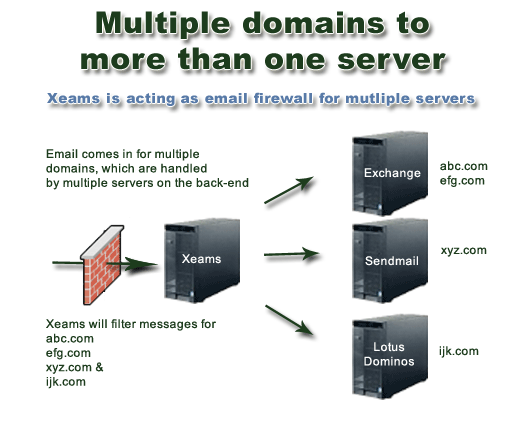
Managing email for multiple domains on a single server needs careful setup. Each domain must send and receive emails without confusion. Proper management helps avoid spam issues and keeps communication clear.
Organizing email accounts for different domains ensures smooth business operations. Setting up the right configurations makes email handling easier and secure.
Email Server Configuration
Set up your server to handle emails from all domains. Use software like Postfix or Exim for managing outgoing mail. For incoming mail, configure Dovecot or Courier. Create separate mailboxes for each domain. Use virtual domains to keep emails separate. Ensure the server listens to all domain names.
Spf, Dkim, And Dmarc Settings
SPF tells other servers which IPs can send emails. Create an SPF record for each domain in DNS. DKIM adds a digital signature to emails for verification. Generate unique DKIM keys for every domain. DMARC helps control email spoofing and phishing. Publish DMARC policies to protect your domains from abuse.
Webmail Access
Provide webmail for users on all domains. Use software like Roundcube or Rainloop for easy access. Configure webmail to support multiple domains separately. Allow users to log in with their full email address. Keep the interface simple and user-friendly. This helps users check emails from anywhere.
Performance Optimization Tips
Hosting multiple domains on one server can slow it down. Performance matters a lot. Good tips can keep your server fast and stable. Focus on smart methods that save time and power. These tips help your sites load quickly. Visitors stay longer and come back more.
Caching Strategies
Caching stores website data temporarily. It speeds up loading times for visitors. Use browser caching to save files on users’ devices. Server-side caching keeps data ready for quick access. Tools like Redis and Memcached improve caching. Cache static content like images and CSS files. Clear cache regularly to avoid showing old content.
Load Balancing
Load balancing spreads traffic across servers. It stops one server from getting too busy. Use a load balancer to share user requests evenly. This keeps all domains running smoothly. It also prevents crashes during high traffic. Load balancing improves uptime and user experience. Choose simple load balancing methods for easy setup.
Resource Monitoring
Keep track of CPU, memory, and disk use. Monitoring helps find problems before they grow. Use tools like Nagios or Zabbix to watch server health. Set alerts for unusual spikes in resource use. Fix issues early to avoid slowdowns or downtime. Regular checks keep your server strong and reliable.
Common Issues And Troubleshooting
Hosting multiple domains on one server can save money and simplify management. Yet, it brings some common problems. Knowing these issues helps fix them fast. Troubleshooting ensures smooth website performance and happy visitors.
Domain Resolution Problems
Domain resolution means turning your domain name into an IP address. If this fails, visitors cannot reach your site. Check DNS settings carefully. Make sure each domain points to the correct server IP. Use tools like “ping” or “nslookup” to test domain resolution. Clear DNS cache if updates do not show.
Ssl Errors
SSL certificates protect data and build trust. With multiple domains, SSL errors often appear. Each domain needs its own valid SSL certificate. Use a multi-domain (SAN) certificate or individual ones for each domain. Check certificate expiration dates and renewal status. Configure the server to serve the correct SSL for each domain. Mismatched SSL causes browser warnings and lost visitors.
Server Overload
Hosting many domains can strain server resources. Overload slows down websites and may cause crashes. Monitor CPU, memory, and bandwidth regularly. Optimize websites to use fewer resources. Consider upgrading your server or using load balancing. Set limits on processes and connections per domain. Prevent overload to keep all domains running smoothly.
Security Best Practices
Securing multiple domains on one server is crucial. Without proper security, all your sites risk being hacked or damaged. Following best practices helps protect your data and visitors. Simple steps can keep your server safe and running well.
Firewall Configuration
Set up a strong firewall to control network traffic. Block unwanted connections to stop hackers. Allow only trusted IPs to access important ports. Use firewalls that log suspicious activity. This helps detect and stop attacks early.
Regular Updates
Keep your server software and applications up to date. Updates fix security holes and bugs. Schedule updates regularly to avoid delays. Outdated software is an easy target for hackers. Automatic updates can help maintain protection.
Backup Solutions
Back up your data often to prevent loss. Store backups in a safe, separate location. Test backups to ensure they work correctly. Regular backups allow quick recovery after attacks or errors. Use both manual and automated backup methods.

Credit: www.liquidweb.com
Credit: www.xeams.com
Frequently Asked Questions
How Can I Host Multiple Domains On One Server?
You can host multiple domains by configuring virtual hosts in your web server. Each domain points to a separate directory. This setup lets one server handle different websites efficiently and cost-effectively.
What Web Servers Support Multiple Domains On One Server?
Popular web servers like Apache, Nginx, and Microsoft IIS support hosting multiple domains. They use virtual host configurations to manage different domain requests on a single server.
Do I Need Separate Ip Addresses For Multiple Domains?
No, you don’t need separate IP addresses. Modern web servers use name-based virtual hosting, allowing multiple domains to share a single IP address.
How Does Dns Work For Hosting Multiple Domains?
Each domain’s DNS points to your server’s IP address. The server then directs traffic to the correct website based on the domain name requested.
Conclusion
Hosting multiple domains on one server saves money and space. It lets you manage websites easily in one place. Just follow the right steps to set up each domain correctly. Keep your server secure and update software regularly. This way, your sites run smoothly and stay safe.
With patience and care, you can handle many domains without trouble. Try it out and see the benefits yourself. Simple, cost-effective, and smart hosting starts here.


